
Uvod
This manual provides detailed instructions for the NEMTMCUA Digital Wall Clock, an 8.5-inch large display LED clock. It features a multifunctional display showing time, date, day of the week, and temperature. The clock includes two independent alarms and three adjustable brightness levels. It is designed for versatile placement, suitable for wall mounting or desktop use in various indoor environments such as living rooms, bedrooms, and offices.

Slika: Konecview of the NEMTMCUA Digital Wall Clock's features, including multiple displays, 3 AAA battery option, 2 alarm sets, USB charging, 3 brightness levels, and 2 placement methods.
Vsebina paketa
Prosimo, preverite, ali so v paketu prisotni vsi elementi:
- Digital Wall Clock x 1
- USB kabel x 1
- Navodila za uporabo x 1
Nastavitev
Napajalnik
The NEMTMCUA Digital Wall Clock supports two power supply modes: USB plug-in power or 3 AAA batteries (not included).
- Napajanje USB: Connect the provided USB cable to the clock's power input and a compatible USB power adapter (not included). This is the primary power source for continuous display.
- Battery Power (3 x AAA, not included): When powered solely by batteries, the screen will automatically turn off after 10 seconds to conserve energy. To activate the display, make a sound such as tapping on the clock or the surface it rests on.
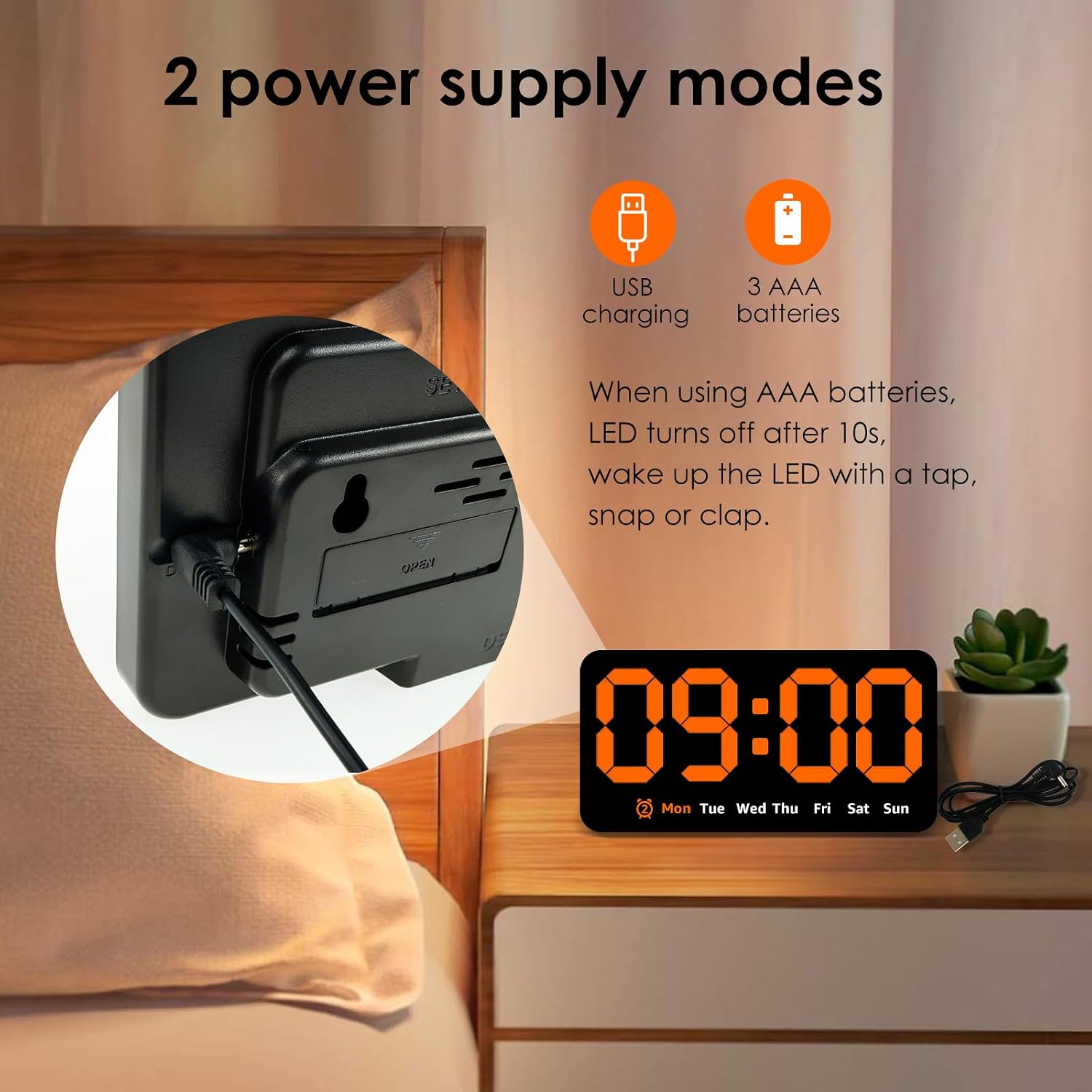
Slika: Zadaj view of the clock highlighting the USB charging port and the battery compartment, illustrating the two power supply options.
Umestitev
Ura ponuja prilagodljive možnosti namestitve:
- Montaža na steno: Utilize the two hanging holes located on the back of the clock to securely mount it on a wall.
- Postavitev na namizje: The clock can also stand independently on any flat surface, such as a desk, nightstand, or shelf.
Video: An unboxing and initial setup guide for the Digital Wall Clock, demonstrating how to power on the device and its basic display functions.
Navodila za uporabo
Funkcije gumbov
The clock features several buttons on its top for setting and adjusting functions:
- NASTAVITEV: Used to enter setting modes for time, date, and alarms.
- +: Used to increase values during setting or switch display modes.
- -: Used to decrease values during setting.
- ALARM (Bell Icon): Used to activate/deactivate alarms or enter alarm setting mode.
Nastavitev ure in datuma
- Pritisnite NASTAVI enkrat pritisnite gumb za vstop v način nastavitve časa. Številke za ure bodo utripale.
- Uporabite + or - gumbi za nastavitev ure.
- Pritisnite NASTAVI ponovno za premik na nastavitev minut. Uporabite + or - za prilagoditev minut.
- Nadaljujte s pritiskom NASTAVI za preklapljanje med nastavitvami leta, meseca in dneva ter prilagajanje vsake od njih z + or -.
- Pritisnite NASTAVI še zadnjič za izhod iz načina nastavitev.
Nastavitev alarmov
Ura podpira dva neodvisna alarma.
- Pritisnite ALARM button to cycle through Alarm 1, Alarm 2, and Alarm Off.
- To set an alarm, press and hold the ALARM button when the desired alarm (e.g., AL1) is displayed. The hour digits will flash.
- Uporabite + or - gumbe za nastavitev ure budilke.
- Pritisnite ALARM ponovno za premik na nastavitev minut. Uporabite + or - to adjust alarm minutes.
- Pritisnite ALARM še zadnjič za potrditev in izhod iz načina nastavitve alarma.
- When an alarm sounds, press any button to enter snooze mode.

Image: Detail of the clock's top-mounted control buttons, including SET, +, -, and the alarm button, with an alarm icon visible on the display.
Prilagajanje svetlosti
The clock offers three levels of brightness. To adjust the brightness:
- V običajnem načinu prikaza časa pritisnite + button to cycle through the three brightness levels.
- Dimming the light at night can improve sleep comfort.

Image: A visual comparison of the clock's display at three distinct brightness settings, from brightest to dimmest.
Načini prikaza
The clock supports two main display modes:
- DP1: Displays only the time and day of the week.
- DP2: Cycles between time + day of the week, and temperature + date.
To switch between display modes, long press the + gumb.

Image: A composite image showing the clock's various display options, including time-only (DP1) and cycling displays of time, date, and temperature (DP2).
Vzdrževanje
To ensure the longevity and proper functioning of your NEMTMCUA Digital Wall Clock, follow these maintenance guidelines:
- Čiščenje: Gently wipe the clock's surface with a soft, dry cloth. Avoid using abrasive cleaners, solvents, or harsh chemicals, as these can damage the display or casing.
- Zamenjava baterije: If using battery power, replace all three AAA batteries simultaneously when the display becomes dim or unresponsive. Ensure correct polarity when inserting new batteries.
- Okolje: Uro hranite stran od ekstremnih temperatur, neposredne sončne svetlobe in visoke vlažnosti.
Odpravljanje težav
If you encounter issues with your NEMTMCUA Digital Wall Clock, refer to the following common problems and solutions:
| Težava | Možen vzrok | rešitev |
|---|---|---|
| Display turns off after 10 seconds (on battery power) | This is a power-saving feature when running on batteries. | Make a sound (e.g., tap the clock or table) to reactivate the display. For continuous display, use USB power. |
| Clock loses time or is inaccurate | Unstable power supply or internal malfunction. | Ensure the USB power connection is stable. If using batteries, replace them with fresh ones. If the issue persists, try resetting the clock by disconnecting all power sources for a few minutes. |
| Alarm sounds even when set to OFF | Alarm setting not properly deactivated. | Press the ALARM button repeatedly until no alarm icon is displayed, indicating all alarms are off. |
| Display is too bright or too dim | Potrebno je prilagoditi raven svetlosti. | In normal time display mode, press the '+' button to cycle through the three available brightness levels until the desired setting is reached. |
| Clock resets to 0:00 when touched or moved | Loose power connection or internal issue. | Ensure the USB cable is firmly connected. If using batteries, check they are securely seated. Avoid excessive force when handling the clock. |
Specifikacije

Image: Diagram illustrating the product dimensions of the NEMTMCUA Digital Wall Clock, measuring 21.4cm (8.43in) in width and 11cm (4.33in) in height, with a thickness of 2.8cm (1.1in).
| Funkcija | Podrobnost |
|---|---|
| Znamka | NEMTMCUA |
| Številka modela | 450220240009071633 |
| Vrsta zaslona | Digitalna LED |
| barva | Oranžna |
| Dimenzije izdelka (Š x V) | 8.27"W x 4.33"H (approx. 21.4cm x 11cm) |
| Vrsta materiala | Akrilonitril butadien stiren (ABS) |
| Vir napajanja | USB (cable included) or 3 x AAA Batteries (not included) |
| Posebne lastnosti | Adjustable Brightness (3 levels), Double Alarm, Date, Week, Temperature Display, Wall Mountable / Desktop |
| Vrsta sobe | Living Room, Bedroom, Office, Classroom |
| Teža predmeta | 0.28 kilogramov |
Garancija in podpora
For warranty information, please refer to the documentation provided at the time of purchase or contact your retailer. For technical support or further assistance, please reach out to the manufacturer or the seller through your purchase platform.