
LIECTROUX M7S PRO
Uporabniški priročnik za robotski sesalnik LIECTROUX M7S Pro
Model: M7S Pro
1. Uvod
Hvala za nakupasing the LIECTROUX M7S Pro Robot Vacuum Cleaner. This manual provides essential information for the safe operation, maintenance, and troubleshooting of your device. Please read this manual thoroughly before using the product and retain it for future reference.
Varnostna navodila
- Pred prvo uporabo zagotovite, da je robot povsem napolnjen.
- Robota ne uporabljajte v mokrem okolju ali v bližini tekočin.
- Ohlapne kable, zavese in majhne predmete držite stran od robota, da preprečite zapletanje.
- Med delovanjem robota nadzorujte otroke in hišne ljubljenčke.
- Robota ne uporabljajte za sesanje večjih odpadkov, ostrih predmetov ali gorečih materialov.
- Only use the original charging dock and power adapter provided with the robot.
- Turn off the robot and unplug it from the charging dock before performing any maintenance.
2. Vsebina paketa
Preverite, ali so v paketu prisotni vsi elementi:
- LIECTROUX M7S Pro Robot Vacuum Cleaner
- Polnilna postaja
- Napajalni adapter
- Stranske krtače (komplet)
- HEPA filter (predhodno nameščen ali rezervni)
- Orodje za čiščenje
- Daljinski upravljalnik
- Uporabniški priročnik
3. Izdelek je končanview
Familiarize yourself with the components of your LIECTROUX M7S Pro robot vacuum cleaner.

Slika 3.1: The LIECTROUX M7S Pro robot vacuum cleaner, showcasing its sleek black design, along with its remote control and a smartphone displaying the cleaning map via the app.
Glavne komponente:
- Zgornja plošča: Power button, Wi-Fi indicator, charging indicator.
- Sprednji odbijač: Obstacle detection sensors.
- Stranske krtače: Z robov in vogalov poberite prah in umazanijo.
- Pogonska kolesa: Allow movement across various floor types.
- Smetnjak: Zbira suhe odpadke.
- Water Tank (for mopping): Holds water for wet cleaning.
- Kontakti za polnjenje: Povezuje se s polnilno postajo.
- Senzorji za prepad: Detects drops and prevents falls.
4. Nastavitev
4.1 Namestitev polnilne postaje
Place the charging dock against a wall in an open area, ensuring there are no obstacles within 1 meter (3 feet) to the sides and 2 meters (6 feet) in front of the dock. Connect the power adapter to the charging dock and plug it into a power outlet.
4.2 Začetno polnjenje
Place the robot onto the charging dock, ensuring the charging contacts align. The robot will begin charging automatically. For first use, allow the robot to charge completely (approximately 4-5 hours) before operation.

Slika 4.1: The robot vacuum cleaner automatically returning to its charging dock when its battery is low, ensuring it is always ready for the next cleaning cycle.
4.3 App Connection (TUYA App)
- Download the "TUYA Smart" app from your smartphone's app store (iOS or Android).
- Registrirajte se ali se prijavite v svoj račun TUYA.
- Prepričajte se, da je vaš robot napolnjen in vklopljen.
- Follow the in-app instructions to add your LIECTROUX M7S Pro robot vacuum cleaner. This typically involves pressing and holding a button on the robot to enter pairing mode and connecting to your home Wi-Fi network.
- Ko je povezava vzpostavljena, lahko upravljate robota, view cleaning maps, and set schedules via the app.
4.4 Integracija glasovnega pomočnika
The LIECTROUX M7S Pro supports voice control via Amazon Alexa and Google Home. Refer to the respective app (Alexa app or Google Home app) for instructions on how to link your TUYA Smart account and control your robot with voice commands.
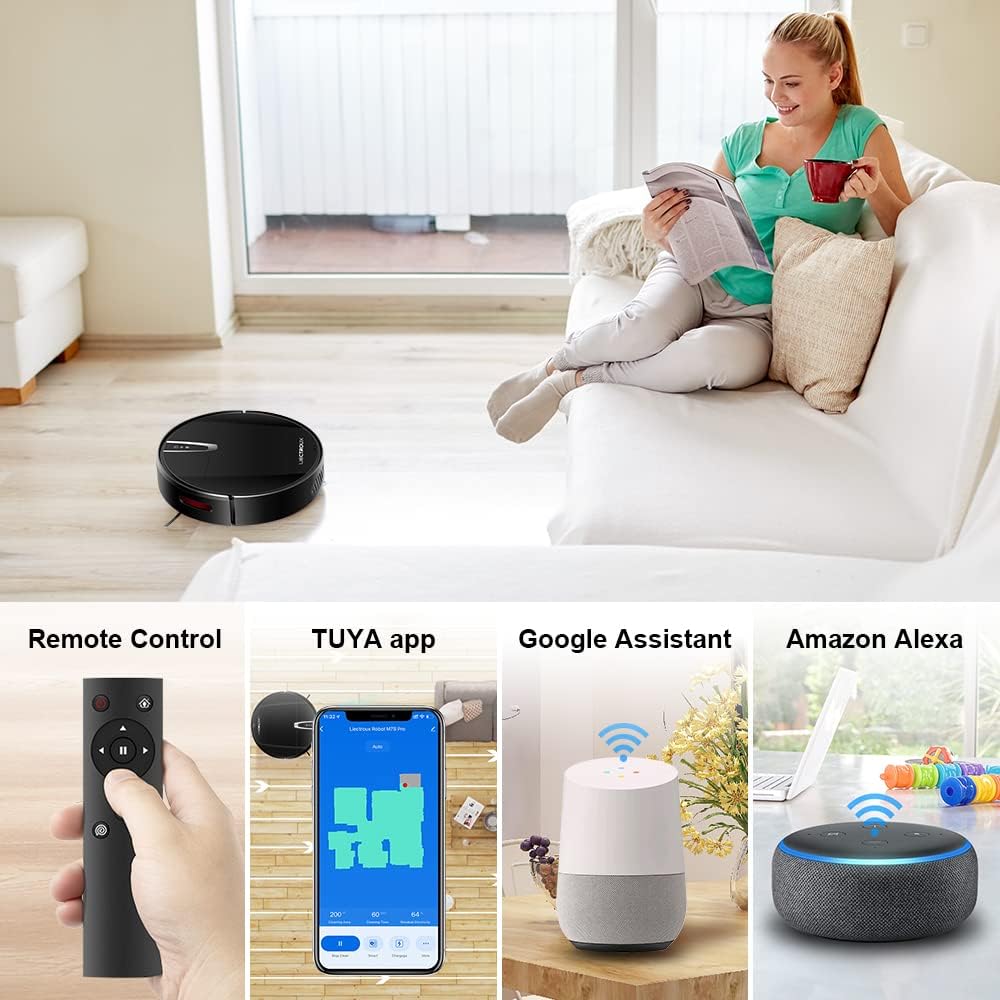
Slika 4.2: Various control methods for the robot vacuum, including a physical remote control, the TUYA smartphone application displaying a cleaning map, and integration with voice assistants like Google Assistant and Amazon Alexa.
5. Navodila za uporabo
5.1 Načini čiščenja
The robot offers multiple cleaning modes to suit different needs, accessible via the app, remote control, or voice commands:
- Samodejno čiščenje: Robot inteligentno krmari in čisti celotno površino tal.
- Čiščenje na mestu: Osredotoča se na določeno umazano območje in čisti v spiralnem vzorcu.
- Čiščenje robov: Čisti ob stenah in robovih pohištva.
- Način brisanja: For wet cleaning, attach the water tank and mopping cloth.

Slika 5.1: The robot vacuum cleaner operating on a floor with scattered debris, illustrating its powerful suction and various cleaning modes: Scheduled Cleaning, Auto Cleaning, Edge Cleaning, and Spot Cleaning.
5.2 Navigacija in kartiranje
The M7S Pro utilizes smart gyroscope navigation to create a 2D map of your environment, allowing for precise positioning and efficient route planning. This ensures comprehensive coverage and minimizes missed spots.

Slika 5.2: The robot vacuum cleaner navigating a room, with a grid overlay illustrating its smart gyroscope navigation system for precise positioning and thorough cleaning.

Slika 5.3: A visual comparison showing the efficient, systematic cleaning path generated by the LIECTROUX M7S Pro's gyroscope navigation versus a less organized common route planning method, highlighting intelligent route planning.
5.3 Samodejno polnjenje
When the battery level is low or a cleaning task is complete, the robot will automatically return to its charging dock to recharge. Ensure the charging dock is always powered on and accessible.
5.4 Anti-Drop System
The robot is equipped with cliff sensors to detect stairs and elevated surfaces, preventing it from falling. It also intelligently detects different floor types and adjusts its direction within 10 milliseconds.
6. Vzdrževanje
Redno vzdrževanje zagotavlja optimalno delovanje in podaljšuje življenjsko dobo vašega robotskega sesalnika.
6.1 Praznjenje posode za prah
Empty the dustbin after each cleaning cycle or when the 'full' indicator appears. Open the top cover, remove the dustbin, and dispose of the collected debris.
6.2 Čiščenje filtra
The HEPA filter should be cleaned regularly (e.g., weekly) using the provided cleaning tool or a soft brush. Replace the HEPA filter every 3-6 months, depending on usage, to maintain suction efficiency.
6.3 Čiščenje stranskih krtač
Inspect and clean the side brushes regularly. Remove any tangled hair or debris. If brushes are worn or damaged, replace them with new ones.
6.4 Čiščenje senzorjev in polnilnih kontaktov
Wipe the cliff sensors and charging contacts on both the robot and the charging dock with a clean, dry cloth to ensure proper function and charging.
6.5 Brush-less Suction Nozzle
The M7S Pro features an advanced brush-less suction nozzle designed to minimize hair entanglement, reducing the frequency of cleaning the main suction path.

Slika 6.1: An illustration of the robot vacuum's underside, highlighting the advanced brush-less suction nozzle designed to prevent hair entanglement and ensure consistent cleaning performance.
7. Odpravljanje težav
Če imate težave z robotskim sesalnikom, si oglejte naslednje pogoste težave in rešitve:
| Težava | Možen vzrok | rešitev |
|---|---|---|
| Robot se ne vklopi. | Prazna baterija; izklop napajanja. | Charge the robot; ensure the main power switch is on. |
| Robot se ne polni. | Charging contacts dirty; charging dock not powered. | Clean charging contacts; ensure charging dock is plugged in. |
| Robot se pogosto zatika. | Ovire (kabli, preproge); ozki prostori. | Clear the cleaning area; use virtual walls if available. |
| Slaba učinkovitost čiščenja. | Koš za prah poln; filter zamašen; krtače zapletene. | Empty dustbin; clean/replace filter; clean brushes. |
| Težave s povezavo aplikacije. | Incorrect Wi-Fi password; robot not in pairing mode; 5GHz Wi-Fi network. | Verify Wi-Fi details; re-enter pairing mode; ensure 2.4GHz Wi-Fi is used. |
8. Specifikacije
| Funkcija | Podrobnost |
|---|---|
| Znamka | LIECTROUX |
| Ime modela | M7S PRO |
| barva | Črna |
| Dimenzije izdelka | 32D x 32Š x 7.8V cm |
| Teža predmeta | 4 kilogramov |
| Največja sesalna moč | 4000 Pa |
| Kapaciteta baterije | 2500mAh Litij-ion |
| Runtime | Do 120 minut |
| Vrsta filtra | HEPA |
| Vrsta krmilnika | App Control, Touchpad Control, Voice Control |
| Združljivost z glasovnim asistentom | Google Home, Amazon Alexa |
| Vrsta navigacije | Gyroscope Navigation (2D Map) |
| Posebna funkcija | Anti-drop system, Brush-less suction nozzle |
| Priporočilo za površino | Low-pile carpet, hard floors, ceramic tiles |
9. Garancija in podpora
The LIECTROUX M7S Pro Robot Vacuum Cleaner comes with a standard manufacturer's warranty. Please refer to the warranty card included in your package for specific terms and conditions, including the warranty period and coverage details.
For technical support, troubleshooting assistance, or warranty claims, please contact the seller or LIECTROUX customer service. Contact information can typically be found on the product packaging, the seller's website, or within the TUYA Smart app.
When contacting support, please have your product model number (M7S Pro) and purchase details readily available.
Ask a question about this manual
Ask about setup, troubleshooting, compatibility, parts, safety, or missing instructions. Manuals+ will review the question and use this page’s manual context to help answer it.