
Uvod
Thank you for choosing the NBD 4K 48MP Digital Camera. This manual provides essential information for setting up, operating, and maintaining your camera. Please read it thoroughly before use to ensure optimal performance and longevity of your device.

Figure 1: NBD 4K 48MP Digital Camera with its 16x digital zoom capability and 180-degree rotatable screen.
Vsebina paketa
Preverite, ali so v vašem paketu priloženi vsi spodaj navedeni elementi:
- 1 x NBD 4K 48MP Digital Camera Body
- 1 x 32GB pomnilniška kartica TF
- 1 x USB kabel
- 2 x 1500mAh Rechargeable Lithium-ion Batteries
- 1 x uporabniški priročnik
- 1 x 52mm Wide-Angle Lens
- 1 x Macro Lens
- 1 x polnilec baterije
- 1 x Custom Leather Case (Black)
- 1 x Leather Wrist Strap
Kamera je končanaview
Zamenljive leče
The NBD camera supports interchangeable lenses, allowing for versatile shooting. It comes equipped with a 52mm wide-angle lens and a macro lens. The wide-angle lens expands your field of view to 120 degrees, ideal for landscapes and group shots. The macro lens is designed for capturing clear and detailed close-up images of small subjects.
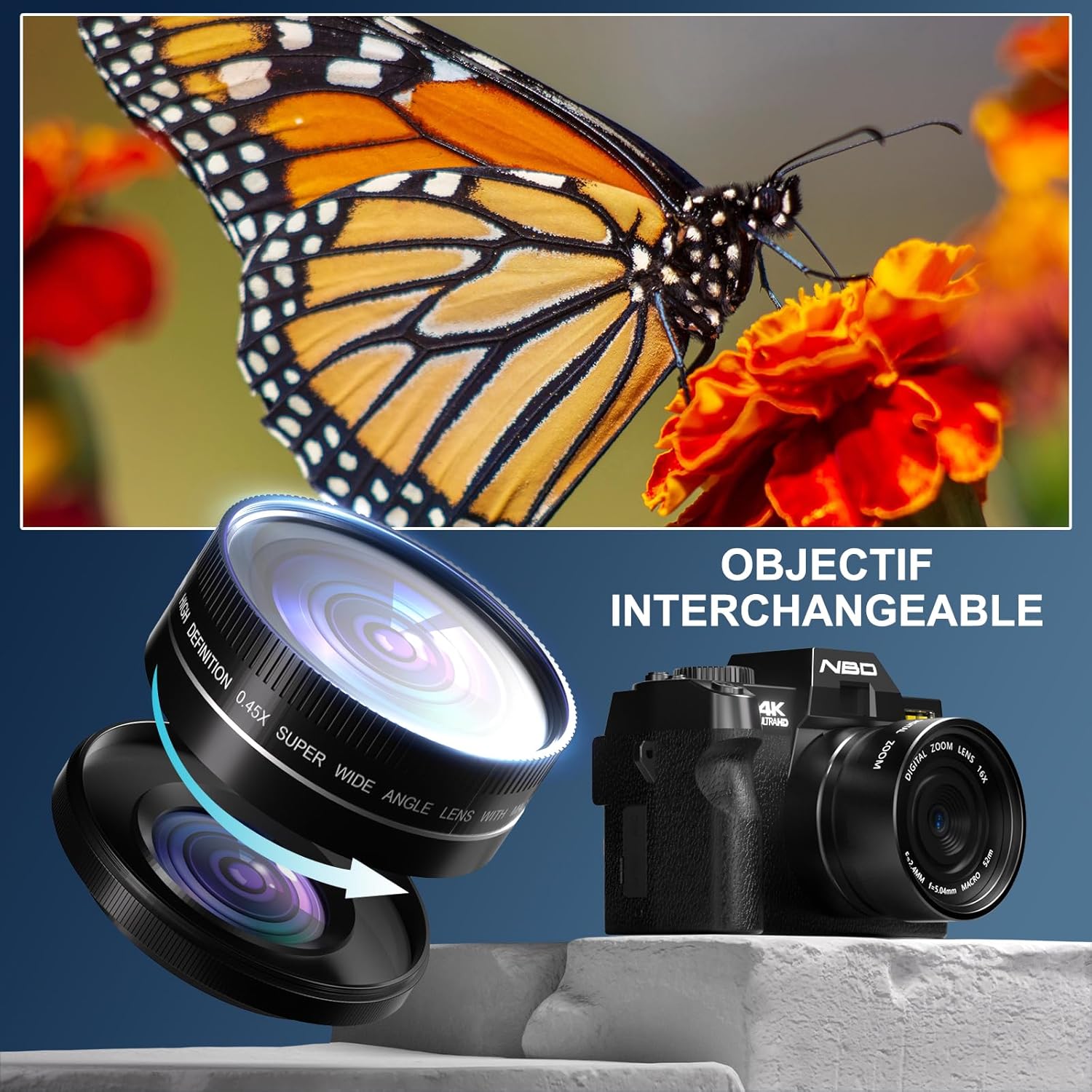
Figure 2: The camera's interchangeable lens system, featuring a wide-angle lens and a macro lens for diverse photographic needs.
Zaslon in kontrole
The camera features a 3-inch 180-degree rotatable IPS touchscreen, providing flexibility for various shooting angles, including vlogging and self-portraits. Physical buttons and a mode dial offer intuitive control over camera settings.
Video 1: Overview of the NBD camera's design, including its rotatable screen and various control dials and ports, demonstrating its versatility in different shooting environments.
Nastavitev
1. Polnjenje baterije
Insert one or both 1500mAh lithium-ion batteries into the provided charger. Connect the charger to a power source using the USB cable. The indicator light on the charger will show the charging status. A full charge typically takes approximately 2-3 hours per battery. The camera supports recording while charging, allowing continuous use with an AC adapter or power bank.
2. Vstavljanje pomnilniške kartice
Locate the memory card slot on the side of the camera. Insert the included 32GB TF card with the gold contacts facing the front of the camera until it clicks into place. To remove, press the card gently until it springs out.
3. Pritrditev leče
Align the mounting marks on the lens and the camera body. Gently twist the lens clockwise until it locks into position. To detach, press the lens release button (if present) and twist counter-clockwise.
Navodila za uporabo
Vklop/izklop
Pritisnite in držite gumb za vklop, da vklopite ali izklopite kamero.
Izbira načinov fotografiranja
Za izbiro želenega načina fotografiranja zavrtite gumb za izbiro načina na vrhu fotoaparata. Razpoložljivi načini vključujejo:
- Foto način: For capturing still images up to 48MP.
- Video način: For recording 4K/60fps video.
- Fotografiranje s časovnim zamikom: Captures a series of images over time to create a video.
- Neprekinjeno fotografiranje: Zajame več fotografij v hitrem zaporedju.
- Samosprožilec: Zakasni sprostitev zaklopa pri avtoportretih ali skupinskih posnetkih.
- Način predvajanja: Za ponovnoviewsnemanje fotografij in videoposnetkov.

Figure 3: The camera's mode dial, illustrating the range of creative shooting options available.
Uporaba digitalnega zooma
The camera features 16x digital zoom. Use the zoom controls (typically 'W' for wide and 'T' for telephoto) to adjust the magnification. Note that digital zoom may reduce image quality compared to optical zoom.
Povezljivost Wi-Fi
The camera supports Wi-Fi for easy file transfer to compatible devices like smartphones and tablets. Activate Wi-Fi in the camera settings, then connect your device to the camera's Wi-Fi network. Use the dedicated NBD app (if available) or your device's file transfer features.
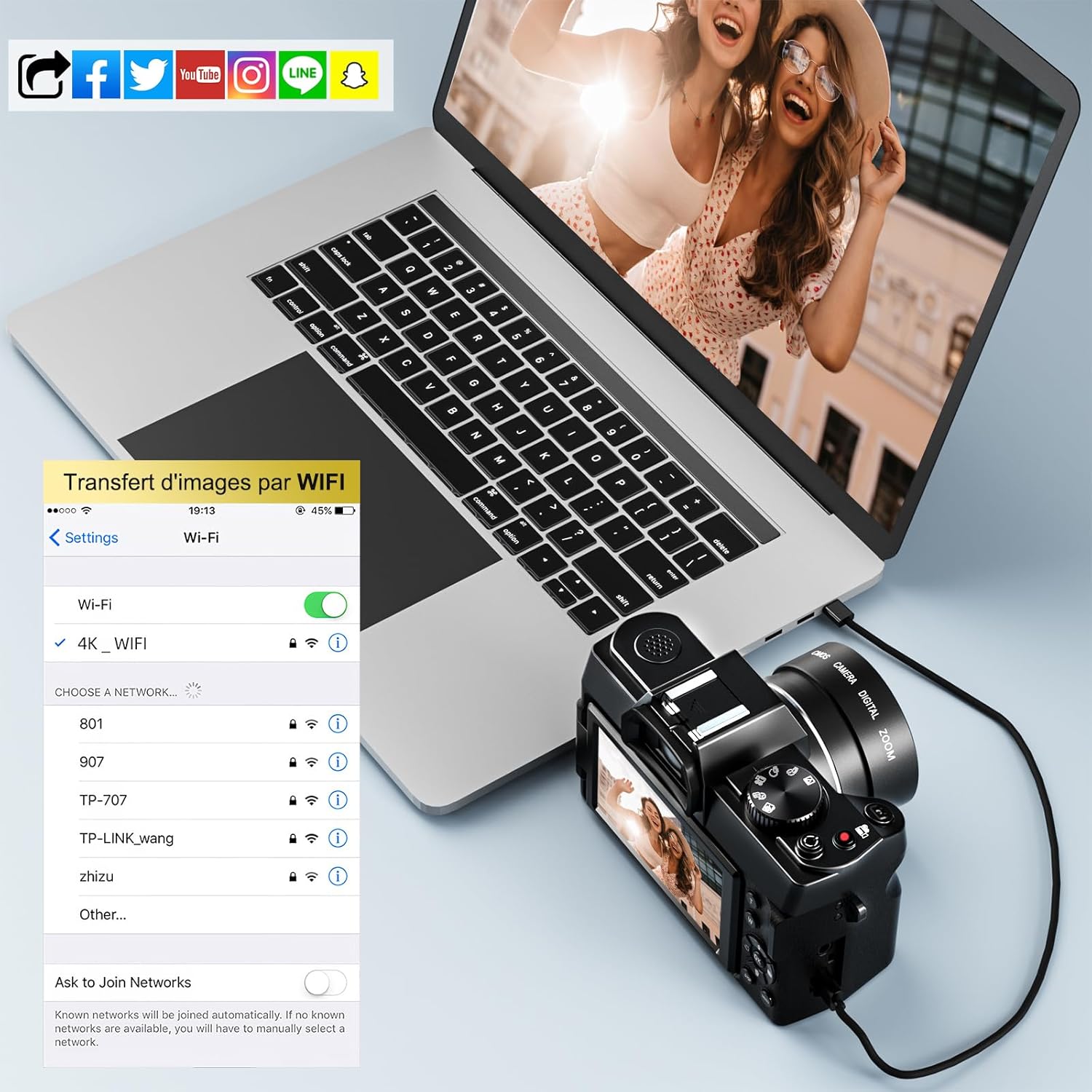
Figure 4: The camera's Wi-Fi interface, demonstrating how to connect and transfer images wirelessly to a laptop or other smart devices.
Uporaba bliskavice
The built-in flash can be used to illuminate subjects in low-light conditions. Access flash settings through the camera menu to select modes such as Auto Flash, Fill-in Flash, or Flash Off.

Figure 5: Comparison of a scene without flash (left) and with flash (right), highlighting the flash's ability to restore detail in low-light conditions.
PC Camera & HDMI Output
Connect the camera to your PC via USB. You can select "Storage Mode" for easy file transfer or "PC Camera" mode to use the camera for video chat or live streaming. For larger display, the camera supports HDMI output (HDMI cable not included) for direct connection to an HD TV.
Vzdrževanje
Čiščenje kamere
Use a soft, lint-free cloth to clean the camera body. For the lens, use a specialized lens cleaning cloth and solution. Avoid touching the lens surface directly with your fingers. Do not use harsh chemicals or abrasive materials.
Shranjevanje
When not in use, store the camera in a cool, dry place away from direct sunlight and extreme temperatures. Remove the battery if the camera will not be used for an extended period. Use the provided leather case for protection during storage and transport.
Odpravljanje težav
- Kamera se ne vklopi: Ensure the battery is fully charged and correctly inserted. Try using the second battery.
- Fotografiranje/snemanje videoposnetkov ni mogoče: Check if the memory card is inserted correctly and has sufficient free space. Ensure the lens cap is removed.
- Slaba kakovost slike: Verify that the lens is clean. Adjust shooting mode and settings according to lighting conditions. Digital zoom can reduce quality; use sparingly.
- Težave s povezavo Wi-Fi: Ensure Wi-Fi is enabled on both the camera and your smart device. Restart both devices and try reconnecting.
- Zaslon se ne odziva: If the touchscreen is unresponsive, try using the physical buttons. Power off and restart the camera.
Specifikacije
| Funkcija | Specifikacija |
|---|---|
| Znamka | NBD |
| Številka modela | NBD-S100-WM-DPT-EU-2410 |
| Učinkovita še vedno ločljivost | 48 milijonov slikovnih pik |
| Video ločljivost | 4K (2160p) pri 60 sličicah na sekundo |
| Digitalni zoom | 16x |
| Optični zoom | 16x |
| Senzorska tehnologija | CMOS |
| zaslon | 3-inch 180° Rotatable IPS Display |
| Povezljivost | Wi-Fi, USB, HDMI |
| Vrsta baterije | Litij-ionska (1500 mAh) |
| Included Memory | 32GB TF kartica |
| Included Lenses | 52mm Wide-Angle Lens, Macro Lens |
| Razpon ISO | 100-6400 |
| Zaslonka | F2.8 |
| Točke samodejnega ostrenja | 1 |
| Dimenzije (D x Š x V) | 12.6 x 11 x 8.2 cm |
| Teža | 1.03 kilogramov |
Garancija in podpora
NBD offers a three-month free replacement and refund service for this product. For any questions or assistance, please contact our customer support. We aim to provide a solution within 24 hours.
Za garancijske zahtevke shranite dokazilo o nakupu.