
Uvod
Thank you for choosing the Fixwal L-Shaped Gaming Desk. This manual provides detailed instructions for assembly, operation, maintenance, and troubleshooting to ensure optimal use of your new desk. Please read this manual thoroughly before assembly and retain it for future reference.
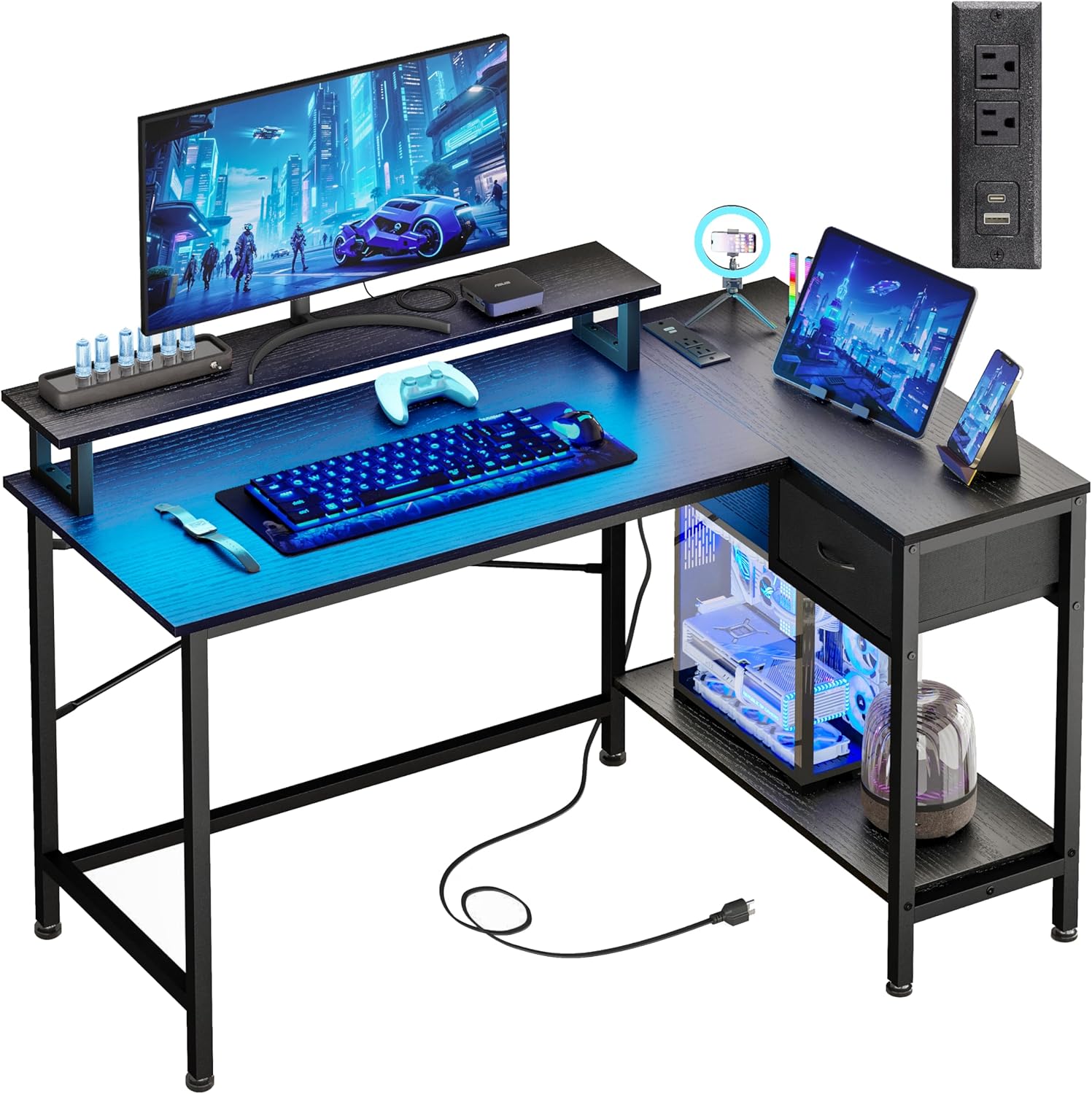
Image: The Fixwal L-Shaped Gaming Desk, showcasing its design and functionality in a typical user environment.
Varnostne informacije
Da preprečite poškodbe ali škodo na izdelku, upoštevajte naslednja varnostna navodila:
- Do not exceed the maximum weight capacity of 150 lbs (68 kg) for the desk surface.
- Med montažo se prepričajte, da so vsi vijaki in pritrdilni elementi varno priviti, in občasno preverite, ali so zrahljani.
- Keep liquids away from the power outlets and LED light strip to prevent electrical hazards.
- Mizo sestavite na mehki, čisti površini, da preprečite praskanje komponent.
- This L-shaped desk is not reversible; the drawer can only be installed on the right side.
Warning: This desk should not be loaded beyond 150 lbs to ensure safety and stability.
Vsebina paketa
Pred začetkom montaže preverite, ali so vse komponente prisotne in nepoškodovane. Če kateri koli deli manjkajo ali so poškodovani, se obrnite na podporo strankam.
- Desk Panels (Main desktop, L-extension, monitor stand, drawer panels, bottom shelf)
- Metal Frame Components (Legs, support bars)
- Hardware Kit (Screws, bolts, Allen wrench)
- LED Strip Light Kit (LED strip, controller, remote)
- Power Outlet Unit (2 AC outlets, 1 USB-A, 1 USB-C port, power cord)
- Nastavljive podloge za noge
- Priročnik z navodili za sestavljanje
Navodila za postavitev in sestavljanje
Assembly typically takes 30-60 minutes. Follow the included step-by-step instructions carefully. It is recommended to have two people for assembly.
Ključni nasveti za sestavljanje:
- Identify all parts: Lay out all components and hardware, matching them with the parts list in the separate assembly guide.
- Do not overtighten screws initially: Hand-tighten screws during initial assembly, then fully tighten once the entire structure is aligned.
- Install the monitor stand: The monitor stand is designed to accommodate two 21-24 inch monitors and supports up to 50 lbs.
- Ensure stability: The desk features cross-bracing for enhanced stability. Ensure these are correctly installed.
- Adjust foot pads: Use the adjustable anti-slip foot pads to level the desk on uneven surfaces and protect your floor.

Image: A detailed diagram illustrating the dimensions and weight capacities for different sections of the desk, including the main desktop (150 lbs), monitor stand (50 lbs), and drawer (20 lbs).

Slika: Bližnji posnetek view of the X-shaped cross-bracing, highlighting the structural support for enhanced desk stability.
Navodila za uporabo
LED trakovi:
The integrated LED strip lights offer customizable ambiance for your workspace or gaming setup.
- Nadzorne metode: The LED lights can be controlled via a physical switch control or a Bluetooth control application on your smartphone.
- Barvne možnosti: Choose from 12 static RGB colors.
- Svetlost: Adjust between 6 brightness levels.
- Dinamični načini: Explore various dynamic lighting modes.
- Funkcija pomnilnika: The lights retain your last setting when powered off and on.

Image: A smartphone displaying the Bluetooth application interface for controlling the desk's LED lights, showing color and mode selection.

Image: An infographic highlighting the RGB LED light strip's capabilities, such as 20 dynamic modes, a built-in microphone for sound reactivity, music synchronization, and a timing function.
Vtičnice:
The integrated power strip provides convenient access to charging ports.
- AC vtičnice: Two standard 120V/12A AC outlets for powering devices like monitors or laptops.
- Vrata USB: One USB-A charging port and one USB-C charging port (5V/2A) for mobile devices, power banks, and gaming accessories.
- Napajalni kabel: The unit includes a 4.9-foot power cord for connection to a wall outlet.

Slika: Bližnji posnetek view of the desk's integrated power strip, showing two AC outlets, a USB-A port, and a USB-C port, with a smartphone charging.

Image: An infographic illustrating the technical specifications of the built-in power outlets, including voltage, amperage, and USB port output.
Vzdrževanje
Regular maintenance will help prolong the life and appearance of your Fixwal desk.
- Čiščenje: Površine mize obrišite z mehko krpoamp krpo. Izogibajte se agresivnim kemikalijam ali abrazivnim čistilom, ki bi lahko poškodovala površino.
- Odstranjevanje prahu: Regularly dust the LED strip and power outlets to ensure proper function and prevent dust buildup.
- Preverjanje strojne opreme: Občasno preverite vse vijake in matico, da se prepričate, da so trdno priviti. Po potrebi jih ponovno privijte.
- Upravljanje kablov: Organize cables to prevent tangles and reduce strain on the power outlets.
Odpravljanje težav
Če imate težave z mizo, si oglejte naslednje pogoste težave in rešitve:
| Težava | Možen vzrok | rešitev |
|---|---|---|
| Miza je majava/nestabilna | Loose screws; uneven floor; incorrect assembly of cross-bracing. | Ensure all screws are fully tightened. Adjust the foot pads to level the desk. Verify cross-bracing is installed correctly. |
| LED luči ne delujejo | Napajanje ni priključeno; napačna povezava; baterija daljinskega upravljalnika prazna. | Check if the LED strip is properly plugged into its power source. Ensure connections are secure. Replace remote battery if applicable. |
| Vtičnice ne zagotavljajo napajanja | Desk power cord unplugged; circuit breaker tripped; device not properly plugged in. | Ensure the desk's main power cord is securely plugged into a working wall outlet. Check your home's circuit breaker. Verify devices are fully inserted into the outlets. |
| Deli se med sestavljanjem ne poravnajo | Napačna orientacija delov; proizvodna napaka. | Double-check the assembly instructions and part numbers. If parts are still misaligned, contact customer support for assistance. |
Specifikacije
| Funkcija | Podrobnost |
|---|---|
| Znamka | Fixwal |
| Številka modela | L Shaped Desk 0002 |
| Mere izdelka (D x Š x V) | 19.7"D x 43"Š x 30.1"V |
| barva | Črna |
| Vrsta zgornjega materiala | Metal, MDF Board |
| Osnovni material | Legirano jeklo |
| Največja priporočena teža | 150 lbs |
| Število predalov | 1 |
| Število polic | 1 (lower shelf) |
| Posebne lastnosti | LED Strip Lights, Built-in Power Outlets (2 AC, 1 USB-A, 1 USB-C), Monitor Stand, Utility Drawer, CPU Tower Space |
| Power Outlet Specs | AC: 120V/12A; USB: 5V/2A |
| Dolžina napajalnega kabla | 4.9 čevljev |
| Zahtevana montaža | ja |
Informacije o garanciji
The Fixwal L-Shaped Gaming Desk comes with a limited warranty. Please refer to the warranty card included in your package for specific terms, conditions, and duration of coverage. This warranty typically covers manufacturing defects under normal use.
Podpora uporabnikom
If you have any questions, require assistance with assembly, or need to report missing/damaged parts, please contact Fixwal customer support. Refer to the contact information provided in your product packaging or visit the official Fixwal store on Amazon: