
Uvod
Thank you for choosing the GGSTOPWATER Open Ear Headphones, Model JM13. These headphones are designed to provide a comfortable listening experience while maintaining awareness of your surroundings. Featuring Bluetooth 5.4 connectivity and an IPX5 waterproof rating, they are suitable for various activities including sports, gaming, and driving.
Please read this manual carefully to ensure proper use and to maximize the performance and lifespan of your device.
Vsebina paketa
Preverite, ali so v paketu vsi elementi:
- True Wireless Bluetooth Headphones (2 units)
- Headset Charging Compartment (1 unit)
- Polnilni kabel tipa C (1 kos)
- Uporabniški priročnik (1 enota)
- Silicone Lanyard (1 unit)

Konec izdelkaview
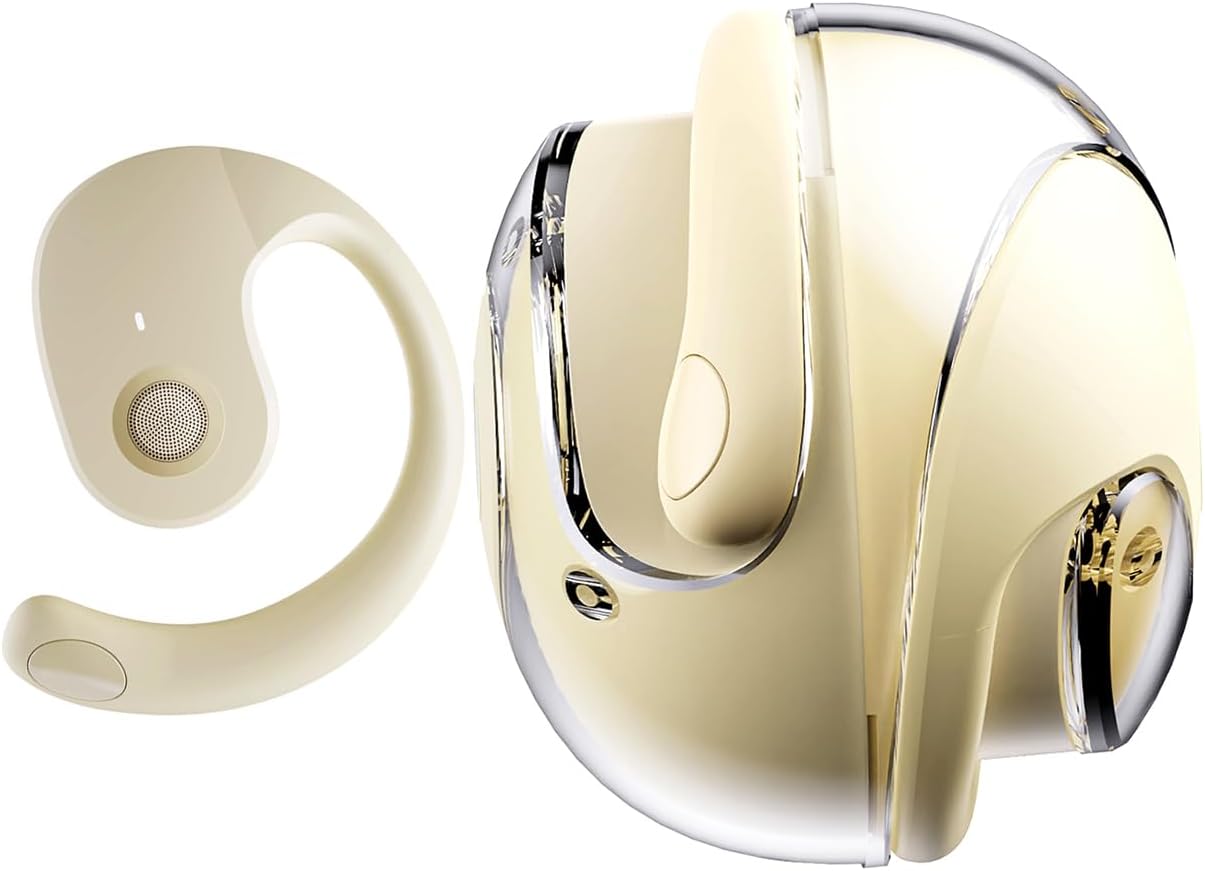
The GGSTOPWATER JM13 headphones feature an open-ear design with ear hooks for a secure and comfortable fit. The charging case is designed for portability and convenience.
Nastavitev
1. Polnjenje slušalk in etuija
Before first use, fully charge the headphones and the charging case. Place the headphones into the charging case. Connect the Type-C charging cable to the charging port on the case and plug the other end into a USB power source.
- Čas polnjenja: Približno 1.5 uri za polno polnjenje.
- Headset Usage Time: Do 4 ur z enim polnjenjem.
- Čas pripravljenosti: Do 120 ure.


2. Nošenje slušalk
The open-ear design with ear hooks ensures a stable and comfortable fit without entering the ear canal.
- Pick up the headset from the charging case.
- Wear it along the back of your ear, positioning the speaker over your ear canal.
- Gently adjust the headphones to a comfortable and secure position.

3. Bluetooth seznanjanje
The headphones utilize Bluetooth 5.4 for a stable and fast connection. They support multi-device linking and are compatible with iOS, Android, and Windows systems.
- Prepričajte se, da so slušalke napolnjene in vklopljene.
- Odprite nastavitve Bluetooth na svoji napravi (pametnem telefonu, tablici, prenosniku).
- Iskanje available devices and select "JM13" from the list.
- Once connected, you will hear a confirmation tone, and the device will show as 'Connected'.

Navodila za uporabo
Dotaknite se kontrolnikov
The headphones feature intuitive touch controls for managing calls and music playback.

| Akcija | Function (Telephone Mode) | Funkcija (glasbeni način) |
|---|---|---|
| Dolgo pritisnite 2 s | Zavrni klic | N/A |
| Kliknite | Sprejmi dohodni klic | N/A |
| Ponovno kliknite | Prekinite klic | N/A |
| Double touch (L) | N/A | Predvajaj prejšnjo skladbo |
| Double touch (R) | N/A | Predvajaj naslednjo pesem |
| En dotik | N/A | Predvajaj/Premor |
| Dolgo pritisnite 3 s | Vklop/izklop | Vklop/izklop |
| Three touch (L) | N/A | Zmanjšanje glasnosti |
| Three touch (R) | N/A | Povečaj glasnost |
Večtočkovna povezava
The headphones support connecting to multiple devices simultaneously. This allows you to seamlessly switch between, for example, your smartphone and laptop without needing to re-pair each time. Ensure both devices are paired with the headphones. The headphones will prioritize audio from the active device.
Vzdrževanje
Čiščenje
Redno čiščenje pomaga ohranjati kakovost zvoka in higieno:
- Za brisanje slušalk in polnilnega ohišja uporabite mehko, suho krpo, ki ne pušča vlaken.
- Ne uporabljajte močnih kemikalij, čistilnih topil ali močnih detergentov.
- Izogibajte se vdoru vlage v morebitne odprtine.
Shranjevanje
Ko slušalk ne uporabljate, jih shranite v polnilno škatlico, da jih zaščitite pred prahom in poškodbami. Hranite jih na hladnem in suhem mestu, stran od ekstremnih temperatur.
Vodoodpornost (IPX5)
The headphones are rated IPX5 water-resistant, meaning they can withstand splashes of water and sweat. This makes them suitable for workouts and light rain exposure. However, they are not designed for submersion in water or for use during heavy rain or showering. Ensure the charging port is dry before charging.
Odpravljanje težav
If you encounter issues with your GGSTOPWATER JM13 headphones, please refer to the following common solutions:
- Brez napajanja: Prepričajte se, da so slušalke in polnilna škatlica popolnoma napolnjene.
- Ni mogoče seznaniti:
- Ensure Bluetooth is enabled on your device and the headphones are within range.
- Turn off and then turn on the headphones.
- Delete "JM13" from your device's Bluetooth list and attempt to re-pair.
- If only one earbud connects, try placing both back in the case, closing it, and then reopening to reset.
- Ni zvoka ali nizka glasnost:
- Check the volume level on both your connected device and the headphones using the touch controls.
- Ensure the headphones are properly seated on your ears.
- Confirm that the headphones are connected to the correct audio output on your device.
- Neodzivne kontrole na dotik:
- Pri uporabi tipk na dotik se prepričajte, da so vaši prsti čisti in suhi.
- Restart the headphones by placing them in the charging case and taking them out again.
- Težave s polnjenjem:
- Preverite, ali je polnilni kabel varno priključen tako na ohišje kot na vir napajanja.
- Poskusite z drugim kablom tipa C in napajalnikom.
- Ensure the charging contacts on the headphones and inside the case are clean and free of debris.
Če ti koraki ne odpravijo vaše težave, se obrnite na podporo strankam.
Specifikacije
| Funkcija | Podrobnost |
|---|---|
| Ime modela | JM13 |
| Znamka | GGSTOPWATER |
| Tehnologija povezljivosti | Brezžično (Bluetooth) |
| Različica Bluetooth | 5.4 |
| Namestitev ušesa | Odprto uho |
| Oblika slušalke | Ušesni kavelj |
| Stopnja vodoodpornosti | IPX5 (vodoodporno, odporno na znoj) |
| Nadzor hrupa | Aktivno odpravljanje hrupa |
| Vrsta zvočnega gonilnika | Dinamični gonilnik (16 mm) |
| Frekvenčno območje | 20 Hz - 20,000 Hz |
| Impedanca | 32 Ohm |
| Nadzorna metoda | Daljinski upravljalnik (na dotik) |
| Vrsta baterije | Litijev polimer |
| Teža predmeta | 4.6 unč |
| Material | Silikon |
| Združljive naprave | Laptops, Tablets, Cellphones (iOS, Android, Windows) |
Garancija in podpora
GGSTOPWATER products are manufactured to high-quality standards. For information regarding warranty coverage, please refer to the warranty card included in your product packaging or contact your retailer. Keep your purchase receipt as proof of purchase.
Podpora uporabnikom
If you have any questions, concerns, or require technical assistance, please contact GGSTOPWATER customer support through the retailer's platform or the official GGSTOPWATER website. Please have your product model (JM13) and purchase details ready when contacting support.