
LIECTROUX X6
LIECTROUX X6 Robotic Vacuum Cleaner and Mop User Manual
Model: X6
Uvod
This manual provides essential information for the safe operation, maintenance, and troubleshooting of your LIECTROUX X6 Robotic Vacuum Cleaner and Mop. Please read this manual thoroughly before using the product and retain it for future reference. The LIECTROUX X6 is designed to provide efficient and comprehensive cleaning for various floor types, utilizing advanced navigation and smart features.
Konec izdelkaview
Ključne značilnosti
- Moč globinskega čiščenja: 6500Pa suction for efficient cleaning of hard floors, pet hair, and carpets.
- LSD LIDAR Navigation: Precise navigation and mapping for systematic cleaning.
- Precision Mapping: Customizable cleaning routes and schedules for personalized cleaning.
- Povezljivost Wi-Fi: Control and schedule cleanings remotely through the app or voice assistants.
- Glasovni nadzor: Združljivo z glasovnimi pomočniki za prostoročno upravljanje.
- Napredni filtrirni sistem: Captures 99.97% of dust, dirt, and allergens for cleaner air.
- Daljinski upravljalnik in nadzor aplikacij: Schedule cleanings, adjust settings, and monitor progress remotely.
- Pet Hair and Allergy Friendly: Effectively picks up pet hair, dust, and allergens for a cleaner environment.
Vključene komponente
- 1 x Robotic Vacuum
- 1 x polnilna postaja
- 1 x adapter za polnjenje
- 1 x 2-v-1 posoda za prah in rezervoar za vodo
- 2 x Pairs of Side Brushes
- 2 x Re-usable Wet Mopping Cloth
- 1 x Krpa za brisanje
- 1 x ščetka za čiščenje
- 2 x HEPA filter
- 1 x uporabniški priročnik
Vizualni elementi izdelka
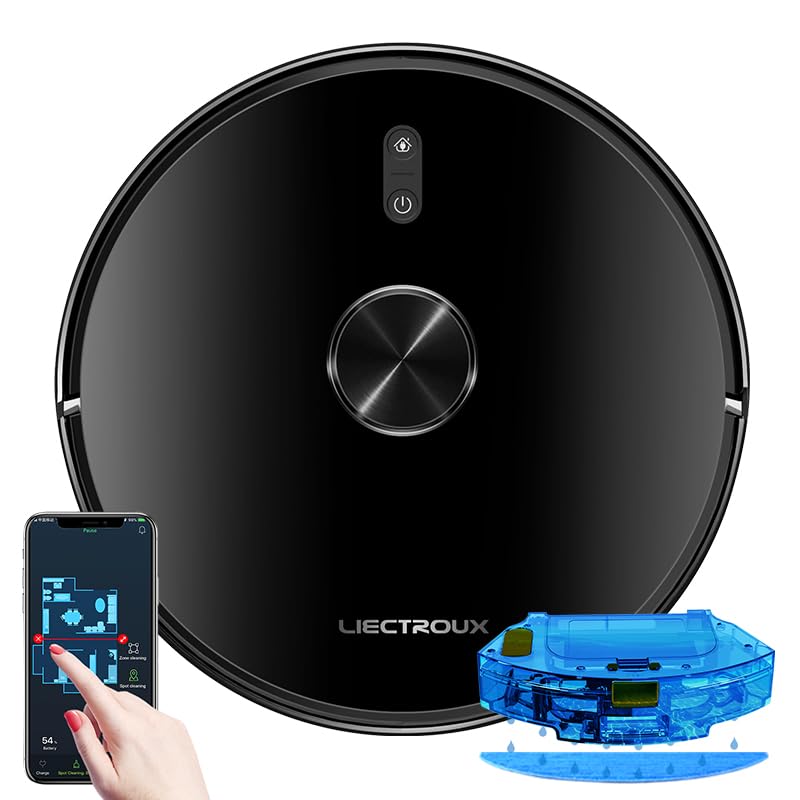
Figure 1: The LIECTROUX X6 Robotic Vacuum Cleaner and Mop, showcasing its sleek design, the accompanying mobile app interface for control, and the integrated water tank for mopping functionality.

Figure 2: Illustration of the integrated dust box and water tank system, highlighting the 400ml large dust box and 235ml large water tank, designed for effortless and worry-free cleaning. It also shows the sweeping, vacuuming, and mopping functions.

Figure 3: The LDS laser radar metering system in action, demonstrating its capabilities for LDS laser navigation, precision mapping, multi-layer map management, Y-routed floor mopping, and custom deep cleaning.

Figure 4: The mobile application interface displaying visual maps for whole house cleaning, including features like house-wide cleaning, routed cleaning, specified-area cleaning, scheduled cleaning tasks, and suction level adjustment.

Figure 5: Depiction of multiple custom cleaning modes for efficient and thorough cleaning, such as Selective Areas Cleaning, Cleaning Order, Restricted Zone Setting, Palm Virtual Blocker, and Areas Cleaning Frequency.

Figure 6: Illustration of the comprehensive breakthrough in Micro Electric Control and Air Pump Water Tank technology, showing different levels of wet mopping: Basic (Low), Normal (Medium), and Deep (High).
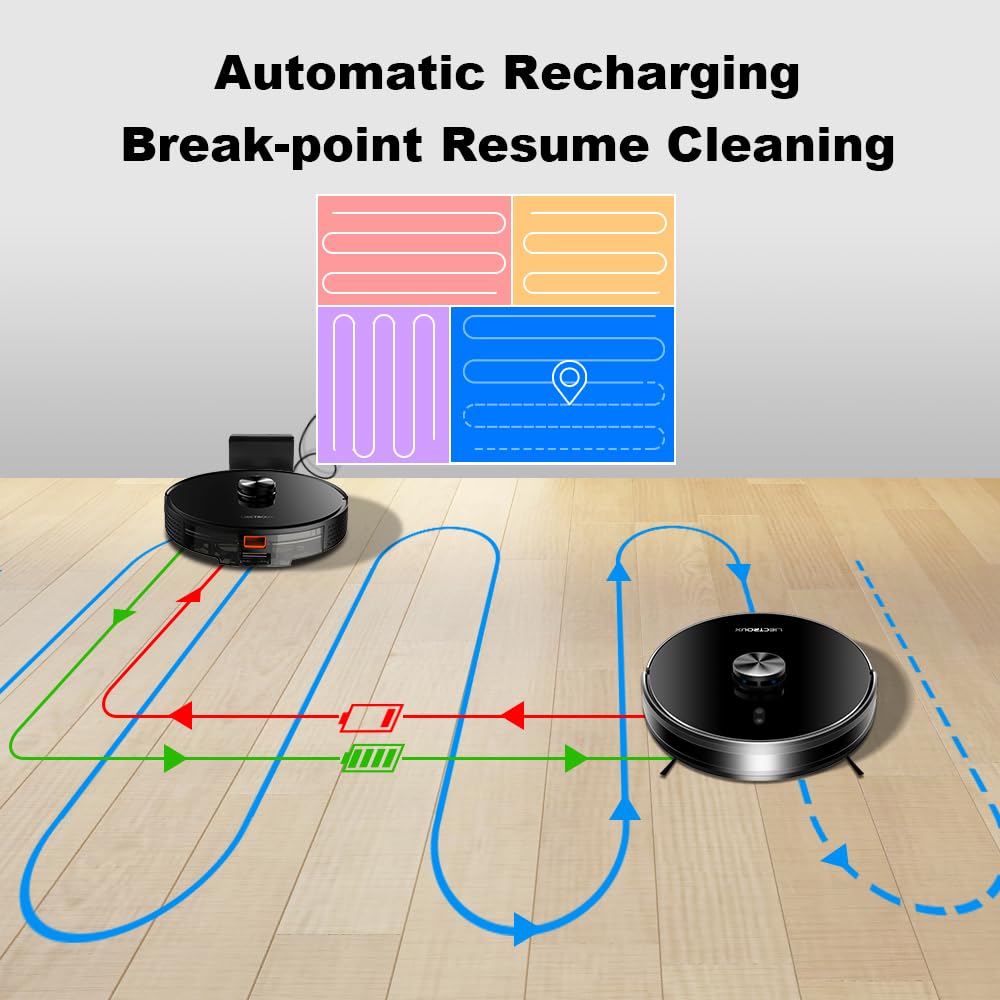
Figure 7: Diagram illustrating the automatic recharging feature and breakpoint resume cleaning, where the robot returns to its charging dock when battery is low and resumes cleaning from where it left off once sufficiently charged.

Figure 8: Visual representation of the Y-routed cleaning pattern, designed for repeated mopping and sweeping, imitating artificial kneeling-type cleaning for thorough stain removal.

Figure 9: Depiction of the multi-layer map management feature, allowing for areas segmentation, areas consolidation, recovering partition, and areas naming across multiple floors (1F to 6F shown).

Slika 10: Bližnji posnetek view of key internal components, including the dustbin with double filters, the Japan-imported brushless motor, and the floating V-shaped roller brush, designed for efficient debris collection.
Nastavitev
1. Razpakiranje
Carefully remove all components from the packaging. Ensure all included items listed in the "Included Components" section are present. Remove any protective films or packing materials from the robot and charging dock.
2. Namestitev polnilne postaje
- Polnilno postajo postavite ob steno na trdo, ravno površino.
- Prepričajte se, da je na obeh straneh priklopne postaje vsaj 0.5 metra (1.6 čevlja) praznega prostora in 1.5 metra (4.9 čevlja) pred njo.
- Keep the area free of obstacles, such as furniture or power cords, that could obstruct the robot's return to the dock.
- Priključite napajalnik na polnilno postajo in ga vključite v stensko vtičnico.
3. Začetna obremenitev
Place the robot onto the charging dock, ensuring the charging contacts align. The robot will begin charging automatically. For optimal battery life, fully charge the robot before its first use. The indicator light on the robot will show charging status.
4. Namestitev in povezava aplikacije
- Download the official LIECTROUX app from your mobile device's app store (iOS or Android).
- Open the app and follow the on-screen instructions to create an account and add your LIECTROUX X6 robot.
- Ensure your Wi-Fi network is 2.4GHz, as the robot may not support 5GHz networks.
- Aplikacija vas bo vodila skozi postopek povezave robota z vašim domačim omrežjem Wi-Fi.
Navodila za uporabo
1. Zagon cikla čiščenja
- Od robota: Za začetek samodejnega cikla čiščenja enkrat pritisnite gumb za vklop na robotu.
- Iz aplikacije: Open the LIECTROUX app, select your robot, and tap "Start Cleaning" or choose a specific cleaning mode.
- Glasovni nadzor: If connected to a voice assistant (e.g., Amazon Alexa, Google Assistant), use voice commands like "Alexa, tell [Robot Name] to start cleaning."
2. Načini čiščenja
- Samodejno čiščenje: Robot inteligentno krmari in čisti celotno dostopno območje.
- Čiščenje na mestu: Directs the robot to clean a specific small area intensively. Ideal for spills or concentrated dirt.
- Čiščenje območja: Use the app to define specific zones on the map for the robot to clean.
- Čiščenje po urniku: Set up recurring cleaning times and days through the app.
- Restricted Zones/Virtual Walls: Use the app to draw virtual boundaries or restricted zones on the map to prevent the robot from entering certain areas.
3. Funkcija brisanja
- Fill the water tank with clean water. Do not use cleaning solutions that are not approved by LIECTROUX.
- Pritrdite krpo za brisanje na rezervoar za vodo.
- Insert the 2-in-1 dustbin and water tank into the robot.
- Select a mopping mode or a combined vacuuming and mopping mode via the app. Adjust water flow levels (Low, Medium, High) as needed.
4. Pausing and Resuming
Press the power button on the robot or use the app to pause a cleaning cycle. Press again to resume. If the robot returns to the charging dock due to low battery, it will automatically resume cleaning from where it left off once sufficiently charged.
5. Returning to Charging Dock
The robot will automatically return to its charging dock when the battery is low or when a cleaning cycle is complete. You can also manually send it back via the app or by pressing and holding the power button on the robot.
Vzdrževanje
Regular maintenance ensures optimal performance and extends the lifespan of your LIECTROUX X6. Always power off the robot before performing any maintenance.
1. Praznjenje smetnjaka
- Pritisnite gumb za sprostitev posode za prah in izvlecite posodo za prah 2 v 1 in rezervoar za vodo.
- Odprite pokrov posode za smeti in njeno vsebino stresite v koš za smeti.
- Frequency: After each use or when full.
2. Čiščenje filtrov
- Iz posode za prah odstranite HEPA filter in gobasti filter.
- Tap the filters gently to remove dust. Do not wash HEPA filters with water.
- The sponge filter can be rinsed with water and air-dried completely before reinstallation.
- Frequency: Weekly, replace HEPA filter every 3-6 months.
3. Čiščenje glavne krtače
- Flip the robot over and remove the main brush cover.
- Lift out the main brush. Use the provided cleaning tool to remove hair and debris tangled around the brush.
- Frequency: Weekly.
4. Čiščenje stranskih krtač
- Inspect side brushes for damage or tangled hair.
- If necessary, remove the side brushes (they usually snap on/off) and clean them. Replace if worn.
- Frequency: Monthly, replace every 3-6 months.
5. Čiščenje senzorjev in polnilnih kontaktov
- Wipe the cliff sensors (located on the bottom of the robot), wall sensors, and charging contacts on both the robot and the charging dock with a clean, dry cloth.
- Frequency: Monthly.
6. Cleaning the Mopping Cloth
- Remove the mopping cloth after each mopping cycle.
- Rinse it thoroughly with water and allow it to air dry completely before storing or reattaching.
- Frequency: After each mopping use.
Odpravljanje težav
If your LIECTROUX X6 encounters an issue, refer to the following common problems and solutions:
| Težava | Možen vzrok | rešitev |
|---|---|---|
| Robot se ne vklopi ali polni. | Battery is completely depleted; charging contacts are dirty; power adapter not connected. | Ensure robot is properly seated on the charging dock. Clean charging contacts on both robot and dock. Check power adapter connection. |
| Robot se pogosto zatika. | Obstacles (cables, rugs); cliff sensors dirty; robot stuck on high thresholds. | Clear obstacles from cleaning path. Clean cliff sensors. Use virtual walls/restricted zones for problematic areas. |
| Slaba sesalna zmogljivost. | Dustbin full; filter clogged; main brush tangled; suction inlet blocked. | Empty dustbin. Clean/replace filters. Clean main brush and side brushes. Check suction inlet for blockages. |
| Robot se ne more povezati z Wi-Fi. | Napačno geslo za Wi-Fi; omrežje 5 GHz; robot je predaleč od usmerjevalnika. | Ensure correct 2.4GHz Wi-Fi network is selected. Re-enter password carefully. Move robot closer to router during setup. |
| Mopping function is not working. | Water tank empty; mopping cloth not attached; water outlet clogged. | Fill water tank. Ensure mopping cloth is properly attached. Check water outlets for blockages. |
For issues not listed here, please refer to the comprehensive troubleshooting section in the full user manual or contact customer support.
Specifikacije
| Funkcija | Podrobnost |
|---|---|
| Znamka | LIECTROUX |
| Ime modela | X6 |
| Sesalna moč | 6500 Pa |
| Vrsta navigacije | LSD Laser Navigation, Precision Mapping |
| Zmogljivost zbiralnika prahu | 400 ml |
| Kapaciteta rezervoarja za vodo | 235 ml |
| Vrsta filtra | HEPA |
| Življenjska doba baterije | Do 120 minut |
| Nadzorna metoda | Nadzor aplikacij, glasovni nadzor |
| Dimenzije izdelka | 33 D x 33 Š x 6 V centimetrov |
| Teža predmeta | 4 kg |
| barva | Črna |
Garancija in podpora
Your LIECTROUX X6 Robotic Vacuum Cleaner and Mop comes with a standard manufacturer's warranty. Please refer to the warranty card included in your product packaging for specific terms and conditions, including warranty period and coverage details.
For technical support, service, or warranty claims, please contact LIECTROUX customer service. Contact information can typically be found on the official LIECTROUX webspletnem mestu ali na embalaži izdelka.
It is recommended to register your product online to receive updates and support.
Ask a question about this manual
Ask about setup, troubleshooting, compatibility, parts, safety, or missing instructions. Manuals+ will review the question and use this page’s manual context to help answer it.