
Mesqool CR1025
Mesqool Alarm Clock CR1025 Instruction Manual
Model: CR1025
Uvod
This manual provides detailed instructions for the Mesqool Alarm Clock with Bluetooth Speaker, FM Radio, USB Chargers, Dimmer, Snooze, and Battery Backup (Model CR1025). Please read this manual thoroughly before operating the device to ensure proper use and optimal performance.
The Mesqool CR1025 is a versatile bedside device combining multiple functions:
- Alarm Clock with 2 optional sounds (radio or buzzer) and 9-minute snooze.
- Bluetooth 5.0 Speaker for wireless audio streaming.
- Digital FM Radio (87.5-108MHz) with auto-scan and 20 station presets.
- Adjustable Night Light.
- Dual USB Charging Station (Type-C & USB-A, 5V/1A each).
- Large LED display with 5-level dimmer and 12/24H time format.
- Battery backup for settings retention during power outages.

Image: The Mesqool Alarm Clock highlighting its five main features: Alarm Clock, Bluetooth V5.0, FM Radio, Night Light, and 2 USB Chargers.
Nastavitev
Power Connection and Battery Backup
The Mesqool CR1025 operates on AC power. Connect the provided power adapter to the DC IN port on the back of the unit and plug it into a standard wall outlet. The device also includes a battery backup feature (1 AAA battery included) to retain time and alarm settings during a power interruption. The battery does not power the display or alarm functions during an outage.

Image: The alarm clock connected to power, demonstrating its compact design suitable for a bedside table.
Začetna nastavitev časa
- Pritisnite Ura 12/24 gumb. Številke za uro bodo začele utripati.
- Rotate the right knob (Scan) to adjust the hour.
- Pritisnite Ura 12/24 ponovno pritisnite gumb. Številke minut bodo utripale.
- Rotate the right knob (Scan) to adjust the minute.
- Pritisnite Ura 12/24 še enkrat pritisnite gumb, da potrdite nastavitev časa.
Video: Demonstrates how to set the time on the Mesqool Alarm Clock by pressing the Time button and rotating the knob to adjust hours and minutes.
12/24-urni časovni format
To switch between 12-hour and 24-hour time formats, press and hold the Ura 12/24 button for 2 seconds. The display will change between AM/PM indicators for 12-hour format and no indicator for 24-hour format.
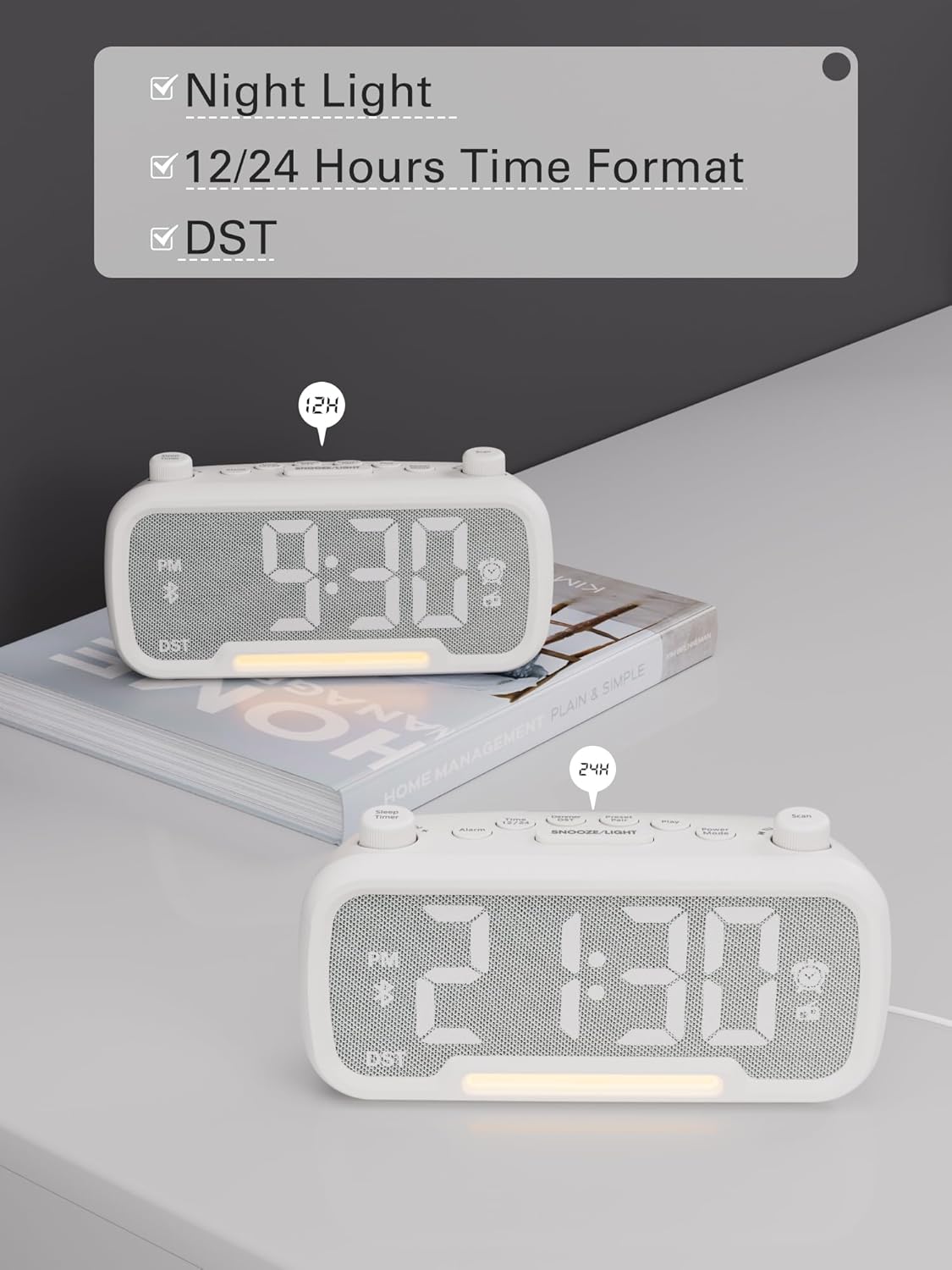
Image: The alarm clock displaying time in both 12-hour (with PM indicator) and 24-hour formats, also showing the DST indicator.
Daylight Saving Time (DST) Mode
Za vklop ali izklop poletnega časa (DST) pritisnite Dimmer DST button. The time will adjust by one hour forward or backward, and the "DST" indicator will appear or disappear on the display.
Video: Demonstrates how to activate or deactivate DST mode by pressing the DST button, showing the time adjustment.
Navodila za uporabo
Nastavitev alarma
- Pritisnite in držite Alarm button for 2 seconds. The hour digits will flash.
- Rotate the left knob (Sleep Timer) to adjust the hour.
- Pritisnite Alarm ponovno pritisnite gumb. Številke minut bodo utripale.
- Rotate the left knob (Sleep Timer) to adjust the minute.
- Pritisnite Alarm button again to select the alarm sound: bell or last radio channel.
- Rotate the left knob (Sleep Timer) to adjust the alarm volume (L01-L16).
- Pritisnite Alarm button once more to complete the alarm setting.
Video: Illustrates the steps to set the alarm time, choose the alarm sound (bell or radio), and adjust the alarm volume.
Preklic alarma
To cancel the alarm, press the Alarm button. The alarm icon on the display will turn off, indicating that the alarm has been canceled.
Funkcija dremeža
Ko se oglasi alarm, pritisnite tipko SNOOZE / LUČ gumb za vklop funkcije dremeža. Alarm se bo za 9 minut ustavil in nato znova zazvonil.

Image: The alarm clock with the SNOOZE/LIGHT button clearly marked, explaining its 9-minute snooze function.
Delovanje Bluetooth zvočnika
- Pritisnite Način napajanja button repeatedly until "bt" appears on the display. The Bluetooth icon will start flashing, indicating it's ready for pairing.
- On your mobile device, search for Bluetooth devices and select "CR1025" to connect.
- Once connected, the Bluetooth icon will stop flashing. You can now stream audio from your device.
Video: Shows how to enter Bluetooth mode and pair the alarm clock with a mobile device, indicated by the flashing and solid Bluetooth icon.

Image: The alarm clock wirelessly connected to a smartphone, demonstrating its Bluetooth 5.0 audio streaming capability.
Delovanje radia FM
- Pritisnite Način napajanja button repeatedly until the radio icon lights up and a frequency is displayed.
- Samodejno skeniranje: Pritisnite Skeniraj button to automatically search for and store up to 20 FM stations (P01-P20).
- Ročno iskanje: Rotate the right knob (Scan) to browse frequencies manually.
- Saving a Station: While listening to a desired station, press and hold the Preset Pair button for 2 seconds. Use the right knob (Scan) to select a preset number (P01-P20), then press Preset Pair spet shraniti.
- Recalling a Preset: Na kratko pritisnite Preset Pair za preklapljanje med shranjenimi postajami.
- Prilagodi glasnost: Rotate the left knob (Sleep Timer) to control the volume (16 levels).
Video: Demonstrates how to operate the FM radio, including auto-scanning, manual tuning, saving presets, and adjusting volume.

Image: The alarm clock showing an FM radio frequency, illustrating its use as a radio.
Nastavitev izklopnega časovnika
When using the FM radio or Bluetooth speaker functions, you can set a sleep timer to control playback duration before the device automatically turns off.
- Pritisnite Časovnik za izklop button on the top left.
- Rotate the left knob (Sleep Timer) to select the desired duration: 15, 30, 60, 90, or 120 minutes. You can also select "OFF" to disable the sleep timer.
Video: Demonstrates how to set the sleep timer for the FM radio or Bluetooth speaker, showing available duration options.
Zaslon zatemnitve
The LED display has 5 levels of brightness. To adjust the brightness, press the Dimmer DST button repeatedly to cycle through the levels (L01-L05).
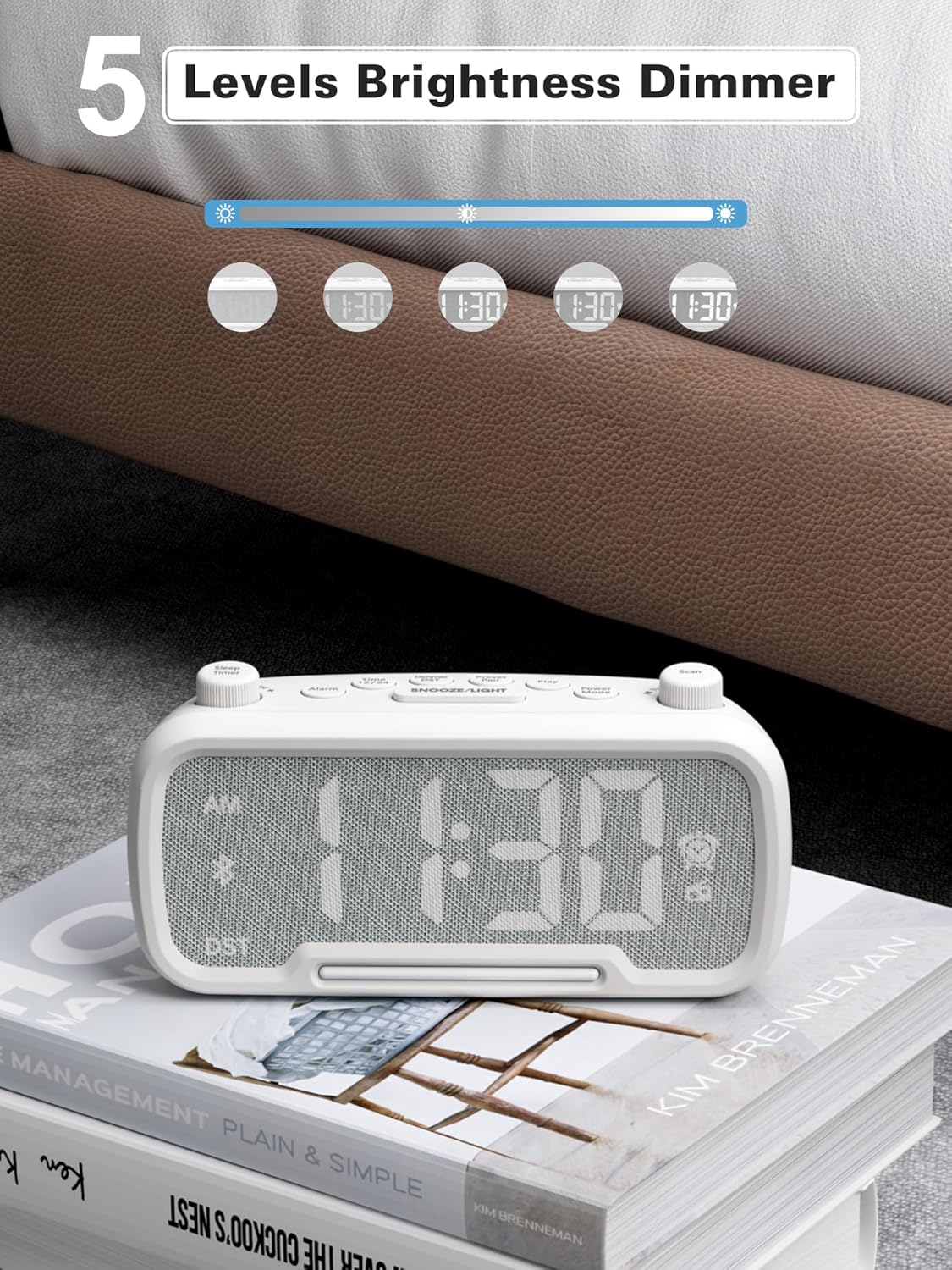
Image: The alarm clock illustrating the five different brightness levels for its LED display.
Nočna luč
The alarm clock features a gentle fixed night light. To turn the night light on or off, press the SNOOZE / LUČ button. This light creates a sleep-friendly environment.

Image: The alarm clock's warm night light glowing, positioned next to a teddy bear, suggesting its use in a child's room.
Vrata za polnjenje USB
The device includes two USB charging ports: one Type-C and one USB-A. Both ports provide 5V/1A output, allowing you to conveniently charge your smartphone, tablet, or other USB-powered devices simultaneously.

Image: The alarm clock with a smartphone connected to its Type-C port and a smartwatch to its USB-A port, demonstrating simultaneous charging.
Vzdrževanje
- Čiščenje: Za čiščenje površine budilke uporabite mehko, suho krpo. Ne uporabljajte tekočih čistil ali abrazivnih materialov.
- Shranjevanje: If storing the device for an extended period, disconnect it from power and remove the backup battery. Store in a cool, dry place.
- Izogibajte se vlagi: Keep the device away from water, high humidity, and direct sunlight to prevent damage.
Odpravljanje težav
| Težava | Možen vzrok | rešitev |
|---|---|---|
| Ni prikaza/Naprava se ne vklopi | Napajalnik ni priključen ali pa je vtičnica pokvarjena. | Ensure the power adapter is securely plugged into the device and a working wall outlet. Test the outlet with another device. |
| Alarm se ne oglasi | Alarm not set, alarm volume too low, or alarm canceled. | Verify alarm time is set correctly, alarm icon is visible, and volume is adequate. Ensure the alarm was not accidentally canceled. |
| Bluetooth se ne povezuje | Naprava ni v načinu seznanjanja, je izven dosega ali pa je že povezana z drugo napravo. | Ensure the clock is in Bluetooth pairing mode ("bt" flashing). Move your mobile device closer. Disconnect from other Bluetooth devices. |
| Slab FM radijski sprejem | Šibek signal, antena ni iztegnjena. | Fully extend the FM antenna. Try repositioning the clock for better reception. Perform an auto-scan again. |
| USB polnjenje ne deluje | Cable issue, device not compatible, or device already fully charged. | Check the USB cable for damage. Ensure your device is compatible with 5V/1A charging. Verify the device requires charging. |
Specifikacije
- Znamka: Mesqool
- Številka modela: CR1025
- barva: Bela
- Vrsta zaslona: LED
- vir energije: Corded Electric (AC power)
- Varnostno kopiranje baterije: 1 AAA baterija (priložena)
- Dimenzije izdelka: 3.31"W x 2.32"H (Note: Length is 6.61" from feature bullets)
- Teža artikla: 7.7 unč
- Material: Fabric, Acrylonitrile Butadiene Styrene
- FM radijska frekvenca: 87.5-108MHz
- USB izhod: Type-C & USB-A, 5V/1A each
- Zvoki alarma: Bell, FM Radio
- Svetlost zaslona: 5 ravni
- Format časa: 12H/24H
- Posebne lastnosti: Bluetooth 5.0, Night Light, DST adjustment, Snooze
Garancija in podpora
For warranty information or technical support, please refer to the contact details provided with your purchase or visit the official Mesqool webmesto. Shranite račun za garancijske zahtevke.
Ask a question about this manual
Ask about setup, troubleshooting, compatibility, parts, safety, or missing instructions. Manuals+ will review the question and use this page’s manual context to help answer it.