
1. Uvod
The heltec bms HT-ED50AC8 is an advanced 8-channel battery capacity tester designed for comprehensive analysis of various lithium battery types. This device facilitates precise charging, discharging, and equalization processes, making it suitable for battery repair, research, and quality control. Each channel operates independently with a dedicated processor, ensuring accurate data collection and control. This manual provides essential information for the safe and effective use of your HT-ED50AC8 tester.
2. Varnostne informacije
Pred uporabo naprave preberite in razumite vsa varnostna navodila. Neupoštevanje teh navodil lahko povzroči električni udar, požar ali resne poškodbe.
- vir energije: Use only the specified power source (Corded Electric) and ensure proper grounding.
- Prezračevanje: Ensure adequate ventilation around the device. Do not block the air outlets. The device features an independent heat source air duct with temperature-controlled fans.
- Ravnanje z baterijo: Always handle batteries with care. Ensure correct polarity when connecting batteries to avoid damage to the device or batteries.
- Okolje: Operate the device in a dry, stable environment, away from flammable materials, moisture, and extreme temperatures.
- Vzdrževanje: Naprave ne poskušajte odpirati ali popravljati sami. Vsa servisna dela prepustite usposobljenemu osebju.
- Izklop v sili: Familiarize yourself with the location of the main power switch for quick shutdown in emergencies.
3. Vsebina paketa
Preverite, ali so v paketu prisotni vsi elementi:
- heltec bms 8-Channel Lithium Battery Capacity Tester (HT-ED50AC8)
- Napajalni kabel
- Connection Cables with Alligator Clips (8 sets)
- USB Communication Cable (for PC connection)
- Uporabniški priročnik (ta dokument)
4. Izdelek je končanview
The HT-ED50AC8 features an intuitive design for efficient battery testing. Below is a diagram highlighting key components and their functions.
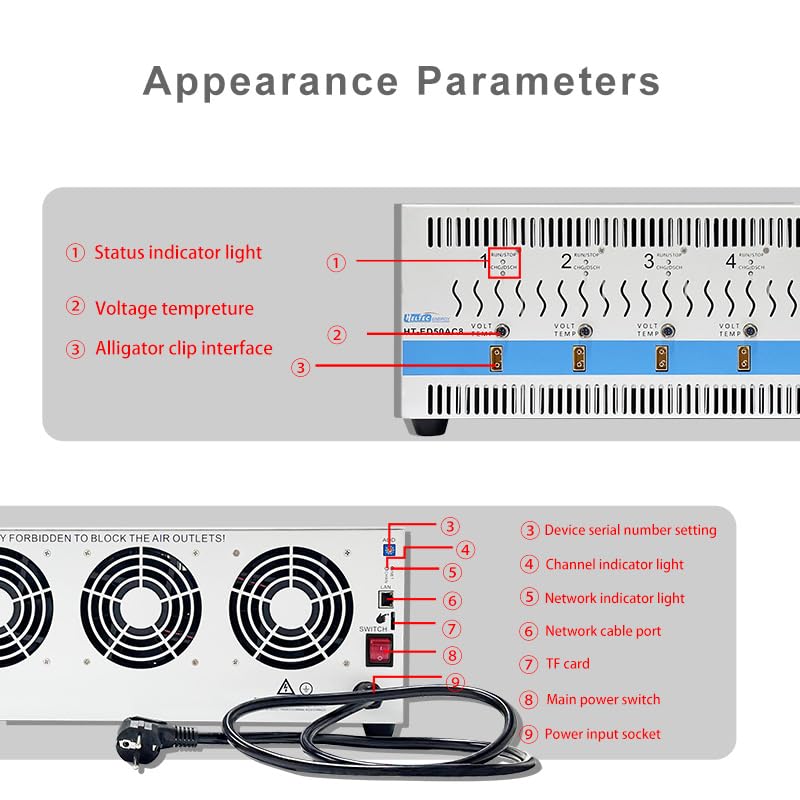
Slika 4.1: Front and Rear Panel Layout of the HT-ED50AC8
Komponente sprednje plošče:
- Lučka indikatorja stanja: Displays the operational status of each channel.
- voltage/Temperature Ports: Connectors for voltage and temperature probes.
- Alligator Clip Interface: Connection points for battery cables with alligator clips.
Komponente zadnje plošče:
- Device Serial Number Setting: For identification and software configuration.
- Channel Indicator Light: Indicates the status of individual channels.
- Indikatorska lučka omrežja: Prikazuje stanje omrežne povezljivosti.
- Network Cable Port: For connecting to a computer network.
- Reža za TF kartice: Za shranjevanje podatkov.
- Glavno stikalo za vklop: Nadzira glavno napajanje enote.
- Vhodna vtičnica: Za priključitev napajalnega kabla.
5. Nastavitev
Follow these steps to set up your HT-ED50AC8 battery tester:
5.1 Physical Placement and Power Connection
- Place the device on a stable, flat surface with sufficient clearance around the air vents for proper cooling.
- Connect the power cord to the Power Input Socket (9) on the rear panel and then to a suitable power outlet.
- Ensure the Main Power Switch (8) is in the OFF position before connecting power.

Slika 5.1: Rear Panel with Power Connection and Air Ducts
5.2 Software Installation and PC Connection
- Install the provided software on your computer. Refer to the software's installation guide for detailed steps.
- Connect the device to your computer using the USB communication cable or a network cable via the Network Cable Port (7).
- Launch the software. The Network Indicator Light (6) should illuminate, indicating a successful connection.
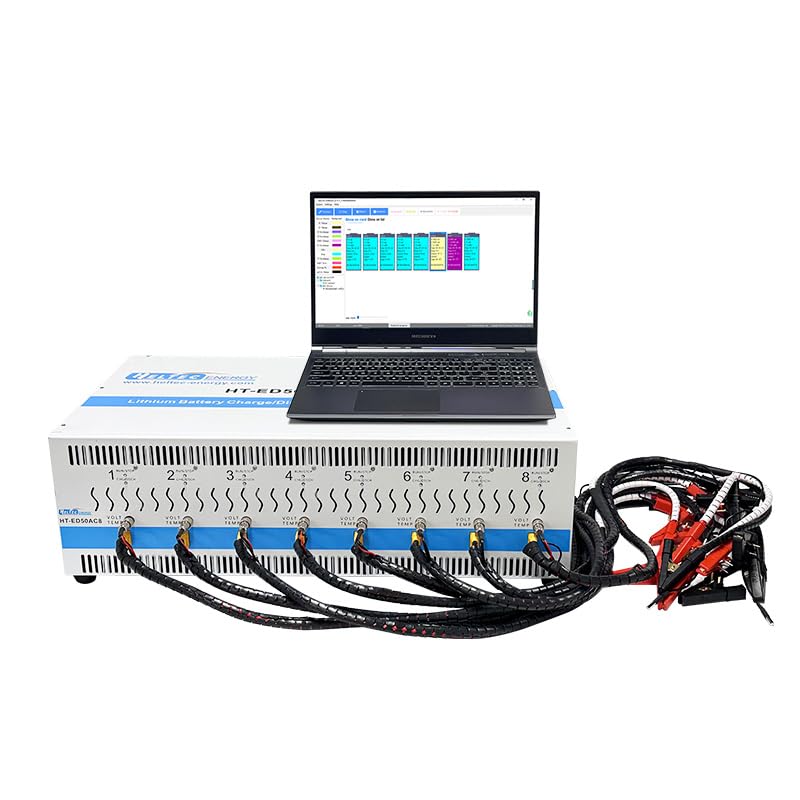
Slika 5.2: Device Connected to PC with Software Interface
5.3 Priključitev baterije
- Ensure the device is powered off before connecting batteries.
- Connect the battery cables with alligator clips to the Alligator Clip Interfaces (3) for each channel you intend to use.
- Attach the alligator clips to the battery terminals, ensuring correct polarity (red for positive, black for negative).
- The battery test probe is height-adjustable; adjust it for proper contact with various battery types.
Slika 5.3: Battery Connections to the Tester
6. Delovanje
The HT-ED50AC8 offers various testing modes and features for comprehensive battery analysis.
6.1 Vklop in inicializacija
- After connecting all cables and batteries, turn on the Main Power Switch (8).
- Open the control software on your computer. The software should detect the device.
- The Status Indicator Lights (1) and Channel Indicator Lights (4) will show the device's readiness.
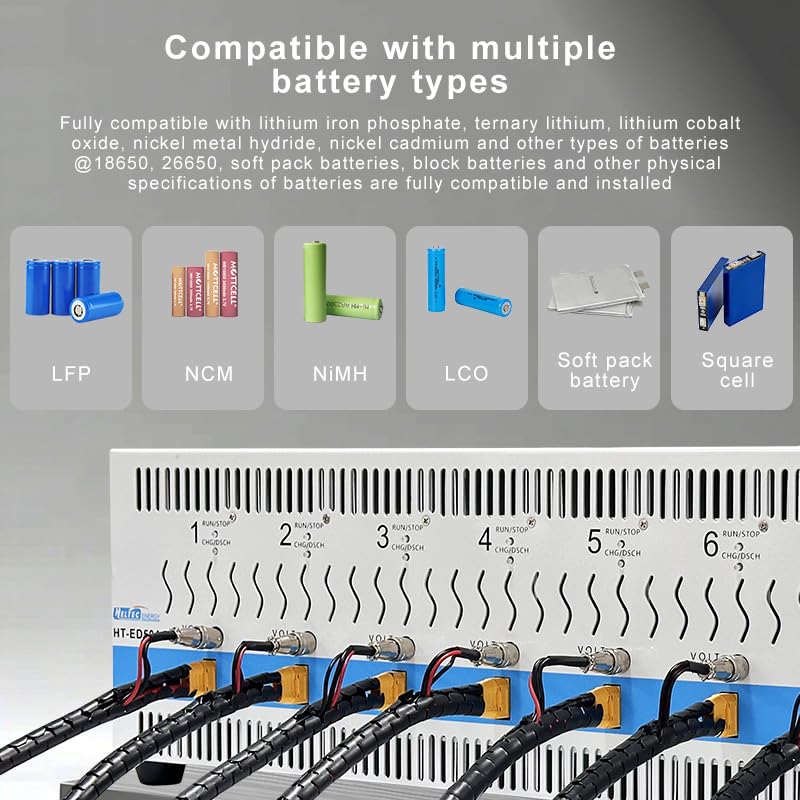
6.2 Združljivost baterij
The HT-ED50AC8 is compatible with a wide range of battery chemistries and physical specifications:
- Litijev železov fosfat (LFP)
- Ternary Lithium (NCM)
- Lithium Cobalt Oxide (LCO)
- Nikelj kovinski hidrid (NiMH)
- Nickel Cadmium (NiCd)
- Compatible physical specifications include 18650, 26650, soft pack batteries, and block batteries.

Slika 6.1: Združljive vrste baterij
6.3 Test Modes and Parameters
The software provides various test steps and customizable parameters:
- Načini polnjenja: Constant Current (CC) charging, Constant Voltage (CV) charging, Constant Current Constant Voltage (CCCV) charging.
- Discharging Modes: Constant Current (CC) discharge, Constant Power (CP) discharge, Constant Resistance (CR) discharge.
- Drugi koraki: Shelving, step jump capability.
- Customize parameters such as charging voltage, current limits, and duration for each step.
6.4 Zapisovanje in analiza podatkov
- The device records test process data, which can be viewed and analyzed through the software.
- The software offers 3 Y-axes (voltage, current, capacity) and a time axis for curve plotting.
- Data report functions are available for detailed analysis and export.
- Test results can be grouped according to custom standards, with visual indicators on the device and software.
6.5 naprednih funkcij
- Dedicated Processors: Each channel has a dedicated processor for precise capacity calculation, timing, voltage, and current control.
- Full Channel Isolation: Allows direct testing of battery cells within an entire battery pack without interference.
- Inteligentna zaščita: Features include module design, 50A charge-discharge capability, intelligent temperature monitoring, data visualization, custom grouping, anti-reverse connection, compatible installation, constant current protection, and precise calculation.

Slika 6.2: Dedicated Processor Architecture

Slika 6.3: Intelligent Protection Features
7. Vzdrževanje
Proper maintenance ensures the longevity and accuracy of your HT-ED50AC8 tester.
- Čiščenje: Regularly clean the exterior of the device with a soft, dry cloth. Do not use liquid cleaners or solvents.
- Prezračevanje: Periodically check that the air vents are clear of dust and debris to maintain optimal cooling performance.
- Shranjevanje: Ko naprave dalj časa ne uporabljate, jo shranite na hladnem in suhem mestu, stran od neposredne sončne svetlobe in ekstremnih temperatur.
- Pregled kabla: Inspect all cables and connectors regularly for signs of wear or damage. Replace any damaged cables immediately.
8. Odpravljanje težav
If you encounter issues with your HT-ED50AC8, refer to the following common problems and solutions:
| Težava | Možen vzrok | rešitev |
|---|---|---|
| Naprava se ne vklopi. | Power cord not connected or faulty; Main power switch off. | Ensure power cord is securely connected and the main power switch is ON. Check power outlet. |
| Software does not detect the device. | USB/Network cable not connected or faulty; Software not installed correctly; Device drivers missing. | Verify cable connections. Reinstall software and drivers. Restart both device and computer. |
| Channel not responding or showing incorrect readings. | Battery not connected correctly; Faulty battery cable; Channel malfunction. | Check battery polarity and connection. Try a different battery or cable. If issue persists, contact support. |
| Overheating or fan noise. | Blocked air vents; High ambient temperature; Prolonged high-current operation. | Ensure air vents are clear. Operate in a well-ventilated area. The intelligent temperature control system will adjust fan speed. If alarm, reduce load. |
| Test data not saving or incorrect. | TF card full or faulty; Software error. | Check TF card status, replace if necessary. Ensure software is up-to-date. |
9. Specifikacije
Key technical specifications for the heltec bms HT-ED50AC8 battery tester:
- Številka modela: HT-ED50AC8
- Znamka: heltec bms
- Kanali: 8 (fully isolated)
- Tok polnjenja/praznjenja: Do 50A na kanal
- vir energije: Električni na kabel
- Združljive vrste baterij: Lithium Iron Phosphate, Ternary Lithium, Lithium Cobalt Oxide, Nickel Metal Hydride, Nickel Cadmium
- Compatible Battery Sizes: 18650, 26650, soft pack, block batteries
- Hlajenje: Independent heat source air duct with temperature-controlled speed-adjustable fan
- Povezljivost: USB, Network (for PC control)
- Shranjevanje podatkov: Reža za kartico TF
- Dimenzije: Približno 29.13 x 20.47 x 12.2 cm (dimenzije paketa)
- Teža artikla: Približno 28 kilograma (61.6 funta)
- UPC: 762716254336
10. Podpora
For technical assistance, warranty information, or service inquiries, please contact heltec bms customer support. Refer to the product packaging or the official heltec bms webspletno mesto za najnovejše kontaktne podatke.
Spletni viri: Obiščite heltec bms Store on Amazon for product updates and additional information.