
Mesqool e5a70cca-01be-4e29-bb91-9cfc7e32344
Mesqool Emergency Radio Instruction Manual
Model: e5a70cca-01be-4e29-bb91-9cfc7e32344
Blagovna znamka: Mesqool
1. Uvod
This manual provides detailed instructions for the Mesqool Emergency Radio, a versatile device designed for emergency preparedness and outdoor activities. It features multiple power sources, including a large-capacity rechargeable battery, hand crank, and solar panel, along with AM/FM/SW radio reception, NOAA weather alerts, a powerful flashlight, a reading lamp, and a cell phone charging function.

Figure 1: Mesqool Emergency Radio in Gray Camo, demonstrating phone charging capability.
2. Vsebina paketa
Označite polje za naslednje elemente:
- Radio za nujne primere
- 5V 2A Adapter and Type C Cord
- Kovinski kavelj
- Portable Belt
- Navodila za uporabo
3. Ključne značilnosti
- NOAA Weather Alert Radio: Receives 7 pre-programmed NOAA weather channels with automatic alert function for severe weather events.
- Multi-Band Radio: Supports AM, FM, and Shortwave (SW) frequencies for broad reception.
- Visoko zmogljiva baterija: Equipped with a 12000mAh rechargeable Li-ion battery for extended operation and device charging.
- Five Power Sources: Rechargeable battery, USB-C input, hand crank, solar panel, and 3 AAA batteries (not included).
- Zasilna razsvetljava: Features a bright flashlight (150-300 Lumens) and a 2-level brightness reading lamp (120-250 Lumens).
- SOS alarm: Activates a loud 116dB alarm with flashing red light for emergency signaling.
- Cell Phone Charger: Functions as a power bank to charge mobile devices via USB output.
- LCD zaslon: Large, backlit LCD displays radio station, time, and weather channels.
- Vzdržljivost: IPX-3 waterproof and dust-proof rating.
4. Kontrole in komponente
Familiarize yourself with the radio's controls and ports:

Slika 2: Spredaj view of the radio highlighting the large LCD display and control buttons.
- Gumb za vklop: Pritisnite za vklop ali izklop radia.
- Gumb za pas: Cycles through AM, FM, SW, and Weather Band (WB) modes.
- WX Alert Button: Activates or deactivates the NOAA weather alert function.
- Gumbi za glasnost +/-: Prilagodi glasnost zvočnega izhoda.
- Tune +/- Buttons: Prilagodi radijsko frekvenco.
- Gumb za zaklepanje: Preprečuje nenamerne pritiske gumbov.
- Set Time Button: Used to set the current time displayed on the LCD.
- Gumb za osvetlitev ozadja: Toggles the LCD screen backlight.
- Svetilka: Located on the left side of the radio. Activated via a dedicated button.
- SOS Control Button: Activates the emergency SOS alarm.
- USB Output Charging Port: Za polnjenje zunanjih naprav.
- Type-C Input Charging Port: For charging the radio's internal battery.
- 3.5 mm priključek za slušalke: Za zasebno poslušanje.
- Teleskopska antena: Extend for better radio reception.
- Solarni panel: Located on the top, used for trickle charging.
- Ročna ročica: Foldable crank on the back for manual power generation.
- Branje Lamp: Located under the solar panel, flips up for illumination.
- Predal za baterije AAA: Located on the bottom, for optional AAA battery power.
- Kompas: Integrated into the portable strap for navigation.

Slika 3: stran view illustrating the SOS alarm and headphone jack.
5. Power Sources and Charging
The Mesqool Emergency Radio offers five flexible ways to ensure you always have power:
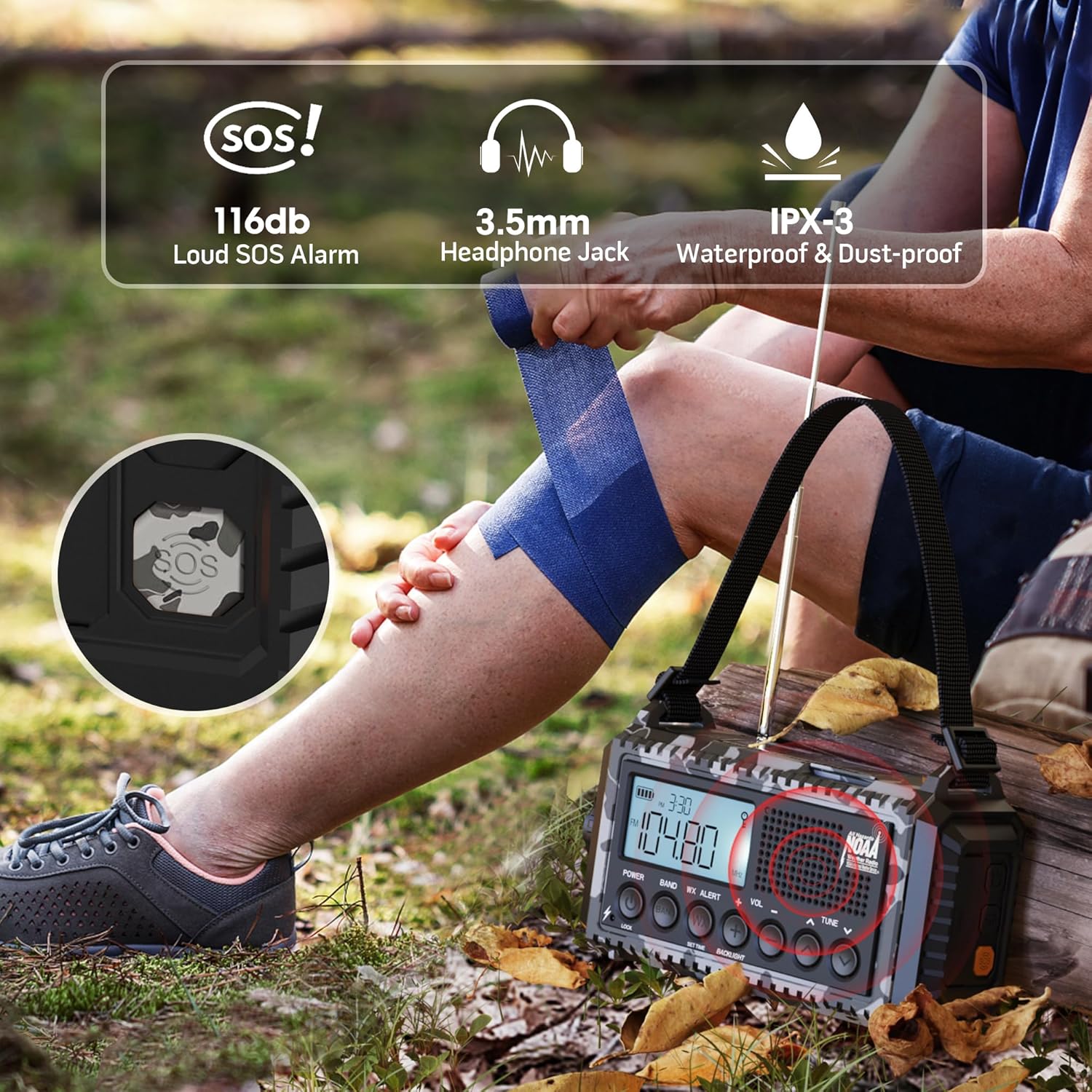
Figure 4: Visual representation of the five power options for the radio.
- 12000mAh Built-in Li-ion Battery: The primary power source. Ensure it is fully charged before extended use.
- Type-C Input (5V/2A): Connect the provided Type-C cable to a compatible USB adapter (not included) for the most efficient charging. The charging indicator lights will show progress.
- Ročna ročica: Rotate the hand crank clockwise or counter-clockwise at a steady pace (approx. 130-150 RPM) for 3-5 minutes to generate enough power for short-term use or to initiate charging.
- Solarni panel: Place the radio in direct sunlight. The solar panel provides trickle charging to maintain the battery level or extend playtime. It is not intended for full charging from a depleted state.
- 3 AAA Batteries (Not Included): Open the battery compartment on the bottom and insert 3 AAA batteries. This serves as a backup power source when the internal Li-ion battery is low or depleted.
The battery indicator on the LCD screen will show the current charge level. A flashing indicator typically means the battery is low and requires charging.
6. Delovanje radia
The radio supports AM, FM, SW, and NOAA Weather Bands.

Figure 5: The radio displaying NOAA Weather Alert functionality.
- Vklop/izklop: Pritisnite MOČ gumb za vklop ali izklop radia.
- Izbira pasu: Pritisnite BAND button repeatedly to cycle through AM, FM, SW, and WB (Weather Band).
- Uglaševanje postaj: Uporabite TUNE +/- buttons to manually adjust the frequency. For automatic scanning, press and hold the TUNE +/- button for 2 seconds. The radio will stop on the next available station.
- Nadzor glasnosti: Uporabite GLASNOST +/- gumbe za nastavitev glasnosti poslušanja.
- Vremensko opozorilo NOAA:
- Če želite omogočiti, pritisnite OPOZORILO WX button. The 'WX' icon will appear on the LCD.
- The radio will automatically scan 7 NOAA weather channels. When an alert is received, an audible alarm will sound, and the red alert light will flash.
- To disable, press the OPOZORILO WX gumb znova.
7. Svetilka in branje Lamp Delovanje
The radio includes integrated lighting features for various situations.

Figure 6: The radio's reading lamp and flashlight in use.
- Svetilka: Press the dedicated flashlight button on the side of the radio to turn it on. Press again to cycle through brightness levels (if applicable) or turn off.
- Branje Lamp: Flip up the solar panel to reveal the reading lampPritisnite odčitavanje lamp button (often located near the flashlight button) to turn it on. Press again to adjust brightness levels or turn off.
8. SOS Alarm Function
In an emergency, the SOS alarm can be activated to attract attention.
- To activate the SOS alarm, press the SOS button (often a distinct yellow or red button, or integrated with a light button). A loud siren will sound, and a red flashing light will activate.
- Za deaktivacijo pritisnite SOS gumb znova.
9. Cell Phone Charging
The radio can serve as an emergency power bank for your mobile devices.
- Connect your mobile device to the USB output charging port on the side of the radio using your device's charging cable.
- The radio's internal 12000mAh battery will provide power to your device.
- If the radio's battery is low, you may need to use the hand crank to generate initial power for charging.

Figure 7: The radio connected to a smartphone for charging.
10. Specifikacije
| Funkcija | Podrobnost |
|---|---|
| Dimenzije izdelka | 3.7 x 2.48 x 6.8 palcev |
| Teža predmeta | 1.46 funtov |
| Vrsta baterije | 1 litij-ionska baterija (priložena) |
| Vir napajanja | Rechargeable Battery | Solar Panel | Hand Crank | Type-C Input 5V/2A |
| Podprti radijski pasovi | AM/FM/7 Pre-Configured NOAA Stations |
| Tehnologija povezljivosti | NOAA RADIO |
| Posebne lastnosti | Cellphone USB Charger, Flashlight, Reading Lamp, Strap, Lightweight, SOS Alarm, NOAA Weather Alert |
11. Odpravljanje težav
- Brez napajanja: Ensure the internal battery is charged. Try hand cranking for a few minutes or connecting to a USB power source. Check if AAA batteries are inserted correctly and have charge.
- Slab radijski sprejem: Extend the telescopic antenna fully. Try repositioning the radio. For AM/SW, rotate the radio for optimal signal.
- NOAA Alert Not Working: Ensure the WX Alert function is enabled. Check if you are within range of a NOAA broadcast.
- Telefon se ne polni: Ensure the radio has sufficient power. Check the USB cable connection. Some devices may require more power than the radio can provide for rapid charging.
- Gumbi se ne odzivajo: Check if the Lock function is activated. Deactivate it if necessary.
12. Vzdrževanje
- Čiščenje: Radio obrišite z mehko, damp krpo. Ne uporabljajte močnih kemikalij ali abrazivnih čistil.
- Shranjevanje: Radio shranjujte na hladnem in suhem mestu, stran od neposredne sončne svetlobe in ekstremnih temperatur.
- Vzdrževanje baterije: For optimal battery life, fully charge the internal Li-ion battery at least once every three months, even if not in use.
- Vodoodpornost: While IPX-3 rated (splash-proof), avoid submerging the radio in water. Ensure all port covers are securely closed when exposed to moisture.
13. Garancija in podpora
For warranty information, technical support, or service inquiries, please refer to the contact details provided on the product packaging or the official Mesqool webspletno mesto. Shranite račun kot dokazilo o nakupu.
Ask a question about this manual
Ask about setup, troubleshooting, compatibility, parts, safety, or missing instructions. Manuals+ will review the question and use this page’s manual context to help answer it.