
Uvod
Thank you for choosing the Mesqool CR1025 Digital Alarm Clock Radio. This device combines multiple functions including a digital alarm clock, Bluetooth 5.0 speaker, FM radio, night light, and dual USB charging ports. This manual provides detailed instructions to help you set up and operate your new device effectively.
Vsebina paketa
- Mesqool CR1025 Digital Alarm Clock Radio
- Napajalni adapter
- Uporabniški priročnik
- C Battery (for backup)
Konec izdelkaview
Familiarize yourself with the components and controls of your Mesqool CR1025 Digital Alarm Clock Radio.
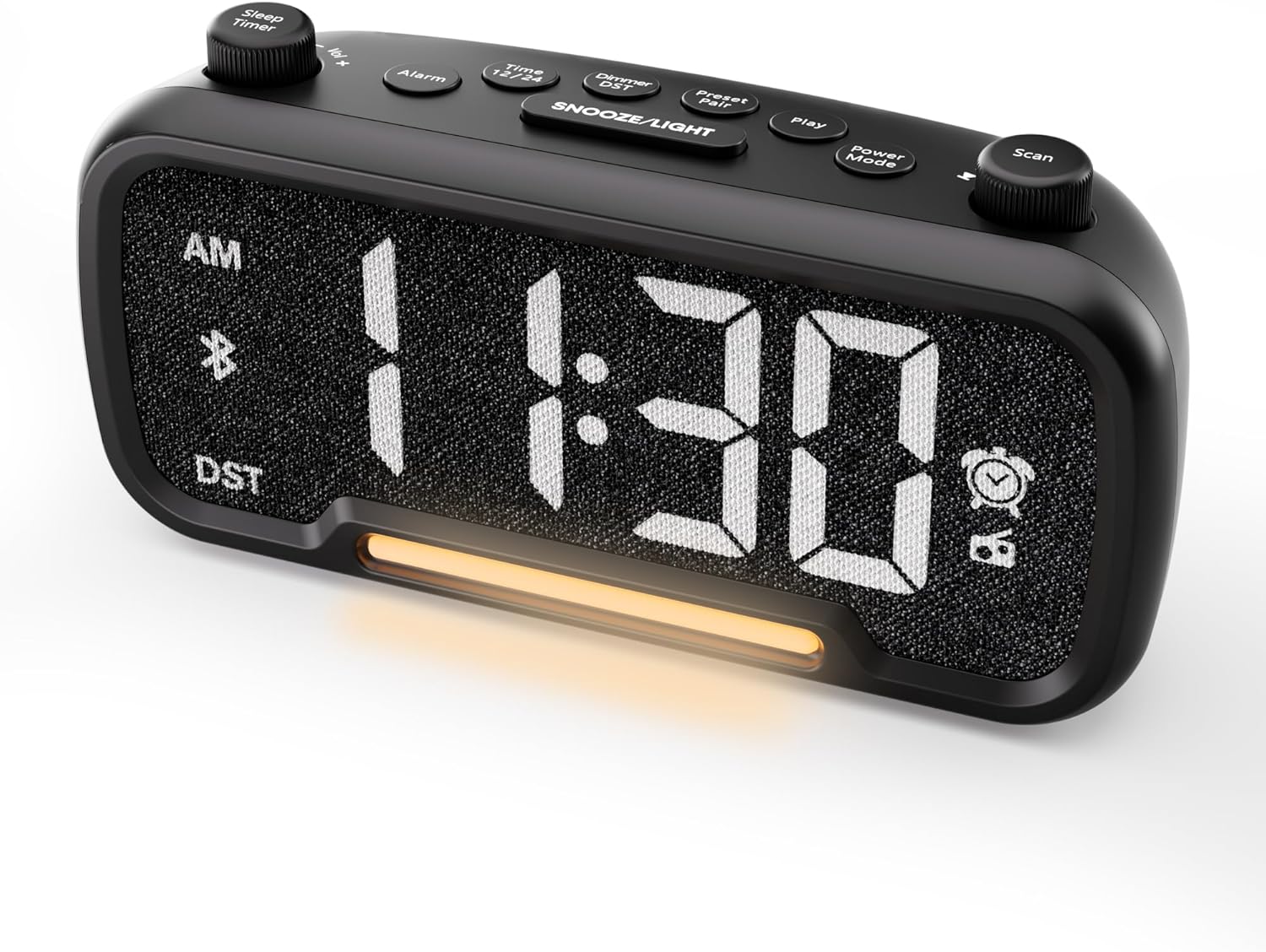

Control Buttons and Knobs:
- Sleep Timer / Vol +/- Knob (Left): Adjusts volume, sets sleep timer duration.
- Alarmni gumb: Sets and activates/deactivates alarms.
- Time 12/24 Button: Preklaplja med 12-urnim in 24-urnim formatom časa.
- Dimmer / DST Button: Adjusts display brightness, activates/deactivates Daylight Saving Time (DST).
- Preset / Pair Button: Saves FM radio presets, initiates Bluetooth pairing.
- Gumb za predvajanje: Plays/pauses media in Bluetooth mode.
- Gumb za način napajanja: Cycles through operating modes (FM, Bluetooth, AUX).
- Scan / TU +/- Knob (Right): Scans FM radio stations, manually tunes FM frequency.
- Gumb DREMEST/LUČKA: Activates snooze function, turns night light on/off.

Nastavitev
1. Začetni vklop
Connect the provided power adapter to the DC 5V IN port on the back of the alarm clock and plug it into a standard wall outlet. The display will light up. Ensure the C battery is installed for backup in case of power outage.

2. Nastavitev časa
- Pritisnite in držite Ura 12/24 button for 2 seconds. The hour digits will begin to flash.
- Zavrtite Glasnost +/- knob (left knob) to adjust the hour.
- Pritisnite Ura 12/24 button again. The minute digits will begin to flash.
- Zavrtite Glasnost +/- gumb za nastavitev minut.
- Pritisnite Ura 12/24 še enkrat pritisnite gumb, da potrdite nastavitev časa.
Video demonstrating how to set the time on the Mesqool Digital Alarm Clock Radio.
3. Oblika ure 12/24 ur
Za preklop med 12-urnim in 24-urnim formatom časa na kratko pritisnite Ura 12/24 button. The display will change accordingly.
4. Prilagoditev poletnega časa (DST)
To activate or deactivate DST, press and hold the Dimmer / DST button for 2 seconds. The time will adjust by one hour forward or backward, and the DST indicator will appear or disappear on the display.
Navodila za uporabo
1. Nastavitev alarma
- Pritisnite in držite Alarm button for 2 seconds. The hour digits will flash.
- Zavrtite Glasnost +/- knob to adjust the desired alarm hour.
- Pritisnite Alarm ponovno pritisnite gumb. Številke minut bodo utripale.
- Zavrtite Glasnost +/- knob to adjust the desired alarm minute.
- Pritisnite Alarm button again. The alarm sound selection will flash (bell icon for buzzer, radio icon for FM radio). Rotate the Glasnost +/- knob to choose between buzzer or FM radio as the alarm sound.
- If FM radio is selected, press the Alarm button again. The volume level will flash (L01-L16). Rotate the Glasnost +/- knob to set the desired alarm volume.
- Pritisnite Alarm button once more to confirm and activate the alarm. The alarm icon will appear on the display.
To deactivate the alarm, short press the Alarm button. The alarm icon will disappear from the display.

Funkcija dremeža:
Ko se oglasi alarm, pritisnite tipko SNOOZE / LUČ button to activate the snooze function for 9 minutes. The alarm will sound again after 9 minutes. To turn off the alarm completely, press any other button except SNOOZE / LUČ.

2. Delovanje radia FM
- Pritisnite Način napajanja button repeatedly until the radio icon lights up on the display, indicating FM radio mode.
- Auto-Scan and Save Presets: Pritisnite Scan / TU +/- knob (right knob) to automatically search for available FM stations and save them as presets (up to 20 stations). The display will show "P01", "P02", etc., as stations are saved.
- Ročna nastavitev: Zavrtite Scan / TU +/- knob to manually browse frequencies.
- Priklic prednastavitev: Kratek pritisk na Prednastavitev / Par button to cycle through saved preset stations.
- Prilagodi glasnost: Zavrtite Glasnost +/- knob (left knob) to adjust the radio volume (L01-L16).

Video demonstrating how to set the FM radio alarm on the Mesqool Digital Alarm Clock Radio.
3. Delovanje Bluetooth zvočnika
- Pritisnite Način napajanja button repeatedly until the Bluetooth icon (bt) starts flashing on the display, indicating pairing mode.
- On your mobile device, enable Bluetooth and search for "CR1025" in the list of available devices.
- Select "CR1025" to pair. Once connected, the Bluetooth icon will stop flashing and remain solid.
- You can now play audio from your device through the alarm clock's speaker.
- Uporabite Glasnost +/- knob on the alarm clock or your mobile device to adjust the volume.
- Pritisnite Igraj za predvajanje ali zaustavitev zvoka.

Video demonstrating how to set up Bluetooth on the Mesqool Digital Alarm Clock Radio.
4. Delovanje nočne lučke
The alarm clock features a gentle night light. To turn the night light on or off, short press the SNOOZE / LUČ gumb.

5. Dimmer Setting
The display brightness can be adjusted to 5 levels. Short press the Dimmer / DST button to cycle through the brightness levels (L01-L05). Select the level that best suits your environment.

6. Sleep Timer Setting
The sleep timer allows you to set a duration for the FM radio or Bluetooth speaker to play before automatically turning off. This is useful for falling asleep to music or podcasts.
- While in FM radio or Bluetooth mode, press the Časovnik za izklop button. The display will show the current sleep timer duration (e.g., "30" for 30 minutes).
- Zavrtite Sleep Timer / Vol +/- knob to select the desired duration: 15, 30, 60, 90, or 120 minutes. You can also select "OFF" to disable the sleep timer.
- The timer will start counting down, and the device will automatically turn off after the selected duration.
7. Vrata za polnjenje USB
The alarm clock is equipped with two USB charging ports (Type-C and USB-A) on the back, each providing 5V/1A output. These ports can be used to conveniently charge your smartphone, tablet, or other USB-powered devices.

Odpravljanje težav
| Težava | Možna rešitev |
|---|---|
| Prikaz ure je prazen. | Ensure the power adapter is securely connected to both the clock and a working power outlet. Check if the power outlet is functional. |
| Alarm se ne oglasi. | Verify that the alarm is set and activated (alarm icon visible on display). Check the alarm volume level. Ensure the correct alarm sound (buzzer or FM radio) is selected. |
| Slab sprejem FM radia. | Extend the FM antenna fully. Try repositioning the antenna or the clock for better signal. Perform an auto-scan again to find stronger stations. |
| Naprave Bluetooth ni mogoče seznaniti. | Ensure the clock is in Bluetooth pairing mode (flashing 'bt' icon). Make sure Bluetooth is enabled on your mobile device and it is within range. Forget "CR1025" from your device's Bluetooth list and try pairing again. |
| Vrata za polnjenje USB ne delujejo. | Confirm the alarm clock is powered on. Ensure the charging cables are properly connected to both the clock and your device. Try a different USB cable or device to rule out cable/device issues. |
Specifikacije
| Funkcija | Podrobnost |
|---|---|
| Znamka | Mesqool |
| Številka modela | CR1025 |
| barva | Črna |
| Vrsta zaslona | Digitalna LED |
| Dimenzije izdelka | 6.61 cm D x 3.31 cm Š x 2.32 cm V |
| Vir napajanja | Električni z žico (priložen napajalnik) |
| Rezervna baterija | 1 baterija tipa C (priložena) |
| Različica Bluetooth | V5.0 |
| FM radijska frekvenca | 87.5-108MHz |
| Prednastavitve FM | Do 20 postaj |
| Zaslon zatemnitve | 5 ravni |
| Zvoki alarma | Buzzer, FM Radio |
| Trajanje dremeža | 9 minut |
| USB izhod za polnjenje | Type-C & USB-A, 5V/1A each |
| Material | Plastika |
| Teža predmeta | 0.48 funta (približno 7.7 unče) |
Vzdrževanje
- Napravo očistite z mehko, suho krpo. Ne uporabljajte tekočih čistil ali abrazivnih materialov.
- Napravo hranite stran od neposredne sončne svetlobe, ekstremnih temperatur in visoke vlažnosti.
- Poskrbite za ustrezno prezračevanje okoli naprave, da preprečite pregrevanje.
- If the device will not be used for an extended period, remove the backup battery.
Varnostne informacije
- Naprave ne izpostavljajte vodi ali vlagi.
- Naprave ne poskušajte razstavljati ali popravljati sami. Obrnite se na usposobljeno servisno osebje.
- Napravo hranite izven dosega otrok.
- Use only the provided power adapter. Using unauthorized adapters may damage the device and void the warranty.
- Avoid placing the device near heat sources or open flames.
Garancija in podpora
Specific warranty details are not provided in the product information. For warranty claims, technical support, or further assistance, please contact Mesqool customer service through their official website or the retailer where the product was purchased. Please retain your proof of purchase for any warranty-related inquiries.
Visit the Mesqool Store for more information: Mesqool Official Store