
1. Uvod
Thank you for choosing the Kamon K30 Wireless Earbuds. This manual provides detailed instructions for the proper use, setup, and maintenance of your new earbuds. Please read this manual thoroughly before use to ensure optimal performance and longevity of your device.

Image 1.1: Kamon K30 Wireless Earbuds in their charging case.
The Kamon K30 earbuds feature Bluetooth 5.1 technology for stable connectivity, intuitive touch controls, and a comfortable in-ear design. They are designed to deliver clear stereo sound for various audio activities.
2. Vsebina paketa
Prosimo, preverite paket za naslednje artikle:
- 2 x Kamon K30 Wireless Earbuds
- 1 x etui za brezžično polnjenje
- 1 x polnilni kabel USB-C
- 4 x ušesni nastavki (različne velikosti)
- 1 x uporabniški priročnik
3. Izdelek je končanview
Familiarize yourself with the components of your Kamon K30 Wireless Earbuds.

Image 3.1: The Kamon K30 earbuds removed from their open charging case, showing the charging contacts.
The earbuds are designed for a secure and comfortable fit. The charging case protects the earbuds and provides additional battery life.
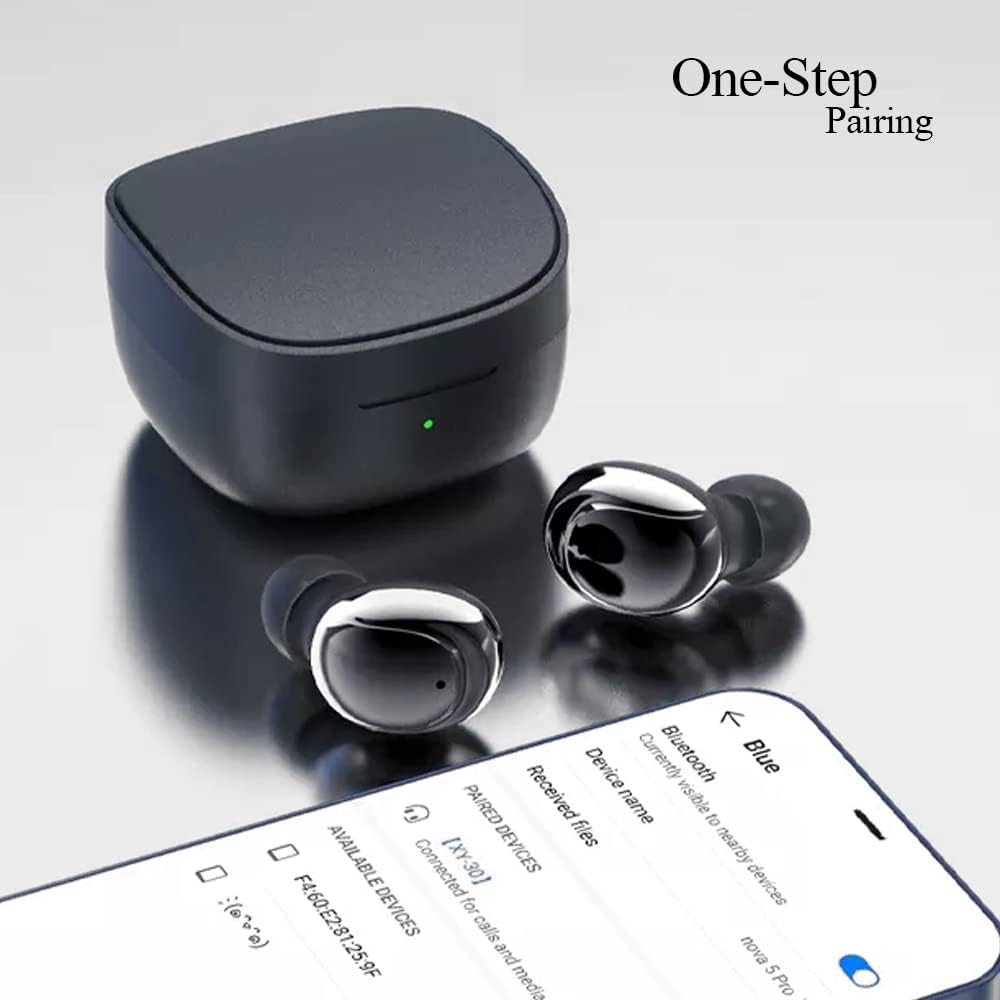
Image 3.2: Internal structure diagram illustrating the components responsible for Hi-Fi stereo sound delivery.
4. Nastavitev
4.1 Polnjenje slušalk in etuija
Pred prvo uporabo popolnoma napolnite slušalke in polnilno ohišje.
- Slušalke vstavite v polnilno ohišje. Prepričajte se, da so pravilno nameščene, da se dotikajo polnilnih priključkov.
- Polnilni kabel USB-C priključite na polnilno vtičnico na ohišju, drugi konec pa vključite v napajalnik USB (ni priložen) ali v vrata USB računalnika.
- The indicator light on the charging case will show charging status. Once fully charged, the light will change or turn off depending on the model.
- Earbud charging time: Approximately 40 minutes.
- Charging box charging time: Approximately 1 hour.

Image 4.1: The charging case and earbuds, illustrating battery life and charging indicators.
4.2 Seznanjanje z napravo
The Kamon K30 earbuds feature one-step auto-pairing for convenience.
- Prepričajte se, da je Bluetooth vaše naprave vklopljen.
- Odprite polnilno ohišje. Slušalke se bodo samodejno vklopile in preklopile v način seznanjanja.
- On your device, search for Bluetooth devices and select "Kamon K30" (or similar name like "XY-30") from the list.
- Ko je povezava vzpostavljena, boste zaslišali potrditveni zvok in slušalke bodo pripravljene za uporabo.

Image 4.2: A smartphone displaying the Bluetooth pairing menu, showing "Kamon K30" as an available device.
The earbuds support Bluetooth 5.1, providing a stable connection up to 33 feet (10 meters) in open outdoor environments.
5. Navodila za uporabo
5.1 Kontrole na dotik
The Kamon K30 earbuds feature intuitive touch controls on each earbud. Refer to the diagram below for specific functions:

Image 5.1: A visual guide to the touch control functions on the Kamon K30 earbuds.
- Predvajanje/pavza: One-click on the left or right earbud.
- Odgovori/prekini klic: One-click on the left or right earbud.
- Zavrni klic: Long press on the left or right earbud.
- Povečaj glasnost: Triple-click the Left earbud.
- Znižaj glasnost: Triple-click the Right earbud.
- Prejšnja pesem: Double-click the Left earbud.
- Naslednja pesem: Double-click the Right earbud.
- Prikliči glasovnega pomočnika: Long press on the left or right earbud for 3 seconds.
Note: The touch sensors are sensitive. Apply a light touch for control. Avoid forceful tapping.
5.2 Način z eno slušalko
You can use either earbud independently:
- Odstranite eno slušalko iz polnilnega ohišja.
- Zaprite pokrov ohišja za polnjenje.
- The single earbud will automatically connect to your paired device.
6. Vzdrževanje
Pravilno vzdrževanje zagotavlja dolgo življenjsko dobo in optimalno delovanje vaših slušalk.
- Čiščenje: Slušalke in polnilno ohišje redno čistite z mehko, suho krpo, ki ne pušča vlaken. Ne uporabljajte agresivnih kemikalij ali abrazivnih materialov. Nežno očistite polnilne kontakte na slušalkah in ohišju, da zagotovite pravilno polnjenje.
- Shranjevanje: Ko slušalk ne uporabljate, jih shranite v polnilno škatlico, da jih zaščitite pred prahom in poškodbami. Škatlico shranjujte na hladnem in suhem mestu, stran od neposredne sončne svetlobe in ekstremnih temperatur.
- Vodoodpornost: The earbuds are waterproof (IPX rating not specified, but generally means splash/sweat resistant). Avoid submerging them in water or exposing them to heavy rain. Dry them thoroughly if they get wet.
- Vzdrževanje baterije: Da bi podaljšali življenjsko dobo baterije, se izogibajte pogostemu popolnemu praznjenju slušalk in etuija. Redno jih polnite, tudi če jih ne uporabljate nenehno.
7. Odpravljanje težav
If you encounter issues with your Kamon K30 Wireless Earbuds, refer to the following common solutions:
| Težava | rešitev |
|---|---|
| Slušalke se ne seznanijo z napravo. |
|
| Samo ena slušalka deluje. |
|
| Slušalke se ne polnijo. |
|
| Low sound quality or intermittent connection. |
|
8. Specifikacije
Detailed technical specifications for the Kamon K30 Wireless Earbuds:
- Ime modela: K30 (XY-30)
- Znamka: Kamon
- Povezljivost: Brezžično (Bluetooth 5.1)
- Bluetooth Profiles: HSP, HFP, A2DP, AVRCP
- Razdalja prenosa: Up to 33 feet (10 meters) in open outdoor environments
- Zmogljivost baterije slušalk: 35 mAh
- Kapaciteta akumulatorja za polnilno ohišje: 350 mAh
- Čas poslušanja: 3-5 ur
- Čas polnjenja slušalk: Približno 40 minut
- Čas polnjenja polnilne škatle: Približno 1 uro
- Material roga: Graphene True Copper Ring Horn
- Nadzorna metoda: Dotik
- Material: ABS, Electronic Component
- Teža artikla: 0.9 ounces (earbuds and case combined)
- Dimenzije paketa: 2.53 x 2.5 x 2 palcev
- barva: Purple (as per this variant)
- Posebne lastnosti: Lightweight, Microphone Included, Rechargeable Battery, Surround Sound, Sweatproof (Waterproof)

Image 8.1: Dimensional drawing of the Kamon K30 earbuds and their charging case.
9. Garancija in podpora
For warranty information or technical support, please refer to the contact details provided on the product packaging or the official Kamon webspletnega mesta. Račun shranite kot dokazilo o nakupu za morebitne garancijske zahtevke.

Image 9.1: A user wearing a Kamon K30 earbud, demonstrating its in-ear fit.