
1. Uvod
This manual provides detailed instructions for the installation, operation, and maintenance of your suptek PC Monitor Arm MD01A. Please read this manual thoroughly before installation and keep it for future reference. This gas spring display arm is designed to support a single LCD monitor, enhancing your workspace ergonomics and efficiency.

Figure 1: suptek PC Monitor Arm MD01A Overview with dimensions and specifications.
2. Značilnosti izdelka
- Združljivi monitorji: This gas spring display arm supports a single LCD monitor. It has a load capacity of 2-9kg and is compatible with monitor sizes ranging from 13 to 32 inches.
- Standardi VESA: Supports VESA mounting patterns of 75x75mm and 100x100mm.
- Prilagoditev več kotov: The gas spring mechanism allows for smooth vertical and horizontal screen adjustments with minimal effort. The multi-axis design enables tilt up 90°, down 90°, swivel left/right 180°, and 360° rotation. This wide range of motion helps reduce eye strain and improve work efficiency.
- Prihranek prostora: Replaces traditional monitor stands, freeing up significant desk space.
- Upravljanje kablov: Integrated cable clips help organize and protect cables, maintaining a tidy workspace.

Figure 2: Optimized workspace with the monitor arm.
3. Navodila za nastavitev
3.1 Preverjanje pred namestitvijo
Before proceeding with installation, ensure your desk and monitor meet the following requirements:
- Velikost monitorja: 13-32 palcev
- Teža monitorja: 2-9 kg
- Združljivost z VESA: 75x75mm ali 100x100mm
- Desk Thickness (for Clamp Mount): 10-70 mm
- Desk Hole Diameter (for Grommet Mount): Najmanj 10 mm

Figure 3: Pre-installation compatibility checks.
3.2 Izbira načina montaže
The monitor arm offers two installation methods:
- Pisalna miza Clamp: For desks with an edge, the robust C-clamp securely fastens the monitor, providing maximum stability. Suitable for desks 10-70mm thick.
- Nosilec za ušesa: For desks with a pre-drilled hole, this method provides a flush and stable installation. Suitable for desks with a bolt-through hole (minimum hole diameter 10mm).
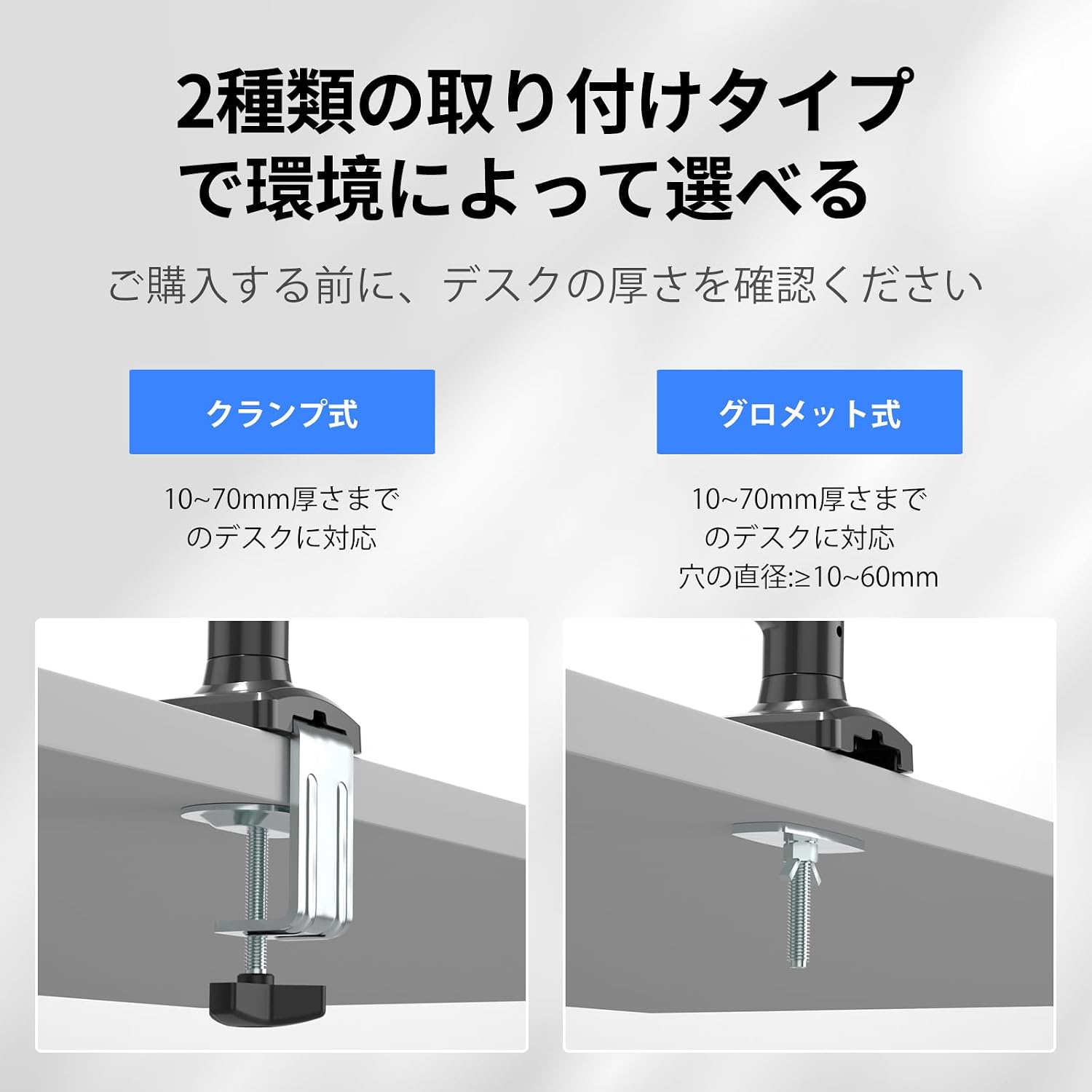
Slika 4: Clamp in možnosti montaže Grommet.
3.3 koraki namestitve
Follow these steps to install your monitor arm:
- Pritrdite Clamp/Grommet to the Desk: Securely fasten the chosen mounting base (C-clamp or grommet) to your desk according to the selected method. Ensure it is tightened firmly.
- Pritrdite roko: Slide the monitor arm onto the pole of the mounting base.
- Attach the Monitor: Align your VESA-compatible monitor with the VESA plate on the arm. Secure the monitor using the provided screws.

Figure 5: Monitor arm installation steps.
4. Navodila za uporabo
4.1 Večkotna nastavitev
The monitor arm allows for flexible positioning to achieve optimal viewzorni koti:
- Nagib: Adjust the screen vertically up to 90° and down to 90°.
- Vrtljiva: Rotate the screen horizontally left or right up to 180°.
- Vrtenje: Zaslon zavrtite za 360° za pokončno ali ležečo orientacijo.

Figure 6: Multi-angle adjustment options.
4.2 Nastavitev napetosti plinske vzmeti
The gas spring tension must be adjusted to match your monitor's weight for smooth movement and stable positioning. Pomembno: To prevent damage to the monitor or mount, always keep the arm in a horizontal position during adjustment. The gas pressure cannot be adjusted without a monitor attached.
- Če roka pade: Turn the internal bolt counter-clockwise (towards '+') to increase the gas spring tension until the arm stays in the desired position.
- If the arm rises or cannot be pushed down: Turn the internal bolt clockwise (towards '-') to decrease the gas spring tension until the arm stays in the desired position.

Figure 7: Gas spring tension adjustment.
4.3 Height and Length Adjustment
The arm allows for flexible height adjustment from 140mm to 450mm and a maximum extension length of 534mm to suit your ergonomic needs.

Figure 8: Adjusting arm height and length.
5. Vzdrževanje
To ensure the longevity and proper functioning of your suptek PC Monitor Arm, follow these maintenance guidelines:
- Redno čiščenje: Obrišite roko in podstavek z mehko krpoamp cloth to remove dust and dirt. Avoid abrasive cleaners or solvents that could damage the finish.
- Preverite povezave: Občasno preverite vse vijake in matico, da se prepričate, da so trdno pritrjeni. Po potrebi jih ponovno privijte, da ohranite stabilnost.
- Nastavitev plinske vzmeti: If you change monitors or notice the arm is not holding its position correctly, re-adjust the gas spring tension as described in Section 4.2.
- Upravljanje kablov: Ensure cables are routed properly through the cable clips and are not pinched or under excessive tension.

Figure 9: Cable management routing.
6. Odpravljanje težav
| Težava | Možen vzrok | rešitev |
|---|---|---|
| Monitor arm drops or cannot hold position. | Napetost plinske vzmeti je prenizka glede na težo monitorja. | Increase gas spring tension by turning the internal bolt counter-clockwise (towards '+'). Refer to Section 4.2. |
| Monitor arm rises or cannot be pushed down. | Napetost plinske vzmeti je previsoka glede na težo monitorja. | Decrease gas spring tension by turning the internal bolt clockwise (towards '-'). Refer to Section 4.2. |
| Monitor is wobbly or unstable. | Mounting screws or clamp/grommet are not tight enough. | Check and tighten all mounting screws and the desk clamp/grommet. Ensure the monitor is securely attached to the VESA plate. |
| Omejen obseg gibanja. | Obstructions or incorrect assembly. | Ensure there are no physical obstructions. Review assembly steps in Section 3.3 to confirm correct installation. |
7. Specifikacije
- Model: MD01A
- Znamka: suptek
- Vrsta pritrditve: Tabletop Mount (C-clamp ali tesnilna obroča)
- Vrsta gibanja: Tilt, Swivel, Rotation, Height Adjustment
- Material: Legirano jeklo
- barva: Črna
- Združljiva velikost monitorja: 13-32 palcev
- Nosilnost: 2-9 kg (4.4-19.8 lbs)
- Združljivost z VESA: 75x75 mm, 100x100 mm
- Debelina mize (Clamp): 10–70 mm (0.39–2.76 palca)
- Desk Hole Diameter (Grommet): Najmanj 10 mm (0.39 palca)
- Razpon nagiba: +90° do -90°
- Obseg vrtenja: ±180°
- Vrtenje: 360°
- Območje nastavitve višine: 140–450 mm (5.5–17.7 palca)
- Maximum Arm Extension: 534 mm (21 palca)
8. Garancija in podpora
suptek provides a one-year warranty from the date of purchase for this product. In case of any malfunction or defect, please contact us through your Amazon account. To expedite the support process, please include your order number when contacting us.
Način stika:
- Prijavite se v svoj račun Amazon.
- Navigate to 'Account Service'.
- Go to 'Order History'.
- Find your order for the suptek PC Monitor Arm MD01A.
- Click on 'Seller' and then 'Ask a Question'.
We are committed to resolving your issues promptly and sincerely.


