
Uvod
This manual provides comprehensive instructions for the setup, operation, maintenance, and troubleshooting of your BPXX D463B Bluetooth Thermal Label Printer. Please read this manual thoroughly before using the printer to ensure proper function and longevity of the device.
Varnostne informacije
- Use only the original power adapter provided with the printer.
- Tiskalnika ne izpostavljajte vodi ali prekomerni vlagi.
- Tiskalnika ne postavljajte na neposredno sončno svetlobo ali v bližino virov toplote.
- Keep the printer away from dust and debris to prevent internal damage.
- Tiskalnika ne poskušajte razstavljati ali popravljati sami. Za pomoč se obrnite na podporo strankam.
- Med delovanjem zagotovite ustrezno prezračevanje okoli tiskalnika.
Vsebina paketa
Preverite, ali so v vašem paketu priloženi vsi spodaj navedeni elementi:
- BPXX D463B USB & Bluetooth Printer
- USB kabel
- Napajalni adapter
- Napajalni kabel
- U Disk (USB flash drive with drivers and guide)
- OTG adapter
- Oznake (sample roll)
- Vodnik za hiter začetek

Image: Contents of the BPXX D463B Thermal Label Printer package.
Konec izdelkaview
The BPXX D463B is a compact and efficient thermal label printer designed for various labeling needs, including shipping labels, product labels, and more. It features both Bluetooth and USB connectivity for versatile use across different operating systems.

Slika: spredaj view of the BPXX D463B Thermal Label Printer in operation.
Ključne značilnosti:
- Visokokakovosten tisk: 203dpi resolution for clear images, text, and barcodes.
- Dvojna povezljivost: Supports Bluetooth for iOS, Android, and Windows, and USB for Windows, Mac OS, Linux, and ChromeOS.
- Široka združljivost: Works with major e-commerce and shipping platforms like Amazon, Shopify, eBay, UPS, USPS, FedEx, and more.
- Hitra hitrost tiskanja: Up to 152mm/s (72 sheets of 4x6 labels per minute).
- Samodejno zaznavanje etiket: Automatically identifies label size for ease of use.
- Vzdržljiva tiskalna glava: Features an aluminum alloy print head with smart temperature control for prolonged service life.
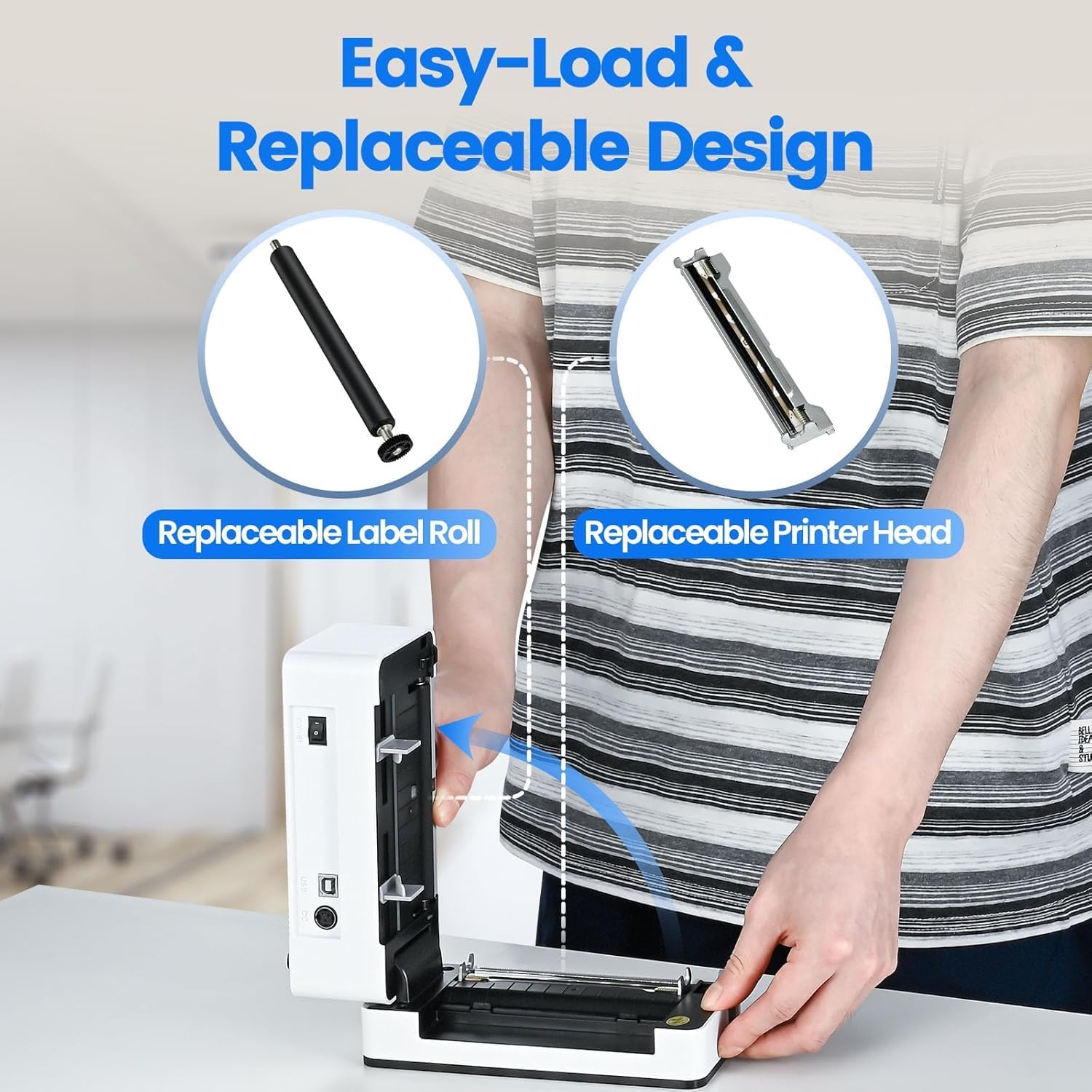
Image: The printer's aluminum alloy print head, designed for durability and extended service life.
Nastavitev
1. Nalaganje oznak
- Odprite zgornji pokrov tiskalnika.
- Insert the thermal labels into the label compartment, ensuring the printable side is facing up.
- Vodila za nalepke prilagodite širini nalepk.
- Close the top cover. The printer will automatically detect the label size and feed a few labels to calibrate.

Image: Illustration of the easy-load label mechanism.
2. Povezovanje z vašo napravo
The D463B printer offers both Bluetooth and USB connectivity.

Image: Connectivity options for the BPXX D463B printer.
Bluetooth Connection (iOS, Android, Windows):
- Ensure the printer is powered on. The indicator light should be blue.
- Download the "4Barcode" APP from your device's app store (iOS/Android) or install the driver for Windows from the provided U Disk.
- Omogočite Bluetooth na mobilni napravi ali računalniku.
- Open the "4Barcode" APP or the printer driver software.
- Iskanje available Bluetooth devices and select "D463B" or a similar name.
- Pair the device. Once paired, you can begin printing wirelessly.
USB Connection (Windows, Mac OS, Linux, ChromeOS):
- En konec kabla USB priključite na tiskalnik, drugega pa na računalnik.
- Insert the provided U Disk into your computer.
- Follow the instructions on the U Disk to install the appropriate printer drivers for your operating system. A detailed installation guide video is included on the U Disk.
- Once drivers are installed, the printer will be recognized by your computer and ready for use.
Delovanje tiskalnika
Postopek tiskanja
After successful setup and connection, you can print labels from various applications and platforms.

Image: Demonstrating the printer's high-speed and high-definition printing capabilities.
- Odprite dokument ali nalepko file želite natisniti (npr. PDF z nalepko za pošiljanje).
- Select the print option within your application.
- Choose the "BPXX D463B" printer from the list of available printers.
- Ensure the correct label size is selected in the print settings (e.g., 4x6 inches). The printer supports various label sizes up to 4.1 inches in width.
- Potrdite nastavitve tiskanja in začnite tiskanje.

Image: The printer's maximum 4.1-inch label width capability and auto-detection feature.
Združljivost platforme
The BPXX D463B is compatible with a wide range of e-commerce and shipping platforms, streamlining your workflow:
- Amazon
- Shopify
- eBay
- Shopee
- UPS
- USPS
- Shippo
- FedEx
- Etsy
- ShipStation
- PayPal
- In še veliko več.

Image: The printer's compatibility with major e-commerce and shipping platforms.
Vzdrževanje
Čiščenje tiskalnika
Regular cleaning ensures optimal print quality and extends the life of your printer.
- Turn off the printer and unplug it from the power source before cleaning.
- Narahlo uporabite mehko krpo, ki ne pušča vlaken dampened with isopropyl alcohol to clean the print head. Allow it to dry completely before use.
- Wipe down the exterior of the printer with a dry, soft cloth.
- Remove any dust or label debris from the label compartment.
Zamenjava komponent
The BPXX D463B is designed for easy replacement of key components to maximize its lifespan.
Image: Easy-load and replaceable design for label roll and printer head.
Replacing the Label Roll:
Follow the "Loading Labels" instructions in the Setup section to replace an empty label roll.
Replacing the Printer Head:
While the aluminum alloy print head is designed for durability, it is replaceable if needed. Refer to the detailed instructions provided on the U Disk or contact customer support for guidance on replacing the print head.
Odpravljanje težav
| Težava | Možen vzrok | rešitev |
|---|---|---|
| Tiskalnik se ne vklopi. | Napajalni kabel ni priključen; težava z električno vtičnico. | Prepričajte se, da je napajalni kabel varno priključen. Poskusite z drugo vtičnico. |
| Povezave ni mogoče vzpostaviti prek Bluetootha. | Bluetooth not enabled; incorrect app/driver; printer not discoverable. | Ensure Bluetooth is on. Use the "4Barcode" APP. Restart printer and device. |
| Poor print quality (faded, unclear). | Print head dirty; incorrect label type; low-quality labels. | Clean the print head. Ensure you are using thermal labels. Try new labels. |
| Etikete se ne podajajo pravilno. | Labels improperly loaded; label guides not adjusted. | Reload labels, ensuring they are straight and guides are snug. |
| Printer not recognized by computer (USB). | Drivers not installed; faulty USB cable/port. | Install drivers from the U Disk. Try a different USB cable or port. |
Specifikacije
| Funkcija | Podrobnost |
|---|---|
| Ime modela | D463B |
| Tehnologija tiskanja | Toplotna |
| Tehnologija povezljivosti | Bluetooth, USB |
| Ločljivost tiskanja | 203 DPI (pik na palec) |
| Največja hitrost tiskanja (enobarvno) | 152mm/s (72 sheets 4x6 labels/min) |
| Največja širina nalepke | 4.1 palcev |
| Compatible Label Sizes | 4"x6", 3"x2", 3"x1", 2"x1", 2-5/16" x 4" inches |
| Združljive naprave | Laptops, PCs, Tablets, Smartphones |
| Podprt OS | iOS, Android, Windows, Mac OS, Linux, ChromeOS |
| Dimenzije izdelka | 3.35"D x 3.35"Š x 7.28"V |
| Teža predmeta | 3.12 funtov |
| Vir napajanja | AC adapter (priložen) |

Image: The compact size of the BPXX D463B printer.
Garancija
The BPXX D463B Thermal Label Printer comes with a enoletna garancija od datuma nakupa. Ta garancija krije proizvodne napake in okvare pri normalni uporabi. Ne krije škode, ki jo povzroči napačna uporaba, nesreče, nepooblaščena popravila ali naravne nesreče.
Za garancijske zahtevke shranite dokazilo o nakupu.
Podpora uporabnikom
For any questions, technical assistance, or warranty claims, please contact BPXX customer support through the following channels:
- E-pošta: Refer to the contact information provided in your product packaging or on the official BPXX webmesto.
- Spletna podpora: Visit the BPXX official webspletno mesto za pogosta vprašanja, gonilnike in vire za podporo.
When contacting support, please have your printer model (D463B) and purchase information ready.