
Konec izdelkaview
The TP-Link Archer MR505 is a 4G+ Cat6 AC1200 Wireless Dual Band Gigabit Router designed to provide reliable internet connectivity. This router supports dual-band Wi-Fi (2.4 GHz and 5 GHz) and features Gigabit Ethernet ports for high-speed wired connections. It is compatible with 4G+ Cat6 networks, offering mobile broadband access.

Slika 1: Spredaj view of the Archer MR505 router.
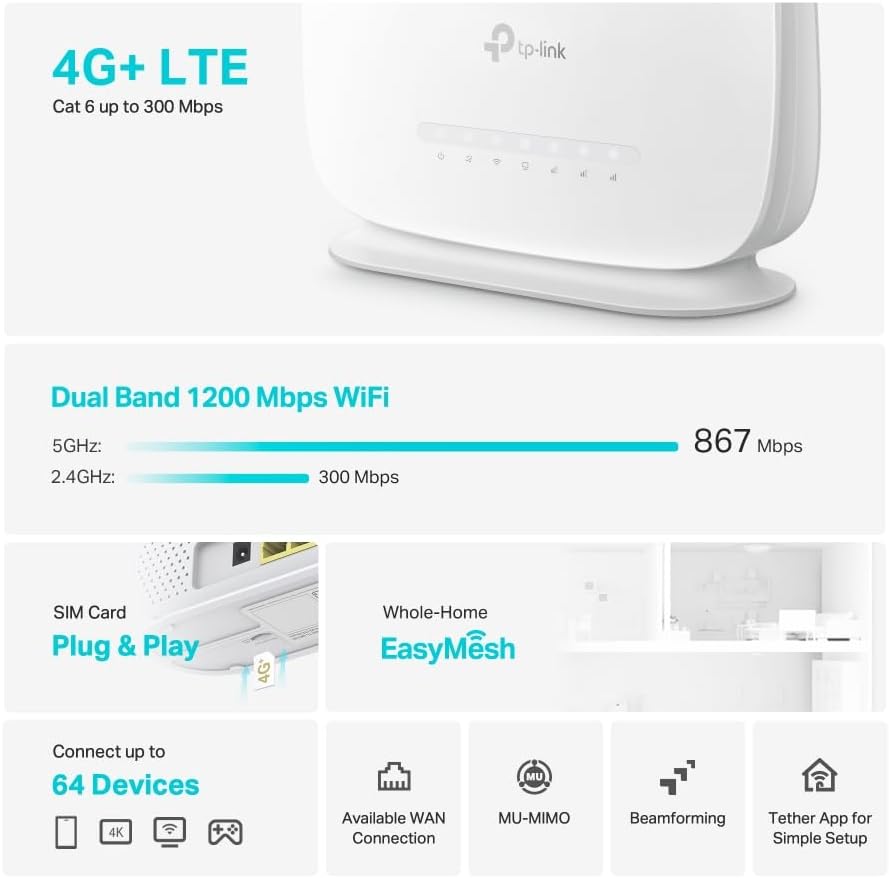
Slika 2: stran view of the Archer MR505 router.
Vsebina paketa
Preverite, ali so v paketu vsi elementi:
- TP-Link Archer MR505 Router
- Napajalni adapter
- Navodila za hitro namestitev
- Ethernet kabel RJ45

Figure 3: Key features and components of the Archer MR505.
Navodila za namestitev
Follow these steps to set up your Archer MR505 router:
- Vstavite kartico SIM: Locate the SIM card slot on the router. Insert your 4G/LTE SIM card into the slot until it clicks into place. Ensure the SIM card is a normal data SIM for optimal compatibility. Some data-only SIM cards may require specific configurations or may not be fully compatible.
- Priključite napajanje: Connect the provided power adapter to the router's power port and then plug it into a power outlet. The router will power on automatically.
- Počakajte na inicializacijo: Allow a few minutes for the router to boot up and establish a connection to the 4G/LTE network. The LED indicators on the front panel will show the connection status.
- Začetna povezava z omrežjem Wi-Fi:
- Find the default Wi-Fi network name (SSID) and password printed on the label at the bottom of the router.
- Povežite računalnik ali mobilno napravo s tem omrežjem Wi-Fi.
- Access Router Management:
- Odpri a web browser and enter the default management address (e.g., http://tplinkwifi.net or http://192.168.1.1).
- Prijavite se s privzetim uporabniškim imenom in geslom (običajno admin/admin or specified on the label).
- Konfigurirajte omrežne nastavitve: Follow the on-screen Quick Setup wizard to configure your internet connection, change the Wi-Fi network name (SSID), and set a strong, unique password for both your Wi-Fi and router management interface.
- Tether App Setup (Optional): Download the TP-Link Tether app from your device's app store. The app provides an intuitive way to manage your router settings from your smartphone or tablet.
- External Antenna (Optional): If using external antennas (not included), connect them to the designated ports on the back of the router. You may need to manually enable external antenna usage through the router's web interface or Tether app.
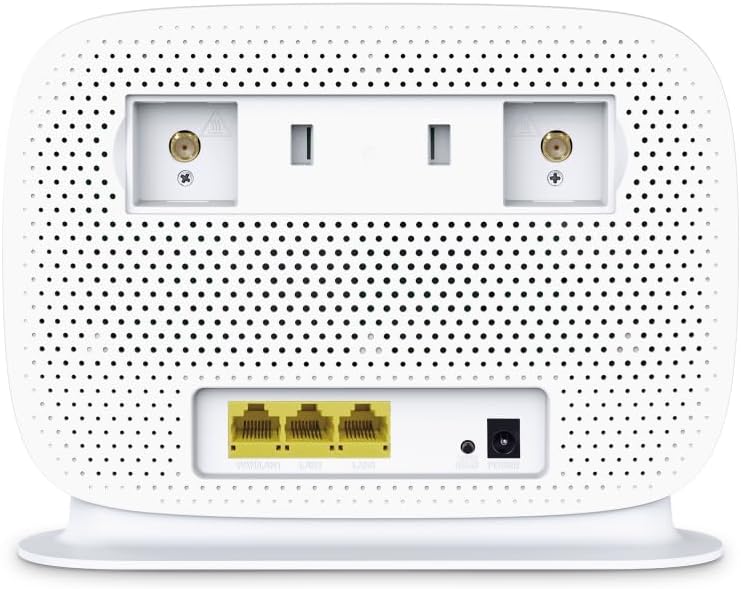
Figure 4: Rear panel of the Archer MR505 with ports and SIM slot.

Figure 5: Archer MR505 in various usage scenarios.
Navodila za uporabo
The Archer MR505 provides robust wireless and wired connectivity:
- Dvopasovni Wi-Fi: The router operates on both 2.4 GHz and 5 GHz bands, offering speeds up to 300 Mbps and 867 Mbps respectively, for a total of AC1200 Wi-Fi.
- 4G+ Cat6 Connectivity: Enjoy mobile broadband speeds up to 300 Mbps download and 300 Mbps upload (maximum upstream data transfer rate).
- Gigabit Ethernet vrata: Four Gigabit LAN ports (1000 Mbps) are available for high-speed wired connections to devices like computers, gaming consoles, or smart TVs. One port can also function as a WAN port for traditional broadband connections.
- Zmogljivost naprave: The router can support connectivity for up to 64 devices simultaneously.
- Smart Connect: This feature automatically assigns devices to the best available Wi-Fi band (2.4 GHz or 5 GHz) for optimized performance.
- Združljivost z EasyMesh: The Archer MR505 is compatible with TP-Link EasyMesh, allowing you to create a seamless whole-home mesh Wi-Fi network by adding compatible range extenders.
- Napredne tehnologije: Features like MU-MIMO and Beamforming enhance Wi-Fi efficiency and range, especially for multiple connected devices.
- Varnost: The router supports WPA3 encryption for enhanced network security.

Figure 6: Versatile connectivity and speed capabilities.

Figure 7: Whole-Home EasyMesh integration.
Vzdrževanje
To ensure optimal performance and security of your router:
- Posodobitve vdelane programske opreme: Regularly check for and install the latest firmware updates from the TP-Link official website or via the Tether app. Firmware updates often include security patches and performance improvements.
- Varna gesla: Use strong, unique passwords for your Wi-Fi network and router management interface. Change them periodically.
- Fizična namestitev: Usmerjevalnik postavite na osrednjo lokacijo, stran od ovir in virov motenj (npr. mikrovalovnih pečic, brezžičnih telefonov), da povečate pokritost z omrežjem Wi-Fi.
- Čiščenje: Keep the router clean and free from dust. Ensure ventilation holes are not blocked.
- Občasno znova zaženite: Restarting the router occasionally can help resolve minor network issues and improve performance.
Odpravljanje težav
If you encounter issues with your Archer MR505 router, consider the following:
- No Internet Connection via 4G/LTE:
- Prepričajte se, da je vaša SIM kartica pravilno vstavljena in aktivirana.
- Verify that your SIM card is a normal data SIM. Some data-only SIM cards may require specific APN settings or might not be fully compatible. Contact your mobile service provider for details.
- Check the 4G/LTE signal strength indicated by the router's LEDs. If the signal is weak, try repositioning the router or consider using external antennas (if supported and configured).
- Znova zaženite usmerjevalnik in povezane naprave.
- Težave s povezavo Wi-Fi:
- Ensure your device is within the router's Wi-Fi range.
- Verify you are using the correct Wi-Fi password.
- If a device frequently connects and disconnects, try restarting that specific device.
- Preverite motnje drugih elektronskih naprav.
- Počasna internetna hitrost:
- Check your 4G/LTE signal strength. Weak signal can significantly reduce speed.
- Ensure no other applications or devices are consuming excessive bandwidth.
- If using Wi-Fi, try connecting to the 5 GHz band for faster speeds, if your device supports it.
- Perform a speed test to confirm the actual speed you are receiving.
- Strani za upravljanje usmerjevalnika ni mogoče dostopati:
- Prepričajte se, da je vaša naprava povezana z omrežjem usmerjevalnika (prek omrežja Wi-Fi ali ethernetnega kabla).
- Verify you are entering the correct management address (e.g., http://tplinkwifi.net).
- Poskusite počistiti predpomnilnik brskalnika ali uporabiti drug brskalnik.
Specifikacije
| Znamka | TP-Link |
| Ime modela | Archer MR505 |
| Brezžični standard | 802.11ac (Wi-Fi 5) |
| Razred frekvenčnega pasu | Dvopasovni (2.4 GHz in 5 GHz) |
| Hitrost prenosa podatkov Wi-Fi | Up to 300 Mbps (2.4 GHz), Up to 867 Mbps (5 GHz) - AC1200 Total |
| Hitrost 4G+ Cat6 | Up to 300 Mbps Download, Up to 300 Mbps Upload |
| Ethernet vrata | 4 x Gigabit LAN Ports (1000 Mbps), 1 x WAN/LAN Port |
| Vrsta antene | Internal (External antenna support available) |
| Varnostni protokol | WPA3 |
| Nadzorna metoda | App (TP-Link Tether) |
| Združljive naprave | Laptop, Personal Computer, Smart Television, Smartphone, Tablet |
| Vhodna moč | 12 volta |
| Teža predmeta | 0.93 kilogramov |
| Vključene komponente | Archer MR505, Power Adapter, Quick Installation Guide, RJ45 Ethernet Cable |
Garancija in podpora
For warranty information, please refer to the warranty card included with your product or visit the official TP-Link website for your region. Support resources, including FAQs, firmware downloads, and contact information, are available on the TP-Link support website and through the TP-Link Tether app.
Official TP-Link Webspletno mesto: https://www.tp-link.com
Aplikacija TP-Link Tether: Available on iOS App Store and Google Play Store.