
OnePlus OnePlus Buds Pro 3
OnePlus Buds Pro 3 Wireless Earbuds User Manual
Brand: OnePlus | Model: OnePlus Buds Pro 3
Uvod
Welcome to the comprehensive user manual for your OnePlus Buds Pro 3 Wireless Earbuds. These earbuds are designed to deliver an exceptional audio experience with advanced features such as dual drivers, adaptive noise cancellation, and high-resolution audio support. This guide will help you set up, operate, maintain, and troubleshoot your earbuds to ensure optimal performance and longevity.

Image: OnePlus Buds Pro 3 earbuds and their charging case in Midnight Opus color.
Kaj je v škatli
- Slušalke OnePlus Buds Pro 3
- etui za polnjenje
- Polnilni kabel USB-C
- Ušesni nastavki (velikosti XS, S, M, L)
- Uporabniški priročnik
Nastavitev
1. Začetno seznanjanje
- Prepričajte se, da so vaše slušalke napolnjene.
- Open the charging case. The earbuds will automatically enter pairing mode (indicated by a flashing white light).
- On your smartphone or device, go to Bluetooth settings and select "OnePlus Buds Pro 3" from the list of available devices.
- Sledite morebitnim pozivom na zaslonu, da dokončate postopek seznanjanja.
2. Izbira ušesnih konic
For optimal sound quality and comfort, choose the ear tips that provide a good seal with your ear canals. The OnePlus Buds Pro 3 come with four sizes (XS, S, M, L) of rounded ear tips.

Image: OnePlus Buds Pro 3 earbuds shown with various ear tip sizes (XS, S, M, L) for a customized fit.
3. App Installation (HeyMelody)
Download the HeyMelody app from your device's app store (Google Play Store for Android or App Store for iOS). This app allows for firmware updates, personalized sound settings, and custom controls for your earbuds.
Delovanje
1. Dotaknite se Controls
The earbuds feature intuitive touch controls on their stems:
- Quick Squeeze: Predvajaj/začasno ustavi glasbo.
- Dvojni stis: Naslednja skladba.
- Trojni stisk: Previous track or Voice Assistant activation.
- Stisnite in držite: Toggle between Noise Cancellation and Transparency modes.
- Pomaknite se gor/dol: Prilagodite glasnost.
2. Noise Cancellation & Transparency Mode
The earbuds offer up to 50dB adaptive noise cancellation to minimize external distractions. Use Transparency mode to hear your surroundings without removing the earbuds.

Image: Diagram illustrating the 50dB adaptive noise cancellation feature of the OnePlus Buds Pro 3.
3. Kakovost zvoka
Equipped with dual drivers (11mm woofer and 6mm tweeter) and dual DACs, the earbuds deliver rich, detailed sound. They support LHDC 5.0 for high-resolution audio. Customize your sound profile using Dynaudio EQs and BassWave™ for enhanced bass.

Slika: Razstavljeno view of OnePlus Buds Pro 3 showing 11mm woofer and 6mm tweeter with dual DACs.
4. Kakovost klicev
Enjoy crystal-clear calls thanks to three microphones and a bone conduction microphone (VPU) that effectively suppress background noise.
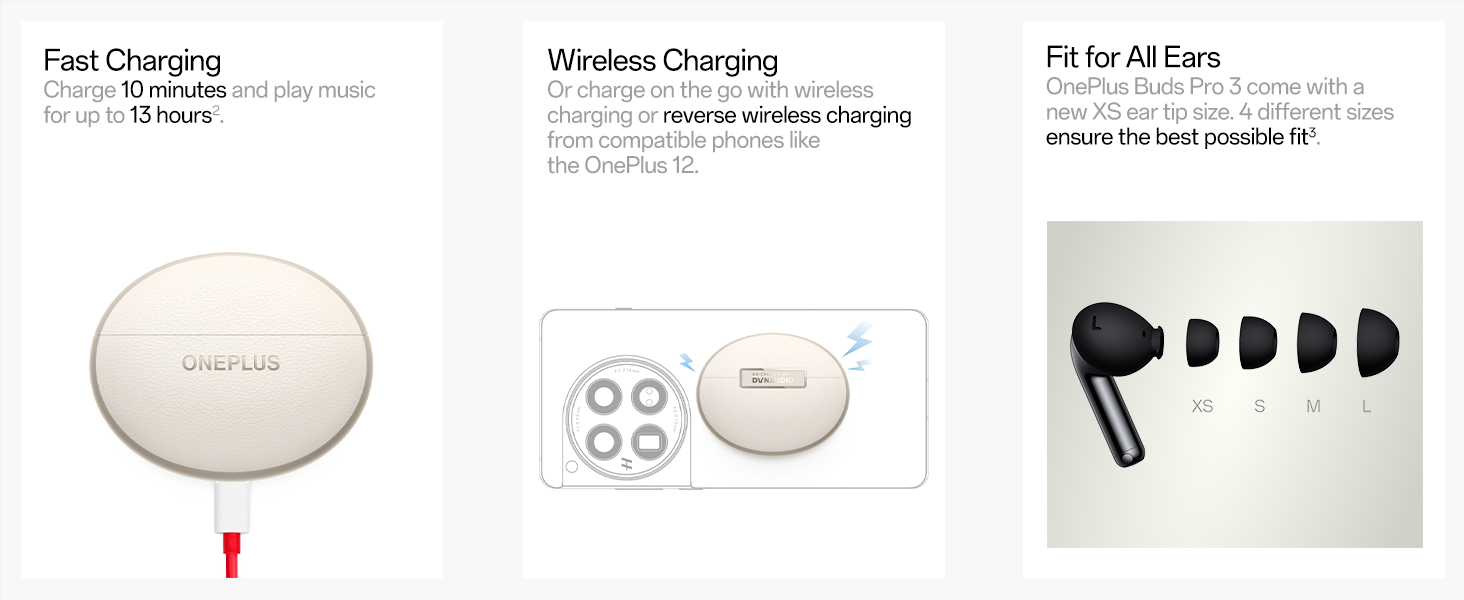
Image: Internal diagram of OnePlus Buds Pro 3 highlighting the microphone placement for call clarity.
5. Spatial Audio & Head Tracking
Experience immersive 3D sound with proprietary on-device spatial audio rendering, compatible with any Android or iOS device. Head tracking ensures the sound remains fixed in space relative to your head movements.

Image: Visual representation of spatial audio with head tracking on OnePlus Buds Pro 3.
6. Način igre
Activate Game Mode for ultra-low latency (94ms) to ensure a seamless and responsive gaming experience.

Image: OnePlus Buds Pro 3 in Game Mode with 94ms ultra-low latency for gaming.
7. Find My Earbuds
If you misplace your earbuds, use the "Find My Earbuds" feature in the HeyMelody app to make them emit sounds until you locate them.

Image: Screenshot of the HeyMelody app showing the "Find My Earbuds" feature.
8. Neck Health & Zen Mode Air
Integrated IMU sensors monitor your activity and provide timely posture alerts for improved neck health. Zen Mode Air offers spatial soundscapes for focus, calm, or complete escape.

Image: Visuals depicting Neck Health monitoring and various Zen Mode Air soundscapes.
Polnjenje in baterija
The earbuds offer up to 43 hours of total battery life with the charging case (ANC off). A quick 10-minute charge provides over 5 hours of music playback.

Image: Detailed battery life breakdown and fast charging capabilities of OnePlus Buds Pro 3.
Metode polnjenja
- USB-C polnjenje: Priloženi kabel USB-C priključite na polnilno ohišje in vir napajanja.
- Brezžično polnjenje: Polnilno ohišje postavite na združljivo brezžično polnilno podlogo.
Vzdrževanje
The earbuds have an IP55 rating, making them resistant to dust and splashes. To maintain performance, regularly clean the ear tips and charging contacts with a soft, dry cloth. Avoid exposing them to extreme temperatures or harsh chemicals.
Odpravljanje težav
Pogoste težave in rešitve:
- No Sound/Connectivity Issues: Ensure earbuds are charged, Bluetooth is enabled on your device, and they are within range. Try unpairing and re-pairing the earbuds.
- Slaba kakovost zvoka: Check ear tip fit for a proper seal. Ensure earbuds and device are updated to the latest firmware via the HeyMelody app.
- Težave s polnjenjem: Clean charging contacts on earbuds and case. Ensure the charging cable/pad is working correctly.
- Slušalke se ne odzivajo: Place earbuds back in the case, close the lid for 10 seconds, then open to reset.
Specifikacije
| Znamka | OnePlus |
| Ime modela | OnePlus Buds Pro 3 |
| Tehnologija povezljivosti | Brezžično (Bluetooth 5.4) |
| Vrsta zvočnega gonilnika | Dual Drivers (11mm woofer + 6mm tweeter) |
| Nadzor hrupa | Aktivno odpravljanje šumov (do 50 dB) |
| Življenjska doba baterije | Do 43 ur (s polnilno škatlico, izklopljenim ANC) |
| Čas polnjenja | 10 mins charge for 5+ hours playback |
| Stopnja vodoodpornosti | IP55 (odporno na prah in pljuske) |
| Teža predmeta | 0.002 unč |
| Dimenzije izdelka | 2.76 x 2.36 x 1.18 palcev |
Garancija in podpora
Your OnePlus Buds Pro 3 are covered by a standard manufacturer's warranty. For detailed warranty information, technical support, or service requests, please visit the official OnePlus support webspletno mesto ali se obrnite na njihovo službo za stranke.
Uradni videoposnetki izdelkov
Video: Uradna video predstavitev izdelkaasing the OnePlus Buds Pro 3 Wireless Earbuds. This video provides an overview of the earbuds' design and key features.
Ask a question about this manual
Ask about setup, troubleshooting, compatibility, parts, safety, or missing instructions. Manuals+ will review the question and use this page’s manual context to help answer it.