
1. Uvod
Thank you for choosing the Minisopuru 8-in-1 Mac mini Dock & Stand. This device is designed to enhance your Mac mini experience by expanding storage capabilities and providing a versatile array of connectivity options. It also serves as a stylish and functional stand, optimizing desktop space and promoting efficient heat dissipation.

Image: The Minisopuru 8-in-1 Mac mini Dock & Stand, showcasing njegovo elegantno obliko in funkcionalnost.
2. Izdelek je končanview & Lastnosti
The Minisopuru 8-in-1 Mac mini Dock & Stand integrates multiple functionalities into a single, compact unit:
- M.2 NVMe SSD Enclosure: Supports up to 10Gbps M.2 PCIe NVMe SSDs (M, B+M Key size 2230/2242/2260/2280) for convenient internal storage expansion up to 2TB. (SSD not included)
- Visokohitrostna vrata USB:
- 1 x 10Gbps USB-C 3.2 Gen2 port
- 1 x 10Gbps USB-A 3.2 Gen2 port
- 2 x USB-A 2.0 ports (for peripherals like mouse/keyboard)
Note: USB-C/A ports support data transmission only, not video output or charging.
- Čitalec kartic: 1 x SD/TF card slot (UHS-I 104MB/S) for fast data transfer and backup.
- Avdio povezljivost: 1 x Headphone Jack port.
- Integrated Stand Design: Improves desktop organization, ensures efficient heat dissipation for the Mac mini, and features non-slip, scratch-resistant silicone pads.
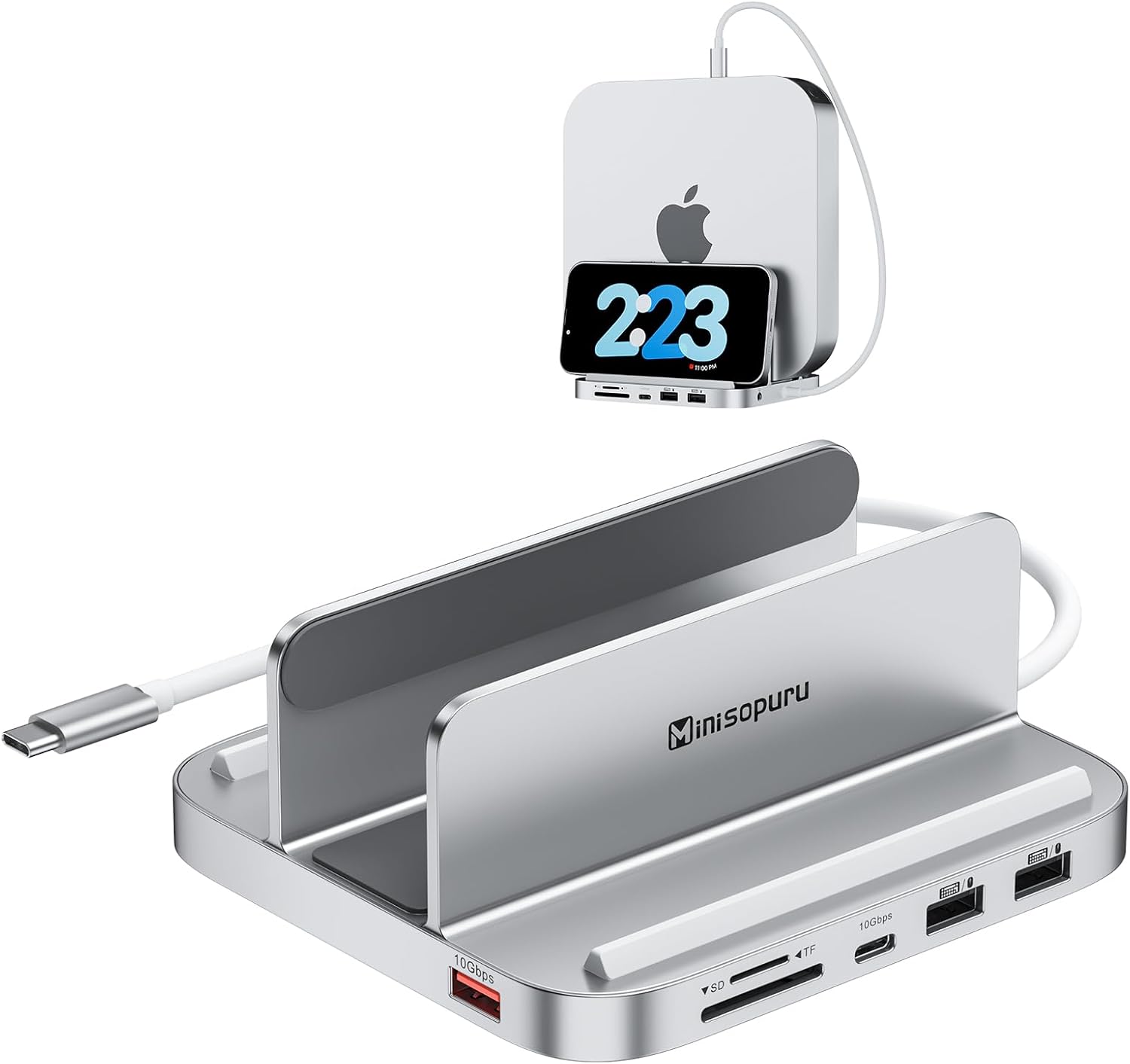
Slika: spredaj view of the Minisopuru Mac mini Dock, highlighting its various ports and sleek design.
Video: Kratek pregledview of the Minisopuru MH218B Mac Mini Dock, demonstrating its features and compact form factor.
3. Združljivost
This Mac mini USB hub is designed for broad compatibility with modern Apple devices:
- Mac mini Models: Perfectly fits Mac mini 2018 or newer models, including:
- 2018 Mac mini
- 2020 Mac mini M1
- 2023 Mac mini M2 or M2 Pro
Note: Mac mini models from 2017 and earlier are not supported. This device is not compatible with Mac mini M4.
- Druge naprave: Also supports all laptops with Type-C Thunderbolt ports (e.g., MacBook Pro/Air) and iPad Pro.

Image: Visual representation of compatible devices including Mac mini M1/M2, MacBooks, and iPads.
4. Nastavitev
4.1. Installing the M.2 NVMe SSD
The dock features an M.2 NVMe SSD enclosure for expanding your Mac mini's storage. Follow these steps to install an SSD (SSD not included):
- Remove the Bottom Cover: Use the provided screwdriver to remove the screws securing the bottom cover of the dock.
- Vstavite SSD: Gently insert your M.2 NVMe SSD into the slot at a 45-degree angle.
- Varni SSD: Press the SSD down and fix it with the provided rubber cap.
- Nanesite termično blazinico: Place the thermal pad (included) onto the SSD for heat dissipation.
- Zapri naslovnico: Reattach the bottom cover and secure it with the screws.

Image: Detailed steps for installing an M.2 NVMe SSD into the Minisopuru dock.
4.2. Connecting the Dock to Mac mini
Place your compatible Mac mini into the stand. Connect the integrated USB-C cable from the dock to a Thunderbolt/USB-C port on your Mac mini. This single connection enables all the dock's features.

Image: A Mac mini securely positioned in the vertical stand of the Minisopuru Dock.
4.3. Inicializacija SSD-ja
After installing the SSD and connecting the dock, you may need to initialize and format the new SSD for use with your Mac mini:
- Connect the dock to your Mac mini.
- Odpri Disk Utility on your Mac mini (Applications > Utilities > Disk Utility).
- Locate your new SSD in the sidebar. It may appear as an uninitialized drive.
- Select the SSD and click Izbriši.
- Choose a name, format (e.g., APFS for macOS), and scheme (e.g., GUID Partition Map).
- Kliknite Izbriši again to confirm. The SSD will now be ready for use.
5. Delovanje
Once set up, the Minisopuru dock provides easy access to its expanded ports:
- USB-C 3.2 Gen2 (10Gbps): Connect high-speed peripherals like external SSDs or other USB-C devices for rapid data transfer.
- USB-A 3.2 Gen2 (10Gbps): Ideal for connecting fast USB-A devices.
- USB-A 2.0 (480Mbps): Use for standard peripherals such as keyboards, mice, printers, or USB flash drives.
- Reže za SD/TF kartice: Insert SD or TF (MicroSD) cards for quick photo and video transfers (UHS-I 104MB/S).
- Zvočni priključek: Priključite slušalke ali zunanje zvočnike za avdio izhod.

Image: Illustration emphasizing the 10Gbps data transfer capabilities of the USB-C and USB-A 3.2 Gen2 ports.

Image: Close-up of the TF and SD card slots, highlighting their use for fast data backup.
6. Vzdrževanje
- Čiščenje: Use a soft, dry cloth to clean the exterior of the dock. Avoid liquid cleaners.
- Odvajanje toplote: The integrated stand design is optimized for heat dissipation. Ensure the Mac mini and dock are placed in a well-ventilated area to prevent overheating.
- Upravljanje kablov: Keep cables organized to prevent strain on ports and maintain desktop neatness.
- Nedrseče blazinice: The silicone pads on the stand help stabilize the Mac mini and protect its surface. Ensure they are clean and intact.

Slika: Spodnja stran view of the dock, showing the anti-slip silicone rings for stability.
7. Odpravljanje težav
- SSD ni prepoznan:
- Prepričajte se, da je SSD pravilno nameščen in trdno pritrjen v ohišju.
- Check Disk Utility to see if the SSD is detected but uninitialized. Follow initialization steps if necessary.
- Verify the USB-C connection between the dock and Mac mini is secure.
- Periferna naprava ne deluje:
- Ensure the peripheral is properly connected to the correct port on the dock.
- Try connecting the peripheral directly to your Mac mini to rule out a device issue.
- Restart your Mac mini.
- Počasen prenos podatkov:
- Ensure you are using the 10Gbps USB-C or USB-A 3.2 Gen2 ports for high-speed devices.
- Check the specifications of your peripheral and cable to ensure they support the desired speeds.
- Dock Disconnects:
- Ensure the USB-C cable connecting the dock to the Mac mini is not loose or damaged.
- Avoid moving the Mac mini or dock excessively during operation.
8. Specifikacije
| Funkcija | Podrobnost |
|---|---|
| Dimenzije izdelka | 5.1 x 4.7 x 2.3 palcev |
| Teža predmeta | 15.7 unč |
| Število vrat | 8 |
| Skupno število vrat USB | 5 |
| Strojni vmesnik | MicroSD, USB, USB Type C |
| M.2 SSD Support | Up to 2TB M.2 PCIe NVMe SSDs (M, B+M Key size 2230/2242/2260/2280) |
| Hitrost SD/TF kartice | UHS-I 104MB/S |
| Hitrost prenosa podatkov USB | 10Gbps (USB-C 3.2 Gen2, USB-A 3.2 Gen2), 480Mbps (USB-A 2.0) |
| Compatible Mac mini Models | 2018, 2020 M1, 2023 M2/M2 Pro |
9. Garancija in podpora
The Minisopuru Mac mini dock includes a 12-month customer service guarantee. For any issues or inquiries, 24/7 služba za stranke is available to provide timely and quick solutions. Please refer to the contact information provided in your product packaging or visit the official Minisopuru webstran za podporo.