
1. Uvod
Thank you for choosing the Hama DR2002BT Digital Radio. This device offers a comprehensive audio experience with FM, DAB/DAB+ digital radio reception, and Bluetooth connectivity. Its user-friendly design, featuring large buttons and a clear 4.3-inch TFT color display, makes it suitable for all users. This manual will guide you through the setup, operation, and maintenance of your new digital radio.
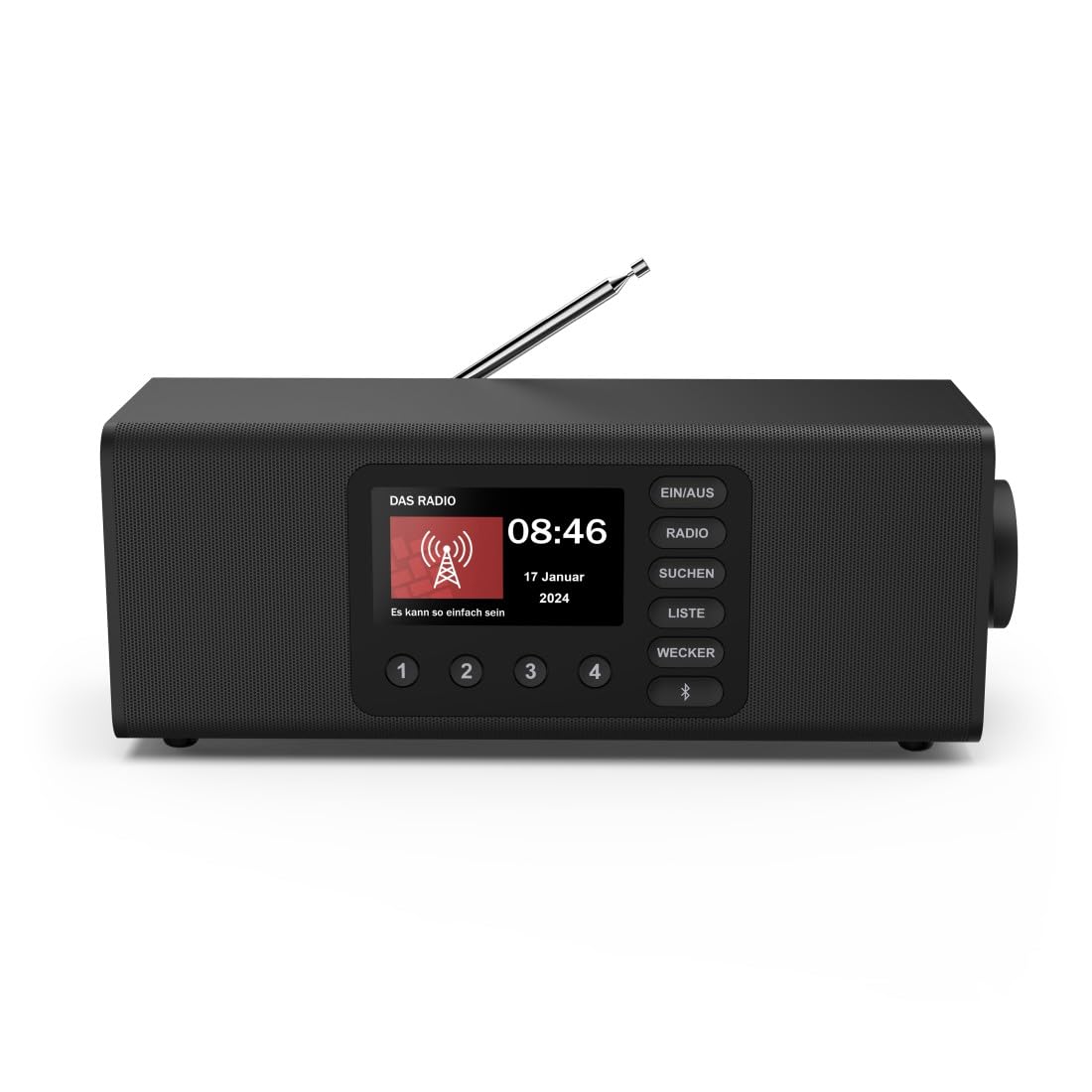
Slika: spredaj view of the Hama DR2002BT Digital Radio, showcasinnjegov zaslon in gumbe za upravljanje.
2. Varnostne informacije
Pred uporabo naprave natančno preberite ta varnostna navodila. Priročnik shranite za poznejšo uporabo.
- Naprave ne izpostavljajte vlagi, dežju ali ekstremnim temperaturam.
- Naprave ne postavljajte v bližino virov toplote ali na neposredno sončno svetlobo.
- Ne odpirajte naprave casing. Repairs should only be performed by qualified personnel.
- Uporabljajte samo priloženi napajalnik.
- Zagotovite ustrezno prezračevanje okoli naprave.
3. Vsebina paketa
Ob razpakiranju preverite, ali so vsi predmeti prisotni:
- Hama DR2002BT Digital Radio
- Napajalni adapter
- Uporabniški priročnik
4. Izdelek je končanview
4.1 Kontrole in zaslon na sprednji plošči

Image: Front panel of the radio highlighting the display and control buttons, with icons for Bluetooth, DAB+, and Alarm functions.
The front panel features a 4.3-inch TFT color display, large control buttons, and a rotary knob for easy navigation and selection. Key buttons include:
- EIN/AUS (ON/OFF): Vklopi ali izklopi napravo.
- RADIO: Switches between FM and DAB/DAB+ modes.
- SUCHEN (SEARCH): Initiates station scanning.
- LISTE (LIST): Accesses the list of available stations.
- WECKER (ALARM): Konfigurira nastavitve alarma.
- Gumb Bluetooth: Aktivira način seznanjanja Bluetooth.
- Prednastavljeni gumbi (1–4): Hiter dostop do shranjenih priljubljenih postaj.
- Rotary Knob (LAUTSTÄRKE/NAVIGIEREN): Controls volume and navigates menus.
4.2 Priključki na zadnji plošči
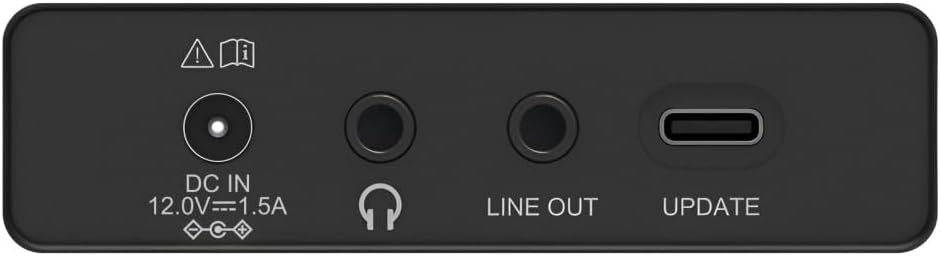
Image: Close-up of the rear panel showing the DC IN, Headphone, Line Out, and UPDATE (USB-C) ports.
The rear panel provides essential connectivity options:
- DC IN 12.0V --- 1.5A: Power input for the external adapter.
- Vhod za slušalke (3.5 mm): Za zasebno poslušanje.
- LINE OUT: Audio output for connecting to external amplifiers ali zvočniki.
- UPDATE (USB-C): Za posodobitve vdelane programske opreme.
- Teleskopska antena: For FM and DAB/DAB+ reception.

Slika: Zadaj view of the Hama DR2002BT Digital Radio with its telescopic antenna extended for optimal signal reception.
5. Nastavitev
5.1 Napajalni priključek
- Priloženi napajalnik priključite na DC IN vrata na zadnji strani radia.
- Priključite napajalnik v ustrezno vtičnico.
- The radio will power on automatically or enter standby mode.
5.2 Antenna Positioning
For optimal FM and DAB/DAB+ reception, fully extend the telescopic antenna. Position the radio near a window if reception is poor.
5.3 Začetna namestitev (prva uporaba)
Upon first power-on, the radio may guide you through an initial setup process, including language selection and an automatic DAB station scan. Follow the on-screen prompts.
6. Navodila za uporabo
6.1 Vklop/izklop
Pritisnite EIN/AUS gumb za vklop ali izklop radia.
6.2 Radijski način DAB/DAB+
- Pritisnite RADIO gumb za izbiro načina DAB.
- If this is the first time in DAB mode or if you want to rescan, press SUCHEN to perform a full scan for available stations.
- Use the rotary knob to navigate through the station list. Press the knob to select a station.
- Za view the station list, press the LISTE gumb.
6.3 Način radia FM
- Pritisnite RADIO gumb za izbiro načina FM.
- Pritisnite SUCHEN za samodejno iskanje naslednje razpoložljive FM postaje.
- Alternatively, use the rotary knob to manually tune to a frequency.
6.4 Shranjevanje in priklic prednastavitev
The radio allows you to store up to 4 favorite stations using the dedicated preset buttons (1-4).
- Nastavite želeno postajo (DAB ali FM).
- Press and hold one of the preset buttons (1-4) until the display confirms the station has been saved.
- To recall a preset station, simply press the corresponding preset button (1-4).
6.5 Delovanje Bluetooth

Slika: spredaj view of the radio with Bluetooth and stereo speaker icons, indicating its wireless audio streaming capability.
The Hama DR2002BT can stream audio from your smartphone, tablet, or laptop via Bluetooth 5.0.
- Press the Bluetooth button on the front panel to enter Bluetooth pairing mode. The display will show a pairing indicator.
- On your external device (smartphone, tablet), enable Bluetooth and search for available devices.
- Select "Hama DR2002BT" from the list of devices to pair.
- Once paired, you can play audio from your device, and it will be output through the radio's speakers.
6.6 Funkcija budilke

Image: A person waking up with the Hama DR2002BT Digital Radio placed on a bedside table, illustrating its alarm clock functionality.
The radio features two independent alarm settings.
- Pritisnite WECKER button to access alarm settings.
- Use the rotary knob to select Alarm 1 or Alarm 2.
- Configure the alarm time, source (buzzer or radio station), and repetition (once, daily, weekdays, weekends, or specific days).
- Press the rotary knob to confirm each setting.
- To quickly activate/deactivate an alarm, press the WECKER button and use the rotary knob to toggle the alarm status.

Image: A person interacting with the Hama DR2002BT Digital Radio, demonstrating its ease of use for setting functions like alarms or tuning stations.
7. Vzdrževanje
To ensure the longevity and optimal performance of your Hama DR2002BT Digital Radio, follow these maintenance guidelines:
- Čiščenje: Use a soft, dry, lint-free cloth to clean the exterior of the radio. Do not use abrasive cleaners, waxes, or solvents.
- Prah: Regularly dust the device to prevent accumulation in vents and ports.
- Shranjevanje: If storing the radio for an extended period, disconnect it from the power supply and store it in a cool, dry place.
- Antena: S teleskopsko anteno ravnajte previdno, da se ne upognete ali zlomite.
8. Odpravljanje težav
Če imate težave z radiem, si oglejte naslednje pogoste težave in rešitve:
| Težava | Možen vzrok | rešitev |
|---|---|---|
| Brez moči | Power adapter not connected; Power outlet faulty | Check power adapter connection; Try a different power outlet. |
| Slab radijski sprejem (DAB/FM) | Antena ni iztegnjena; Območje šibkega signala; Motnje | Fully extend the telescopic antenna; Reposition the radio (e.g., near a window); Perform a new station scan. |
| Bluetooth povezovanje ne uspe | Bluetooth not enabled on external device; Radio not in pairing mode; Device too far | Ensure Bluetooth is on and visible on your device; Press the Bluetooth button on the radio; Move devices closer (within 10m). |
| Brez zvoka | Volume too low; Mute activated; Incorrect source selected | Increase volume using the rotary knob; Check if mute is active; Ensure the correct mode (DAB, FM, Bluetooth) is selected. |
| Alarm se ne oglasi | Alarm not activated; Incorrect alarm time/day set | Verify alarm is enabled in settings; Check alarm time and repetition settings. |
9. Specifikacije

Image: Diagram showing the dimensions of the Hama DR2002BT Digital Radio: 35 cm (width), 12.5 cm (depth), and 13 cm (height).
| Funkcija | Podrobnost |
|---|---|
| Številka modela | DR2002BT (00054298) |
| Sprejem | DAB, DAB+, FM |
| Različica Bluetooth | 5.0 |
| izhodna moč (RMS) | 10 W (Stereo) |
| Zaslon | 4.3-palčni barvni TFT zaslon |
| Povezave | 3.5mm Jack (Headphone), USB-C (Update), Line Out, DC IN |
| Napajalnik | Zunanji napajalnik |
| Dimenzije (Š x G x V) | 35 x 12.5 x 13 cm |
| Teža | 1788 gramov |
| Material | Plastika |
| barva | Črna |
| Dodatne funkcije | Alarm Function (2 alarms), Direct Selection Keys |
10. Garancija in podpora
Hama GmbH & Co KG provides a warranty for this product. Please refer to the warranty card included in your package or visit the official Hama webza podrobne garancijske pogoje.
For technical support, troubleshooting assistance, or spare parts, please contact Hama customer service or visit their website. The availability of spare parts in the EU is guaranteed for 7 years.
- Proizvajalec: Hama GmbH & Co KG
- Država izvora: Nemčija
- EU Spare Parts Availability: 7 leti