
1. Izdelek je končanview
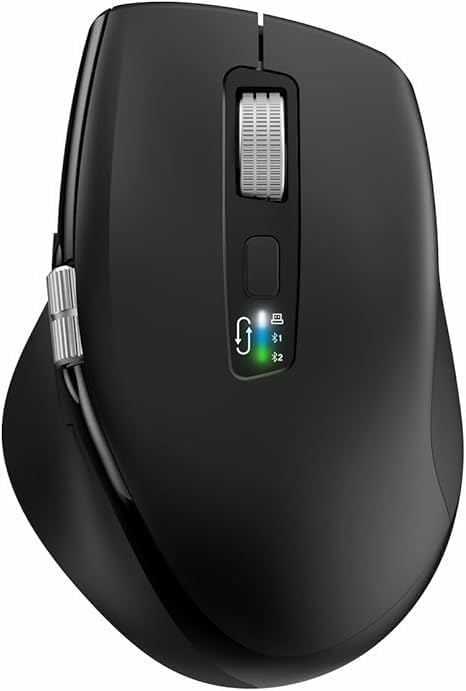
The INFINMIND L910 is a versatile wireless mouse designed for comfort and efficiency across multiple devices. It features both 2.4G wireless and Bluetooth connectivity, adjustable DPI settings, and specialized scrolling functions.
2. Vsebina paketa
- INFINMIND L910 Wireless Bluetooth Mouse
- USB Receiver (typically stored in the mouse battery compartment)
- 2 x AA baterije
- Uporabniški priročnik (ta dokument)
3. Navodila za nastavitev
3.1. Namestitev baterije
- Poiščite predal za baterije na spodnji strani miške.
- Odprite pokrov prostora za baterije.
- Insert one or two AA batteries, ensuring correct polarity (+/-). The mouse can operate with either one or two batteries, allowing for weight preference.
- Trdno zaprite pokrov prostora za baterije.
3.2. Načini povezljivosti
The mouse supports three connection channels: one 2.4G wireless channel and two Bluetooth channels (BT1 and BT2). You can switch between these channels using the dedicated mode switch button on the mouse.
3.3. 2.4G brezžična povezava
- Remove the USB receiver from its storage slot, usually located in the battery compartment.
- USB-sprejemnik priključite v razpoložljiva vrata USB na vašem računalniku.
- Switch the mouse to the 2.4G wireless mode (indicated by a specific LED light, refer to mouse markings).
- Računalnik bi moral samodejno zaznati in namestiti potrebne gonilnike. Miška je pripravljena za uporabo.
3.4. Povezava Bluetooth (BT1 / BT2)
- Switch the mouse to either BT1 or BT2 mode using the mode switch button.
- Press and hold the mode switch button for 3-5 seconds until the corresponding Bluetooth LED indicator starts blinking rapidly. This indicates the mouse is in pairing mode.
- On your device (computer, smartphone, tablet), navigate to the Bluetooth settings.
- Iskanje new devices. The mouse should appear as "INFINMIND L910" or similar.
- Select the mouse to pair. Once paired, the LED indicator will stop blinking and remain solid for a few seconds before turning off.
- Če želite vzpostaviti povezavo z drugo napravo, ponovite te korake za drugi kanal Bluetooth (BT2).
4. Navodila za uporabo
4.1. Upravljanje porabe
The mouse features an automatic sleep mode to conserve battery life. To wake the mouse from sleep, simply move it. There is no manual on/off switch; power is managed by battery insertion and activity.
4.2. Prilagoditev DPI
The mouse offers four adjustable DPI (Dots Per Inch) settings to suit various tasks and preferences. Press the DPI button, located near the main scroll wheel, to cycle through the available settings: 1000, 1600, 2400, and 3000 DPI.

4.3. Smart Flying Scroll Wheel
The main scroll wheel features a 'Smart Flying Scroll' function, allowing for rapid vertical scrolling. This is particularly useful for navigating long documents or web pages quickly and silently.
4.4. Side Scroll Wheel (Thumb Scroll)
A dedicated side scroll wheel, operated by the thumb, provides horizontal page scrolling. This feature enhances productivity, especially when working with wide spreadsheets or timelines.

4.5. Preklapljanje med več napravami
To switch between connected devices (2.4G, BT1, BT2), simply press the mode switch button. The corresponding LED indicator will light up to confirm the active connection.
4.6. Stikalo za združljivost sistema
The mouse includes a one-touch switch specifically designed for seamless transitions between Windows and Mac operating systems, ensuring optimal performance on both platforms.
4.7. Ergonomic Design and Quiet Click
The contoured shape and soft rubber grips of the mouse are designed to reduce hand fatigue during extended use. The quiet click feature allows for multi-scene use without disturbing others.

5. Vzdrževanje
5.1. Zamenjava baterije
When the mouse performance degrades or the LED indicator suggests low power, replace the AA batteries. Battery life can extend up to 20 months with one battery or 40 months with two batteries, depending on usage environment.
5.2. Čiščenje
Za čiščenje miške uporabite mehko, suho krpo. Za trdovratno umazanijo uporabite rahloamp Uporabite lahko krpo z blagim milom, pri čemer pazite, da tekočina ne pride v notranjost. Izogibajte se abrazivnim čistilom ali topilom.
5.3. Shranjevanje
Store the mouse in a cool, dry place away from direct sunlight and extreme temperatures. If storing for an extended period, it is recommended to remove the batteries to prevent leakage.
6. Odpravljanje težav
6.1. Miška se ne odziva
- Preverite, ali so baterije pravilno vstavljene in ali so dovolj napolnjene. Po potrebi jih zamenjajte.
- Ensure the mouse is switched to the correct connection mode (2.4G, BT1, or BT2) for your device.
- For 2.4G connection, ensure the USB receiver is securely plugged into the computer. Try a different USB port.
- For Bluetooth connection, ensure Bluetooth is enabled on your device and the mouse is paired. Try re-pairing the mouse.
6.2. Connectivity Issues / Lag
- Zmanjšajte razdaljo med miško in sprejemnikom/napravo.
- Odstranite vse morebitne vire motenj (npr. druge brezžične naprave, velike kovinske predmete).
- Try connecting to a different USB port or re-pairing the Bluetooth connection.
6.3. DPI se ne spreminja
- Ensure you are pressing the DPI button firmly.
- If the issue persists, try restarting the mouse by removing and reinserting the batteries.
7. Specifikacije
| Funkcija | Podrobnost |
|---|---|
| Znamka | INFINMIND |
| Številka modela | L910 |
| barva | Črna |
| Tehnologija povezljivosti | Bluetooth, USB (brezžično 2.4 G) |
| Posebne lastnosti | Ergonomic Design, Thumb Scroll, Smart Flying Scroll |
| Združljive naprave | Osebni računalnik, pametni telefon, tablični računalnik |
| Sestava baterije | Alkalna |
| Tehnologija zaznavanja gibanja | Optični |
| Število gumbov | 8 |
| Ročna orientacija | prav |
| Priporočene uporabe izdelka | Pisarna |
| Življenjska doba baterije | Up to 40 months (with 2 AA batteries) |
| Nastavitve DPI | 1000/1600/2400/3000 |
8. Garancija in podpora
Information regarding product warranty and specific customer support contact details is not available in this document. Please refer to the product packaging or the retailer's webza garancijske pogoje in možnosti podpore.