
AULA F3061
AULA F3061 Gaming Keyboard and Mouse Combo User Manual
Model: F3061
1. Uvod
This manual provides detailed instructions for the AULA F3061 Gaming Keyboard and Mouse Combo. This wired combo is designed for gaming, featuring anti-ghosting technology, a rainbow LED backlit keyboard, and a 1200 DPI gaming mouse. Please read this manual carefully before use to ensure proper operation and to maximize your gaming experience.
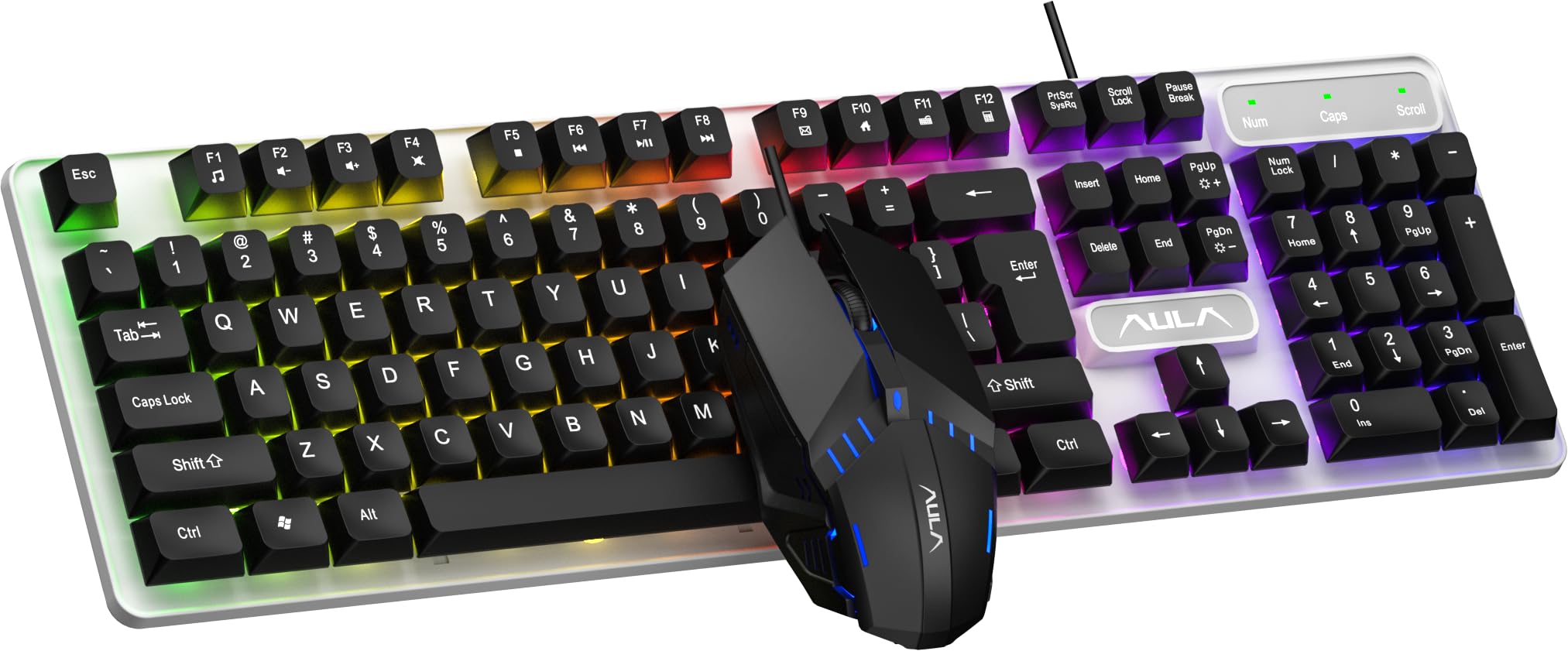
Image 1.1: The AULA F3061 Gaming Keyboard and Mouse Combo.
2. Vsebina paketa
Prepričajte se, da so v paketu prisotni vsi elementi:
- AULA F3061 Wired Gaming Keyboard
- AULA F3061 Wired Gaming Mouse
- Uporabniški priročnik
3. Navodila za nastavitev
The AULA F3061 combo is a plug-and-play device, requiring no additional drivers for basic functionality.
- Connect the USB-A cable of the keyboard to an available USB port on your computer (PC or Laptop).
- Connect the USB-A cable of the mouse to another available USB port on your computer.
- Vaš operacijski sistem bo samodejno zaznal in namestil potrebne gonilnike.
- The keyboard and mouse are now ready for use.

Image 3.1: Connecting the AULA F3061 keyboard and mouse combo via USB.
4. Navodila za uporabo
4.1. Keyboard Backlight Control
The AULA F3061 keyboard features a vibrant rainbow LED backlight with adjustable settings.
- Preklop svetlobnih učinkov: Use the designated shortcut key (refer to keyboard layout for specific key, often Fn + Scroll Lock or similar) to cycle through 3 different lighting effects.
- Prilagodi svetlost: Use the designated shortcut key combination (e.g., Fn + puščica gor/dol) to increase or decrease the backlight brightness.
- Prilagodi hitrost: Use the designated shortcut key combination (e.g., Fn + puščica levo/desno) to adjust the speed of dynamic lighting effects.

Image 4.1: The AULA F3061 keyboard with its rainbow LED backlight activated.

Slika 4.2: Bližnji posnetek view of the keyboard's breathable color backlight with adjustable brightness.
4.2. Anti-Ghosting and Win Lock
The keyboard features 26-key rollover anti-ghosting technology, allowing multiple keys to be pressed simultaneously without conflict, which is crucial for intense gaming. The Win lock function prevents accidental presses of the Windows key during gameplay or typing, which can interrupt your activity.
4.3. Upravljanje z miško
The AULA F3061 gaming mouse operates at 1200 DPI, providing precise tracking for various applications, including gaming and general computer use.

Image 4.3: The AULA F3061 gaming mouse with its distinctive design and LED lighting.

Image 4.4: The mouse features an overall streamlined appearance designed to fit the curvature of the hand.
5. Ključne značilnosti
- Multimedia & Backlight Control: The wired membrane keyboard allows for effortless control of media functions and backlight settings (3 lighting effects, brightness, and speed adjustments) via dedicated shortcut keys.
- Durable ABS Panel: The keyboard's panel is constructed from top-grade ABS material with a matte-finish texture, providing durability and resistance against scratches.
- Cool RGB Rainbow Backlight: Customize your keyboard's aesthetic with a vibrant rainbow backlight, offering personalized brightness and speed settings.
- 26-Keys Rollover & Ergonomic Design: Experience simultaneous key presses without conflict thanks to 26-key rollover anti-ghosting technology. The ergonomic design ensures comfortable use during extended gaming or typing sessions. The Win lock function prevents accidental interruptions.
- Široka združljivost: This gaming keyboard and mouse combo is compatible with Windows XP / Vista / Win7 / Win8 / Win10 / MacOS for gaming. It also supports PC, Laptop, Google TV, Smart TV, PS4, and Xbox One.

Image 5.1: The ergonomic design of the keyboard provides a comfortable typing experience.

Image 5.2: The keyboard features bass-suspended keycaps that snap back quickly for responsive input.

Image 5.3: The mouse is constructed with 3D anti-slip rubber material for enhanced grip and wear resistance.
6. Specifikacije
| Funkcija | Podrobnost |
|---|---|
| Znamka | AULA |
| Številka modela | F3061 |
| Združljive naprave | Namizni računalnik, prenosni računalnik |
| Tehnologija povezljivosti | USB-A (žični) |
| Opis tipkovnice | Igranje |
| Priporočene uporabe | Igranje |
| Lastnosti izdelka | Backlit, Ergonomic, Integrated Stand |
| Število ključev | 104 |
| Osvetlitev tipkovnice | Mavrica RGB |
| Tip stikala | Membrana |
| Razporeditev tipkovnice | QWERTY |
| DPI miške | 1200 DPI |
| Ročna orientacija | Ambidextrous (Mouse) |
| barva | Črna |
| Mere predmeta (D x Š x V) | 16 D x 2.8 Š x 45.7 V centimetrov |
| Material ohišja | Akrilonitril butadien stiren (ABS) |
| Teža predmeta | 740 gramov |
7. Odpravljanje težav
7.1. Keyboard or Mouse Not Responding
- Ensure both the keyboard and mouse USB cables are securely connected to your computer's USB ports.
- Poskusite priključiti naprave na različna vrata USB na računalniku.
- Znova zaženite računalnik.
- If the devices were previously working, check for any recent software updates or driver conflicts.
7.2. Backlight Not Working or Incorrect
- Ensure the backlight is not turned off or set to the lowest brightness. Use the backlight control shortcut keys (as described in Section 4.1) to adjust brightness and effects.
- Verify that the keyboard is properly connected to the computer.
7.3. Mouse Tracking Issues
- Ensure the mouse sensor is clean and free from dust or debris.
- Use the mouse on a suitable surface (e.g., a mouse pad) for optimal tracking.
7.4. Samodejni način mirovanja
The keyboard will automatically enter sleep mode after 5 minutes of inactivity. To wake it up, simply press any key.
8. Garancija in podpora
8.1. Informacije o garanciji
The AULA F3061 Gaming Keyboard and Mouse Combo comes with a 10-mesečna garancija from the date of purchase, covering manufacturing defects only. Please retain your proof of purchase for warranty claims.
8.2. Podpora strankam
For technical assistance or warranty inquiries, please contact the importer:
SOAI India Private Limited
Manufacturer: Dongguan Suoai Electronics Co Ltd
9. Izdelek je končanview Video
Video 9.1: Kratek pregledview of the AULA F3061 Gaming Keyboard and Mouse Combo, highlighting its key features and design.
Ask a question about this manual
Ask about setup, troubleshooting, compatibility, parts, safety, or missing instructions. Manuals+ will review the question and use this page’s manual context to help answer it.