
groov e GVEB16
Digital Buds - Wired in-Ear Earphones User Manual
Model: GVEB16
Brand: groov e
Uvod
Thank you for choosing the groov e Digital Buds. These USB-C earphones are designed to provide a high-quality audio experience for music playback and hands-free calls. This manual will guide you through the setup, operation, and maintenance of your new earphones to ensure optimal performance and longevity.
Vsebina paketa
- Digital Buds USB-C Earphones
- Earbuds (3X Sizes) - Note: The product description mentions "Includes Earbuds (3X Sizes)", but "whats_in_the_box" only lists "Earphones". Assuming the different sizes are pre-attached or included as accessories with the main earphones.
Konec izdelkaview
Familiarize yourself with the components of your Digital Buds.
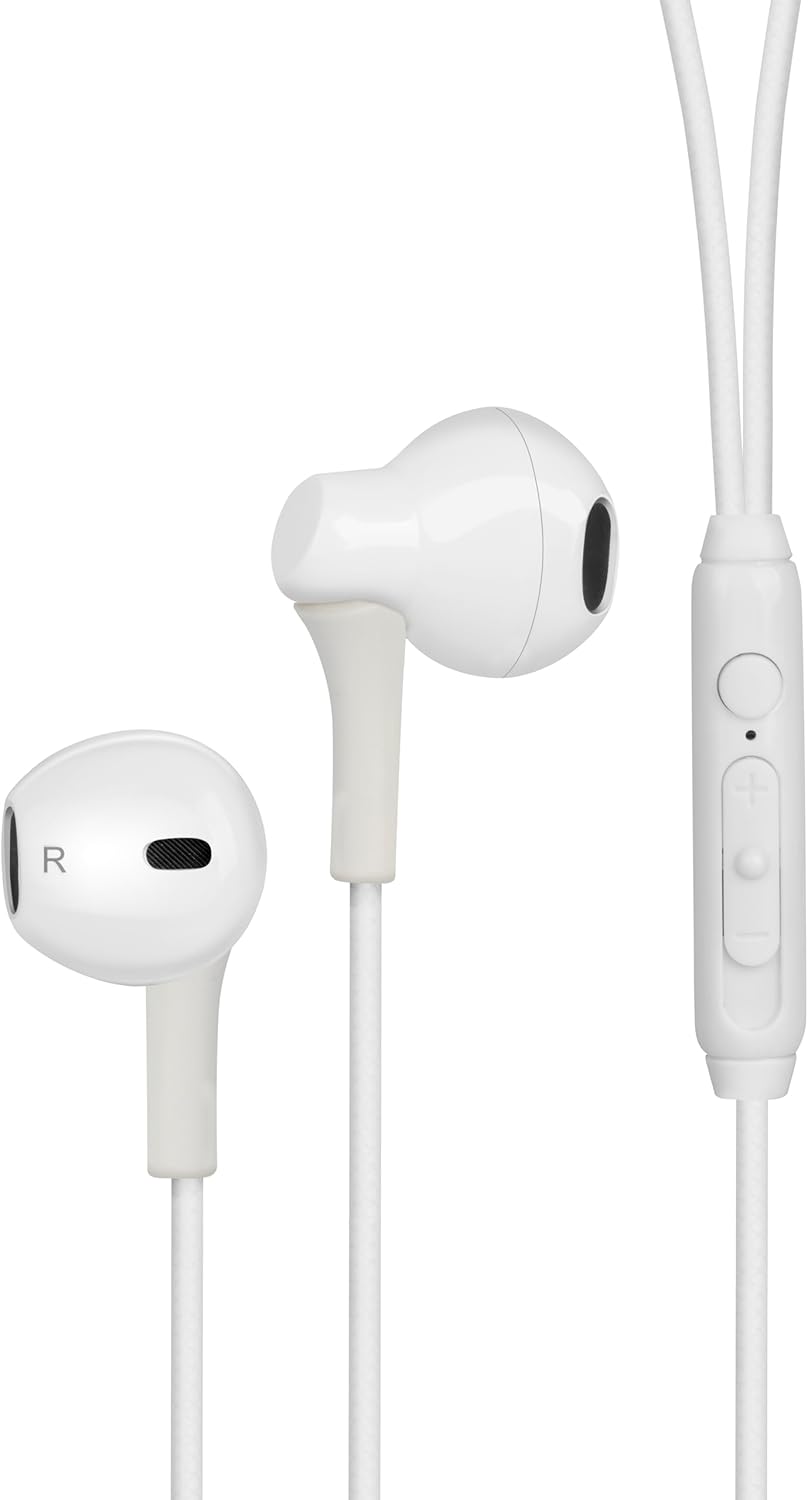
Figure 1: Digital Buds Earphones. This image shows both the left and right earbuds connected by their cable.

Figure 2: In-Line Remote and Microphone. The remote features volume up (+), volume down (-), and a multi-function button for calls and music control. The microphone is integrated into this unit.

Figure 3: USB-C Connector. This connector is used to plug the earphones into compatible devices such as smartphones, tablets, and laptops.
Nastavitev
- Povežite se z napravo: Locate the USB-C port on your smartphone, tablet, or laptop. Insert the USB-C connector of the Digital Buds firmly into the device's USB-C port.
- Namestitev slušalk: Gently insert the earbuds into your ears. The earbud marked 'L' is for the left ear, and 'R' is for the right ear. Adjust them for a comfortable and secure fit. If necessary, try the different sized ear tips included to find the best fit for optimal sound quality and comfort.
- Začetno priznanje: Your device should automatically recognize the earphones. You may need to select them as the audio output device in your device's sound settings.
Navodila za uporabo
Vgrajeni daljinski upravljalnik omogoča priročen nadzor nad zvokom in klici.
Predvajanje glasbe
- Predvajanje/pavza: Enkrat pritisnite večfunkcijski gumb.
- Naslednja skladba: Dvakrat hitro pritisnite večfunkcijski gumb.
- Prejšnja skladba: Trikrat hitro pritisnite večfunkcijski gumb.
- Povečaj glasnost: Pritisnite gumb '+'.
- Znižaj glasnost: Pritisnite gumb '-'.
Upravljanje klicev
- Sprejmi/končaj klic: Med dohodnim ali aktivnim klicem enkrat pritisnite večfunkcijski gumb.
- Zavrni klic: Med dohodnim klicem pritisnite in držite večfunkcijski gumb približno 2 sekundi.
Glasovni pomočnik
- Aktiviranje glasovnega pomočnika: Press and hold the multi-function button for approximately 2 seconds when not on a call or playing music. This will activate your device's default voice assistant (e.g., Google Assistant, Siri).
Vzdrževanje
Proper care will extend the life of your Digital Buds.
- Čiščenje: Use a soft, dry, lint-free cloth to wipe the earbuds and cable. For stubborn dirt, slightly dampKrpo sperite z vodo. Ne uporabljajte agresivnih kemikalij ali abrazivnih čistil.
- Shranjevanje: When not in use, store the earphones in a clean, dry place, preferably in a small pouch or case to prevent tangling and damage.
- Izogibajte se vlagi: Slušalk ne izpostavljajte prekomerni vlagi, dežju ali tekočinam.
- Ravnajte previdno: Avoid pulling on the cable excessively or bending the USB-C connector at sharp angles.
Odpravljanje težav
Če naletite na težave, si oglejte naslednje pogoste težave in rešitve.
| Težava | rešitev |
|---|---|
| Iz slušalk ni zvoka. |
|
| Mikrofon ne deluje med klici. |
|
| Gumbi na daljinskem upravljalniku se ne odzivajo. |
|
Specifikacije
| Funkcija | Podrobnost |
|---|---|
| Znamka | groov e |
| Ime modela | Groove Digital Buds - White |
| Številka modela artikla | GVEB16 |
| Tehnologija povezljivosti | Žično (USB-C) |
| Namestitev ušesa | V ušesu |
| Faktor oblike | V ušesu |
| Nadzorna metoda | Remote (In-line) |
| Vključene komponente | Slušalke |
| Material | Silikon, plastika |
| Teža predmeta | 1.06 unč |
| Dimenzije paketa | 6.61 x 2.36 x 1.26 palcev |
| Združljive naprave | Tablets, Mobile phones, Laptops, Desktops |
| Posebne uporabe za izdelek | Zabava |
Garancija in podpora
groov e products are manufactured to high standards and undergo rigorous quality checks. For information regarding warranty coverage, technical support, or customer service, please refer to the warranty card included with your purchase or visit the official groov e webmesto.
Prosimo, shranite dokazilo o nakupu za morebitne garancijske zahtevke.
Ask a question about this manual
Ask about setup, troubleshooting, compatibility, parts, safety, or missing instructions. Manuals+ will review the question and use this page’s manual context to help answer it.