
Uvod
Thank you for choosing the Edifier STAX Spirit S5 Wireless Planar Magnetic Headphones. These headphones are engineered to deliver an exceptional audio experience, featuring advanced planar magnetic drivers with EqualMass diaphragms for precise sound reproduction and minimal distortion. With Qualcomm Snapdragon Sound technology, LDAC, and LHDC codec support, the S5 provides high-resolution wireless audio. This manual provides detailed instructions for setup, operation, maintenance, and troubleshooting to ensure you get the most out of your new headphones.
Vsebina paketa
Prosimo, preverite, ali so v vašem paketu priloženi vsi spodaj navedeni artikli:
- 1 x Edifier STAX Spirit S5 Headset
- 2 x Cooling Mesh Earpads (pre-installed or spare)
- 1 x polnilni kabel USB Type-C
- 1 x Earpad Pick Tool
- 1 x 3.5 mm AUX avdio kabel
- 1 x adapter s 3.5 mm na 6.35 mm
- 1 x Headphone Carrying Case
- 2 x Earpad Pouches
- 1 x uporabniški priročnik
Konec izdelkaview
Familiarize yourself with the components and controls of your Edifier STAX Spirit S5 headphones.

Spredaj view of the Edifier STAX Spirit S5 headphones, showcasinz elegantno črno obliko in ušesnimi školjkami.

A user wearing the Edifier STAX Spirit S5 headphones, demonstrating their comfortable fit and profile med uporabo.
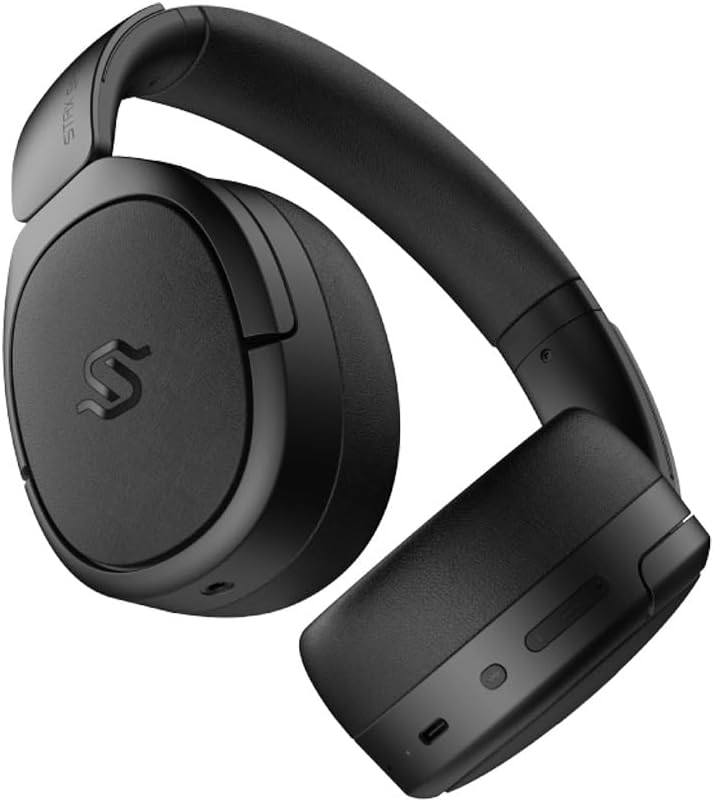
Stran view of the headphones, highlighting the control buttons and ports located on the right earcup, including the USB-C port.

A detailed close-up of the control buttons on the earcup, showing the power button, volume controls, and the USB-C charging port.

The Edifier STAX Spirit S5 headphones folded compactly, illustrating their portability and ease of storage in the included carrying case.
Nastavitev
Polnjenje slušalk
Before first use, fully charge your Edifier STAX Spirit S5 headphones.
- Connect the supplied USB Type-C cable to the charging port on the headphones and the other end to a USB power adapter (not included) or a computer's USB port.
- The LED indicator will show charging status. It typically takes approximately 10 minutes for a quick charge, providing extended playback. A full charge can provide up to 80 hours of battery life.
- Once fully charged, the LED indicator will change (refer to the specific indicator behavior in your quick start guide, if available).
Vklop/izklop
- Vklop: Pritisnite in držite gumb za vklop približno 3 sekunde, dokler se ne prižge indikatorska lučka.
- Ugasniti: Pritisnite in držite gumb za vklop približno 5 sekund, dokler se indikatorska lučka ne izklopi.
Bluetooth združitev
The STAX Spirit S5 uses Bluetooth V5.4 for stable and fast transmission.
- Prepričajte se, da so slušalke izklopljene.
- Pritisnite in držite gumb za vklop približno 5–7 sekund, dokler indikatorska lučka ne začne hitro utripati, kar označuje način seznanjanja.
- V napravi (pametnem telefonu, tablici, računalniku) omogočite Bluetooth in na seznamu razpoložljivih naprav poiščite »Edifier STAX Spirit S5«.
- Select the headphones to connect. Once successfully paired, the indicator light will stop flashing and remain solid or turn off, depending on the model's specific behavior.
- Google Fast Pair: For Android devices, the headphones support Google Fast Pair for quick and seamless connection. Simply power on the headphones near your Android device, and a pairing prompt will appear.
- Multi-device Connection: The S5 can connect to two audio devices simultaneously. After pairing with the first device, put the headphones back into pairing mode and connect to the second device. The headphones will intelligently switch between the two.
Žična povezava
The headphones support both USB-C and 3.5mm AUX wired connections.
- Zvok USB-C: Connect the USB Type-C cable from the headphones to a compatible USB-C port on your device for digital audio playback and charging.
- 3.5mm AUX Audio: Connect the 3.5mm AUX cable to the audio input port on the headphones and the other end to your audio source's 3.5mm output. Use the included 3.5mm to 6.35mm adapter for devices with a 6.35mm jack. Note that the headphones must be powered on for passive wired mode.
Navodila za uporabo
Osnovne kontrole
The main controls are located on the earcup:
- Gumb za vklop:
- Press and hold for 3 seconds to Power On.
- Press and hold for 5 seconds to Power Off.
- Press and hold for 5-7 seconds (from off) to enter Bluetooth pairing mode.
- Povečanje glasnosti (+): Kratek pritisk za povečanje glasnosti.
- Znižaj glasnost (-): Kratek pritisk za zmanjšanje glasnosti.
- Multi-function Button (often between volume buttons):
- Kratek pritisk: Predvajanje/začasna ustavitev glasbe.
- Short press: Answer/End call.
- Long press: Reject call.
- Dvojni pritisk: Naslednja skladba.
- Trojni pritisk: Prejšnja skladba.
Zvočne tehnologije
The STAX Spirit S5 supports various high-fidelity audio codecs for an optimal listening experience:
- Qualcomm Snapdragon Sound: Ensures stable RF connection and efficient power consumption for extended listening.
- LDAC & LHDC: Compatible with Hi-Res Audio and Wireless Hi-Res Audio, delivering exceptional detail and clarity.
- aptX HD, aptX Adaptive, aptX Lossless: Part of the Snapdragon Audio technology, providing high-resolution audio with ultra-low latency (as low as 89ms with aptX Adaptive).
Funkcionalnost klica
The headphones are equipped with dual microphones and Qualcomm cVc technology for clear calls.
- Odpravljanje hrupa: Integrated Qualcomm cVc actively suppresses ambient noise, enhancing voice clarity during calls.
- Zasebnost: The closed-back design helps ensure conversation privacy.
Vzdrževanje
Pravilno vzdrževanje zagotavlja dolgo življenjsko dobo in delovanje vaših slušalk.
- Čiščenje:
- Slušalke obrišite z mehko, suho krpo.
- For earpads, use a slightly damp po potrebi s krpo, vendar se izogibajte prekomerni vlagi.
- Ne uporabljajte močnih kemikalij, čistilnih topil ali močnih detergentov.
- Zamenjava ušesnih blazinic:
- The STAX Spirit S5 comes with two sets of earpads (mesh and leather).
- To replace, gently pull off the existing earpad. Use the included earpad pick tool if needed to carefully detach it from the earcup.
- Align the new earpad with the earcup and press firmly around the edges until it clicks securely into place.
- Shranjevanje:
- Ko slušalk ne uporabljate, jih shranite v priloženo torbico, da jih zaščitite pred prahom, praskami in udarci.
- Izogibajte se shranjevanju pri ekstremnih temperaturah ali visoki vlažnosti.
- Vzdrževanje baterije:
- Da bi podaljšali življenjsko dobo baterije, se izogibajte pogostemu popolnemu praznjenju slušalk.
- Če boste baterijo shranjevali dlje časa, jo pred shranjevanjem napolnite na približno 50 %.
Odpravljanje težav
Če imate težave s slušalkami, si oglejte naslednje pogoste težave in rešitve:
| Težava | Možen vzrok | rešitev |
|---|---|---|
| Slušalke se ne vklopijo. | Nizka baterija. | Slušalke napolnite s kablom USB-C. |
| Seznanitev prek Bluetootha ni mogoča. | Slušalke niso v načinu seznanjanja; Bluetooth naprave izklopljen; motnje. | Ensure headphones are in pairing mode (flashing light). Turn Bluetooth off/on on your device. Move closer to the device. Clear previous pairings on your device. |
| Ni zvoka ali nizka glasnost. | Volume too low; incorrect audio source; loose cable (wired mode). | Increase volume on headphones and source device. Ensure correct audio output is selected on your device. Check wired connections. |
| Poor audio quality (wireless). | Distance from device; interference; low-quality audio source. | Reduce distance to your device. Avoid strong electromagnetic interference. Use high-quality audio files/streaming services. |
| Mikrofon ne deluje med klici. | Incorrect input device selected; microphone muted. | Ensure the headphones are selected as the input device in your call application settings. Check if the microphone is muted. |
Če težava ne izgine, se obrnite na podporo strankam Edifier.
Specifikacije
Key technical specifications for the Edifier STAX Spirit S5 headphones:
| Znamka | Edifier |
| Ime modela | S5 |
| Številka modela | S5spaceblack |
| barva | Črna |
| Tehnologija povezljivosti | Žično, brezžično (Bluetooth) |
| Brezžična komunikacijska tehnologija | Bluetooth |
| Različica Bluetooth | V5.4 (implied from feature bullets) |
| Priključek za slušalke | 3.5mm Jack, USB-C |
| Impedanca | 120 ohme |
| Namestitev ušesa | Nad ušesi |
| Faktor oblike | Circum-Aural |
| Teža predmeta | 420 gramov |
| Sestava baterije | Litij-ionski |
| Akumulatorska baterija | ja |
| Čas polnjenja | Approx. 10 minutes (for quick charge) |
| Posebne lastnosti | Hitro polnjenje |
| Združljive naprave | Computer, Laptop, Mobile Phone |
| Posebne uporabe za izdelek | Music, Professional, Studio Listening |
Garancija in podpora
The Edifier STAX Spirit S5 headphones come with a two-year warranty, ensuring reliable performance and support.
For technical assistance, warranty claims, or further inquiries, please contact Edifier customer support through their official webspletno mesto ali prodajalec, pri katerem ste izdelek kupili. Prosimo, shranite dokazilo o nakupu za potrditev garancije.