
T-Wolf GG-G530
T-Wolf RoboCop Competitive Gaming Mouse GG-G530 User Manual
Model: GG-G530
Uvod
This manual provides essential information for the setup, operation, and maintenance of your T-Wolf RoboCop Competitive Gaming Mouse GG-G530. Please read this manual thoroughly before using the product to ensure optimal performance and longevity.
Vsebina paketa
- 1 x T-Wolf RoboCop Competitive Gaming Mouse GG-G530
- 1 x Uporabniški priročnik (ta dokument)
Lastnosti izdelka
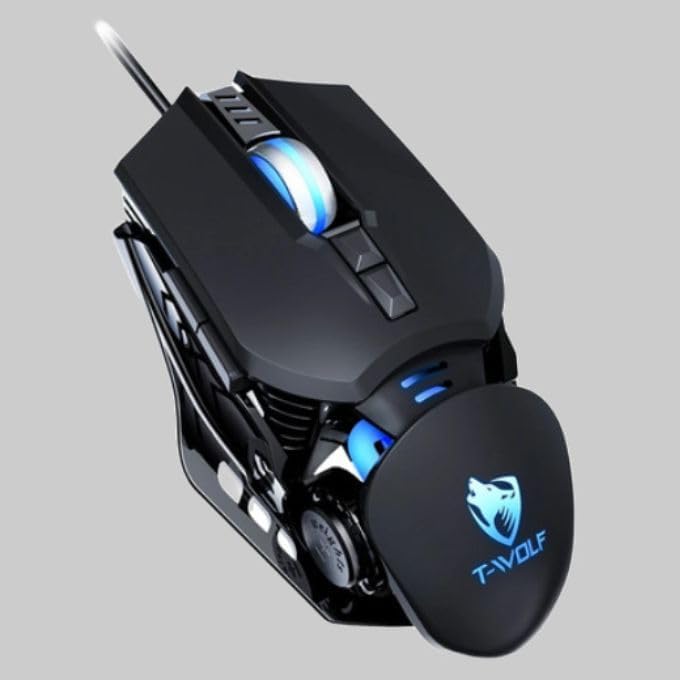
The T-Wolf RoboCop Competitive Gaming Mouse GG-G530 is designed for precision and comfort, suitable for both gaming and office use. Key features include:
- Optical Engine Design: Ensures stable operation and high sensitivity.
- Mechanical Armored Modeling: Distinctive and robust design.
- Symmetrical DIY Counterweight: Allows for adaptable weight adjustment.
- 7 Gumbi: Includes left click, right click, scroll wheel, DPI switcher, and additional programmable buttons.
- Inteligentna povezljivost: Plug-and-play functionality with automatic driver installation.
- Nastavljiv DPI: Four levels of sensitivity (1200/2400/3200/6400 DPI) for precise control.
- Ergonomska oblika: Provides comfortable use for extended periods without fatigue.
- Four-Color Light Effect: Dynamic lighting for visual appeal.
- Žična povezava: Reliable USB interface with a 150cm cable.
- Združljivost sistema: Podpira operacijska sistema Windows in Mac.
Nastavitev
- Povežite miško: Insert the USB connector of the T-Wolf RoboCop Gaming Mouse into an available USB port on your computer.
- Samodejna namestitev gonilnikov: The operating system will automatically detect the mouse and install the necessary drivers. This process typically takes a few moments. No manual driver installation is required.
- Pripravljeno za uporabo: Ko so gonilniki nameščeni, je miška pripravljena za takojšnjo uporabo.
Navodila za uporabo
The T-Wolf RoboCop Gaming Mouse features 7 buttons for various functions. Familiarize yourself with their basic operations:
- Levi klik na gumb: Primarna selekcija in interakcija.
- Desni klik na gumb: Accesses contextual menus and secondary functions.
- Kolesce za pomikanje: Pomika se po dokumentih in web strani. Lahko deluje tudi kot srednji klik.
- DPI Switcher Button: Adjusts the mouse sensitivity (DPI).
- Dodatni gumbi: The remaining buttons can be assigned specific functions through your operating system's mouse settings or compatible third-party software (note: no macro programming is natively supported by the mouse hardware).

Prilagoditev DPI
The mouse features an adjustable DPI (Dots Per Inch) setting, allowing you to change the cursor sensitivity on the fly. This is particularly useful for different tasks, such as precise aiming in games or fast navigation in general use.
- Poiščite DPI Switcher Button, typically positioned behind the scroll wheel.
- Press the DPI Switcher Button to cycle through the available DPI settings: 1200 DPI, 2400 DPI, 3200 DPI, and 6400 DPI.
- Each press will change the sensitivity, allowing you to find the setting that best suits your current activity.

Vzdrževanje
To ensure the longevity and optimal performance of your T-Wolf RoboCop Gaming Mouse, follow these simple maintenance guidelines:
- Čiščenje: Za brisanje površine miške uporabite mehko, suho krpo. Za trdovratno umazanijo rahlo obrišiteampKrpo sperite z vodo ali blago čistilno raztopino. Izogibajte se agresivnim kemikalijam ali abrazivnim materialom.
- Optični senzor: Periodically clean the optical sensor on the underside of the mouse with a cotton swab to prevent dust buildup, which can affect tracking performance.
- Skrb za kabel: Avoid sharply bending or pulling the USB cable to prevent internal damage.
- Shranjevanje: Ko miške ne uporabljate, jo shranjujte v čistem in suhem okolju, stran od ekstremnih temperatur.
Odpravljanje težav
If you encounter issues with your T-Wolf RoboCop Gaming Mouse, refer to the following common solutions:
- Miška se ne odziva:
- Prepričajte se, da je kabel USB varno priključen v delujoča vrata USB na računalniku.
- Poskusite miško priključiti v drug USB vhod.
- Znova zaženite računalnik.
- Premikanje kurzorja je neenakomerno ali poskakujoče:
- Očistite optični senzor na spodnji strani miške.
- Miško uporabljajte na čisti, nebleščeči in enakomerni površini. Priporočljiva je uporaba podlog za miško.
- Prilagoditev DPI ne deluje:
- Ensure you are pressing the correct DPI switcher button.
- The mouse cycles through fixed DPI settings; there is no visual indicator on the mouse itself for the current DPI level, only the change in cursor speed.
- Gumbi ne delujejo:
- Check your operating system's mouse settings to ensure buttons are enabled and configured correctly.
- Test the mouse on another computer to rule out a software or system issue.
Specifikacije
| Model | GG-G530 |
| Material | ABS + Electroplating |
| Sledilni sistem | Optični |
| Povezava | Žično |
| Dolžina kabla | 150 cm |
| Vrsta vmesnika | USB |
| Nastavitve DPI | 1200/2400/3200/6400 (nastavljivo) |
| Število gumbov | 7 |
| Življenjska doba | Approximately three years |
| Metoda dela | Fotoelektrična |
| Svetlobni učinek | Four-color cycling |
| Velikost predmeta | 130 x 80 x 35 mm |
| Teža predmeta | 160 g |
| Podprti sistemi | Windows, Mac |
Garancija in podpora
Your T-Wolf RoboCop Competitive Gaming Mouse GG-G530 comes with a 6-mesečna garancija proizvajalca od datuma nakupa.
This warranty covers defects in materials and workmanship under normal use. It does not cover damage caused by accident, misuse, abuse, unauthorized modification, or external causes such as liquid damage.
For warranty claims or technical support, please contact your retailer or the point of purchase. Please retain your proof of purchase for warranty validation.

Ask a question about this manual
Ask about setup, troubleshooting, compatibility, parts, safety, or missing instructions. Manuals+ will review the question and use this page’s manual context to help answer it.