
Uvod
This manual provides detailed instructions for the safe and effective use of your BÉABA Zen Nomad Video Baby Monitor. Please read this manual thoroughly before operating the device and retain it for future reference.
Konec izdelkaview
The BÉABA Zen Nomad is a portable video baby monitor designed for flexible use at home or while traveling. It connects to your smartphone via a dedicated application, offering a range of features to help you monitor your baby.
Ključne značilnosti:
- Brezžična povezljivost: Connects directly to your smartphone via a dedicated app.
- Prenosna zasnova: Lightweight with a versatile clip for easy positioning.
- Dolga življenjska doba baterije: Up to 6 hours of autonomy on battery power.
- Nočni vid: Infrared night vision for clear monitoring in low light.
- Two-Way Talk (Walkie-Talkie): Komunicirajte z dojenčkom na daljavo.
- Uspavanke: Integrated lullabies to soothe your baby.
- Večbarvna nočna lučka: Remote-controlled night light for a calming atmosphere.
- Okoljski senzorji: Built-in thermometer and humidity detector.
- Funkcija VOX: Sound and motion detection for continuous monitoring.
- Podpora za več kamer: Connect and monitor multiple cameras simultaneously via the app.
Komponente
The BÉABA Zen Nomad Video Baby Monitor includes the following components:
- Zen Nomad Camera Unit
- USB polnilni kabel
- Uporabniški priročnik (ta dokument)

Slika 1: The BÉABA Zen Nomad Video Baby Monitor, showing the camera unit, its versatile clip stand, and the product packaging. A smartphone displaying the live feed is also visible.
Navodila za namestitev
- Napolnite napravo: Before first use, fully charge the Zen Nomad camera using the provided USB cable. The charging port is typically located on the back or side of the unit.
- Download the Mobile Application: Iskanje the dedicated BÉABA Zen Nomad application on your smartphone's app store (iOS or Android) and install it.
- Ustvari račun: Open the application and follow the on-screen instructions to create a user account or log in if you already have one.
- Dodaj kamero:
- Power on the Zen Nomad camera.
- In the application, select the option to "Add Device" or "Add Camera."
- Follow the app's instructions to pair the camera with your smartphone. This usually involves scanning a QR code on the camera or connecting to a temporary Wi-Fi network broadcast by the camera.
- Ensure your smartphone is connected to a 2.4GHz Wi-Fi network during the pairing process.
- Postavite kamero: Use the versatile clip to securely attach the camera to a crib rail, shelf, or other stable surface. Ensure the camera has a clear view vašega otroka.

Slika 2: The BÉABA Zen Nomad camera unit demonstrating its clip attachment feature on a crib rail. The camera is positioned to monitor the baby.

Slika 3: The BÉABA Zen Nomad camera unit securely clipped to the side of a crib, providing a clear view into the crib.
Navodila za uporabo
Once your BÉABA Zen Nomad is set up, you can access its features through the dedicated mobile application.
Mobile Application Interface:
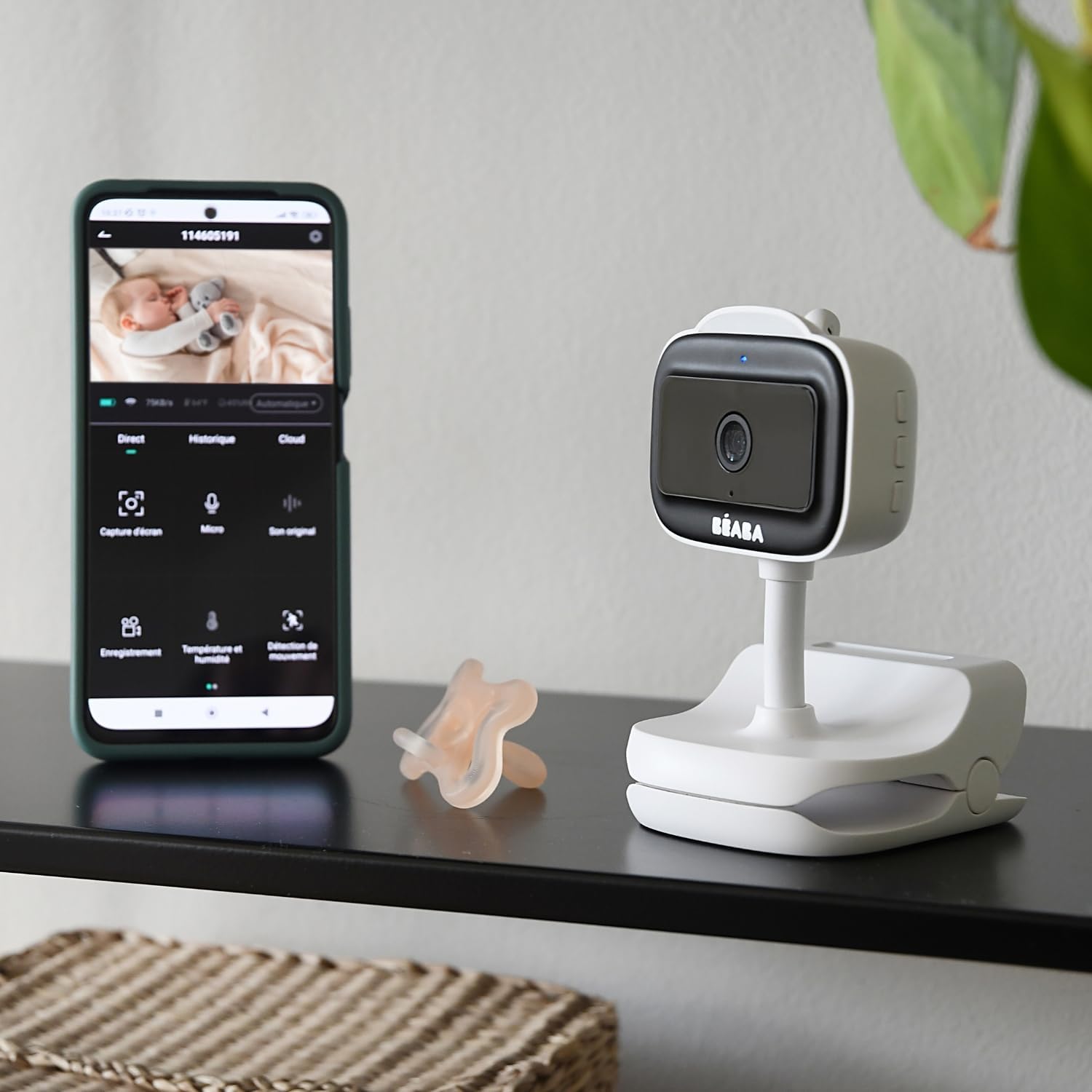
Slika 4: A smartphone displaying the BÉABA Zen Nomad mobile application interface, showing live video feed and various control options like recording, microphone, temperature, and motion detection.
- V živo View: Access real-time video and audio from the camera.
- Dvosmerni pogovor: Use the microphone icon in the app to speak through the camera to your baby.
- Nočni vid: The camera automatically activates infrared night vision in low-light conditions.
- Nočna luč: Control the multi-color night light feature directly from the app to create a soothing environment.
- Uspavanke: Select and play integrated lullabies through the camera's speaker.
- Nadzor temperature in vlažnosti: View real-time temperature and humidity readings of the baby's room within the app.
- VOX Function (Sound and Motion Detection): Activate VOX mode to receive alerts on your smartphone when sound or motion is detected in the baby's room. Adjust sensitivity settings as needed.
- Multi-Camera Monitoring: If you have multiple Zen Nomad cameras, you can view feeds from all connected cameras within the same application.

Slika 5: A smartphone displaying the BÉABA Zen Nomad mobile application, illustrating the capability to monitor multiple camera feeds simultaneously.
- Manual Camera Rotation: The camera unit can be manually rotated to adjust the viewvhodni kot.
Vzdrževanje
- Čiščenje: Wipe the camera unit with a soft, dry cloth. Do not use abrasive cleaners or solvents.
- Shranjevanje: Ko naprave ne uporabljate, jo hranite na hladnem in suhem mestu.
- Vzdrževanje baterije: Da podaljšate življenjsko dobo baterije, se izogibajte pogostemu popolnemu praznjenju baterije. Redno jo polnite.
Odpravljanje težav
| Težava | Možen vzrok | rešitev |
|---|---|---|
| Kamera se ne vklopi. | Nizka ali nična baterija. | Connect the camera to a power source using the USB cable and allow it to charge for at least 30 minutes before attempting to power on again. |
| Unable to pair camera with the app. | Incorrect Wi-Fi network (5GHz instead of 2.4GHz), incorrect password, or camera not in pairing mode. |
|
| No video feed or poor image quality. | Weak Wi-Fi signal, camera too far from router, or network congestion. |
|
| Težave z zvokom (ni zvoka, popačen zvok). | Microphone or speaker blocked, app volume settings, or network delay. |
|
Specifikacije
- Številka modela: 930373
- Tehnologija povezljivosti: Brezžično (Wi-Fi)
- vir energije: Napajanje na baterije (za ponovno polnjenje)
- Avtonomija baterije: Do 6 ur
- Ločljivost video snemanja: 720p
- Posebne lastnosti: Motion Detector, Night Vision, Temperature and Humidity Sensor, Two-Way Talk, Lullabies, Multi-Color Night Light, VOX Function
- Združljive naprave: Pametni telefon
- Material: Plastika
- barva: Bela
- voltage: 5 volta
- moč: 5 vatov
- Dimenzije: Približno 20.5 x 12.7 x 9.2 cm
- Teža: Približno 453 gramov
Garancija in podpora
The BÉABA Zen Nomad Video Baby Monitor comes with a 2-letna garancija on spare parts, ensuring support for potential component replacements. For technical assistance, troubleshooting beyond this manual, or warranty claims, please contact BÉABA customer support through their official webspletno mesto ali kontaktne podatke, ki ste jih prejeli ob nakupu.
For more information, visit the official BÉABA store: BÉABA Official Store