
1. Uvod
This manual provides detailed instructions for the ROVE R3 Dash Cam and its accompanying Circular Polarizer Lens (CPL) Filter. The ROVE R3 is a 3-channel touch screen dash camera designed for comprehensive vehicle recording, capturing front, cabin, and rear views. The CPL filter enhances video quality by reducing glare and reflections.

Image 1.1: ROVE R3 Dash Cam with CPL Filter and smartphone app interface.
2. Vsebina paketa
Preverite, ali so v vašem paketu priloženi vsi spodaj navedeni elementi:
- ROVE R3 Primary Dash Cam (Front & Cabin)
- ROVE R3 Rear Dash Cam
- 360° Windshield Suction Mount
- Windshield 3M Sticky Mount
- 4.8 AMP Dual USB FAST Car Charger
- 6M Type-C USB Rear Camera Cable
- 12 FT Type-C USB Power Cable for Front Dash Cam
- 1M Type-C USB Data Cable
- Spare 3M Sticky Tapes & 5x Cable Clips
- 4x elektrostatična filma
- 2x Wet Cleaning Pads & Car Wiring Tools
- User Manual (English) & Quick Start Guide
- CPL Filter for ROVE R3
- Krpa za čiščenje iz mikrovlaken
Note: A MicroSD Memory Card is NOT included and must be purchased separately for camera operation.
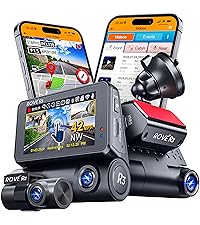
Image 2.1: Contents of the ROVE R3 Dash Cam package.
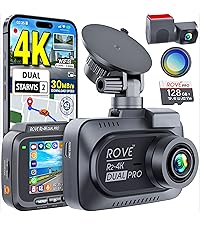
Image 2.2: Contents of the ROVE CPL Filter package.
3. Izdelek je končanview
The ROVE R3 Dash Cam features a compact design with a 3-inch IPS touch screen. It integrates three cameras for comprehensive coverage: a front camera, a cabin camera, and a rear camera. The device also includes a supercapacitor for enhanced durability and safety, and supports USB Type-C connectivity.
3.1 ključni komponenti
- Sprednja kamera: Zapisuje pot pred seboj.
- Kamera v kabini: Records the vehicle interior.
- Zadnja kamera: Records the view za vozilom.
- 3-palčni IPS zaslon na dotik: For navigation and settings adjustment.
- Vrata USB Type-C: Za napajanje in prenos podatkov.
- Reža za kartico MicroSD: Za shranjevanje posnetkov.
- Superkondenzator: Provides power stability and extends product lifespan.
- Filter CPL: Reduces glare and reflections from the windshield.

Slika 3.1: Konecview of the ROVE R3's 3-channel recording capabilities.

Image 3.2: Illustration of the supercapacitor used in the ROVE R3 for durability.

Image 3.3: USB Type-C port on the ROVE R3 for power and data.
4. Nastavitev
4.1 Namestitev kartice MicroSD
- Prepričajte se, da je kamera na armaturni plošči izklopljena.
- Poiščite režo za kartico MicroSD na strani kamere v armaturni plošči.
- Insert the MicroSD card with the gold contacts facing the front of the camera until it clicks into place.
- Za odstranitev kartico nežno potisnite, dokler ne izskoči.
Recommendation: Use a ROVE Ultimate MicroSD Card (supports up to 512GB) for optimal performance.
4.2 Namestitev armaturne kamere
- Izbrano območje na vetrobranskem steklu temeljito očistite.
- Attach an electrostatic film to the windshield first, then apply the mount to the film.
- Choose between the suction mount or the 3M sticky mount.
- Secure the dash cam to the chosen mount. Position the camera to ensure a clear view ceste in kabine.
- Install the rear camera in a suitable location on your rear windshield, ensuring a clear view.
4.3 Priključitev napajanja
- Connect the 12 FT Type-C USB Power Cable to the dash cam's USB Type-C port.
- Route the cable neatly along the windshield and dashboard using the provided cable clips.
- Avtomobilski polnilnik priključite v 12V vtičnico vašega vozila.
- Connect the 6M Type-C USB Rear Camera Cable from the main dash cam unit to the rear camera.
4.4 Namestitev filtra CPL
The CPL filter is designed to reduce glare and reflections from the windshield, improving video clarity and color saturation.
- Align the CPL filter with the front lens of the ROVE R3 Dash Cam.
- Gently push and twist the filter onto the lens until it is securely attached.
- Once installed, you can rotate the outer ring of the CPL filter to adjust the polarization effect and minimize glare.

Image 4.1: Demonstrates how to attach the CPL filter to the dash cam lens.
4.5 Začetne nastavitve
- Vklopite kamero na armaturni plošči.
- Follow the on-screen prompts to set the correct date and time.
- It is crucial to format the MicroSD card within the dash cam before first use and periodically thereafter to ensure stable recording. Navigate to the settings menu and select 'Format SD Card'.
5. Delovanje
5.1 Osnovno snemanje (snemanje v zanki)
The ROVE R3 automatically begins recording when powered on. It utilizes loop recording, continuously recording in segments (1, 3, 5, or 10 minutes) and overwriting the oldest unlocked files when the MicroSD card is full.

Image 5.1: Explanation of the seamless loop recording function.
5.2 Vmesnik zaslona na dotik
The 3-inch IPS touch screen allows for intuitive navigation through menus and settings. Tap icons to access different functions, view v živo footage, or playback recorded videos.

Image 5.2: The responsive 3-inch IPS touch screen for camera control.
5.3 ROVE App & Wi-Fi Connectivity
Connect your ROVE R3 to your smartphone via the ROVE App (available for iOS and Android) using the built-in dual-band 5.0 GHz and 2.4 GHz Wi-Fi. This enables live preview, video download, settings management, and sharing of footage.

Image 5.3: Features of the ROVE R3's dual-band Wi-Fi connectivity.

Image 5.4: The ROVE Dash Cam App interface for smartphone control.
5.4 Funkcionalnost GPS-a
The built-in GPS module records your driving speed, compass direction, and location data. This information can be viewed during video playback on the dash cam or through the free ROVE Dash Cam GPS Player software on your PC/Mac.

Image 5.5: The ROVE Dash Cam GPS Player software for reviewing GPS data.
5.5 Parkirni monitor
When activated, the 24-hour Auto Trigger Parking Monitor detects impacts or motion while your vehicle is parked. If an event occurs, the camera will automatically turn on and record, locking the video evidence. This feature requires the ROVE Ultimate Type-C 3-Lead Hardwire Kit (sold separately).

Image 5.6: Explanation of the 24-hour Auto Trigger Parking Monitor.
5.6 Glasovno vodenje
The ROVE R3 provides proprietary fail-safe voice guidance, alerting you to important statuses such as parking mode activation or if the camera is not recording. This ensures you are always aware of the camera's operational status.

Image 5.7: The ROVE R3's voice guidance system providing alerts.
5.7 Nočni vid
Equipped with advanced sensors and 4 hidden IR LEDs for the cabin camera, the ROVE R3 provides clear image capture in low-light conditions, including complete darkness inside the car cabin.

Image 5.8: Demonstration of the Super Night Vision capability.
5.8 Wide Dynamic Range (WDR)
WDR technology ensures optimal exposure balance, capturing clear details in both very bright and very dark areas of the footage, even in challenging lighting conditions.

Image 5.9: Comparison showing the effectiveness of Wide Dynamic Range (WDR).
5.9 Snemanje s časovnim zamikom
The integrated time-lapse feature, especially useful with parking mode, allows for long-duration recording at a reduced frame rate, saving storage space while capturing important events over extended periods.
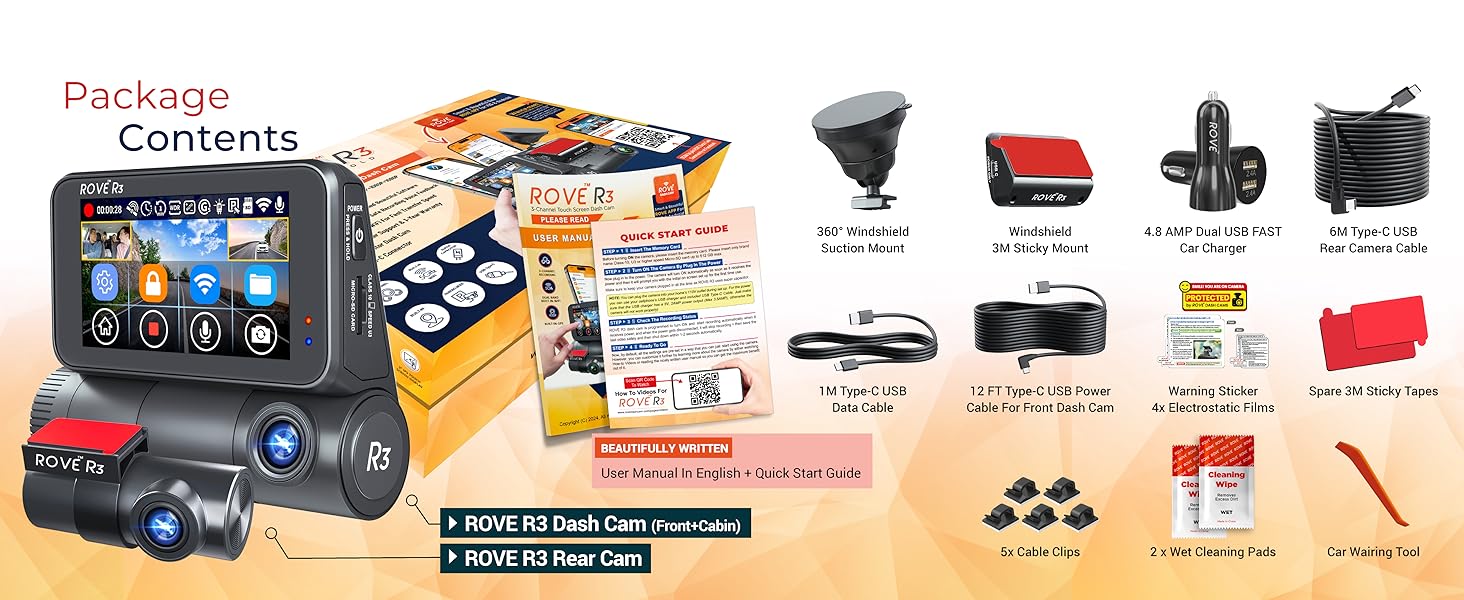
Image 5.10: Illustration of the Time-Lapse Video recording feature.
6. Vzdrževanje
6.1 MicroSD Card Care
- Regularly format the MicroSD card (at least once a month) to prevent data corruption and ensure optimal performance.
- Use high-quality, reputable MicroSD cards designed for dash cam use.
- Replace the MicroSD card every 6-12 months, depending on usage, as they have a limited lifespan due to continuous writing cycles.
6.2 Čiščenje naprave
- Use the provided microfiber cleaning cloth to gently wipe the camera lenses and touch screen.
- Avoid using harsh chemicals or abrasive materials that could scratch the lenses or screen.
- Pred čiščenjem se prepričajte, da je naprava izklopljena in odklopljena iz električnega omrežja.
6.3 Posodobitve vdelane programske opreme
ROVE regularly releases firmware updates to improve performance and add new features. You can update your dash cam's firmware wirelessly via the ROVE App.
- Connect your dash cam to the ROVE App via Wi-Fi.
- The app will notify you if a new firmware update is available.
- Follow the on-screen instructions in the app to download and install the update. Ensure the dash cam remains powered during the entire update process.

Image 6.1: Steps for performing an Over-The-Air firmware update via the ROVE App.
7. Odpravljanje težav
7.1 Kamera ne snema
- Check if the MicroSD card is properly inserted and formatted.
- Prepričajte se, da se kamera napaja.
- If the card is full, ensure loop recording is enabled or format the card.
- The voice guidance system will alert you if the camera is not recording.
7.2 Slaba kakovost videa
- Clean the camera lenses and windshield.
- Ensure the CPL filter is correctly installed and adjusted to minimize glare.
- Preverite nastavitve ločljivosti videa v meniju.
7.3 Težave z omrežjem Wi-Fi
- Ensure the ROVE App is updated to the latest version.
- Znova zaženite kamero na armaturni plošči in pametni telefon.
- Verify that Wi-Fi is enabled on the dash cam and your phone.
7.4 Dash Cam Freezes or Restarts
- Format the MicroSD card. A corrupted card can cause instability.
- Prepričajte se, da je napajalna povezava stabilna.
- Perform a factory reset via the settings menu if issues persist.
8. Specifikacije
| Funkcija | Specifikacija |
|---|---|
| Ime modela | R3 |
| Ločljivost zajema videa | Front: 4K (3840x2160p) @30fps (Single Channel Mode); Front + Cabin + Rear: 1440p + 1080p + 1080p @30fps |
| Polje od View | 130 stopinj (spredaj) |
| Tehnologija povezljivosti | USB, Dual-band Wi-Fi (5.0 GHz & 2.4 GHz) |
| Nadzorna metoda | Touch Screen, Remote (via App) |
| Vrsta namestitve | Suction Mount, 3M Sticky Mount |
| Shranjevanje | Supports MicroSDXC Card up to 512GB (Class 10, U3 recommended) |
| Vir napajanja | Supercapacitor |
| barva | Črna |
| Vključene komponente | Dash Cam, Rear Cam, Suction Mount, CPL Filter, Cables, Car Charger, Cleaning Tools |
9. Garancija in podpora
ROVE products are designed for reliability and performance. For specific warranty details, please refer to the warranty card included in your product packaging or visit the official ROVE webmesto.
9.1 Podpora strankam
If you encounter any issues or have questions regarding your ROVE R3 Dash Cam or CPL Filter, please contact ROVE customer support. Support contact information can typically be found in the Quick Start Guide, on the ROVE official website, or through the ROVE App.
Za najnovejše informacije in vire podpore obiščite: www.rovedashcam.com


