
Uvod
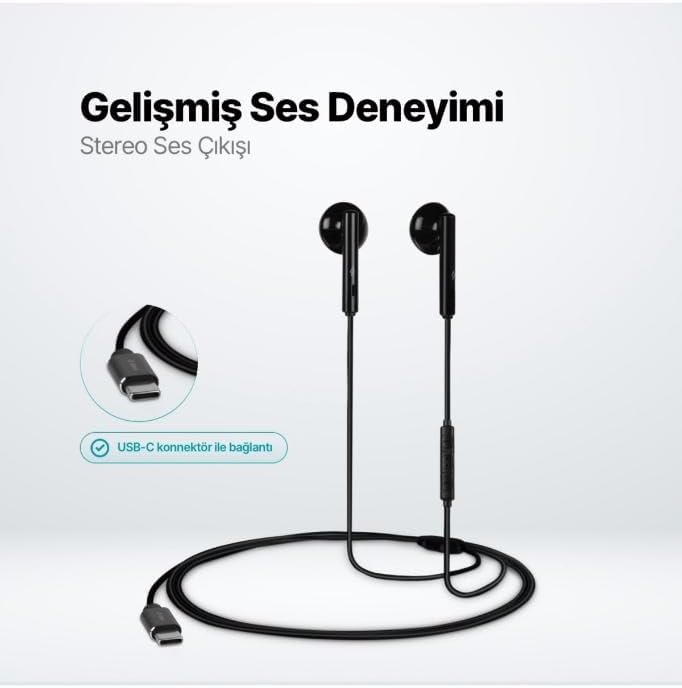
The TTEC Rio 2 Stereo USB-C Headset with Microphone is designed to provide a high-quality audio experience for music and calls. Its comfortable, lightweight design ensures a perfect fit and effective ambient noise isolation, allowing for hands-free communication and entertainment.
Ključne značilnosti:
- Advanced stereo sound output for an immersive audio experience.
- Integrated microphone for clear phone calls.
- Smart inline controller for easy management of volume, calls, and music playback.
- Lightweight and ergonomic design for extended comfort.
- Universal USB-C connection.
Nastavitev
To begin using your TTEC Rio 2 headset, follow these simple steps:
- Priključite slušalke: Locate the USB-C port on your device (smartphone, tablet, laptop, etc.). Insert the USB-C connector of the TTEC Rio 2 headset firmly into the device's USB-C port.
- Prepoznavanje naprave: Your device should automatically recognize the headset. If prompted, select the TTEC Rio 2 as the audio output and input device.
- Prilagodi prileganje: Place the earbuds comfortably in your ears. The ergonomic design ensures a snug fit for optimal sound quality and noise isolation.
Navodila za uporabo
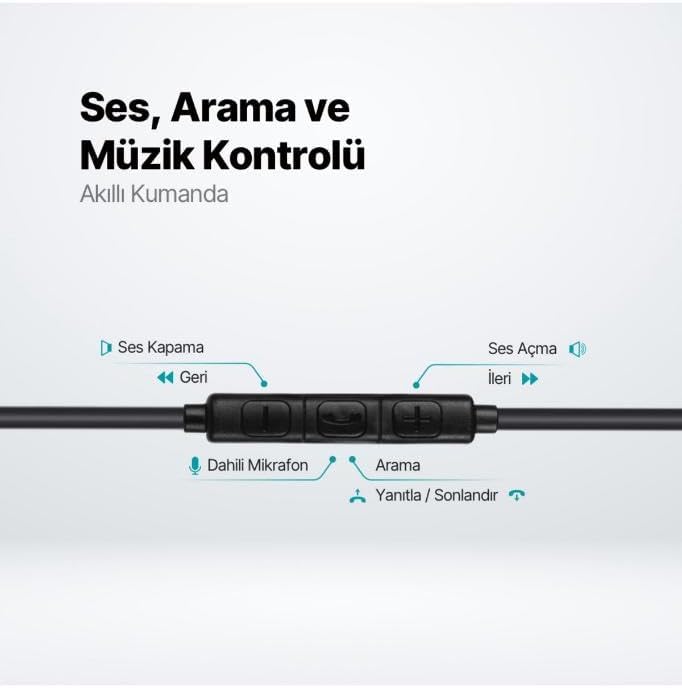
The TTEC Rio 2 headset features an inline smart controller for convenient management of your audio and calls.
Inline Controller Functions:
- Povečanje glasnosti (+): Pritisnite za povečanje glasnosti zvoka.
- Znižaj glasnost (-): Pritisnite za zmanjšanje glasnosti zvoka.
- Play/Pause/Answer/End Call (Center Button):
- Single press to play or pause music.
- Single press to answer an incoming call.
- Single press to end an active call.
- Dolgo pritisnite, da zavrnete dohodni klic.
- Next Track (Forward Button): Pritisnite za preskok na naslednjo pesem.
- Previous Track (Backward Button): Press to go back to the beginning of the current song or to the previous song.
- Vgrajen mikrofon: Located on the inline controller, it captures your voice for calls and voice commands.
Vzdrževanje
Proper care will extend the life and performance of your TTEC Rio 2 headset.
- Čiščenje: Slušalke in kabel nežno obrišite z mehko, suho krpo. Ne uporabljajte agresivnih kemikalij ali abrazivnih materialov.
- Shranjevanje: When not in use, store the headset in a clean, dry place. Avoid extreme temperatures. The included cable organizer clip can help prevent tangling.
- Izogibajte se vlagi: Slušalk ne izpostavljajte vodi ali prekomerni vlagi.
- Ravnajte previdno: Avoid pulling on the cable or applying excessive force to the connectors.

Odpravljanje težav
If you encounter issues with your TTEC Rio 2 headset, refer to the following common solutions:
| Težava | Možna rešitev |
|---|---|
| Ni zvoka iz slušalk. |
|
| Mikrofon ne deluje. |
|
| Kakovost zvoka je slaba ali popačena. |
|
| Sikanje ali statični hrup. |
|
Specifikacije
| Funkcija | Podrobnost |
|---|---|
| Znamka | TTEC |
| Številka modela | 2KMM14S |
| Povezljivost | USB-C |
| Faktor oblike slušalk | In-Ear |
| Namestitev ušesa | In-Ear |
| Mikrofon | Vgradna |
| Dimenzije paketa | 19.8 x 8.5 x 3.1 cm |
| Teža predmeta | 40 gramov |
| ASIN | B0D3XJ5SP7 |
Garancija in podpora
For warranty information and customer support, please refer to the documentation included with your purchase or visit the official TTEC webspletnega mesta. Shranite dokazilo o nakupu za morebitne garancijske zahtevke.