
1. Izdelek je končanview
The Minisopuru MD6950U DisplayLink Docking Station is a versatile solution designed to expand your laptop's connectivity and display capabilities. It features 16 ports, enabling triple monitor setups, high-speed data transfer, and simultaneous charging for multiple devices. This docking station is compatible with a wide range of systems, including MacBook (M1/M2/M3/M4), Thunderbolt 5/4/3, and Windows laptops.
Glavne lastnosti vključujejo:
- 16-v-1 povezljivost: Expands a single USB-C host cable to 16 ports.
- Podpora za tri monitorje: Supports up to three external displays with 8K/4K resolution via HDMI and DisplayPort.
- Visokohitrostni prenos podatkov: Multiple USB ports offer up to 10Gbps data transfer speeds.
- Zmogljivo polnjenje: Includes a 140W power adapter, providing up to 85W for laptops and 30W for phones/iPads.
- Široka združljivost: Supports macOS, Windows, Chrome OS, Ubuntu, and Android.
2. Vsebina paketa
Preverite, ali so v paketu vsi elementi:
- 1x Minisopuru MD6950U DisplayLink Docking Station
- 1x 140 W napajalnik
- 1x USB-C v USB-C kabel
- 1x USB-A Converter
- 1x uporabniška navodila

Image: Minisopuru MD6950U DisplayLink Docking Station and its accessories, including the 140W power adapter, USB-C cable, USB-A converter, and user guide.
3. Product Diagram and Ports
Familiarize yourself with the various ports and their functions on the docking station:

Image: Detailed diagram showing the front and rear ports of the Minisopuru MD6950U DisplayLink Docking Station with labels for each function.
Vrata na sprednji plošči:
- Gumb za vklop: To power on/off the docking station.
- Reže za kartice SD in TF: Za dostop do pomnilniške kartice.
- USB-A (10Gbps, 7.5W Charging) x2: High-speed data transfer and charging for peripherals.
- USB-C (10Gbps, 7.5W Charging) x2: High-speed data transfer and charging for peripherals.
- USB-C (10Gbps, 30W PD Charging): High-speed data transfer and fast charging for phones or tablets.
- USB-A (480Mbps): Standard USB 2.0 port for basic peripherals.
- Audio/Mic Jack: 3.5mm port for headphones or microphones.
Vrata na zadnji plošči:
- DC IN (24V=5.83A, 140W): Vhod za napajanje priklopne postaje.
- TO HOST (USB-C, Max 85W Charging): Connects to your laptop for data, video, and power delivery.
- HDMI 8K@30Hz or DP 8K@30Hz (DP Alt Mode): High-resolution display output.
- HDMI 4K@60Hz or DP 4K@60Hz (Display 1, DisplayLink Driver): Display output requiring DisplayLink driver.
- HDMI 4K@60Hz or DP 4K@60Hz (Display 2, DisplayLink Driver): Display output requiring DisplayLink driver.
- Gigabitni Ethernet: Vrata RJ45 za žično omrežno povezavo.
4. Navodila za nastavitev
4.1. Driver Installation (Essential for Multi-Display)
To enable all display ports and unlock triple/dual display functionality, especially for macOS devices, the DisplayLink driver must be installed on your laptop.
- Go to the official DisplayLink webspletno mesto: synaptics.com/products/displaylink-usb-graphics/downloads
- Click on the "DOWNLOADS" section.
- Select the corresponding operating system (Windows, macOS, Chrome OS, Ubuntu, Android) to download and install the driver.
- For macOS users, after installation, navigate to Privacy & Security > Screen Recording Permission and allow "DisplayLink Manager" to join.

Image: Visual guide illustrating the steps to download and install the DisplayLink driver from the Synaptics webmesto.
4.2. Priključitev priklopne postaje
- Connect the 140W power adapter to the DC IN port on the docking station and plug it into a power outlet.
- Povežite prenosni računalnik z GOSTITI USB-C port on the docking station using the provided USB-C to USB-C cable. If your laptop only has USB-A ports, use the included USB-A converter.
- Connect your external monitors to the available HDMI or DisplayPort outputs on the docking station.
- Connect any desired peripherals (keyboard, mouse, external hard drives, printer, etc.) to the USB data ports.
- For a wired network connection, connect an Ethernet cable to the Gigabit Ethernet pristanišče.
- Press the power button on the front panel to turn on the docking station.
Video: A short demonstration showing the Minisopuru MD6950U docking station connected to a laptop, providing power and extending display to multiple monitors.
5. Navodila za uporabo
5.1. Konfiguracija zaslona
The docking station supports various display combinations, including triple and dual extended displays, breaking the limitations of some MacBook M1/M2/M3/M4 chips.
- DP Alt Mode: One 8K HDMI or 8K DisplayPort output.
- Gonilnik DisplayLink: Two 4K HDMI or two 4K DisplayPort outputs.
Ensure the DisplayLink driver is installed for optimal multi-display performance.
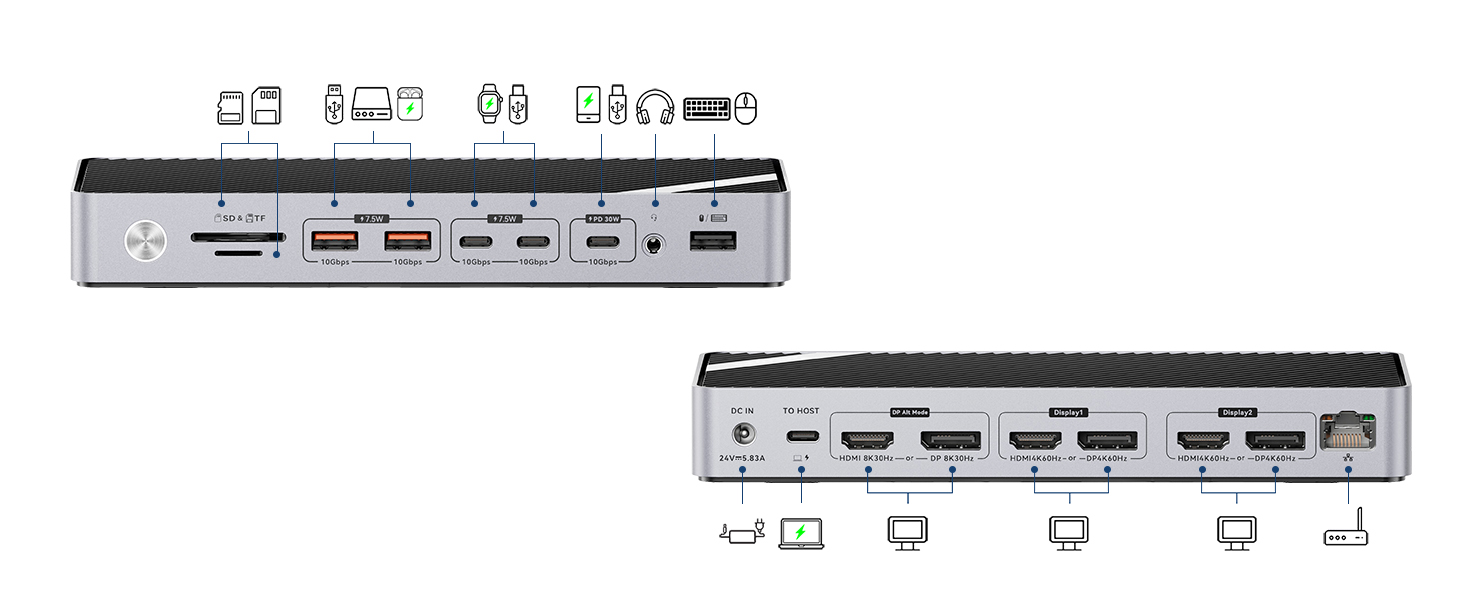
Image: Illustration of a laptop connected to three external monitors via the docking station, showcasing extended display capabilities for Mac and Windows.
5.2. Charging Capabilities
The included 140W power adapter ensures sufficient power for all connected devices.
- Polnjenje prenosnika: Provides up to 85W fast charging for your connected laptop via the GOSTITI vrata USB-C.
- Polnjenje naprave: The dedicated 30W PD USB-C port can fast charge phones and iPads. Other USB data ports provide 7.5W charging for various peripherals.

Image: The docking station providing 85W charging to a laptop, 30W to a smartphone, and 7.5W to a smartwatch, all simultaneously.
5.3. Prenos podatkov
The docking station features multiple USB ports for high-speed data transfer:
- 10 Gbps USB vrata: Four USB ports (2x USB-A, 2x USB-C) support up to 10Gbps data transfer speeds, ideal for external hard drives, SSDs, and other high-bandwidth devices.
- Reže za SD/TF kartice: Conveniently transfer data from memory cards.

Image: A desk setup showing the docking station connected to a laptop, charging a phone and smartwatch, and transferring data to an external hard drive and SD card.
6. Združljivost
The Minisopuru MD6950U DisplayLink Docking Station offers broad compatibility:
- Prenosni računalniki: All laptops with a full-featured USB Type-C port (supporting Display, Charging, and Data Transfer protocols).
- MacBook: Compatible with MacBook Pro/Air (including M1, M2, M3, M4 chips), iMac 24-inch, iMac M3, iMac M4, Mac Mini 2018 and later.
- Thunderbolt: Compatible with Thunderbolt 5/4/3 devices.
- Operacijski sistemi: Windows 10 or later, macOS, Chrome OS, Ubuntu, and Android.
- Opomba: Does NOT support Linux/Unix.
- USB-A Laptops: The included USB-A converter allows connection to USB-A laptops. However, when using the USB-A converter, the USB-C host port cannot charge USB-A laptops, and ports in DP Alt mode will not function.

Image: A visual representation of the docking station's compatibility with various operating systems and devices, including MacBooks, Windows laptops, and iMacs.
7. Odpravljanje težav
7.1. Težave s prikazom
- Ni prikaza/Napačna ločljivost: Ensure the DisplayLink driver is correctly installed and updated for your operating system. Verify all display cables are securely connected.
- MacBook Display Limitations: For triple display on MacBooks, the DisplayLink driver is essential to bypass native chip limitations.
- DP Alt Mode Not Working with USB-A Converter: If using the USB-A converter, DP Alt Mode display outputs will not function.
7.2. Težave s polnjenjem
- Prenosnik se ne polni: Ensure the 140W power adapter is properly connected to the docking station and a power outlet. Verify the USB-C host cable is securely connected to a full-featured USB-C port on your laptop.
- USB-A Laptop Not Charging: The USB-C host port cannot charge USB-A laptops when using the USB-A converter.
7.3. Data Transfer Issues
- Periferne naprave niso prepoznane: Check that USB devices are securely plugged into the correct ports. Try connecting the device directly to your laptop to rule out device-specific issues.
7.4. Splošna uspešnost
- Občasna povezljivost: Ensure all cables are firmly connected. Restarting the docking station and your laptop can resolve temporary issues.
- Odvajanje toplote: The docking station is designed with rapid heat dissipation features. Ensure it is placed in a well-ventilated area.
Video: A demonstration of switching between a Windows laptop and a MacBook using a single USB-C cable connected to the Minisopuru MD6950U docking station, showcasing seamless transition of displays and peripherals.
8. Specifikacije
| Funkcija | Specifikacija |
|---|---|
| Dimenzije izdelka | 7.7 x 3.4 x 1.1 palcev (19.56 x 8.64 x 2.79 cm) |
| Teža predmeta | 15.9 unče (451 grama) |
| Skupno število vrat | 16 |
| Skupno število vrat HDMI | 3 |
| Total DisplayPort Ports | 3 |
| Skupno število vrat USB | 6 (4x 10Gbps, 1x 480Mbps, 1x 30W PD USB-C) |
| Napajalnik Wattage | 140 W |
| Laptop Charging (Host) | Do 85 W |
| Strojni vmesnik | 3.5mm Audio, DisplayPort, HDMI, USB 3.2 Gen 2, USB Type C, Gigabit Ethernet, SD/TF Card Slots |
| barva | siva |
9. Garancija in podpora strankam
Minisopuru is committed to providing excellent products and customer care. This product comes with a 2-year customer service warranty. For technical assistance or product inquiries, please contact our 7/24 technical support team.
For further assistance, please refer to the contact information provided in your detailed User Instructions or visit the official Minisopuru webmesto.