
1. Uvod
This manual provides essential information for the safe and effective operation of your Mastech MS8301A Digital Multimeter. Please read this manual thoroughly before using the device to ensure proper functionality and to prevent potential hazards. Keep this manual for future reference.
2. Varnostne informacije
Always adhere to the following safety precautions to avoid electric shock or personal injury, and to prevent damage to the multimeter or the equipment under test.
- Preberite navodila: Understand all instructions and safety information before use.
- Nazivna voltage: Ne nanašajte več kot nazivna voltage, as marked on the multimeter, between the terminals or between any terminal and ground.
- Testni vodi: Preverite merilne kable za poškodovano izolacijo ali izpostavljeno kovino. Če so poškodovani, jih zamenjajte.
- Circuit Disconnection: Izklopite napajanje tokokroga in izpraznite vse visokonapetostnetage kondenzatorje pred testiranjem upora, kontinuitete, diod ali kapacitivnosti.
- Izbira funkcije: Prepričajte se, da je funkcijsko stikalo v pravilnem položaju za izvajano meritev.
- Živa vezja: Do not measure current on a live circuit with the test leads connected in parallel.
- Delovno okolje: Do not operate the multimeter in explosive gas, vapor, or damp okoljih.
- Osebna zaščitna oprema: Always wear appropriate personal protective equipment, such as safety glasses, when working with electrical circuits.
- Ocena varnosti: This device is rated for CAT III 600V. Do not exceed this rating.
3. Izdelek je končanview
3.1 Lastnosti
The Mastech MS8301A Digital Multimeter offers a range of features for various electrical measurements:
- Zaslon: 2000 štetij
- Zadrževanje podatkov: Zamrzne prikazano vrednost za priročno snemanje.
- Tester baterij: For 1.5V and 9V batteries.
- Kompaktna zasnova: Product Size: 150mm x 74mm x 48mm (5.9" x 2.9" x 1.7")
- Lahek: Product Weight: 220g (0.48lb)

Image: Detailed features and specifications of the Mastech MS8301A multimeter, including display count, data hold, battery test function, and physical dimensions.
3.2 Komponente
The Mastech MS8301A package typically includes the following components:
- Mastech MS8301A Digital Multimeter Unit
- Merilni kabli (rdeči in črni)
- AAA Batteries (2x1.5V)
- Kalibracijski certifikat (če je primerno)
- Vodnik za hiter začetek
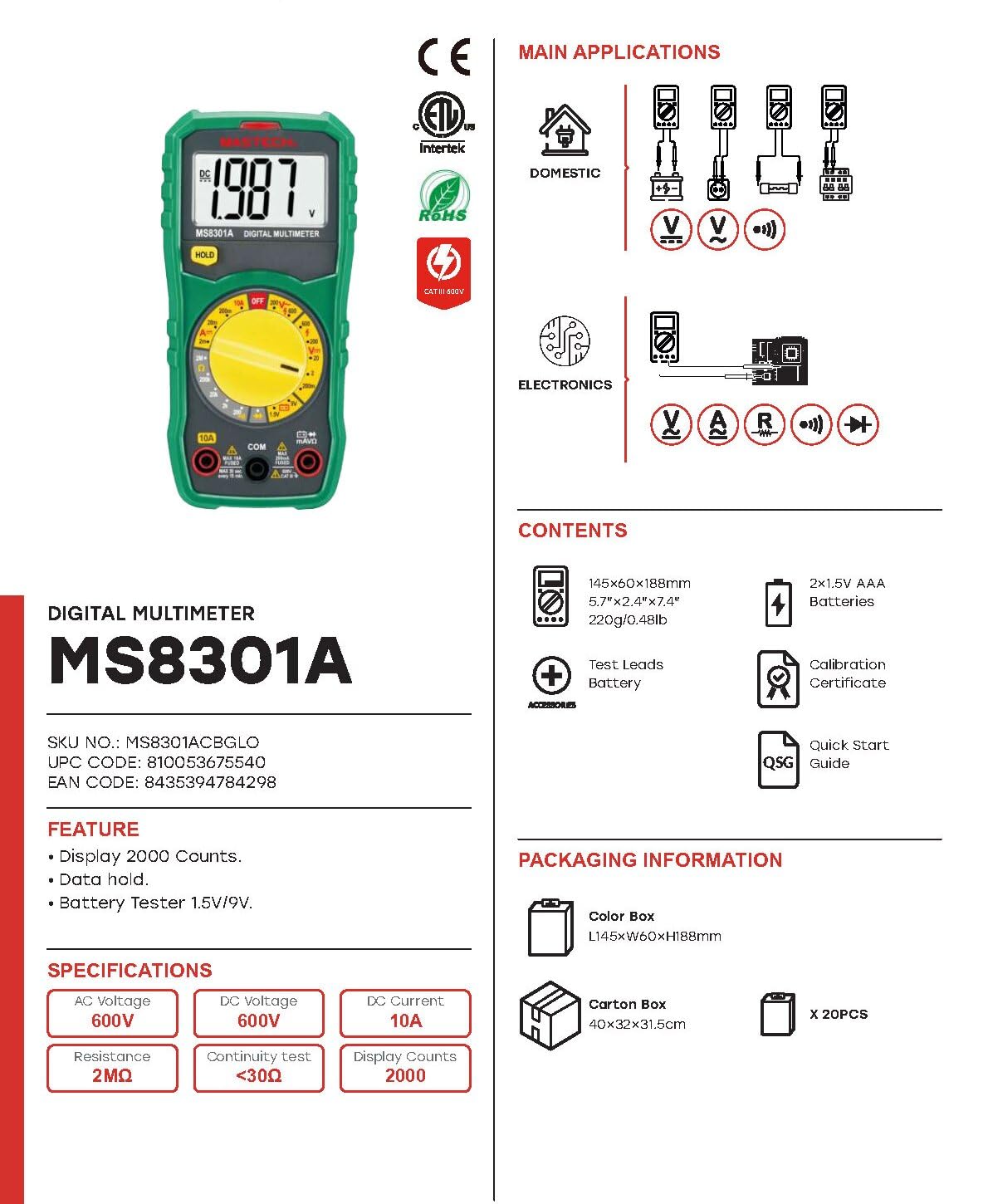
Image: The Mastech MS8301A Digital Multimeter showing its front panel, rotary switch, display, input jacks, and a list of included accessories such as test leads and batteries.
4. Nastavitev
4.1 Namestitev baterije
- Prepričajte se, da je multimeter izklopljen in odklopite vse merilne kable.
- Poiščite pokrovček predalčka za baterije na zadnji strani multimetra.
- Odvijte pritrdilni vijak (vijake) in odstranite pokrov.
- Vstavite dve 1.5 V bateriji AAA in pri tem upoštevajte pravilno polarnost (+ in -), kot je označeno v notranjosti predala.
- Namestite pokrov predalčka za baterije in ga pritrdite z vijakom(-i).
4.2 Priključitev merilnih vodnikov
Priključite merilne kable na ustrezne vhodne priključke na multimetru:
- Vstavite črna merilni kabel v COM (navadni) priključek.
- Za večino meritev (Voltage, Resistance, Diode, Continuity, Temperature, Battery Test), insert the rdeča merilni kabel v VΩmA jack.
- For high current measurements (up to 10A), insert the rdeča merilni kabel v 10A jack.
5. Navodila za uporabo
Before taking any measurement, ensure the test leads are correctly connected and the rotary switch is set to the desired function.
5.1 Merjenje DC Voltage (V=)
- Set the rotary switch to the desired V= range (e.g., 20V for measuring up to 20V DC).
- Rdečo merilno vez priključite na pozitivno (+) stran vezja, črno merilno vez pa na negativno (-) stran.
- Preberite zvtage vrednost na zaslonu.
5.2 Merjenje AC Voltage (V~)
- Set the rotary switch to the desired V~ range (e.g., 200V for measuring up to 200V AC).
- Priključite merilne kable na izmenični tok (AC volt)tage vir.
- Preberite zvtage vrednost na zaslonu.
5.3 Merjenje enosmernega toka (A=)
- Pomembno: Preden multimeter priključite zaporedno, izklopite napajanje tokokroga.
- Set the rotary switch to the desired A= range (e.g., 200mA or 10A). Remember to move the red lead to the 10A jack for high current.
- Odprite tokokrog, kjer želite izmeriti tok.
- Connect the multimeter in series with the circuit, ensuring the current flows through the multimeter.
- Priklopite napajanje na vezje in na zaslonu odčitajte trenutno vrednost.
5.4 Merjenje upornosti (Ω)
- Pomembno: Pred merjenjem upornosti se prepričajte, da je vezje brez napetosti in da so vsi kondenzatorji izpraznjeni.
- Set the rotary switch to the desired Ω obseg.
- Merilne kable priključite na komponento, ki jo želite izmeriti.
- Na zaslonu preberite vrednost upora.
5.5 Test diod (→|)
- Pomembno: Prepričajte se, da je dioda odklopljena iz vezja.
- Vrtljivo stikalo nastavite na Diodni test položaj.
- Rdeči merilni kabel priključite na anodo, črni pa na katodo diode. Na zaslonu se bo prikazala napetost v smeri naprej.tage padec.
- Zamenjajte žice. Na zaslonu bi moral biti napis "OL" (odprta zanka), če je dioda v redu.
5.6 Preizkus neprekinjenosti ())))
- Pomembno: Prepričajte se, da je tokokrog izklopljen.
- Vrtljivo stikalo nastavite na Test kontinuitete položaj.
- Connect the test leads across the component or wire to be tested.
- If the resistance is below approximately 30Ω, the buzzer will sound, indicating continuity. The display will also show the resistance value.
5.7 Test baterije (1.5 V/9 V)
- Vrtljivo stikalo nastavite na 1.5 V or 9V battery test position, corresponding to the battery type.
- Rdečo merilno vez priključite na pozitivni (+) pol baterije, črno merilno vez pa na negativni (-) pol.
- Preberite glasnost baterijetage na zaslonu.
5.8 Zadrževanje podatkov
Press the "HOLD" button to freeze the current reading on the display. Press it again to release the hold function and resume live readings.
6. Specifikacije
| Merjenje | Razpon | Resolucija |
|---|---|---|
| DC Voltage | 200 mV / 2 V / 20 V / 200 V / 600 V | 100µV / 1mV / 10mV / 100mV / 1V |
| AC Voltage | 200V / 600V | 100 mV / 1 V |
| enosmerni tok | 2mA / 20mA / 200mA / 10A | 1µA / 10µA / 100µA / 10mA |
| Odpornost | 200Ω / 2kΩ / 20kΩ / 200kΩ / 2MΩ | 0.1Ω / 1Ω / 10Ω / 100Ω / 1kΩ |
| Test kontinuitete | Buzzer sounds at <30Ω | — |
| Diodni test | Naprej voltage padec | — |
| Test baterije | 1.5V / 9V | — |
Splošne specifikacije
- Zaslon: 2000 štetij
- Napajanje: 2 x 1.5 V AAA baterije
- Dimenzije: 150 mm x 74 mm x 48 mm (5.9" x 2.9" x 1.7")
- Teža: 220 g (0.48 lb)
- Ocena varnosti: CATIII 600V
- Material: Akrilonitril butadien stiren (ABS)
- barva: Modra

Image: A table detailing manual ranging specifications for various Mastech digital multimeters, including the MS8301A, showing display counts, safety ratings, and measurement capabilities.
7. Vzdrževanje
7.1 Zamenjava baterije
When the battery low indicator appears on the display, replace the batteries immediately to ensure accurate readings. Follow the steps outlined in Section 4.1 for battery installation.
7.2 Čiščenje
Obrišite ohišje z oglasomamp krpo in blagim detergentom. Ne uporabljajte abrazivnih sredstev ali topil. Pred uporabo se prepričajte, da je multimeter popolnoma suh.
7.3 Shranjevanje
If the multimeter is not used for an extended period, remove the batteries to prevent leakage and damage to the device. Store in a cool, dry place away from direct sunlight.
8. Odpravljanje težav
| Težava | Možen vzrok | rešitev |
|---|---|---|
| Brez zaslona ali zatemnjen zaslon | Prazne ali skoraj prazne baterije; napačna polarnost baterij. | Zamenjajte baterije; preverite orientacijo baterij. |
| Prikazano je "OL" (preobremenitev) | Measurement exceeds selected range; open circuit. | Select a higher range; check for open circuit in the component or leads. |
| Nepravilni odčitki | Incorrect function selected; poor test lead connection; damaged test leads. | Verify function switch position; ensure secure lead connection; inspect and replace damaged leads. |
| Brez piska za neprekinjenost | Open circuit; resistance too high. | Check for breaks in the circuit; ensure resistance is below 30Ω. |
9. Garancija in podpora
Mastech products are designed for reliability and performance. For specific warranty information, please refer to the warranty card included with your product or contact Mastech customer support. Keep your purchase receipt as proof of purchase.
For technical support or service inquiries, please visit the official Mastech webspletnem mestu ali se obrnite na njihove pooblaščene servisne centre.