
1. Uvod
This manual provides instructions for the safe and effective operation of the Mastech MS2006B Digital AC Clamp Leakage Current Meter. This device is designed for measuring AC leakage current, offering a reliable tool for electrical testing and troubleshooting.
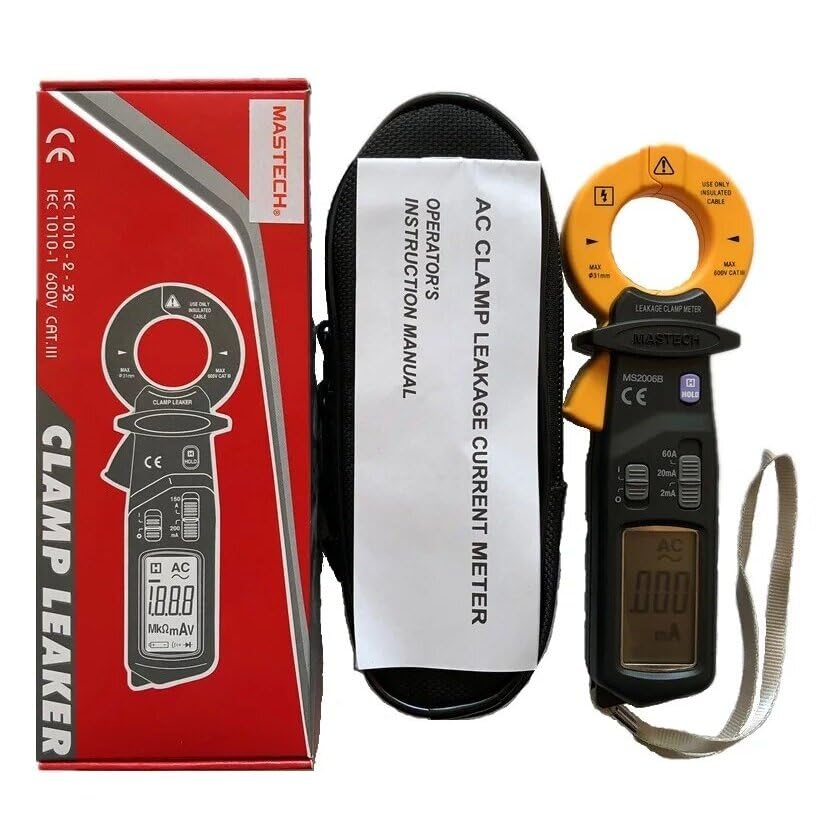
Image 1.1: The Mastech MS2006B Digital AC Clamp Leakage Current Meter, shown with its protective carrying case and instruction manual, alongside its retail packaging.
2. Varnostne informacije
To ensure safe operation, please read and understand all safety warnings and operating instructions before using the meter. Failure to observe these warnings can result in severe injury or damage to the instrument.
- Vedno upoštevajte lokalne in nacionalne varnostne predpise.
- Do not use the meter if it appears damaged or if the insulation is compromised.
- Ensure the meter's range is appropriate for the measurement being taken.
- Avoid contact with live circuits when replacing batteries or opening the case.
- Keep fingers behind the finger guards during operation.
- Merilnika ne uporabljajte v okolju z eksplozivnimi plini, hlapi ali prahom.
3. Značilnosti izdelka
The Mastech MS2006B offers several key features for efficient and accurate measurements:
- Zaslon: 2000 counts digital display for clear readings.
- Odpiranje čeljusti: Maximum jaw opening of Φ31mm (1.2 inches) to accommodate various cable sizes.
- Samodejni izklop: Automatically powers off after a period of inactivity to conserve battery life.
- Zadrževanje podatkov: Zamrzne prikazano vrednost za priročno snemanje.
- Prikaz nizke baterije: Označuje, kdaj je potrebna zamenjava baterije.
- AC Current Ranges: Includes 60A, 20mA, and 2mA measurement ranges.

Image 3.1: A clear front view of the Mastech MS2006B meter, highlighting its digital display, rotary switch for range selection, and the clamp čeljust.
4. Components and Packaging Contents
Po razpakiranju preverite, ali so vsi spodaj navedeni predmeti prisotni in nepoškodovani:
- Mastech MS2006B digitalni klimatski sistemamp Merilnik toka uhajanja
- Zaščitna torba za nošenje
- Certifikat o kalibraciji
- Vodnik za hiter začetek
- 2 x 1.5V LR44 Batteries (pre-installed or included separately)

Image 4.1: An informational diagram detailing the main applications, contents, and packaging information for the MS2006B meter.
5. Nastavitev
5.1 Namestitev baterije
The MS2006B meter requires two (2) LR44 1.5V batteries for operation. These batteries are typically included with the device.
- Poiščite pokrov predalčka za baterije na zadnji strani merilnika.
- Use a suitable tool (e.g., a small screwdriver or coin) to open the battery compartment.
- Insert the two LR44 batteries, observing the correct polarity (+ and -) as indicated inside the compartment.
- Namestite pokrov predala za baterije in ga trdno pritrdite.

Slika 5.1: Notranji view of the MS2006B, illustrating the battery compartment and the meter's internal components.
6. Navodila za uporabo
6.1 Vklop/izklop
To power on the meter, rotate the rotary switch from the 'OFF' position to any desired measurement range (e.g., 60A, 20mA, 2mA). To power off, rotate the switch back to the 'OFF' position.
6.2 Merjenje izmeničnega uhajavega toka
- Select the appropriate AC current range (60A, 20mA, or 2mA) using the rotary switch. Start with the highest range if the current value is unknown.
- Odprite clamp čeljust s pritiskom na sprožilec.
- Enclose the single conductor (not multiple conductors) through which the leakage current is to be measured within the clamp čeljust. Prepričajte se, da je čeljust popolnoma zaprta.
- Read the current value displayed on the LCD. If the reading is too low for the selected range, switch to a lower range for better resolution.
6.3 Funkcija zadrževanja podatkov
Press the 'HOLD' button to freeze the current reading on the display. Press the 'HOLD' button again to release the reading and resume live measurement.
6.4 Samodejni izklop
The meter is equipped with an Auto Power Off feature to conserve battery life. If no operation is performed for approximately 15 minutes, the meter will automatically power off. To reactivate the meter, rotate the rotary switch to 'OFF' and then back to a measurement range, or press any button.
7. Vzdrževanje
7.1 Čiščenje
Obrišite ohišje merilnika z oglasomamp krpo in blagim detergentom. Ne uporabljajte abrazivnih sredstev ali topil. Pred uporabo se prepričajte, da je merilnik popolnoma suh.
7.2 Zamenjava baterije
When the low battery indicator appears on the display, replace the batteries as described in Section 5.1. Always use two new LR44 1.5V batteries.
7.3 Shranjevanje
If the meter is not to be used for an extended period, remove the batteries to prevent leakage and store the meter in a cool, dry place away from direct sunlight.
8. Odpravljanje težav
- Brez zaslona: Preverite namestitev baterij in se prepričajte, da niso izpraznjene. Po potrebi jih zamenjajte.
- Netočni odčitki: Zagotovite clamp jaw is fully closed around a single conductor. Verify the correct measurement range is selected.
- Merilnik se ne vklopi: Confirm batteries are correctly installed and charged. Rotate the function switch to an 'ON' position.
9. Specifikacije
| Parameter | Vrednost |
|---|---|
| Zaslon | 2000 štetij |
| Odpiranje čeljusti | Φ31mm (1.2 inches) |
| Območja izmeničnega toka | 60A, 20mA, 2mA |
| Vir napajanja | 2 x LR44 1.5V Batteries |
| Dimenzije izdelka | 7.87 x 5.91 x 9.84 palcev |
| Teža predmeta | 1 kilogram (2.2 funta) |
| Proizvajalec | MASTECH |
| Številka modela | YQ-MS2006B |
10. Garancija in podpora
For warranty information and technical support, please refer to the documentation included with your product or contact Mastech customer service directly. Keep your purchase receipt as proof of purchase.