
1. Uvod
This manual provides detailed instructions for the safe and effective operation, maintenance, and troubleshooting of your Acebeam Terminator M2-X Dual Head Spot/Flood EDC Flashlight. Please read this manual thoroughly before using the product to ensure optimal performance and longevity.
2. Varnostna navodila
- Zaščita oči: Ne svetite s svetilko neposredno v oči. Močan žarek lahko povzroči začasno okvaro vida ali trajno poškodbo.
- Opozorilo o vročini: The flashlight may become hot during prolonged use at high output levels. Handle with care to avoid burns.
- Varnost baterije:
- Uporabljajte samo priporočeno litij-ionsko baterijo 18650.
- Baterije ne razstavljajte, preluknjajte ali povzročajte kratkega stika.
- Baterije hranite stran od vode in ognja.
- If the battery is damaged or leaking, discontinue use immediately.
- otroci: Hraniti izven dosega otrok.
- Demontaža: Do not attempt to disassemble the flashlight head or body, as this may damage the device and void the warranty.
3. Vsebina paketa
Upon opening your Acebeam Terminator M2-X package, please verify that all items are present and in good condition.
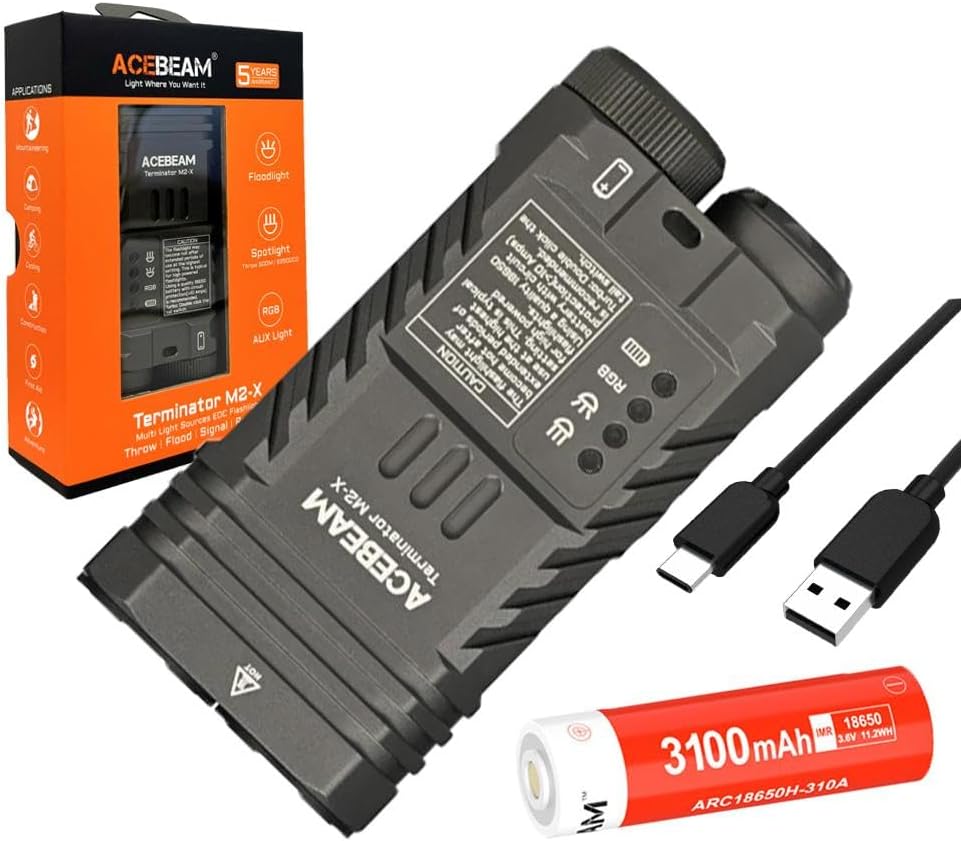
Slika 3.1: The Acebeam Terminator M2-X flashlight, an included 3100mAh 18650 battery, and two USB-C charging cables.
- Acebeam Terminator M2-X Flashlight
- Acebeam ARC18650H-310A 3100mAh 18650 Li-ion Battery (with integrated USB-C charging port)
- Polnilni kabel USB-C
- Uporabniški priročnik (ta dokument)
- Vrvica za ključe (če je priložena)
- Spare O-rings (if included)
4. Izdelek je končanview
The Acebeam Terminator M2-X is a compact, dual-head EDC (Everyday Carry) flashlight featuring both a floodlight and a spotlight, along with auxiliary RGB lights. It is designed for versatility in various lighting scenarios.

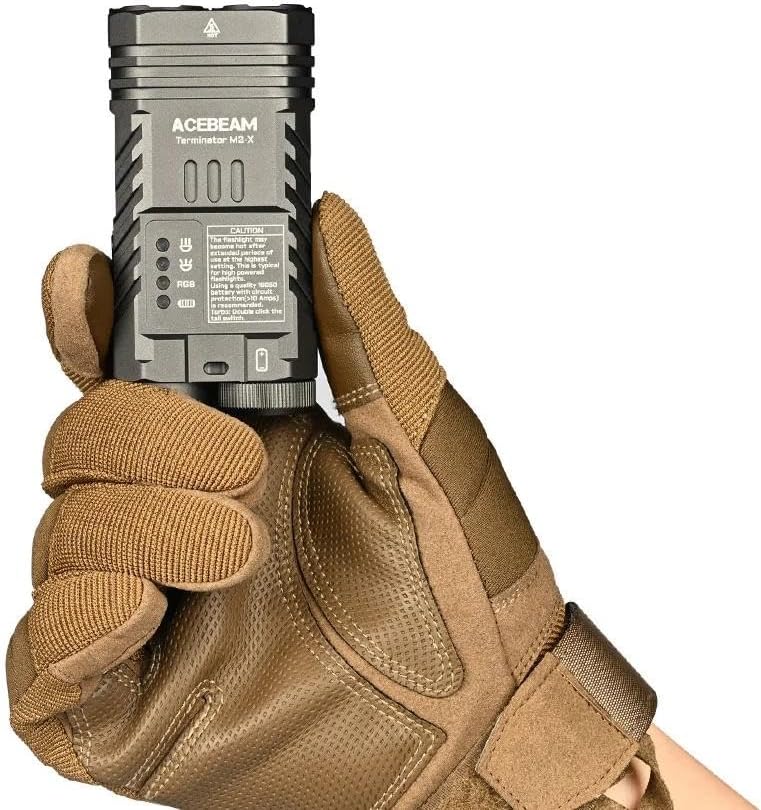
Slika 4.1: The compact design and dimensions of the M2-X, suitable for everyday carry.
4.1 Ključne lastnosti
- Dvojni svetlobni viri: Independent floodlight and spotlight for varied illumination needs.
- High CRI Floodlight: Nichia 519A 5000K High CRI90 LEDs for accurate color rendering.
- Močan žaromet: Long-range beam for distant illumination.
- Auxiliary RGB Lights: Multiple color options and signal modes.
- Kompaktna zasnova: Durable aluminum construction with a detachable body clip for easy carry.
4.2 Komponente

Slika 4.2: Podrobno view of the floodlight (left) and spotlight (right) heads.
- Floodlight Head: Contains 3x Nichia 519A 5000K High CRI90 LEDs.
- Spotlight Head: Single LED for focused, long-distance beam.
- Auxiliary Light Emitters: Located within the floodlight head for RGB functions.
- Zadnje stikalo: For power on/off and brightness adjustment.
- Stranski gumb: For switching between floodlight, spotlight, and auxiliary light modes.
- Pokrov baterije: Removable for battery access.
- Body Clip: Detachable stainless steel clip for secure attachment.
5. Nastavitev
5.1 Namestitev baterije
- Odvijte zadnji pokrovček svetilke tako, da ga obrnete v nasprotni smeri urinega kazalca.
- Insert the included Acebeam 18650 battery with the positive (+) terminal facing towards the flashlight head.
- Screw the tail cap back on clockwise, ensuring it is tightened completely. The flashlight will not operate if the tail cap is not fully secured.
5.2 Začetno polnjenje
The included 18650 battery features an integrated USB-C charging port. It is recommended to fully charge the battery before first use.
- Locate the USB-C port on the side of the 18650 battery.
- Connect the provided USB-C cable to the battery's port and to a USB power source (e.g., wall adapter, computer USB port).
- Indikatorska lučka na bateriji bo prikazovala stanje polnjenja (običajno rdeča za polnjenje, zelena za popolnoma napolnjeno).
- Once fully charged, disconnect the cable and reinsert the battery into the flashlight.
6. Navodila za uporabo
The Acebeam Terminator M2-X features a tail switch for power and brightness, and a side button for mode selection (Floodlight, Spotlight, Auxiliary Light).
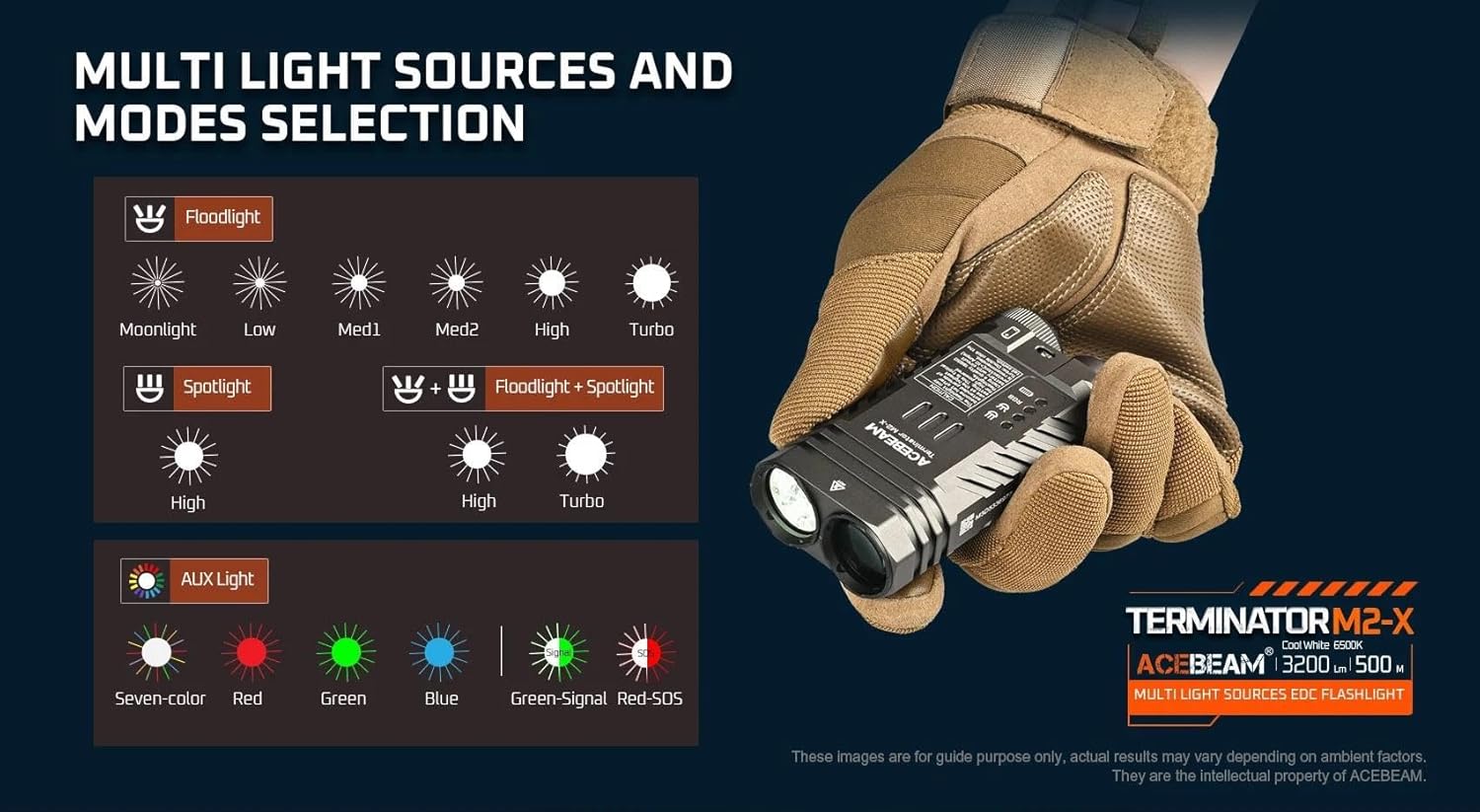
Slika 6.1: konecview of multi-light sources and mode selection.
6.1 Osnovno delovanje (zadnje stikalo)
- VKLOP/IZKLOP: Single click the tail switch to turn the flashlight ON or OFF.
- Brightness Adjustment (Floodlight/Spotlight): When the light is ON, press and hold the tail switch to cycle through brightness levels (Moonlight, Low, Med1, Med2, High, Turbo for Floodlight; High for Spotlight). Release the switch at your desired level. The light will memorize the last used brightness level for Floodlight and Spotlight independently.
- Instant Turbo: From OFF, press and hold the tail switch for approximately 1 second to activate Turbo mode directly. Release to turn OFF.
- Moonlight Mode (Floodlight only): From OFF, press and hold the tail switch for approximately 0.5 seconds to activate Moonlight mode.
6.2 Mode Selection (Side Button)
The side button controls which light source is active (Floodlight, Spotlight, or Auxiliary Light).
- Switching Main Modes: Single click the side button to cycle between Floodlight, Spotlight, and Auxiliary Light modes. The flashlight will remember the last selected mode.
- Floodlight + Spotlight (Combined Mode): From either Floodlight or Spotlight mode, double-click the side button to activate both simultaneously. Double-click again to return to the previous single mode.
- Strobe (Floodlight): From Floodlight mode, triple-click the tail switch to activate Strobe. Single click the tail switch to turn OFF.
6.3 Auxiliary Light Modes
When in Auxiliary Light mode (selected via the side button), the tail switch controls the RGB light functions.

Slika 6.2: Available auxiliary light modes.
- Cycling RGB Colors: With the auxiliary light ON, single click the tail switch to cycle through: Seven-color automatic cycle, Red, Green, Blue, Green-Signal Light, Red-SOS.
- Turning OFF Auxiliary Light: Press and hold the tail switch while in Auxiliary Light mode to turn it OFF.
6.4 Indikator nivoja baterije
The M2-X features an indicator light to show battery status. This indicator typically turns red when the battery charge drops below 20%.
7. Vzdrževanje
- Čiščenje: Ohišje svetilke očistite z mehko krpoamp krpo. Ne uporabljajte abrazivnih čistil ali topil.
- Navoji in O-tesnila: Navoje in O-tesnila občasno namažite s silikonsko mastjo, da ohranite vodoodpornost. Če so O-tesnila poškodovana ali obrabljena, jih zamenjajte.
- Vzdrževanje baterije:
- Ko baterije ne uporabljate, jo hranite na hladnem in suhem mestu.
- Če baterijo shranjujete dlje časa, jo napolnite do približno 50 % zmogljivosti.
- Izogibajte se popolnemu praznjenju baterije, saj lahko to skrajša njeno življenjsko dobo.
8. Odpravljanje težav
| Težava | Možen vzrok | rešitev |
|---|---|---|
| Flashlight does not turn ON. |
|
|
| Svetlobni izhod je šibek ali utripa. |
|
|
| Cannot switch between Floodlight/Spotlight/Auxiliary modes. | Side button malfunction or incorrect operation. | Ensure you are single-clicking the side button. If issue persists, contact support. |
| Auxiliary RGB lights are very dim. | This is normal operation for the auxiliary lights. | The auxiliary RGB lights are designed for low output signaling and close-range use, not for illumination. |
9. Specifikacije
Slika 9.1: Detailed technical parameters for the M2-X.
| Funkcija | Podrobnost |
|---|---|
| Model | Acebeam Terminator M2-X |
| LED (Floodlight) | 3x Nichia 519A 5000K High CRI90 |
| Max Output (Floodlight) | 2,000 lumnov |
| Max Output (Spotlight) | 900 lumnov |
| Max Runtime (Floodlight Moonlight) | 38 uri |
| Max Runtime (Spotlight High) | 1 ura 50 minut |
| Max Beam Distance (Floodlight) | 164 metrov |
| Max Beam Distance (Spotlight) | 500 metrov |
| Max Beam Intensity (Floodlight) | 6724 cd |
| Max Beam Intensity (Spotlight) | 62500 cd |
| Pomožne luči | Seven-color cycle, Red, Green, Blue, Green-Signal, Red-SOS (0.5 lumens each) |
| Vir napajanja | 1x 18650 Lithium-Ion Battery (included) |
| Material | Aluminij |
| Stopnja vodoodpornosti | Vodotesen |
| Dimenzije (dolžina x višina x širina) | 95.4 mm x 48.5 mm x 29 mm (3.75" x 1.90" x 1.14") |
| Teža (vključno z baterijo) | 197.2 g (6.95 oz) |
10. Garancija in podpora
For warranty information and customer support, please refer to the official Acebeam website or contact your authorized Acebeam dealer. Keep your purchase receipt as proof of purchase for any warranty claims.
Acebeam Official Webspletno mesto: www.acebeam.com