
1. Uvod
Thank you for choosing the Pelonis Filter for your AC100-20AR Water-Cooled Air Cooler Fan. This filter is an essential component designed to ensure clean, fresh, and efficient airflow from your device. Regular maintenance and timely replacement of the filter are crucial for maintaining optimal performance and air quality.
This manual provides detailed instructions on how to properly install, maintain, and replace your Pelonis filter. Please read this manual thoroughly before use and keep it for future reference.
2. Varnostna navodila
- Always unplug the Pelonis AC100-20AR air cooler from the power outlet before attempting any installation, removal, or maintenance of the filter.
- Handle the filter with care to avoid damage to the delicate filter mesh.
- Keep the filter out of reach of children and pets.
- Do not use harsh chemicals or abrasive materials to clean the filter, as this may damage its structure and effectiveness.
- Ensure your hands are clean and dry before handling the filter.
3. Izdelek je končanview
The Pelonis filter is specifically designed for the AC100-20AR 5L Water-Cooled Air Cooler Fan. It features a high-density filter mesh that effectively captures dust particles and impurities, contributing to a cleaner and healthier indoor environment. Its corrugated structure maximizes surface area for efficient air purification and cooling.

Image: The Pelonis filter, showcasing its high-density, corrugated design for efficient air purification.
4. Namestitev in zamenjava
The filter is designed for easy removal and installation, facilitating regular cleaning and replacement.
Steps for Filter Replacement:
- Ugasniti: Ensure the Pelonis AC100-20AR air cooler is turned off and unplugged from the power outlet.
- Poiščite predalček filtra: Identify the filter compartment, typically located at the rear or side of the air cooler.
- Odstranite stari filter: Gently pull out the old filter from its slot. It may be secured by clips or a simple slide mechanism. Refer to your air cooler's main manual for specific compartment access.
- Vstavi nov filter: Carefully slide the new Pelonis filter into the compartment, ensuring it is oriented correctly and fits snugly. The filter's design ensures proper airflow direction.
- Varni predal: Pokrov predala za filter trdno zaprite.
- Obnovi moč: Plug the air cooler back into the power outlet and resume operation.
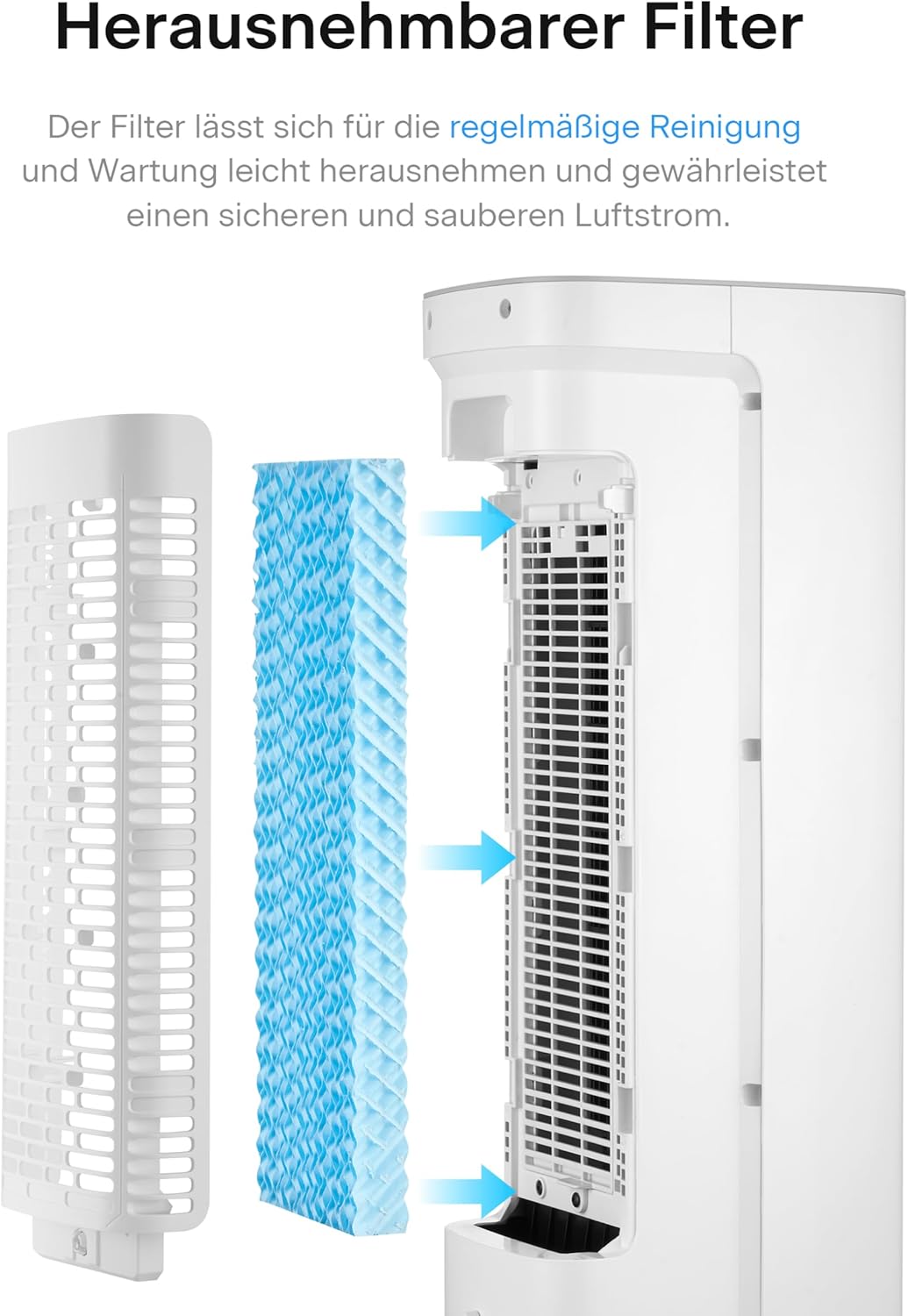
Image: Visual guide demonstrating the process of removing and inserting the filter into the air cooler.

Image: A hand demonstrating the easy removal of the filter from the air cooler's compartment.
5. Vzdrževanje
Regular cleaning and timely replacement of the filter are essential for optimal performance and to ensure a clean and safe airflow.
Čiščenje filtra:
- The filter can be easily removed for regular cleaning.
- Gently rinse the filter under cool, running water to remove accumulated dust and debris.
- Ne uporabljajte mila ali detergentov.
- Allow the filter to air dry completely before reinserting it into the air cooler. Ensure no moisture remains to prevent mold or mildew growth.
Pogostost zamenjave:
The lifespan of the filter depends on usage frequency and environmental conditions. For optimal performance and air quality, it is recommended to replace the Pelonis filter every 3 to 6 months, or more frequently if you notice a decrease in airflow or an increase in dust accumulation.
6. Odpravljanje težav
Če imate težave s filtrom, upoštevajte naslednje:
- Zmanjšan pretok zraka: If the air cooler's airflow seems weaker than usual, the filter might be clogged. Remove and clean the filter as per the maintenance instructions. If the issue persists after cleaning, it may be time for a replacement.
- Nenavaden vonj: A musty or unpleasant odor from the air cooler can indicate a dirty filter or stagnant water in the reservoir. Clean the filter thoroughly and ensure the water tank is clean and filled with fresh water. Allow the filter to dry completely after cleaning.
- Visible Dust on Filter: This is normal and indicates the filter is working. However, if the dust buildup is excessive, it's a sign that cleaning or replacement is needed.
7. Specifikacije
| Funkcija | Specifikacija |
|---|---|
| Številka modela | PFC50A4AWGDE-R |
| Združljivost | Pelonis 5L Water-Cooled Air Cooler Fan AC100-20AR |
| Dimenzije (D x Š x V) | 39.8 mm x 3 mm x 12 mm (približno) |
| Teža | 50 g |
| barva | White / Light Blue |
| Material | High-density filter mesh |
8. Garancija in podpora
For warranty information or technical support regarding your Pelonis filter or AC100-20AR air cooler, please refer to the original product documentation that came with your air cooler or visit the official Pelonis website. You may also contact Pelonis customer service directly for assistance.
Please have your product model number (PFC50A4AWGDE-R) and purchase details ready when contacting support.