
OiLiehu A7146A3216A4MI2
OiLiehu Android 13 Car Radio User Manual
For Hyundai Tucson IX35 (2010-2015) - Model A7146A3216A4MI2
1. Uvod
This manual provides detailed instructions for the installation, operation, and maintenance of your OiLiehu Android 13 Car Radio. Designed specifically for Hyundai Tucson IX35 models from 2010 to 2015, this unit offers advanced features including Wireless Carplay, Android Auto, GPS navigation, Bluetooth connectivity, FM RDS radio, WiFi, Mirror Link, rear camera support, and steering wheel control integration. Please read this manual thoroughly before installation and use to ensure proper function and safety.
2. Varnostne informacije
- Priporočena profesionalna namestitev: Zaradi kompleksnosti avtomobilskih električnih sistemov je zelo priporočljiva profesionalna namestitev, da preprečite poškodbe enote ali vašega vozila.
- Napajanje: Ensure the unit is connected to a 12V DC power supply with negative grounding. Incorrect voltage lahko povzroči škodo.
- Ožičenje: Do not modify or cut the wiring harness. Incorrect wiring can lead to malfunctions or electrical hazards.
- Varnost pri vožnji: Naprave ne upravljajte na način, ki bi vas motil od vožnje. Vedno dajte prednost varnosti v cestnem prometu.
- Temperatura: Izogibajte se izpostavljanju enote ekstremnim temperaturam ali neposredni sončni svetlobi dlje časa.
- Vlaga: Keep the unit away from water and excessive moisture to prevent electrical shock or damage.
3. Vsebina paketa
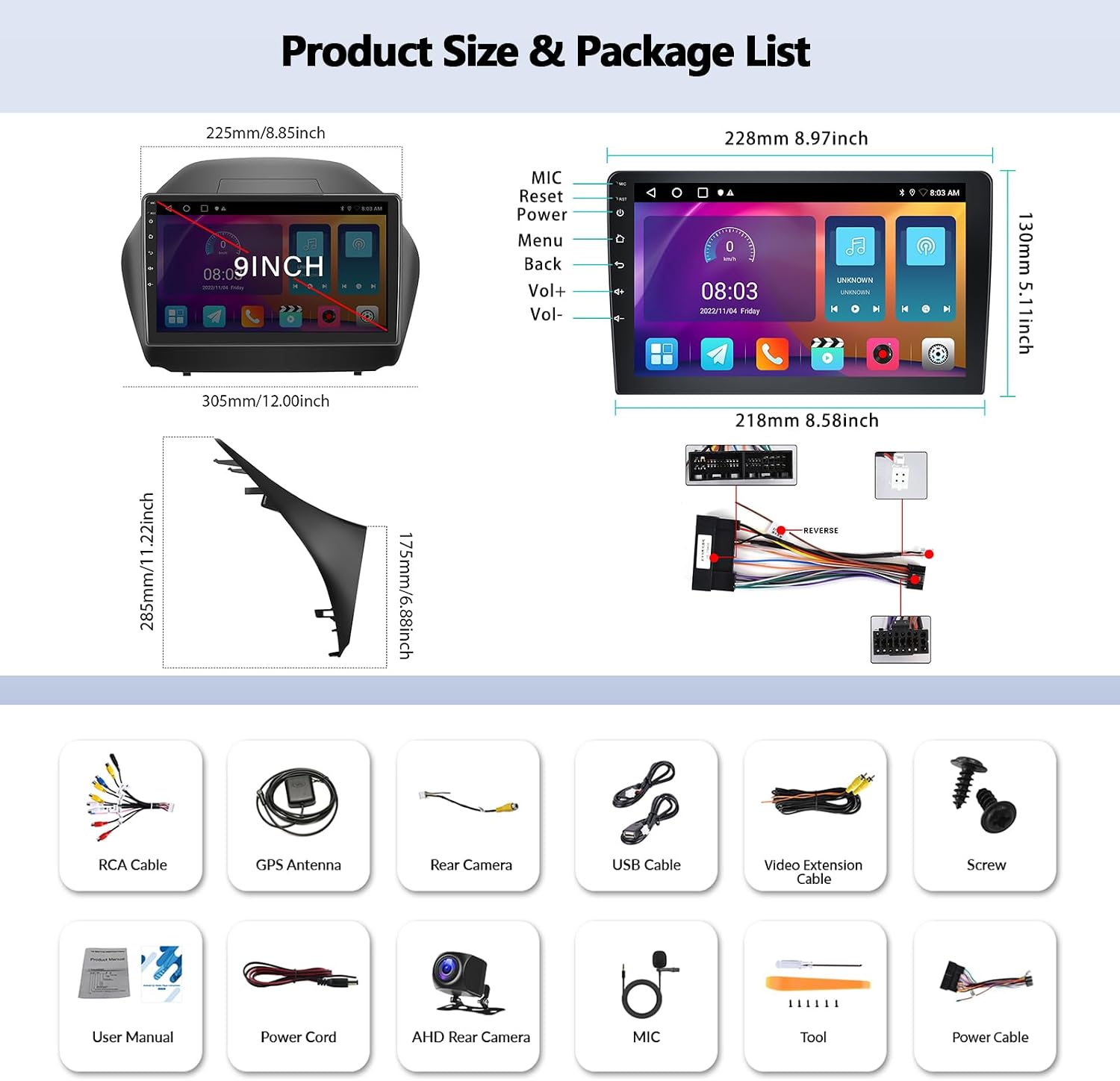
Prosimo, preverite paket za naslednje artikle:
- OiLiehu Android 13 Car Radio Unit
- AHD Rear Camera
- Vijaki za montažo
- Uporabniški priročnik (ta dokument)
- Power Cord (main wiring harness)
- RCA Cable
- USB kabel
- Video Extension Cable
- Mikrofon (MIC)
- Orodje za namestitev
- GPS antena
4. Izdelek je končanview
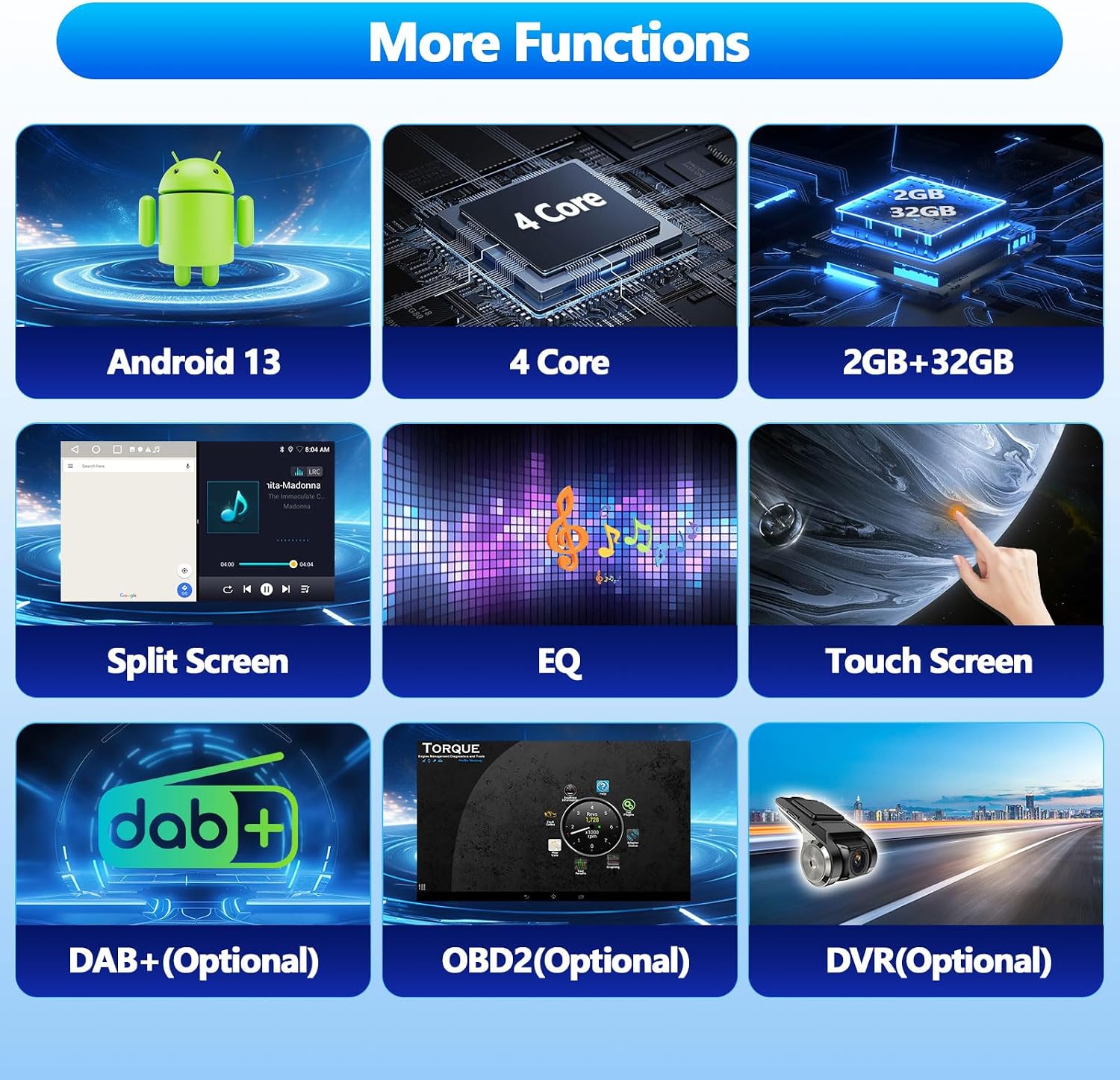
The OiLiehu Android 13 Car Radio features a 10.1-inch touchscreen display and is designed to seamlessly integrate into your Hyundai Tucson IX35 (2010-2015) dashboard. It runs on Android 13 with 2GB RAM and 32GB ROM, providing a responsive and feature-rich experience.

Glavne lastnosti vključujejo:
- Operacijski sistem Android 13
- 10.1-inch Capacitive Touchscreen (1024 x 600 resolution)
- 2 GB RAM + 32 GB ROM
- Brezžični Carplay in Android Auto
- Built-in GPS Navigation
- Bluetooth for Hands-free Calling and Music Streaming
- FM radio z RDS
- WiFi povezljivost
- Funkcionalnost zrcalne povezave
- Support for Original Steering Wheel Controls
- Rear Camera Input with Automatic Switching
- Audio Equalizer (EQ) Settings
- Funkcija razdeljenega zaslona
- Support for optional external devices: DAB+, OBD2, DVR (not included in package)
5. Nastavitev in namestitev
5.1 Preverjanja pred namestitvijo
- Verify vehicle compatibility: This unit is designed for Hyundai Tucson IX35 models from 2010 to 2015.
- Preden začnete z električnimi deli, odklopite negativni pol akumulatorja vozila.
- Prepričajte se, da je vsa vsebina paketa prisotna in nepoškodovana.
5.2 Električna shema in povezave
Refer to the provided wiring diagram (usually on a sticker on the unit or in a separate small diagram) for specific connections. General connections include:
- Napajalni kabel: Connect to vehicle's power, ground, and accessory wires.
- Zvočniške žice: Connect to vehicle's speaker outputs.
- GPS antena: Connect to the dedicated GPS port on the unit and mount in a location with a clear view neba.
- USB kabli: Connect to the unit's USB ports for external storage or phone connection.
- Vhod za zadnjo kamero: Connect the provided AHD Rear Camera to the 'CAM IN' or 'REVERSE' video input. Connect the camera's power to the vehicle's reverse light circuit and the trigger wire to the unit's 'REVERSE' trigger input.
- Zunanji mikrofon: Za boljšo kakovost klicev priključite zunanji mikrofon.

5.3 Fizična namestitev
- Carefully remove the original car radio and trim panels.
- Connect all necessary wiring harnesses and cables to the new OiLiehu unit.
- Mount the GPS antenna in an optimal location, typically on the dashboard with a clear view neba.
- Install the AHD Rear Camera at the rear of the vehicle, ensuring proper alignment and wiring.
- Secure the new car radio unit into the dashboard opening using the provided screws and brackets.
- Ponovno namestite vse okrasne plošče.
- Ponovno priključite negativni pol akumulatorja vozila.

5.4 Nastavitev upravljanja na volanu
The unit supports the original steering wheel controls of your Hyundai Tucson IX35. After installation, you may need to configure these controls:
- Pojdi na nastavitve > Steering Wheel Learn or similar option on the unit.
- Follow the on-screen prompts to assign functions (e.g., volume up/down, track skip, answer call) to your vehicle's steering wheel buttons.
6. Navodila za uporabo
6.1 Osnovna operacija
- Vklop/izklop: The unit typically powers on with the vehicle's ignition. A power button on the unit or screen may also be available for manual control.
- Zaslon na dotik: Navigate through menus and applications by tapping, swiping, and dragging on the 10.1-inch capacitive touchscreen.
- Domači zaslon: Customize widgets and app shortcuts on the home screen for quick access.
6.2 Povezljivost Wi-Fi
Connect the unit to a WiFi network or your phone's hotspot to access online features and applications.
- Pojdi na nastavitve > Omrežje in internet > Wi-Fi.
- Izberite želeno omrežje in po potrebi vnesite geslo.

6.3 GPS navigacija
The unit has a built-in GPS receiver. You can use pre-installed navigation apps or download others from the Google Play Store (requires WiFi connection).
- Launch the navigation application from the home screen or app drawer.
- Enter your destination to receive turn-by-turn directions.
- Supports both online and offline maps (offline maps require prior download).
6.4 Funkcionalnost Bluetootha
Za prostoročno klicanje in pretakanje zvoka povežite pametni telefon prek Bluetootha.
- Enable Bluetooth on your smartphone and on the car radio (usually via the Bluetooth app or Settings).
- Iskanje available devices on your phone or the car radio. The unit's Bluetooth name is typically 'CarBT'.
- Pair the devices. The default PIN is usually '0000'.
- Once paired, you can make/receive calls, access your phonebook, and stream music.

6.5 FM radio z RDS-om
Access local radio stations and receive station information via RDS.
- Open the 'Radio' application.
- Za iskanje razpoložljivih postaj uporabite funkcijo skeniranja ali ročno nastavitev frekvence.
- Save your favorite stations to presets.
- RDS (Radio Data System) provides information like station name, program type, and traffic announcements.
6.6 Brezžični Carplay in Android Auto
Connect your iPhone or Android phone wirelessly for a seamless in-car experience.
- Ensure Bluetooth and Wi-Fi are enabled on both your phone and the car radio.
- Open the 'Carplay' or 'Android Auto' application on the unit.
- Follow the on-screen instructions to pair your phone. For some phones, a wired connection might be required for the initial setup.
- Once connected, you can access navigation, music, messages, and voice assistants (Siri/Google Assistant) directly from the car radio display.
Compatibility Note: For Apple phones, iOS version 16.5 or higher may not be compatible. For Android phones, Android version 12 or higher may not be compatible. Samsung and Huawei phones are generally not supported for this feature.

6.7 Zrcalna povezava
Mirror your smartphone screen onto the car radio display.
- Odprite aplikacijo »Mirror Link« na enoti.
- Follow the instructions to connect your iOS or Android smartphone. This may involve scanning a QR code or connecting via USB.
Compatibility Note: For iOS smartphones, version 15 or lower is recommended. For Android smartphones, version 11 or lower is recommended.

6.8 Prikaz zadnje kamere
When the vehicle is shifted into reverse gear, the unit will automatically display the feed from the connected AHD Rear Camera, assisting with parking and maneuvering.
6.9 Funkcija razdeljenega zaslona
The unit supports split-screen mode, allowing you to run two applications simultaneously (e.g., navigation and music player).
- To activate, open one app, then long-press the recent apps button or swipe from the bottom (depending on Android version) to select another app for split-screen view.
6.10 Sound Settings (EQ)
Customize your audio experience using the built-in equalizer.
- Access the 'EQ' or 'Sound Settings' application.
- Adjust various audio parameters such as bass, treble, balance, and fader, or select from preset equalizer modes.
6.11 Optional Features (Not Included)
The unit supports additional functionalities with separately purchased accessories:
- DAB+ (Digital Audio Broadcasting): Requires an external DAB+ receiver.
- OBD2 (On-Board Diagnostics): Requires an OBD2 dongle for vehicle diagnostics.
- DVR (Digital Video Recorder): Requires an external USB DVR camera for recording driving footage.
7. Vzdrževanje
- Čiščenje zaslona: Zaslon na dotik nežno obrišite z mehko krpo, ki ne pušča vlaken. Za trdovratne madeže rahlo obrišiteampKrpo obrišite z vodo ali čistilom za zaslone, namenjenim elektroniki. Izogibajte se agresivnim kemikalijam.
- Posodobitve programske opreme: Periodically check for software updates via the unit's settings (requires WiFi connection) to ensure optimal performance and access to new features.
- Splošna nega: Med parkiranjem se izogibajte postavljanju težkih predmetov na enoto in njeni daljši izpostavljenosti neposredni sončni svetlobi.
8. Odpravljanje težav
| Težava | Možen vzrok | rešitev |
|---|---|---|
| Enota se ne vklopi. | Ohlapna napajalna povezava, pregorela varovalka, napačna napeljava. | Check all power connections. Inspect vehicle's fuse box and the unit's inline fuse. Verify wiring against the diagram. |
| Brez zvoka. | Volume too low, mute activated, incorrect speaker wiring, audio settings. | Increase volume. Check if mute is active. Verify speaker connections. Adjust EQ/sound settings. |
| Povezava Bluetooth se ne vzpostavi. | Bluetooth off, device not discoverable, incorrect pairing process. | Ensure Bluetooth is enabled on both devices. Make the phone discoverable. Re-attempt pairing with PIN '0000'. Clear previous pairings. |
| Signal GPS je šibek ali izgubljen. | GPS antenna obstruction, poor antenna placement, software issue. | Zagotovite, da ima antena GPS neoviran view of the sky. Check antenna connection. Restart the unit. |
| Carplay/Android Auto not working. | Phone compatibility, incorrect connection, app issues. | Verify phone OS version compatibility (iOS <16.5, Android <12). Ensure Wi-Fi and Bluetooth are on. Try a wired connection first. Restart phone and unit. Note: Samsung/Huawei phones may not be compatible. |
| Zadnja kamera ne prikazuje slike. | Incorrect wiring, camera malfunction, reverse trigger not connected. | Check camera power and video input connections. Ensure the reverse trigger wire is correctly connected to the vehicle's reverse light circuit. |
9. Specifikacije
| Funkcija | Podrobnost |
|---|---|
| Številka modela | A7146A3216A4MI2 |
| Operacijski sistem | Android 13 |
| RAM | 2 GB |
| Notranji pomnilnik | 32 GB |
| Velikost zaslona | 10.1 palcev |
| Ločljivost zaslona | 1024 x 600 |
| Vrsta zaslona na dotik | Kapacitivni |
| Tehnologija povezljivosti | Bluetooth, USB, Wi-Fi |
| Posebne lastnosti | Wireless Carplay, Android Auto, GPS, FM RDS, Mirror Link, Steering Wheel Control, Rear Camera Input, EQ |
| Združljiv tip vozila | Hyundai Tucson IX35 (2010-2015) |
| Mere izdelka (D x Š x V) | 25.7 x 25.7 x 25.7 cm (približno 10.1 x 10.1 x 10.1 palca) |
| Teža | 2.2 kg |
10. Garancija in podpora
For warranty information and technical support, please refer to the documentation provided with your purchase or contact OiLiehu customer service through the retailer where the product was purchased. Keep your proof of purchase for warranty claims.
For further assistance, you may visit the OiLiehu brand store online: OiLiehu Brand Store
Ask a question about this manual
Ask about setup, troubleshooting, compatibility, parts, safety, or missing instructions. Manuals+ will review the question and use this page’s manual context to help answer it.