
1. Uvod
Thank you for choosing the WALFRONT 12-Key One-Handed RGB Mechanical Gaming Keypad. This compact, hot-swappable keypad is designed for enhanced gaming and productivity, offering customizable macros and vibrant RGB lighting. This manual provides detailed instructions for setup, operation, maintenance, and troubleshooting to ensure optimal performance and longevity of your device.
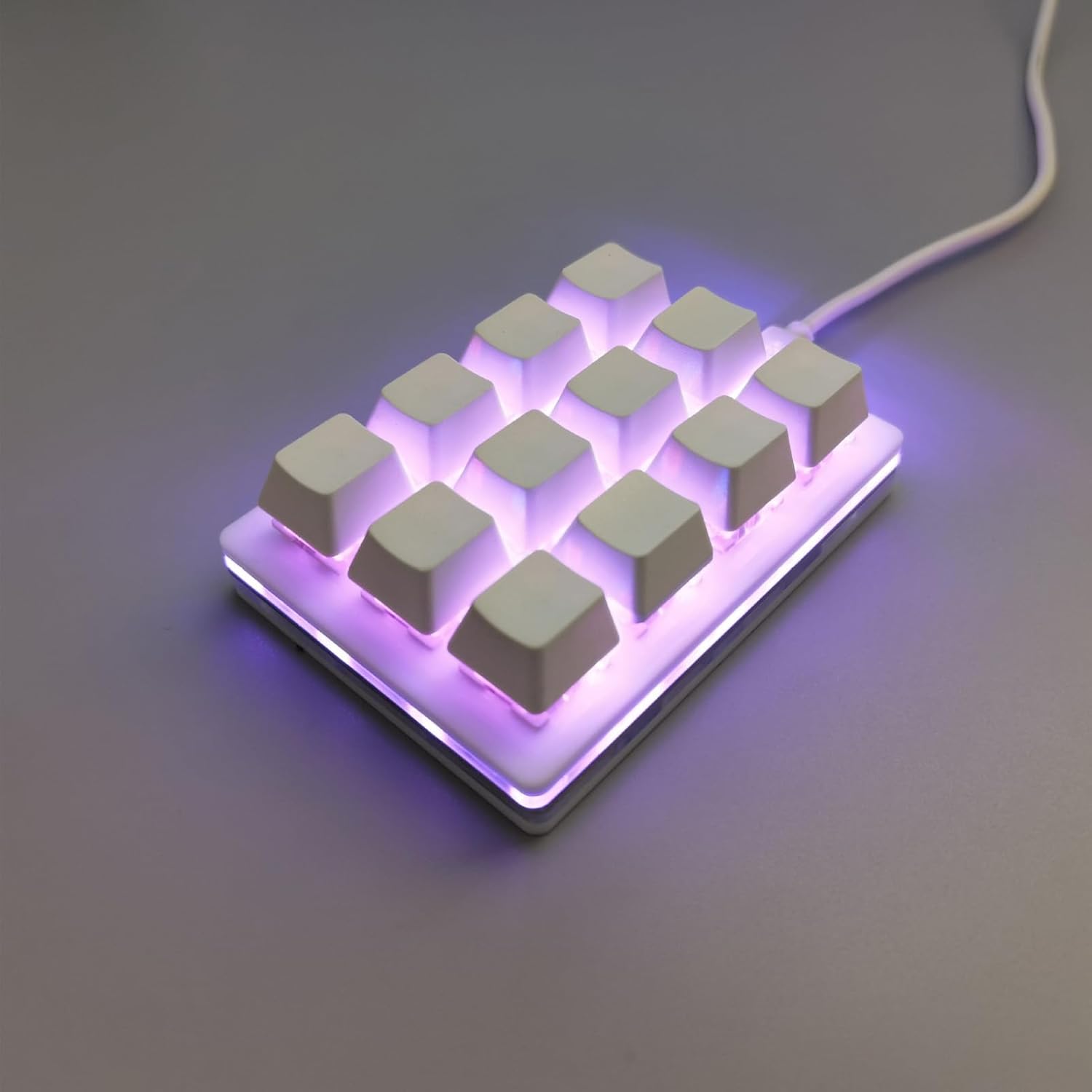
Figure 1: WALFRONT 12-Key One-Handed RGB Mechanical Gaming Keypad
2. Izdelek je končanview
2.1 Ključne lastnosti
- Čip za zaščito pred elektrostatično razelektritvijo: Equipped with an ESD non-static chip to protect against static electricity, prolonging service life and ensuring data integrity.
- Injection Keycaps: Special injection molding process ensures wear resistance and prevents fading or slipping, offering enhanced longevity.
- Ergonomska oblika: The keypad's layout and upper plug line are designed for comfort and aesthetics, improving the user experience.
- Stikala z možnostjo vroče menjave: Features a hot-swappable axle seat for high compatibility and simple insertion, allowing users to change switches for a customizable tactile feel.
- Professional Configuration Software: Dedicated software for full key customization, macro programming, and personalized setups.
- RGB osvetlitev: Adjustable LED lighting effects for a dynamic visual experience.
- Široka združljivost: Supports Windows, macOS, Linux, and mobile phones (requires an OTG converter).

Figure 2: Key features of the WALFRONT Gaming Keypad
2.2 Vsebina paketa
Po razpakiranju preverite vsebino paketa:
- 1 x WALFRONT 12-Key Mechanical Gaming Keypad
- 1 x USB kabel
3. Nastavitev
3.1 Priključitev tipkovnice
- Locate the USB-C port on the keypad.
- Connect one end of the provided USB cable to the keypad's USB-C port.
- Connect the other end of the USB cable to an available USB port on your computer (Windows, macOS, Linux) or mobile device (requires an OTG converter, not included).
- The keypad is plug-and-play; no additional drivers are typically required for basic functionality.

Figure 3: USB-C port for connection
4. Navodila za uporabo
4.1 Programska oprema za prilagajanje
The WALFRONT 12-Key Keypad features professional configuration software for advanced customization. This software allows you to:
- Remap individual keys to any desired function.
- Ustvarjanje in dodeljevanje kompleksnih makrov.
- Prilagodite učinke in barve RGB svetlobe.
- Shrani več profesionalcevfileza različne aplikacije ali igre.
Obrnite se na proizvajalca website or included documentation for instructions on downloading and installing the specific customization software for your operating system.

Figure 4: Keypad features including custom key values and hot-swappable design
4.2 Macro Programming and Key Functions
The keypad supports full key customization, allowing any combination of shortcut keys and multi-key integration. Common functions that can be programmed include:
- Copy, Paste, Cut, Select All
- Undo, Save
- Predvajanje, premor, nadzor glasnosti
- Switch applications, Delete, Screenshot
- Multimedia control and mouse simulation
These functions can be modified at will through the customization software to suit various uses in office, industrial control, finance, customer service, gaming, and media.

Figure 5: Versatile applications and customization capabilities
4.3 Stikala z možnostjo vroče menjave
The hot-swappable design allows you to easily change the mechanical switches without soldering. This feature enables you to experiment with different switch types to find your preferred tactile feel and sound. The keypad supports five-pin axes.

Figure 6: Mechanical switch structure and hot-swappable design
5. Vzdrževanje
5.1 Čiščenje
To maintain the keypad's appearance and functionality:
- Disconnect the keypad from your computer before cleaning.
- Za brisanje površine tipkovnice uporabite mehko, suho krpo.
- Za trdovratno umazanijo rahlo dampKrpo sperite z vodo ali blagim, neabrazivnim čistilom. Izogibajte se prekomerni vlagi.
- Za odstranitev prahu in umazanije med tipkami uporabite stisnjen zrak.
5.2 Zamenjava stikala
Thanks to the hot-swappable design, you can replace individual switches if they become faulty or if you wish to change the typing experience. Use a switch puller (often included with replacement switches or sold separately) to gently remove the old switch and press the new one into place, ensuring the pins align correctly.
6. Odpravljanje težav
6.1 Pogoste težave in rešitve
- Keypad not recognized: Ensure the USB cable is securely connected to both the keypad and the computer. Try a different USB port or cable. Restart your computer.
- Tipke se ne odzivajo: Check if the keycaps are properly seated. If a specific switch is faulty, replace it using the hot-swappable feature.
- RGB osvetlitev ne deluje: Verify that the customization software is installed and configured correctly. Check for any software updates.
- Makri se ne izvajajo: Ensure the macros are correctly programmed and saved within the customization software. Check if the correct profile je aktiven.
6.2 ESD zaščita
The integrated ESD non-static chip helps prevent static electricity generation, which can damage electronic components. This feature increases the service life of the keypad and protects the stability of the keyboard chip and the integrity of transmitted data.

Figure 7: ESD protection chip for enhanced durability
7. Specifikacije
| Funkcija | Specifikacija |
|---|---|
| Proizvajalec | WALFRONT |
| Številka modela | WALFRONTa8kbiehovn |
| Teža predmeta | 6.2 unč |
| Dimenzije paketa | 5.91 x 3.94 x 1.18 palcev |
| barva | Bela |
| Material | Akrilonitril butadien stiren |
| Količina paketa artikla | 1 |
| Posebne lastnosti | Ergonomic, Hot-Swappable, Customizable Macros, RGB Lighting, ESD Chip |
| Vključene komponente | USB kabel |
| Preklopno telo | Rdeče stikalo |
| Združljiv sistem | Windows, macOS, Linux, Mobile (with OTG) |
8. Garancija in podpora
For warranty information and technical support, please refer to the documentation included with your product or visit the official Walfront webspletnega mesta. Račun shranite kot dokazilo o nakupu za morebitne garancijske zahtevke.