
1. Uvod
Hvala za nakupasing the Soundmaster MCD5600 Stereo System. This versatile audio system combines classic and modern audio technologies, including a record player, DAB+ and FM radio, double cassette deck, CD player, USB playback, and Bluetooth connectivity. It also features a digitization function to convert your analog media to MP3 files on a USB drive. This manual provides essential information for safe operation, setup, and maintenance of your device. Please read it thoroughly before use and retain it for future reference.
2. Varnostna navodila
- vir energije: Prepričajte se, da napajalnik ustreza voltage specified on the unit. Disconnect from the power outlet during lightning storms or when unused for long periods.
- Prezračevanje: Ne blokirajte prezračevalnih odprtin. Okoli enote pustite dovolj prostora za pravilen pretok zraka, da preprečite pregrevanje.
- Voda in vlaga: Naprave ne izpostavljajte dežju, vlagi, kapljanju ali brizganju. Na napravo ne postavljajte predmetov, napolnjenih s tekočinami, kot so vaze.
- Toplota: Napravo hranite stran od virov toplote, kot so radiatorji, grelniki, štedilniki ali druge naprave (vključno z amplifiers), ki proizvajajo toploto.
- Čiščenje: Čistite samo s suho krpo. Ne uporabljajte tekočih čistil ali čistil v obliki aerosolov.
- Servisiranje: Tega izdelka ne poskušajte servisirati sami. Vsa servisna dela prepustite usposobljenemu servisnemu osebju.
- Umestitev: Napravo postavite na stabilno, ravno površino, da preprečite njen padec.
3. Vsebina paketa
Pri razpakiranju preverite, ali so vsi predmeti prisotni:
- Soundmaster MCD5600 Main Unit
- 2 x zunanja zvočnika
- Daljinski upravljalnik
- Navodila za uporabo (ta dokument)
- FM/DAB+ Antenna
- Napajalni kabel
4. Izdelek je končanview
Familiarize yourself with the main components and controls of your stereo system.
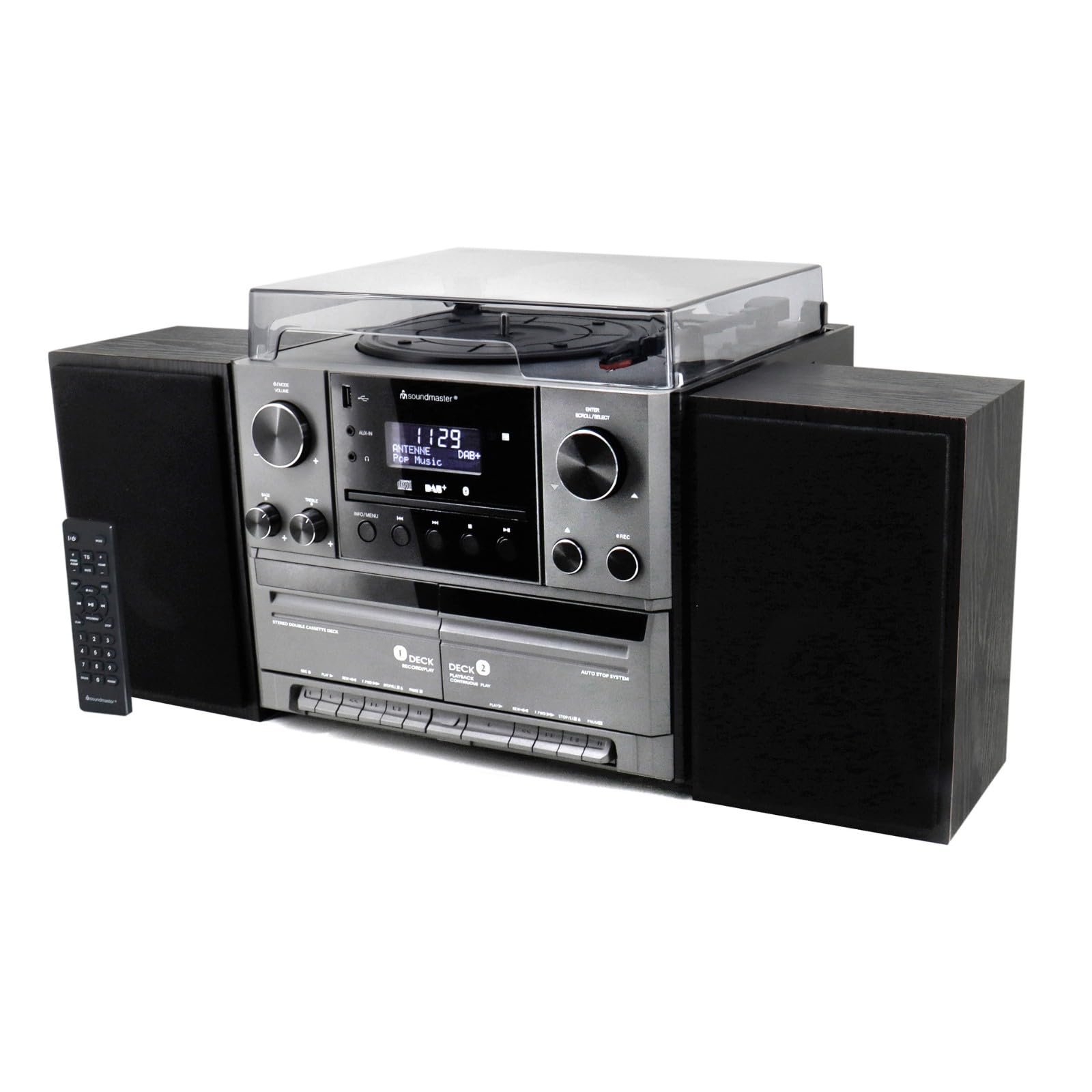
Slika 4.1: Spredaj view of the Soundmaster MCD5600 stereo system, showing the main unit flanked by two speakers, with the remote control positioned to the left. The display, control knobs, and various media inputs are visible.

Slika 4.2: Spredaj view of the Soundmaster MCD5600 stereo system with the CD tray open and a cassette tape inserted into one of the two cassette decks. This image highlights the multi-media capabilities of the unit.
5. Nastavitev
5.1 Priključitev zvočnikov
Connect the included speakers to the speaker terminals on the rear of the main unit. Ensure correct polarity (red to red, black to black) for optimal sound quality. Place speakers equidistant from the listening position for the best stereo effect.
5.2 Antenska povezava
Connect the supplied 75 Ohm antenna to the FM/DAB+ antenna input on the rear panel. Extend the antenna fully and position it for the best possible radio reception.
5.3 Napajalni priključek
Plug the power cable into the AC inlet on the rear of the unit, then connect the other end to a standard wall outlet.
6. Navodila za uporabo
6.1 Splošni nadzor
- Gumb za vklop: Pritisnite za vklop ali izklop enote.
- Gumb za glasnost: Rotate to adjust the overall sound volume.
- Gumb za vir/funkcijo: Press repeatedly to cycle through available audio sources (CD, Phono, Tape, FM, DAB+, Bluetooth, USB).
- Zaslon: Prikazuje trenutni način, informacije o skladbi, radijsko frekvenco in čas.
6.2 Delovanje predvajalnika CD-jev
- Pritisnite CD gumb za vir.
- Pritisnite ODPRTO/ZAPRI gumb za odpiranje pladnja za CD.
- Place a CD (CD/CD-MP3/CD-R/CD-RW/WMA compatible) with the label side up into the tray.
- Pritisnite ODPRTO/ZAPRI ponovno pritisnite, da zaprete pladenj. Enota bo prebrala disk.
- Pritisnite PREDVAJAJ/PAVZA za začetek ali začasno ustavitev predvajanja.
- Uporaba PRESKOČI NAPREJ/NAZAJ gumbi za navigacijo po skladbah.
- The PROGRAM in PONOVI functions allow for customized playback sequences and continuous repetition.
6.3 Record Player Operation
- Pritisnite TELEFON gumb za vir.
- Select the appropriate speed (33, 45, or 78 RPM) using the speed selector switch based on your record type.
- Place a record on the turntable platter. For 45 RPM singles, use the included adapter.
- Carefully lift the tonearm using the cueing lever and position it over the desired track on the record.
- Lower the tonearm gently onto the record. Playback will begin automatically.
- At the end of the record, lift the tonearm and return it to its rest.
6.4 Upravljanje kasetofona
The unit features two cassette decks: Deck 1 (Record/Play) and Deck 2 (Continuous Play).
- Pritisnite TRAK gumb za vir.
- Pritisnite ZAUSTAVI/IZVRNI button on the desired deck to open the cassette door.
- Insert a cassette tape with the open edge facing upwards. Close the door.
- Pritisnite IGRAJ za začetek predvajanja.
- Uporaba HITRO NAPREJ in PREVIJAJ NAZAJ gumbi za navigacijo po traku.
- To record, ensure Deck 1 is selected, insert a blank tape, select your desired input source (e.g., Phono, CD, Radio), and press the SNEMANJE gumb.
6.5 Radio (FM/DAB+) Operation
- Pritisnite FM or DAB+ gumb za vir.
- For FM radio, use the UGLAŠEVANJE knob or buttons to manually tune or auto-scan for stations.
- For DAB+ radio, the unit will automatically scan for available digital stations. Use the PREMIKANJE/IZBERI knob to browse and select stations.
- To save a station as a preset, refer to the specific instructions in the full manual for your model.
6.6 Delovanje Bluetooth
- Pritisnite BLUETOOTH source button. The display will show "PAIRING" or similar.
- Enable Bluetooth on your external device (smartphone, tablet, etc.).
- Iskanje "MCD5600" (or similar device name) in your device's Bluetooth settings and select it to pair.
- Once paired, you can play audio from your device through the stereo system.
6.7 Predvajanje prek USB-ja
- Vstavite USB-ključek v vrata USB na sprednji plošči.
- Pritisnite USB gumb za vir.
- The unit will read the contents of the USB drive. Use the navigation buttons to browse folders and select MP3 files za predvajanje.
6.8 Digitization (Encoding)
The MCD5600 allows you to convert audio from vinyl records, cassette tapes, or radio broadcasts directly to MP3 files na priključenem pogonu USB.
- Vstavite USB-ključek v vrata USB.
- Select the desired audio source (Phono, Tape, FM, DAB+).
- Start playback of your chosen source (e.g., start a record, play a cassette, tune to a radio station).
- Pritisnite SNEMANJE button on the main unit. The display will indicate recording is in progress.
- Pritisnite STOP when you wish to end the recording. The audio will be saved as an MP3 file on your USB drive.
7. Vzdrževanje
- Čiščenje enote: Wipe the exterior surfaces with a soft, dry, lint-free cloth. Do not use abrasive cleaners or solvents.
- Record Player Stylus: Periodically check the stylus for dust and debris. Clean gently with a soft brush designed for styli, brushing from back to front. Replace the stylus if sound quality deteriorates significantly.
- Cassette Heads: After extended use, clean the cassette heads, pinch rollers, and capstans with a cotton swab lightly dampz izopropilnim alkoholom.
- CD-leča: Avoid touching the CD lens. If cleaning is necessary, use a specialized CD lens cleaner disc.
8. Odpravljanje težav
| Težava | Možen vzrok | rešitev |
|---|---|---|
| Brez moči | Napajalni kabel ni priključen; vtičnica je okvarjena | Preverite priključek napajalnega kabla; poskusite z drugo vtičnico |
| Brez zvoka | Volume too low; Incorrect source selected; Speakers not connected | Povečaj glasnost; Izberi pravi vir; Preveri povezave zvočnikov |
| CD skips or doesn't play | CD dirty or scratched; CD inserted incorrectly | Clean CD; Insert CD label-side up |
| Slab radijski sprejem | Antena ni iztegnjena ali pravilno nameščena | Extend and reposition antenna; Try auto-scan for DAB+ |
| Bluetooth povezovanje ne uspe | Device too far; Bluetooth not enabled on external device | Move device closer; Ensure Bluetooth is enabled and in pairing mode |
9. Specifikacije
- Številka modela: MCD5600SW
- Znamka: Tonski mojster
- barva: Črna
- CD predvajalnik: CD, CD-MP3, CD-R, CD-RW, WMA compatible; Program/Repeat functions
- Record Player: 33/45/78 RPM speeds
- Deck za kasete: Double cassette (Deck 1: Record/Play, Deck 2: Continuous Play)
- Radio: FM-PLL with preset stations, DAB+ Digital Radio (75 Ohm antenna connection)
- Povezljivost: Vrata USB, Bluetooth
- Posebne lastnosti: Digitization (CD, cassette, radio to USB-MP3 encoding)
10. Informacije o garanciji
This Soundmaster MCD5600 Stereo System comes with a manufacturer's warranty. Spare parts availability is guaranteed for 1 year from the date of purchase. For detailed warranty terms and conditions, please refer to the warranty card included with your product or contact your retailer. Keep your proof of purchase for any warranty claims.
11. Podpora
If you encounter any issues not covered in the troubleshooting section or require further assistance, please contact your retailer or the Soundmaster customer support. Contact details can typically be found on the manufacturer's webspletnem mestu ali v embalaži vašega izdelka.