
Uvod
This manual provides detailed instructions for the GAMFAMI TERIOS Wireless Controller. Please read this manual carefully before using the product to ensure proper operation and to maximize your gaming experience. This controller is designed for use with PlayStation 4, PS4 Pro, and PS4 Slim consoles.
Lastnosti izdelka
- Igralne palice z Hallovim efektom: Equipped with Hall joysticks to prevent drift and ensure a longer lifespan with smooth, precise control.
- Programiranje makrov: Two programmable back buttons (M1, M2) allow mapping of various inputs (X, O, Triangle, Square, Up, Down, Left, Right, L3, R3, L1, R1, L2, R2) for enhanced gameplay.
- Brezžična povezljivost: Enjoy a seamless wireless gaming experience with Bluetooth technology.
- Dual Shock Vibration: Enhanced dual shock motors provide immersive haptic feedback for a realistic gaming experience.
- Turbo funkcija: Activate the Turbo feature for rapid, repeated button presses, offering a competitive advantage.
- Dolgotrajna baterija: Features a 1000mAh rechargeable battery for extended play sessions.
- Ergonomska oblika: Lightweight and durable ABS construction with textured grips for comfortable handling.
- Built-in Speaker & 3.5mm Audio Jack: Provides high-quality audio directly from the controller and supports headset connection.
Vsebina paketa
Po razpakiranju preverite vsebino paketa:
- GAMFAMI TERIOS Wireless Controller
- USB polnilni kabel
- Navodila za uporabo
Postavitev krmilnika
Familiarize yourself with the buttons and features of your GAMFAMI TERIOS Wireless Controller.
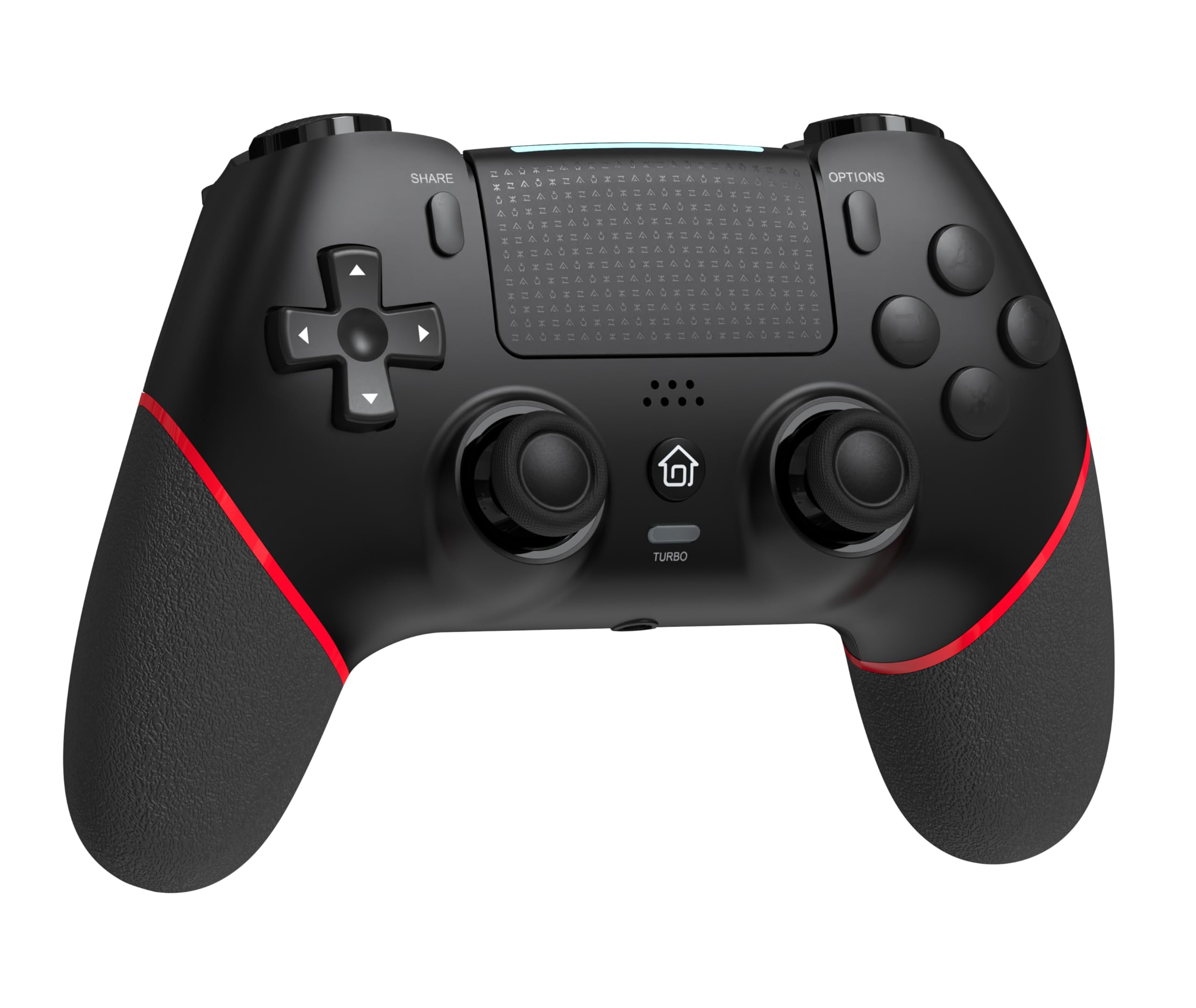
Spredaj view of the GAMFAMI TERIOS Wireless Controller, showing the joysticks, D-pad, action buttons, Share, Options, Home, and Turbo buttons, and the touchpad.
- Smerna ploščica (D-Pad): Za smerni vnos.
- Gumbi za dejanja (trikotnik, krog, križ, kvadrat): Standardni akcijski gumbi PlayStation.
- Leva/desna analogna palica: For precise movement and camera control. Features Hall Effect technology.
- Gumb DELI: Za deljenje igralnih vsebin.
- Gumb MOŽNOSTI: Za menije in možnosti v igri.
- PS Button (Home Button): To access the PS4 system menu.
- Gumbi L1/R1: Gumbi na ramenih.
- Sprožilci L2/R2: Analog triggers.
- Sledilna ploščica: Multi-touch input area.
- Gumbi M1/M2: Programabilni gumbi za nazaj.
- Gumb TURBO: Vklopi/izklopi funkcijo turbo.
- 3.5 mm priključek za slušalke: For connecting a compatible headset.
- Vrata USB-C: Za polnjenje in žično povezavo.

Nazaj view of the controller, highlighting the M1 and M2 programmable buttons and product information.
Nastavitev in povezava
Pairing with PS4/PS4 Pro/PS4 Slim
- Prepričajte se, da je vaša konzola PS4 vklopljena.
- Connect the controller to your PS4 console using the included USB charging cable.
- Press the PS button on the controller. The light bar will flash, indicating it is pairing.
- Once the light bar turns solid, the controller is successfully paired and ready for use.
- You can now disconnect the USB cable for wireless play.
Reconnecting to PS4
After initial pairing, simply press the PS button on the controller to reconnect wirelessly to your PS4 console.
Navodila za uporabo
Uporaba funkcije Turbo
- Pritisnite in držite TURBO gumb.
- Med držanjem TURBO, press the action button (e.g., Cross, Circle, Square, Triangle, L1, R1, L2, R2) you wish to apply the turbo function to.
- Release both buttons. The selected action button will now rapidly repeat its input when held down.
- To disable turbo for a specific button, repeat the process: hold TURBO and press the turbo-enabled action button.
- To disable turbo for all buttons, press and hold the TURBO gumb za 5 sekundi.
Macro Programming (M1/M2 Buttons)
The M1 and M2 buttons on the back of the controller can be programmed to replicate other button inputs.
- Pritisnite in držite DELI gumb in M1 or M2 button simultaneously for 3 seconds until the light bar flashes rapidly. This indicates macro programming mode.
- Press the button(s) you wish to map to M1 or M2 (e.g., X, O, Triangle, Square, Up, Down, Left, Right, L3, R3, L1, R1, L2, R2). You can map a single button or a sequence of buttons.
- Pritisnite M1 or M2 button again to save the macro. The light bar will stop flashing rapidly and return to its normal state.
- To clear a macro, repeat step 1, then press the M1 or M2 button twice without pressing any other buttons.

Illustration of the advanced buttons and their programming capabilities.
Polnjenje in upravljanje baterije
The controller is equipped with a 1000mAh rechargeable battery.
Polnjenje krmilnika
- Connect the included USB charging cable to the USB-C port on the controller.
- Connect the other end of the cable to a USB port on your PS4 console (when powered on or in rest mode) or a compatible USB wall adapter (5V/1A recommended).
- The light bar on the controller will slowly pulse orange while charging.
- Once fully charged, the light bar will turn off.
Prikaz nivoja baterije
The controller's light bar will indicate battery status. A low battery will cause the light bar to flash red. It is recommended to charge the controller when this occurs.
Vzdrževanje
- Čiščenje: Za čiščenje krmilnika uporabite mehko, suho krpo. Ne uporabljajte agresivnih kemikalij ali abrazivnih materialov.
- Shranjevanje: Krmilnik shranjujte na hladnem in suhem mestu, stran od neposredne sončne svetlobe in ekstremnih temperatur.
- Izogibajte se kapljicam: Krmilnik zaščitite pred padci in udarci, ki lahko poškodujejo notranje komponente.
Odpravljanje težav
| Težava | rešitev |
|---|---|
| Krmilnik se ne poveže/seznani. |
|
| Controller experiences input lag or disconnection. |
|
| Joysticks exhibit drift. |

Illustration of Hall Effect joystick technology, designed to prevent drift. |
| Controller does not charge. |
|
Specifikacije
| Ime modela | TERIOS |
| Znamka | GAMFAMI |
| Združljive naprave | PS4, PS4 Pro, PS4 Slim |
| Vrsta krmilnika | Igralni plošček |
| Tehnologija povezljivosti | Bluetooth (brezžično) |
| Vir napajanja | Napajanje na baterije |
| Kapaciteta baterije | 1000 mAh |
| Teža predmeta | 0.37 kilogramov |
| barva | Črna rdeča |
Garancija in podpora
For warranty information and technical support, please refer to the documentation included with your purchase or visit the official GAMFAMI webspletnega mesta. Račun shranite kot dokazilo o nakupu za morebitne garancijske zahtevke.
For further assistance, please contact GAMFAMI customer service through their official channels.