
Angrox NS-RCFNA-21-Upgrade
Angrox Universal TV Remote Control Instruction Manual
Model: NS-RCFNA-21-Upgrade
Blagovna znamka: Angrox
1. Uvod
Thank you for choosing the Angrox Universal TV Remote Control. This remote is designed to simplify your entertainment experience by providing a single control solution for a wide range of smart TVs. It offers seamless compatibility and intuitive operation, making it an ideal replacement for lost or broken original remotes.

Slika 1.1: Spredaj view of the Angrox Universal TV Remote Control.
2. Varnostne informacije
- Baterije hranite izven dosega otrok. Če pride do zaužitja, takoj poiščite zdravniško pomoč.
- Ne mešajte starih in novih baterij ali različnih vrst baterij.
- Če daljinskega upravljalnika ne boste uporabljali dlje časa, odstranite baterije, da preprečite puščanje.
- Avoid exposing the remote to direct sunlight, heat sources, or excessive moisture.
- Ne poskušajte razstavljati ali spreminjati daljinskega upravljalnika.
3. Vsebina paketa
Paket naj vsebuje naslednje predmete:
- 1 x Angrox Universal TV Remote Control
- 1 x Navodila za uporabo (ta dokument)
Opomba: Za delovanje sta potrebni 2 bateriji AAA, ki nista priloženi paketu.
4. Deli in funkcije
Familiarize yourself with the buttons and functions of your new remote control.
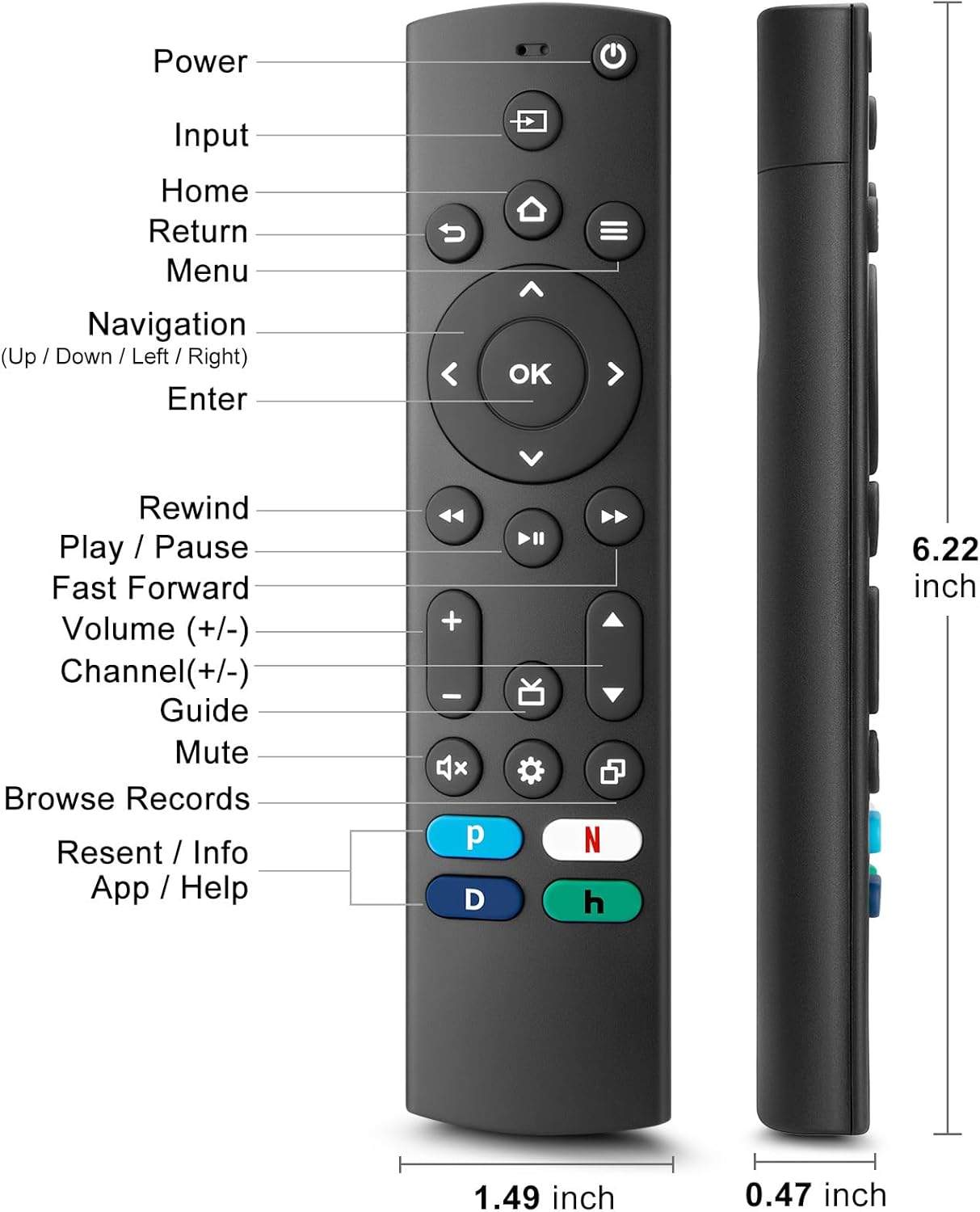
Figure 4.1: Labeled buttons and dimensions of the remote control.
- Gumb za vklop: Vklopi ali izklopi TV.
- Gumb za vnos: Izbere vhodni vir (HDMI, AV itd.).
- Domov gumb: Vrne se na začetni zaslon televizorja.
- Navigacijska tipkovnica (gor/dol/levo/desno) in gumb V redu: Za navigacijo in izbiro po menijih.
- Gumb za vrnitev: Vrne se na prejšnji zaslon.
- Gumb menija: Accesses TV settings or options menu.
- Rewind/Play/Pause/Fast Forward Buttons: Nadzor predvajanja medijev.
- Povečanje/zmanjšanje glasnosti: Prilagodi glasnost televizorja.
- Kanal gor/dol: Menjava televizijskih kanalov.
- Gumb za izklop zvoka: Utiša ali vklopi zvok televizorja.
- Gumb za nastavitve: Accesses quick settings.
- Dedicated Hotkeys (Netflix, P-Video, Disney+, Hulu): Neposreden dostop do priljubljenih storitev pretakanja.
This remote control utilizes infrared (IR) technology for stable performance and a fast response time of 0.2 seconds, with a control range of up to 40 feet. Please note that this remote does NE support voice search functions.

Figure 4.2: Remote's stable performance and precise control features.

Figure 4.3: This remote does not include voice search functionality.
5. Nastavitev
5.1. Namestitev baterije
- Odprite pokrov prostora za baterije na zadnji strani daljinskega upravljalnika.
- Vstavite dve (2) bateriji AAA in pazite, da se pozitivni (+) in negativni (-) pol poravnata z oznakami v predalu.
- Trdno zaprite pokrov prostora za baterije.
5.2. Initial Pairing and TV Compatibility
This universal remote is designed for easy setup with most major TV brands. Simply press and hold two specific buttons simultaneously to pair it with your TV.

Figure 5.1: Easy 2-button setup for various TV brands.
| TV znamka | Button Combination (Press & Hold) | Opombe |
|---|---|---|
| Insignia TV | OK + Home Button | |
| TV Toshiba | OK + Home Button | |
| TV Roku | OK + Up Arrow | |
| TV Hisense | OK + Down Arrow | Hulu not supported |
| TCLTV | OK + Right Arrow | Hulu not supported |
| TV Samsung | OK + Return Button | |
| Vizio TV | OK + Menu Button | |
| TV LG | OK + Rewind Button | Hulu not supported |
| televizor Philips | OK + Play/Pause Button | Prime Video, Disney+, Hulu not supported |
| TV Sony | OK + Fast Forward Button | Hulu not supported |
Once the remote is paired, it should function immediately. No further programming is typically required.
5.3. Opombe o združljivosti
This remote is designed to be a universal replacement for many TV models, including specific Insignia and Toshiba smart TV remotes (e.g., NS-RCFNA-21, NS-RCFNA-19, CT-95018, CT-RC1US-21, CT-RC1US-19). However, it is important to note that it may not be compatible with all specific original remote models or streaming devices, particularly those with unique pairing methods or voice control features.

Slika 5.2: Npramples of remote controls and devices that are NOT compatible with this universal remote.

Figure 5.3: This remote is not compatible with TV Cube or TV Stick streaming devices.
For optimal performance, ensure your TV's infrared receiver is unobstructed.
Video 5.1: An official product video demonstrating the features and ease of use of the Angrox Universal TV Remote. This video highlights the remote's compatibility and quick access buttons for streaming services.
6. Upravljanje daljinskega upravljalnika
Once paired, the Angrox Universal TV Remote operates like a standard TV remote. Point the remote directly at your TV's infrared receiver for best results.
6.1. Osnovne funkcije
- moč: Pritisnite Moč enkrat pritisnite gumb, da vklopite ali izklopite televizor.
- obseg: Uporabite Povečanje glasnosti (+) in Znižaj glasnost (-) gumbe za prilagajanje ravni zvoka.
- Kanal: Uporabite Kanal navzgor (▲) in Kanal navzdol (▼) gumbe za menjavo kanalov.
- Navigacija: Uporabite Gor, dol, levo, desno arrows to navigate through menus and options. Press OK za potrditev izbire.
- Domov: Pritisnite domov button to return to the main smart TV interface.
- Vrnitev: Pritisnite Vrnitev button to go back to the previous screen or menu.
6.2. Dedicated Hotkeys
The remote features dedicated hotkeys for quick access to popular streaming platforms:
- Netflix: Instantly launch the Netflix application.
- P-Video (Prime Video): Instantly launch the Prime Video application.
- Disney+: Instantly launch the Disney+ application.
- Hulu: Instantly launch the Hulu application.

Figure 6.1: Quick access to streaming services with dedicated hotkeys.
7. Vzdrževanje
- Čiščenje: Daljinski upravljalnik obrišite z mehko, suho krpo. Ne uporabljajte abrazivnih čistil ali topil.
- Zamenjava baterije: Replace batteries when the remote's response becomes sluggish or it stops functioning. Always replace both batteries at the same time.
- Shranjevanje: Daljinski upravljalnik shranjujte na hladnem in suhem mestu, stran od neposredne sončne svetlobe in ekstremnih temperatur.
8. Odpravljanje težav
| Težava | Možen vzrok | rešitev |
|---|---|---|
| Daljinski upravljalnik se ne odziva na televizor. | Low or dead batteries. Incorrect pairing. Obstruction between remote and TV. | Replace batteries with new AAA batteries. Re-attempt pairing using the correct button combination for your TV brand (refer to Section 5.2). Ensure no objects are blocking the TV's IR receiver. |
| Specific hotkey (e.g., Hulu) not working. | TV brand incompatibility with specific hotkey functions. | Some TV brands (e.g., Hisense, TCL, LG, Philips, Sony) may not support all dedicated hotkeys. This is a limitation of the TV's software, not the remote. You may need to navigate to these apps manually. |
| No voice control functionality. | This remote does not support voice commands. | The Angrox Universal TV Remote Control is designed for infrared (IR) control and does not include a microphone for voice search. This is an intended feature. |
| Remote feels unresponsive or delayed. | Weak batteries. Remote too far from TV. | Replace batteries. Ensure you are within the effective range (up to 40 feet) and pointing directly at the TV. |
9. Specifikacije
| Funkcija | Podrobnost |
|---|---|
| Številka modela | NS-RCFNA-21-Upgrade |
| Znamka | Angroks |
| Dimenzije (D x Š x V) | 6.22 x 1.49 x 0.47 palcev |
| Teža predmeta | 1.76 unč |
| Vir napajanja | 2 x AAA baterije (niso vključene) |
| Material | Visokokakovosten ABS in silikon |
| Tehnologija krmiljenja | Infrardeči (IR) |
| Odzivni čas | 0.2 sekund |
| Nadzorno območje | Do 40 čevljev |
| Posebne lastnosti | Universal, Ergonomic, Lightweight, Pre-Programmed, No Programming Required (for most TVs) |
| barva | Črna |
| Združljive naprave | Television (Insignia, Toshiba, Pioneer, Samsung, TCL, LG, Hisense, Vizio, Sony, Philips, Roku TVs) |
10. Garancija in podpora
Angrox products are manufactured with high-quality materials and undergo strict quality control. For information regarding warranty coverage, returns, or technical support, please refer to the product listing page on Amazon or contact Angrox customer service directly through the Amazon platform.
You can visit the official Angrox store on Amazon for more information and contact options: Angrox Store
Ask a question about this manual
Ask about setup, troubleshooting, compatibility, parts, safety, or missing instructions. Manuals+ will review the question and use this page’s manual context to help answer it.