
1. Izdelek je končanview
The Rainbuvvy 4G LTE Smartwatch SP9832E is a versatile wearable device featuring a 2.03-inch IPS display, Android 8.1 operating system, and 4G LTE connectivity. It is equipped with a quad-core SP9832E processor, 4GB RAM, and 64GB ROM, providing a smooth user experience. Key features include dual cameras, GPS, Wi-Fi, Bluetooth, and various fitness tracking capabilities.

Image 1.1: The Rainbuvvy 4G LTE Smartwatch SP9832E, showcasing its display and robust design.
2. Nastavitev
2.1 Začetno polnjenje
Before first use, fully charge the smartwatch. Connect the magnetic 4-pin charging cable to the charging port on the back of the watch and plug the USB end into a compatible power adapter (not included) or computer USB port. The watch display will indicate charging status.
2.2 Namestitev kartice SIM
The smartwatch supports 2G, 3G, and 4G network calls via a nano SIM card. To install:
- Poiščite režo za kartico SIM na strani pametne ure.
- Previdno odprite pladenj za kartico SIM s priloženim orodjem (če je primerno) ali tako, da ga nežno dvignete.
- Insert a nano SIM card into the tray with the gold contacts facing down, ensuring correct orientation.
- Pladenj za kartico SIM trdno zaprite.

Image 2.1: Illustration of the SIM card slot on the smartwatch, showing a nano SIM card being inserted.
2.3 Vklop/izklop
- Za vklop: Pritisnite in držite gumb za vklop (običajno ob strani), dokler se zaslon ne prižge.
- Za izklop: Press and hold the power button, then select 'Power Off' from the options displayed on the screen.
2.4 Začetna konfiguracija
Upon first power-on, follow the on-screen prompts to set up your device. This typically includes selecting your language, setting the time and date, and connecting to a Wi-Fi network.
3. Navodila za uporabo
3.1 Osnovna navigacija
The smartwatch features a touchscreen interface. Swipe left, right, up, or down to navigate through menus, notifications, and applications. Tap to select items.
3.2 Klicanje in sprejemanje klicev
With a nano SIM card installed and active, you can make and receive calls directly from your smartwatch. Use the dialer app to make calls or answer incoming calls by tapping the green phone icon.
The watch also supports video calls through compatible applications. Ensure you have a stable 4G or Wi-Fi connection for optimal video call quality.
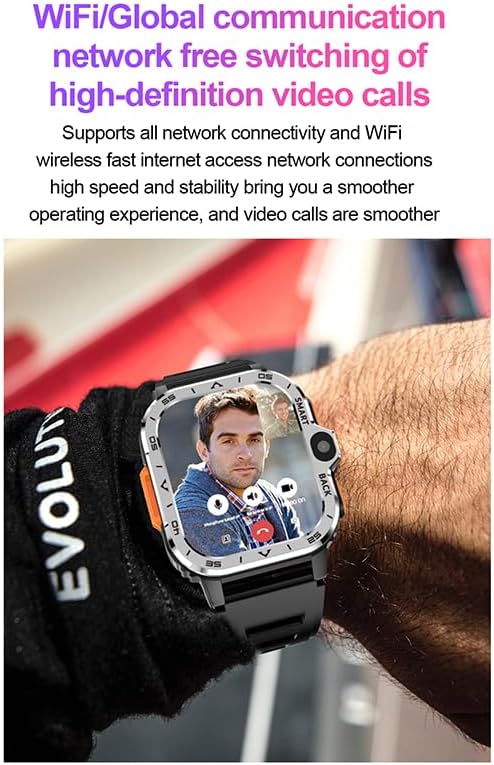
Image 3.1: The smartwatch screen showing an active video call, demonstrating its communication capabilities.
Funkcionalnost kamere 3.3
The smartwatch is equipped with dual cameras (8.0 MP). Open the camera application to take photos or record videos. Tap the screen to focus and press the shutter button to capture.
3.4 GPS pozicioniranje
The integrated GPS allows for accurate location tracking and navigation. Utilize mapping applications for outdoor activities or to find your way.

Image 3.2: The smartwatch displaying a detailed map with GPS positioning, useful for navigation and outdoor sports.
3.5 Spremljanje srčnega utripa
Access the heart rate monitoring application to measure your heart rate. Ensure the watch is worn snugly on your wrist for accurate readings. The device provides timely warnings for high or low heart rates.

Image 3.3: The smartwatch screen showing a heart rate graph and current BPM reading.
3.6 Povezljivost Wi-Fi in Bluetooth
- Wi-Fi: Connect to available Wi-Fi networks through the settings menu for internet access and faster data transfers.
- Bluetooth: Pair with Bluetooth headphones or other compatible devices via the Bluetooth settings.
3.7 Uporaba aplikacije
The smartwatch runs on Android 8.1, allowing you to download and install various applications from the Google Play Store. This includes social media apps, fitness trackers, and more.

Image 3.4: The smartwatch screen showing a variety of application icons, indicating its app compatibility.
3.8 Prilagajanje številčnic ure
Personalize your smartwatch by changing the watch face. Access the watch face settings or long-press the current watch face to browse available options.
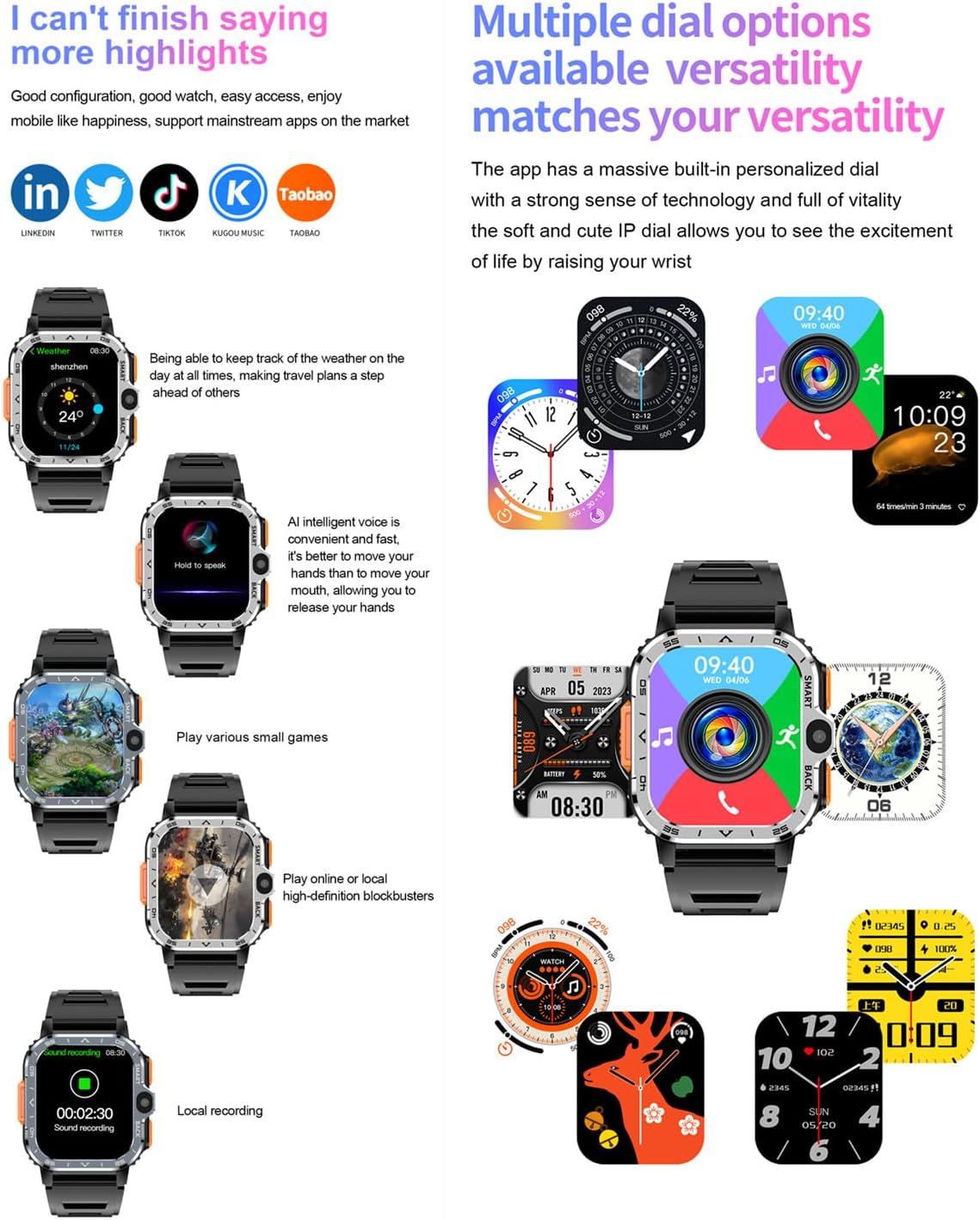
Image 3.5: The smartwatch showcasing various digital and analog watch face designs.
3.9 Glasovni nadzor
The smartwatch supports AI intelligent voice control. Activate it to perform tasks or search information hands-free.
4. Vzdrževanje
4.1 Čiščenje
Zaslon in ohišje pametne ure obrišite z mehko, suho krpo, ki ne pušča vlaken. Za trdovratne madeže rahlo obrišiteampkrpo sperite z vodo. Izogibajte se uporabi agresivnih kemikalij ali abrazivnih materialov.
4.2 Skrb za baterije
- Za podaljšanje življenjske dobe baterije se izogibajte ekstremnim temperaturam.
- Napravo redno polnite, vendar je ne puščajte popolnoma napolnjene ali popolnoma izpraznjene dlje časa.
- Če ure ne boste uporabljali dlje časa, jo pred shranjevanjem napolnite na približno 50 %.
4.3 Vodoodpornost
This smartwatch is ni vodoodporen. Avoid exposing it to water, rain, or high humidity to prevent damage.
5. Odpravljanje težav
5.1 Pogoste težave in rešitve
- Naprava se ne vklopi: Prepričajte se, da je baterija napolnjena. Priključite jo na polnilnik in poskusite znova.
- Zaslon na dotik se ne odziva: Restart the device. If the issue persists, ensure the screen is clean and dry.
- Slaba življenjska doba baterije: Adjust screen brightness, disable unnecessary background apps, or reduce notification frequency. Ensure 'super power saving mode' is enabled if available.
- Težave z omrežno povezljivostjo: Check SIM card installation and ensure it is active. Verify network settings and try restarting the watch.
- Aplikacija se sesuje ali zamrzne: Close and reopen the app. If the problem continues, clear the app's cache or reinstall it.
5.2 Ponastavitev na tovarniške nastavitve
If persistent issues occur, a factory reset may resolve them. This will erase all data on the device. Navigate to Nastavitve > Sistem > Možnosti ponastavitve > Izbriši vse podatke (ponastavitev na tovarniške nastavitve) in potrdite.
6. Specifikacije
| Funkcija | Podrobnost |
|---|---|
| Številka modela | SP9832E |
| Operacijski sistem | Android 8.1 |
| Procesor | Quad-core SP9832E |
| RAM | 4 GB |
| Notranji pomnilnik (ROM) | 64 GB |
| Velikost zaslona | 2.03 palcev |
| Vrsta zaslona | LCD |
| Ločljivost zaslona | 320 x 386 |
| Povezljivost | 4G LTE, Bluetooth 4.2, Wi-Fi, GPS |
| 4G LTE pasovi | B1/B2/B3/B5/B7/B8/B20 (FDD), B38/39/40/41 (TDD) |
| Podpora za kartico SIM | Nano SIM |
| Kamera | Dvojna 8.0 MP |
| Kapaciteta baterije | 800 mAh litij-polimer |
| Vmesnik za polnjenje | Magnetic 4-pin (USB data transfer supported) |
| Vodoodpornost | Ni vodoodporen |
| Material traku | Silikon, guma |
| Podprte aplikacije | Pedometer, Fitness Monitor, Heart Rate Monitor, Camera, GPS, Phone Call, Voice Control, Sleep Monitor, Time Display, Alarm, Music Player |
7. Garancija in podpora
7.1 Informacije o garanciji
This Rainbuvvy smartwatch comes with a standard warranty. Please refer to your purchase documentation for specific terms and conditions regarding warranty coverage and duration.
7.2 Podpora strankam
For technical assistance, troubleshooting not covered in this manual, or warranty claims, please contact Rainbuvvy customer support through the retailer where the product was purchased or visit the official Rainbuvvy webspletno mesto za kontaktne podatke.