
PECSU G5
PECSU G5 32GB MP3 Player with Bluetooth and WiFi User Manual
Model: G5
1. Uvod
This manual provides detailed instructions for the operation and maintenance of your PECSU G5 32GB MP3 Player. Please read this manual thoroughly before using the device to ensure proper functionality and to maximize your user experience. The PECSU G5 is an Android-based music player designed for versatile media consumption, featuring parental controls, extensive app support, and robust connectivity.
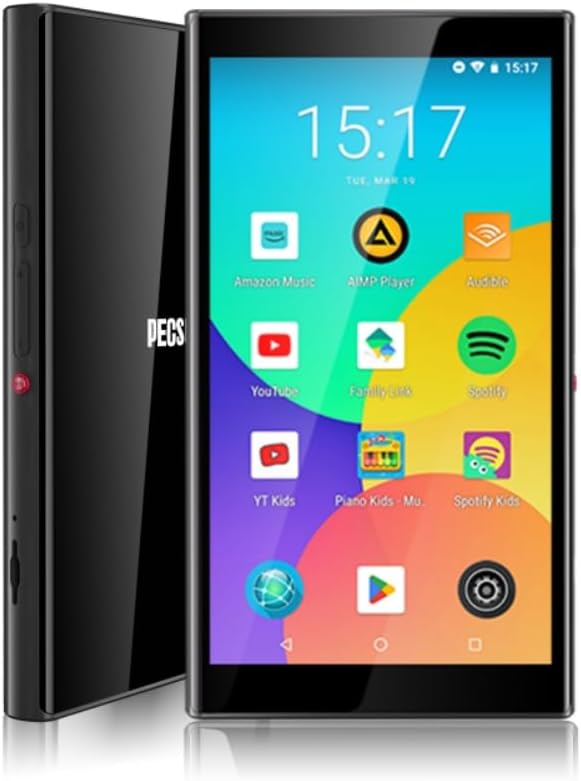
Slika 1.1: Spredaj in ob strani view of the PECSU G5 MP3 Player, displaying its user interface with various application icons.
2. Kaj je v škatli
Preverite, ali so v paketu prisotni vsi elementi:
- 1 × PECSU G5 Music Player
- 1 × uporabniški priročnik
- 1 × Extra Screen Protector
- 1 × polnilni kabel Type-C
3. Izdelek je končanview
3.1 Fizične značilnosti

Image 3.1: A diagram illustrating the dimensions (5.24" height, 2.89" width, 0.47" thickness) and button layout of the PECSU G5. Labels indicate the On/Off button, Volume Up/Down, Recording Key, TF Card Port, Type-C Port, and 3.5mm Port.
The PECSU G5 features a sleek design with a 5-inch full touch screen. Key physical components include:
- Gumb za vklop/izklop: Nahaja se ob strani za vklop ali izklop naprave.
- Gumbi za glasnost: Separate buttons for increasing in odlokasinvolumen v g.
- Recording Key: A dedicated button for one-touch voice recording.
- Vrata za kartico TF: Slot for inserting a Micro SD card to expand storage.
- Vrata tipa C: Za polnjenje in prenos podatkov.
- 3.5 mm avdio priključek: Za priklop žičnih slušalk.
3.2 Ključne lastnosti
- Starševski nadzor: Pre-installed Family Link application allows monitoring, setting usage times, and disabling apps. All app downloads require parental permission.
- Operacijski sistem: Android 8.1 system with an Octa-core 64-bit MTK chipset.
- Trgovina Google Play: Pre-installed for downloading popular music, video, and reading applications such as Spotify, YouTube, Amazon Music, Audible, and Libby.
- Zaslon: 5-inch HD IPS full touchscreen with 1080P video playback (720*1280 PX resolution).
- Povezljivost: Bluetooth 5.0 for stable connections to speakers, earphones, and car audio systems. Dual-band Wi-Fi (2.4G & 5G) for fast data transfer and online streaming.
- Baterija: Built-in 3000mAh LCO Battery, providing approximately 15 hours of continuous music playback or 6 hours of video playback.
- Shranjevanje: 32GB internal ROM and 3GB RAM, expandable up to 1TB via Micro SD card (FAT32 format).
- Kakovost zvoka: Supports HiFi lossless music playback.
- Snemalnik zvoka: One-touch recording function.

Image 3.2: The PECSU G5 screen highlighting its 5-inch 1080P HD IPS display, emphasizing fast response, 720x1280 pixel resolution, and wider viewing kotov.

Image 3.3: The PECSU G5 displaying its storage capabilities, including 3GB RAM, 32GB ROM, and support for up to 1TB TF Card expansion.

Image 3.4: An illustration of the PECSU G5's 3000mAh LCO battery, indicating up to 5 hours of video playback and up to 15 hours of music playback.

Image 3.5: A visual representation of the PECSU G5's 2-Way Bluetooth 5.0 feature, showing connections to headphones/earbuds, a portable speaker, and car audio systems.
4. Nastavitev
4.1 Polnjenje naprave
- Connect the provided Type-C charging cable to the device's Type-C port.
- Drugi konec kabla priključite v združljiv napajalnik USB (ni priložen) ali v vrata USB računalnika.
- The device will indicate charging status on the screen. A full charge typically takes 2-3 hours.
4.2 Vklop/izklop
- Za vklop: Press and hold the On/Off button located on the side of the device until the screen illuminates.
- Za izklop: Press and hold the On/Off button until a power menu appears on the screen. Select "Power off" and confirm.
- Za ponovni zagon: V meniju napajanja izberite »Ponovni zagon«.
4.3 Začetna konfiguracija
Upon first power-on, you will be guided through an initial setup process:
- Izberite želeni jezik.
- Connect to a Wi-Fi network to enable internet access and app downloads.
- Sign in with your Google account. This is necessary for accessing the Google Play Store and utilizing parental controls.
- Za dokončanje nastavitve sledite navodilom na zaslonu.
4.4 Vstavljanje kartice Micro SD
To expand the device's storage:
- Locate the TF Card Port on the side of the device (refer to Image 3.1).
- Gently insert a Micro SD card (up to 1TB, FAT32 format recommended) into the slot until it clicks into place.
- The device will detect the new storage. You may need to format the card if prompted.
5. Navodila za uporabo
5.1 Navigacija
The PECSU G5 features a full touchscreen interface. Use standard Android gestures:
- Tapnite: Za izbiro elementa ali odpiranje aplikacije.
- Povlecite: Za pomikanje po seznamih ali preklapljanje med zasloni.
- Povečava s ščipanjem in ščipanjem prstov: In supported applications like image galleries or web brskalniki.
5.2 Povezovanje z Wi-Fi
- Pojdi na nastavitve > Omrežje in internet > Wi-Fi.
- Preklopi Wi-Fi On.
- Na seznamu izberite želeno omrežje in po potrebi vnesite geslo.
5.3 Bluetooth seznanjanje
- Pojdi na nastavitve > Povezane naprave > Bluetooth.
- Preklopi Bluetooth On.
- Prepričajte se, da je vaša dodatna oprema Bluetooth v načinu seznanjanja.
- Tapnite Seznanite novo napravo and select your accessory from the list.
5.4 Using Google Play Store
The Google Play Store allows you to download and install a wide variety of applications.

Image 5.1: The PECSU G5 screen displaying the Google Play Store icon prominently, surrounded by various popular app icons like Spotify, YouTube, and Amazon Music, indicating broad app compatibility.
- Tapnite Trgovina Play ikono na začetnem zaslonu.
- Iskanje desired apps (e.g., Spotify, Pandora, Amazon Music, Libby, Audible).
- Tapnite Namestite za prenos in namestitev aplikacije.
5.5 Parental Controls (Family Link)
The PECSU G5 is designed with parental controls via the pre-installed Family Link app.

Image 5.2: The PECSU G5 screen showing the Family Link parental control interface, with options for daily limits, downtime, and blocked apps. The image also depicts a child sleeping with the device nearby, suggesting its use for controlled media consumption.
- Ensure Family Link is set up on both the PECSU G5 (for children) and your personal smartphone (for parents).
- From your parent device, you can:
- Monitor app usage and screen time.
- Set daily usage limits and device downtime.
- Block specific applications.
- App downloads from the Play Store will require parental approval.
5.6 Predvajanje glasbe in videoposnetkov
- Use pre-installed music/video players or download your preferred apps from the Google Play Store.
- The device supports HiFi lossless audio formats and 1080P video playback.
5.7 Snemanje zvoka
To use the voice recorder function:
- Pritisnite namensko Ključ za snemanje on the side of the device (refer to Image 3.1).
- Alternatively, open the pre-installed Snemalnik aplikacija.
- Za začetek, začasno ustavitev in shranjevanje posnetkov sledite navodilom na zaslonu.
5.8 File Prenos
Lahko prenesete files to and from the PECSU G5 using the Type-C cable or wirelessly.
- Prek kabla USB: Connect the device to a computer using the Type-C cable. On the device, select "File transfer" when prompted. The device will appear as a removable drive on your computer.
- Brezžični prenos: Utilize pre-installed file sharing apps or download third-party apps from the Play Store for wireless file upravljanje.
6. Vzdrževanje
6.1 Čiščenje
- Zaslon in ohišje naprave očistite z mehko krpo, ki ne pušča vlaken.
- Avoid using harsh chemicals or abrasive materials, as they may damage the screen or finish.
6.2 Skrb za baterije
- Za podaljšanje življenjske dobe baterije naprave ne izpostavljajte ekstremnim temperaturam.
- Do not allow the battery to fully discharge frequently. Charge the device when the battery level is low.
- Če naprave ne boste uporabljali dlje časa, jo pred shranjevanjem napolnite na približno 50 %.
6.3 Posodobitve programske opreme
- Redno preverjajte posodobitve sistema, da zagotovite optimalno delovanje in varnost.
- Pojdi na nastavitve > Sistem > Posodobitev sistema za preverjanje in namestitev razpoložljivih posodobitev.
7. Odpravljanje težav
If you encounter issues with your PECSU G5, refer to the following common problems and solutions:
| Težava | Možna rešitev |
|---|---|
| Naprava se ne vklopi | Ensure the device is charged. Connect to a power source and try again. If unresponsive, press and hold the power button for 10-15 seconds to force a restart. |
| Naprava se zamrzne ali se ne odziva | Press and hold the power button for 10-15 seconds to force a restart. If the issue persists, consider performing a factory reset (backup data first). |
| No sound from speaker or headphones | Check the volume level. Ensure headphones are properly connected or Bluetooth device is paired and connected. Test with different headphones or speakers. |
| Baterija se hitro izprazni | Reduce screen brightness. Close unused background applications. Disable Wi-Fi and Bluetooth when not in use. Check for power-intensive apps. |
| Cannot connect to Wi-Fi or Bluetooth | Ensure Wi-Fi/Bluetooth is enabled in settings. Restart the device and your router/Bluetooth accessory. Verify network password. |
| App download issues from Play Store | Check Wi-Fi connection. Ensure sufficient storage space. Verify parental permissions if Family Link is active. Clear Play Store cache and data in settings. |
8. Specifikacije
| Funkcija | Podrobnost |
|---|---|
| Ime modela | G5 |
| Znamka | PECSU |
| Operacijski sistem | Android 8.1 |
| Procesor | Octa-core 64-bit MTK chipset |
| Notranji pomnilnik (ROM) | 32 GB |
| RAM | 3 GB |
| Razširljiv prostor za shranjevanje | Up to 1 TB (Micro SD, Micro SDHC, Micro SDXC, FAT32 format) |
| Velikost zaslona | 5 palcev |
| Ločljivost zaslona | 1080P HD IPS (720*1280 PX) |
| Povezljivost | Bluetooth 5.0, Dual-band Wi-Fi (2.4G & 5G) |
| Baterija | 3000mAh LCO Lithium Polymer |
| Življenjska doba baterije (glasba) | Approx. 15 hours (Lab. Data) |
| Življenjska doba baterije (video) | Approx. 6 hours (Lab. Data) |
| Čas polnjenja | 2-3 ur |
| Dimenzije izdelka | 0.47 x 2.83 x 5.2 palca (12 x 72 x 133 mm) |
| Teža predmeta | 6.5 unč |
| Posebne lastnosti | Metal & Glass Back, One-Key Recording, Parental Controls, Split-screen Mode, App Store Support |
9. Garancija in podpora
The PECSU G5 MP3 Player is covered by a manufacturer's warranty. For specific warranty terms and conditions, please refer to the documentation included with your purchase or contact PECSU customer support.
For technical assistance, troubleshooting, or warranty claims, please contact PECSU customer support through the retailer where the product was purchased or visit the official PECSU webspletno mesto za kontaktne podatke.