
SENTRY HPXBTA1000
SENTRY BT Pro Sq Headset User Manual
Model: HPXBTA1000
1. Uvod
Welcome to the user manual for your new SENTRY BT Pro Sq Headset with Active Noise Canceling. This manual provides essential information on setting up, operating, maintaining, and troubleshooting your headset to ensure optimal performance and longevity. Please read this manual thoroughly before using the product.
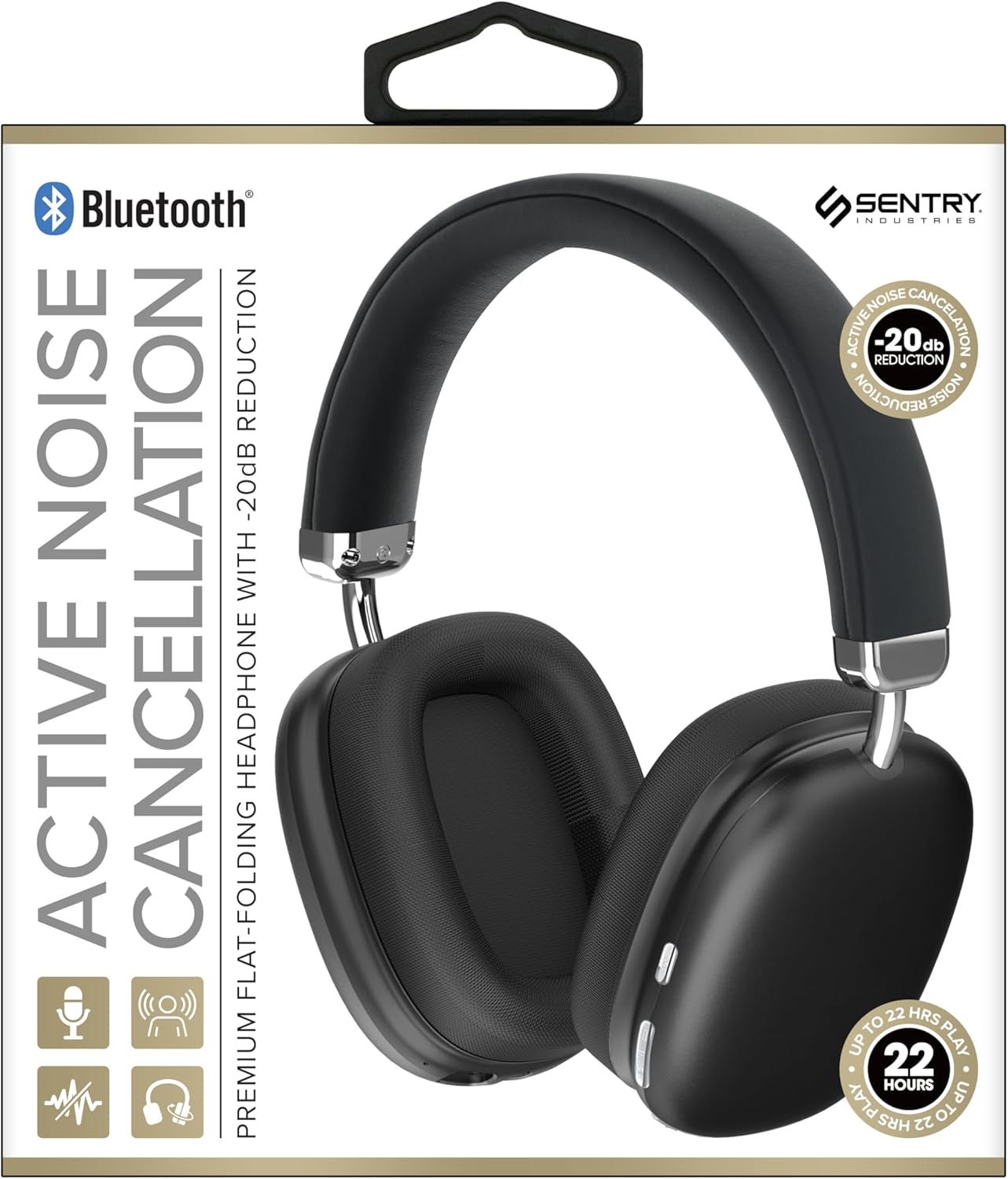
This image displays the SENTRY BT Pro Sq Headset in black, highlighting its over-ear design, adjustable headband, and the control buttons located on the earcups. The packaging indicates features such as Bluetooth connectivity, Active Noise Cancellation with -20dB reduction, and up to 22 hours of play time.
2. Pomembne varnostne informacije
To ensure safe and proper operation, please observe the following guidelines:
- Slušalk ne izpostavljajte ekstremnim temperaturam, vlagi ali korozivnim snovem.
- Pazite, da vam slušalke ne padejo ali da jih ne izpostavljate močnim udarcem.
- Slušalk ne razstavljajte ali poskušajte popraviti sami. S tem boste razveljavili garancijo.
- Clean the headset with a soft, dry cloth only. Do not use liquid cleaners.
- Dolgotrajno poslušanje pri visoki glasnosti lahko povzroči poškodbe sluha. Glasnost prilagodite na varno raven.
- Do not use the headset in situations where inability to hear ambient sounds could be dangerous (e.g., driving, cycling, walking in traffic).
3. Vsebina paketa
Prosimo, preverite paket za naslednje artikle:
- SENTRY BT Pro Sq Headset
- USB polnilni kabel
- Uporabniški priročnik
4. Izdelek je končanview
The SENTRY BT Pro Sq Headset features an over-ear design with soft ear pads for comfort and noise isolation. It includes an adjustable folding headband for portability. Key components include:
- Slušalke: House the audio drivers and provide passive noise isolation.
- Naglavni trak: Adjustable for a comfortable fit, designed to fold for compact storage.
- Gumbi za upravljanje: Located on the earcups for power, volume, track control, and Active Noise Cancellation (ANC).
- Mikrofon: Vgrajeno za prostoročne klice.
- Vrata za polnjenje: Za priklop polnilnega kabla USB.
Refer to the product image in the Introduction section for visual identification of these components.
5. Nastavitev
5.1 Polnjenje slušalk
- Manjši konec polnilnega kabla USB priključite na polnilno vtičnico na slušalkah.
- Večji konec polnilnega kabla USB priključite na napajalnik USB (ni priložen) ali na vrata USB računalnika.
- The LED indicator on the headset will illuminate to show charging status. It will change color or turn off when fully charged.
- Polno polnjenje običajno traja približno 2-3 ure.
5.2 Pairing with Bluetooth Devices
Before using the headset wirelessly, you must pair it with your Bluetooth-enabled device (smartphone, laptop, tablet, smart speaker, gaming console).
- Prepričajte se, da so slušalke popolnoma napolnjene.
- With the headset powered off, press and hold the Power button for approximately 5-7 seconds until the LED indicator flashes rapidly, indicating pairing mode.
- V napravi Bluetooth omogočite Bluetooth in poiščite nove naprave.
- Select "SENTRY BT Pro Sq" (or similar name) from the list of available devices.
- Once paired, the LED indicator on the headset will stop flashing and may turn solid blue or off, depending on the model.
- Slušalke bodo ob vklopu samodejno poskušale ponovno vzpostaviti povezavo z zadnjo seznanjeno napravo.
6. Navodila za uporabo
6.1 Vklop/izklop
- Vklop: Press and hold the Power button for 2-3 seconds. The LED indicator will light up.
- Ugasniti: Press and hold the Power button for 3-4 seconds. The LED indicator will turn off.
6.2 Aktivno odpravljanje hrupa (ANC)
The headset features Active Noise Cancellation to reduce ambient noise.
- Aktiviraj ANC: Locate the ANC button (if separate) or press the designated control. The ANC indicator light will turn on.
- Deaktiviraj ANC: Ponovno pritisnite gumb ANC. Indikatorska lučka ANC ugasne.
6.3 Media Control (Touch Control)
Control your audio playback directly from the headset:
- Predvajanje/pavza: Enkrat tapnite večfunkcijski gumb.
- Povečaj glasnost: Tap the Volume Up button.
- Znižaj glasnost: Tap the Volume Down button.
- Naslednja skladba: Double tap the multi-function button.
- Prejšnja skladba: Triple tap the multi-function button.
6.4 Upravljanje klicev
Manage phone calls with the built-in microphone:
- Sprejmi klic: Single tap the multi-function button when a call comes in.
- Končaj klic: Single tap the multi-function button during a call.
- Zavrni klic: Press and hold the multi-function button for 2 seconds when a call comes in.
7. Vzdrževanje in nega
- Čiščenje: Slušalke obrišite z mehko, suho krpo, ki ne pušča vlaken. Ne uporabljajte abrazivnih čistil, alkohola ali kemičnih topil.
- Shranjevanje: When not in use, store the headset in a cool, dry place, away from direct sunlight and extreme temperatures. Utilize the folding headband feature for compact storage.
- Vzdrževanje baterije: To preserve battery life, charge the headset regularly, even if not used for extended periods. Avoid fully discharging the battery frequently.
- Izogibajte se vodi: The headset is not waterproof. Keep it away from water and moisture.
8. Odpravljanje težav
Če imate težave s slušalkami, si oglejte naslednje pogoste težave in rešitve:
| Težava | Možna rešitev |
|---|---|
| Slušalke se ne vklopijo. | Ensure the headset is fully charged. Connect to a power source and allow it to charge for at least 30 minutes before attempting to power on again. |
| Ni mogoče seznaniti z napravo Bluetooth. | Ensure the headset is in pairing mode (LED flashing rapidly). Make sure Bluetooth is enabled on your device and it is within range (10 meters). Try restarting both the headset and your device. |
| Ni zvoka iz slušalk. | Check the volume level on both the headset and your connected device. Ensure the headset is properly paired and connected. Try playing audio from a different application or device. |
| Aktivno odpravljanje šumov (ANC) ni učinkovito. | Ensure ANC is activated. Make sure the earcups are properly sealed around your ears. ANC is most effective against low-frequency, constant noise. |
| Mikrofon ne deluje. | Ensure the headset is connected and selected as the input device on your computer or smartphone. Check privacy settings on your device that might restrict microphone access. |
9. Specifikacije
| Funkcija | Podrobnost |
|---|---|
| Ime modela | HPXBTA1000 |
| Tehnologija povezljivosti | Brezžično (Bluetooth) |
| Nadzor hrupa | Aktivno odpravljanje hrupa |
| Namestitev ušesa | Nad ušesi |
| Faktor oblike | Nad ušesi |
| Vrsta nadzora | Upravljanje medijev, dotik |
| Frekvenčno območje | 20 Hz do 20,000 Hz |
| Vrsta zvočnega gonilnika | Dinamični gonilnik |
| Združljive naprave | Smartphones, Laptops, Tablets, Smart Speakers, Gaming Consoles |
| barva | Črna |
| Teža predmeta | 1.2 funtov |
| UPC | 080068501503 |
| Proizvajalec | STRAŽA |
10. Garancija in podpora
SENTRY products are designed and manufactured to the highest quality standards. For information regarding warranty coverage, technical support, or service inquiries, please refer to the warranty card included with your product or visit the official SENTRY webspletnega mesta. Prosimo, shranite dokazilo o nakupu za uveljavljanje garancije.
Ask a question about this manual
Ask about setup, troubleshooting, compatibility, parts, safety, or missing instructions. Manuals+ will review the question and use this page’s manual context to help answer it.