
1. Uvod
This manual provides comprehensive instructions for the installation, operation, and maintenance of your LongPlus Smart 4K 8CH Home Security Camera System. This system is designed to provide robust surveillance with advanced features such as 4K UHD resolution, intelligent AI detection, and flexible storage options, ensuring comprehensive protection for your property.
Please read this manual thoroughly before operating the system and retain it for future reference.
2. Vsebina paketa
Verify that all items listed below are included in your package. If any items are missing or damaged, please contact LongPlus customer support.
- 1 x 8CH NVR with 48/1.875V Adaptor
- 4 x 4K PoE Bullet kamer
- 1 x USB miška
- 1 x 1M kabel Cat5
- 1 x 1M HDMI kabel
- 4 x 18M kablov Cat5
- 2 x Extra Connectors
- 4 x paketov vijakov in drugih dodatkov
- 1 x vodnik za hiter začetek

Image: The LongPlus 4K 8CH NVR system, including the main NVR unit, four white PoE bullet cameras, and a 2TB hard drive. This image illustrates the primary components of the security system.
3. Nastavitev
3.1 Fizična namestitev
Before mounting, test all cameras and connections to ensure proper functionality.
- Namestitev snemalnika: Place the NVR in a secure, dry, and well-ventilated area, away from direct sunlight and heat sources. Ensure it is easily accessible for connections.
- Namestitev kamere:
- Choose strategic locations that provide optimal coverage of desired areas (e.g., entry points, driveways, yards).
- Consider the camera's 132° wide-angle view za celovito pokritost.
- Ensure the cameras are within the 100ft night vision range for effective low-light monitoring.
- The cameras are designed for outdoor use with a durable metal body, capable of withstanding extreme weather conditions (-22°F to 140°F).
- kabli:
- Connect each PoE camera to the NVR's PoE ports using the provided Cat5 cables. The system supports cable runs up to 660ft.
- Priključite NVR na monitor s kablom HDMI ali VGA.
- Za navigacijo priključite miško USB na vrata USB na snemalniku.
- Connect the NVR to your router's LAN port using the 1M Cat5 cable for network access.

Image: A detailed diagram illustrating the connection setup for the LongPlus 8-channel PoE Home Security Camera System. It shows PoE cameras connecting to the NVR, the NVR connecting to a router for internet access, and connections to a monitor, mouse, and power. Remote access via PC and mobile devices is also depicted.

Slika: Bližnji posnetek view of the rear panel of the LongPlus NVR, highlighting its various ports including HDMI, VGA, USB, and Ethernet ports for camera and network connections.

Image: A visual comparison showing the LongPlus camera's 132-degree wide viewing angle providing broader coverage compared to a typical 121-degree view from other cameras.
3.2 Začetni vklop in konfiguracija
- Connect the NVR power adapter to a power outlet. The system will power on automatically.
- Follow the on-screen prompts on the connected monitor to complete the initial setup wizard, including setting up a password and network settings.
- The NVR comes with a 2TB HDD pre-installed. Ensure it is properly connected inside the NVR for local storage.
4. Delovanje
4.1 Remote Access and App Installation
To access your security system remotely, download the Longvision APP on your smartphone or tablet (iOS/Android) or use the client software for Mac/Windows.
- Iskanje "Longvision" in the Apple App Store or Google Play Store.
- Install the app and follow the in-app instructions to add your NVR system.
- The system supports up to 32 users for shared access.

Image: Screenshots of the Longvision mobile application, demonstrating its live view, smart motion alert notifications, and video playback features. The app is compatible with Mac, Windows, Apple iOS, and Google Android operating systems.
4.2 Recording Modes and Storage
The NVR supports various recording modes and flexible storage options.
- Neprekinjeno snemanje 24/7: The system records continuously to the pre-installed 2TB HDD. The storage is expandable up to 10TB.
- Snemanje s sprožitvijo gibanja: Records only when motion is detected, saving storage space. This is the default mode.
- Predvideno snemanje: Določite določene čase za snemanje.
- H.265+ kompresija: Utilizes advanced H.265+ video compression technology, which saves over 75% of storage space compared to H.264, allowing for longer recording times.
- Shramba v oblaku: Bank-level encrypted cloud storage is available as an optional service for off-site backup.
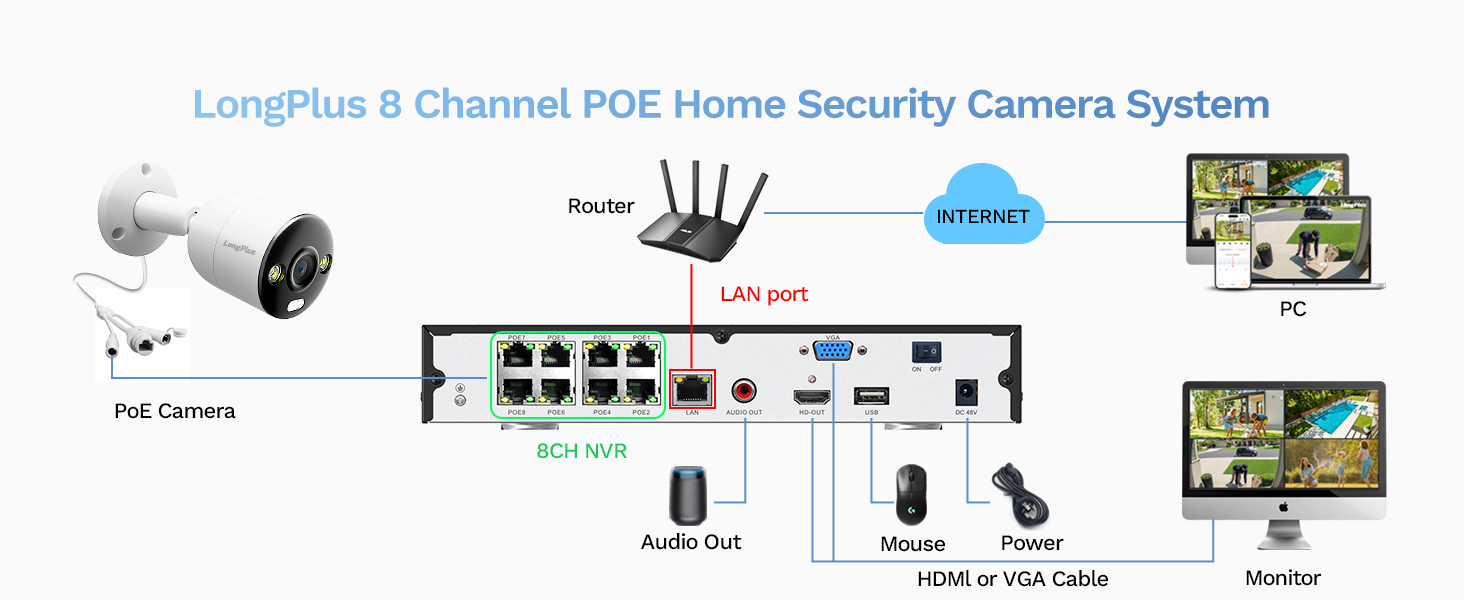
Image: A visual comparison demonstrating the efficiency of H.265+ compression over H.264, highlighting how H.265+ saves over 75% of storage space, enabling longer recording durations.
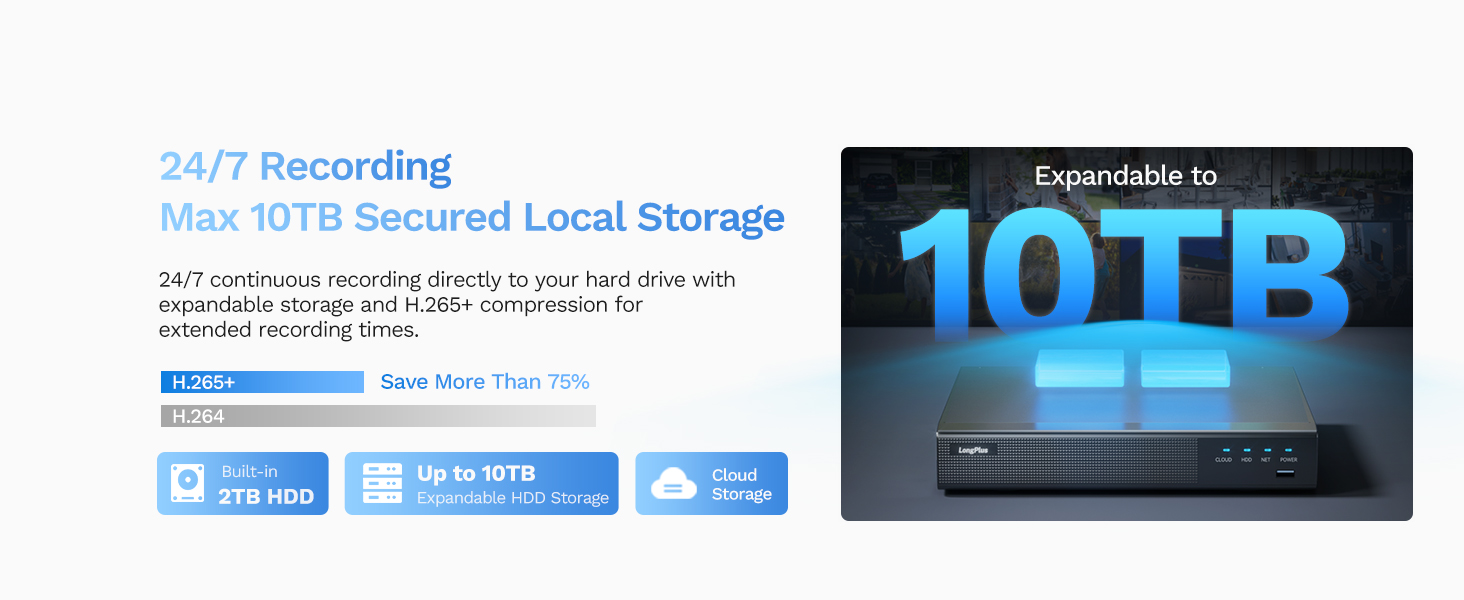
Image: An illustration of the LongPlus NVR's 24/7 recording capability and its support for expandable local storage up to 10TB, with a built-in 2TB HDD.
4.3 Načini nočnega vida
The LongPlus system offers three distinct night vision modes to suit various lighting conditions:
- IR Night Vision (Infrared Mode): Provides clear black and white footage in complete darkness up to 100ft.
- Color Night Vision (Full Color Mode): Delivers vibrant, full-color footage even in low-light conditions, allowing for better identification of details.
- Smart Night Vision (AI Mode): Automatically switches to color night vision and activates the built-in spotlights when motion is detected, providing clear, illuminated footage.

Image: A visual comparison demonstrating the three night vision modes: Full Color Mode, Infrared Mode, and Smart Night Vision (AI Mode), showing how each mode renders the scene differently in low light.
4.4 AI Motion Detection and Activity Zones
The system features advanced AI object detection for precise alerts.
- Zaznavanje predmeta: Accurately detects humans, vehicles, and pets, reducing false alarms.
- Opozorila v realnem času: Receive instant push notifications, emails, or siren alerts when motion is detected.
- Območja dejavnosti: Določite specifična območja znotraj vidnega polja kamere view where motion detection should be active. This helps to ignore irrelevant motion (e.g., public roads).
- Maska zasebnosti: Configure privacy masks to block out specific areas from being recorded or viewed, ensuring privacy.

Image: An illustration of the smart AI detection capabilities, showing the system identifying a person and a vehicle, and the corresponding alert options: push notification, email, and siren.

Image: A visual representation of how to set up motion detection zones and privacy masks within the camera's view, allowing users to customize surveillance areas and protect privacy.
4.5 Two-way Audio and Strobe Light Alarm
Enhance your security with interactive features:
- Dvosmerni zvok: Communicate directly with visitors or deter intruders using the built-in microphone and speaker on the cameras.
- Strobe Light Alarm: When a humanoid, vehicle, or pet motion is detected, the camera can automatically trigger a red and blue strobe light to warn off intruders.
- Alarm sirene: An audible siren can be activated manually or automatically upon detection to further deter unwanted presence.

Image: An illustration depicting the two-way audio feature, where a person can speak through the camera, and the camera's red and blue strobe light alarm activating upon detection of an intruder.
5. Vzdrževanje
- Redno čiščenje: Občasno očistite objektive fotoaparata z mehko krpoamp krpo za zagotovitev jasne kakovosti slike.
- Posodobitve vdelane programske opreme: The NVR firmware automatically updates when connected to the internet. Ensure your system is connected to receive the latest features and security enhancements.
- Preverjanje zdravja trdega diska: Regularly check the health of your HDD through the NVR's system settings to prevent data loss.
- Pregled kabla: Inspect all cables for wear and tear, especially outdoor cables, to ensure reliable connection and power.
6. Odpravljanje težav
| Težava | Možen vzrok | rešitev |
|---|---|---|
| No image on monitor/TV | Loose HDMI/VGA cable, NVR not powered on, incorrect input source on monitor. | Check all cable connections. Ensure NVR is powered. Select correct input source on monitor (HDMI/VGA). |
| Ni slike kamere | Loose PoE cable, camera not powered, faulty camera/cable. | Check PoE cable connections to NVR and camera. Ensure NVR PoE ports are active. Try a different port or cable. |
| Ni oddaljenega dostopa prek aplikacije | NVR not connected to internet, incorrect network settings, app not configured correctly. | Ensure NVR is connected to router and has internet access. Verify network settings on NVR. Re-add device in Longvision app. |
| Opozorila o gibanju niso bila prejeta | Motion detection not enabled, activity zones not set correctly, notification settings off in app. | Enable motion detection in NVR settings. Adjust activity zones. Check app notification settings. |
| Slaba kakovost nočnega vida | Dirty lens, IR/Starlight mode not optimal, external light interference. | Clean camera lens. Try different night vision modes (IR, Color, Smart). Reduce external light sources that might cause glare. |
7. Specifikacije
| Funkcija | Podrobnost |
|---|---|
| Znamka | LongPlus |
| Številka modela | LP8ME84B1 |
| Tehnologija povezljivosti | Žično (PoE) |
| Ločljivost zajema videa | 4K (8 MP) |
| Število kanalov | 8 |
| Zmogljivost pomnilnika | 10 TB (2TB HDD included) |
| Mere predmeta (D x Š x V) | 11.76 x 11.41 x 7.67 palcev |
| Združljivost operacijskega sistema | Android, Mac OS, Windows, iOS |
| Priporočene uporabe | Notranji, zunanji |
| Območje nočnega vida | 100 čevljev |
| Hitrost sličic | 30 sličic na sekundo |
| Način snemanja | Motion-triggered (default), Scheduled, 24/7 |
| Skupno število vrat USB | 2 |
| Strojni vmesnik | Ethernet, HDMI, USB, VGA |
| Viewkota | 132 stopinj |
| Posebne lastnosti | High Efficiency Video Coding (H.265+), Red & Blue Flashing Lights, Easy to Install, Waterproof, Vehicle Detection, Adjustable, Motion Sensor, Siren Alarm, Flexible Storage (Local/Cloud), Smart Playback, Person/Vehicle/Animal Detection, Two-way Audio |
8. Garancija in podpora
LongPlus provides a 2-letna garancija for this product, ensuring peace of mind regarding manufacturing defects and performance issues.
Poleg tega doživljenjska tehnična podpora is available for all LongPlus customers. If you encounter any issues or have questions regarding your security system, please do not hesitate to contact our professional technical team. We aim to respond to all queries within 24 hours.
For support, please refer to the contact information provided in your Quick Start Guide or visit the official LongPlus webmesto.