
1. Uvod
Welcome to the user manual for your Tracer TW7-BL FUN Smartwatch. This device is designed to enhance your daily life by combining convenience, style, and advanced health and fitness tracking features. Please read this manual carefully to understand the full capabilities of your smartwatch and ensure proper usage and maintenance.
The Tracer TW7-BL FUN features a 1.83-inch HD touchscreen, Bluetooth 5.0 connectivity for calls and notifications, multiple sport modes, and comprehensive health monitoring including heart rate, blood oxygen saturation, steps, and sleep tracking. It also boasts an IP65 water resistance rating, making it suitable for everyday use.
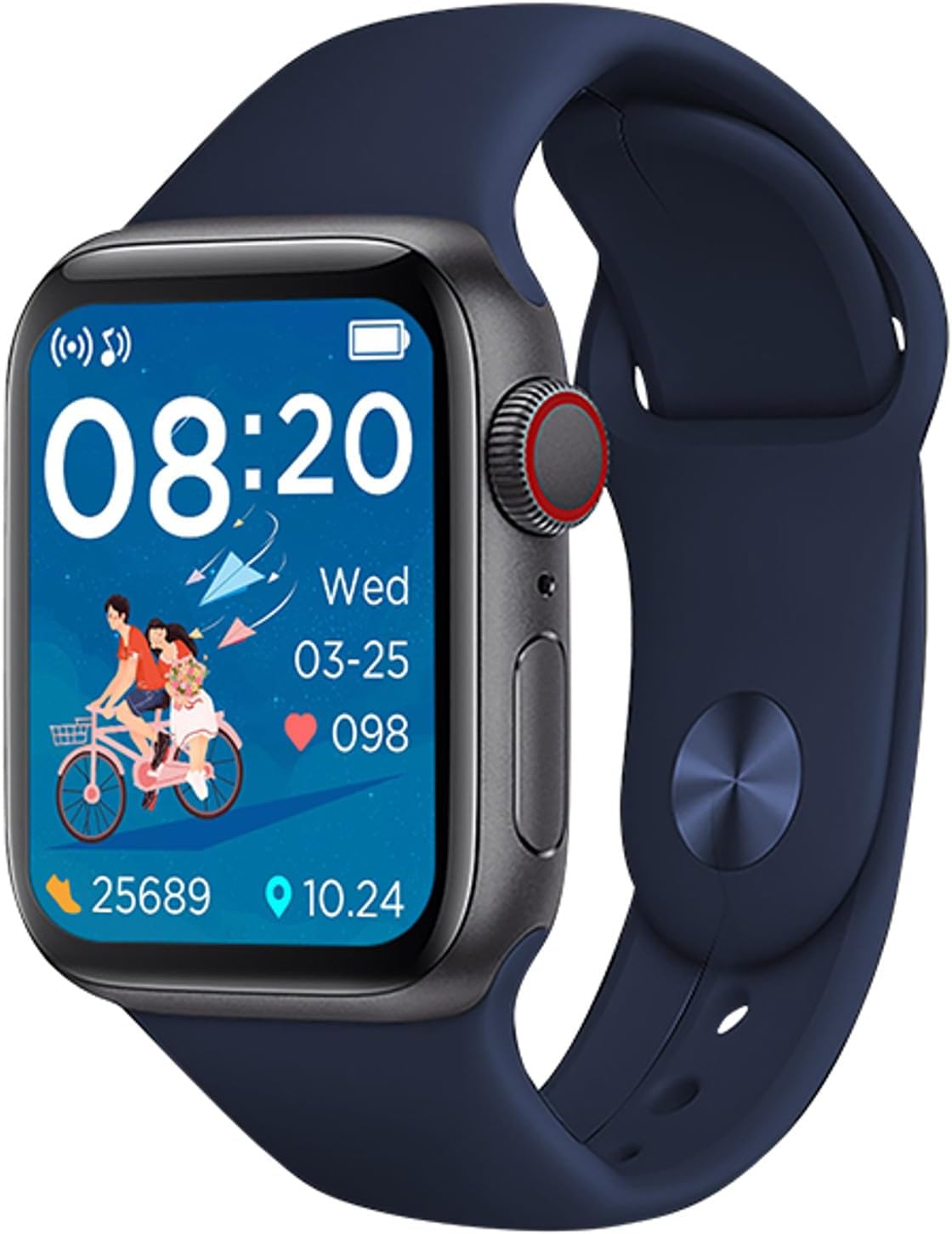
Figure 1: Tracer TW7-BL FUN Smartwatch. This image shows the smartwatch with a blue strap, displaying the time, date, heart rate, and step count on its main screen.
2. Vsebina paketa
Po odprtju paketa preverite, ali so priloženi vsi naslednji elementi:
- Tracer TW7-BL FUN Smartwatch (with strap)
- Charging Cable (clip-type)
- Uporabniški priročnik

Figure 2: Retail packaging of the Tracer TW7-BL FUN Smartwatch. The box highlights key features like BT 5.0, heart pulse, sport modes, and IP65 rating.
3. Nastavitev
3.1 Polnjenje pametne ure
Before initial use, fully charge your smartwatch. Connect the provided clip-type charging cable to the charging contacts on the back of the watch and plug the USB end into a standard USB power adapter (not included) or a computer's USB port.
- Prepričajte se, da so polnilni kontakti čisti in suhi.
- Na zaslonu se bo prikazal indikator polnjenja.
- Full charge typically takes approximately 2 hours.
3.2 Namestitev spremljevalne aplikacije
To unlock the full functionality of your Tracer TW7-BL FUN Smartwatch, you need to install the FitPro na pametnem telefonu.
- Scan the QR code in the manual or on the watch screen (if available) or search for "FitPro" in your smartphone's app store (Google Play Store for Android, Apple App Store for iOS).
- Download and install the FitPro app.
- Ensure your smartphone meets the compatibility requirements: Android 5.0+ or iOS 9.0+.
3.3 Seznanjanje s pametnim telefonom
After installing the FitPro app, follow these steps to pair your smartwatch:
- V pametnem telefonu omogočite Bluetooth.
- Open the FitPro app and grant all necessary permissions (location, notifications, etc.).
- Navigate to the "Device" or "Mine" section within the app and select "Add Device" or "Bind device".
- The app will search for available devices. Select "TW7-BL FUN" or a similar device name from the list.
- Po potrebi potrdite zahtevo za seznanjanje tako na pametnem telefonu kot na pametni uri.
- Once paired, the time and date on your smartwatch will synchronize with your phone.
4. Navodila za uporabo
4.1 Osnovna navigacija
The Tracer TW7-BL FUN Smartwatch features a 1.83-inch full touchscreen display for intuitive control. Swipe left, right, up, or down to navigate through menus and functions. Press the side button to return to the home screen or wake the device.

Figure 3: Smartwatch on a wrist, showing a vibrant watch face. This illustrates the device's display clarity and wearability.
4.2 Bluetooth klicanje
The smartwatch supports Bluetooth calling, allowing you to make and receive calls directly from your wrist. Ensure your watch is connected to your phone via Bluetooth.
- Klicanje: Access the dial pad or contact list on your smartwatch to initiate a call.
- Prejemanje klicev: Ko prejmete klic, ga lahko sprejmete ali zavrnete neposredno na zaslonu ure.
- The built-in microphone and speaker facilitate hands-free communication.
4.3 Spremljanje zdravja
Your smartwatch is equipped with advanced sensors to monitor various health metrics:
- Monitor srčnega utripa: Measures your heart rate throughout the day. Access this feature from the health menu on the watch or view detailed data in the FitPro app.
- Monitor kisika v krvi (SpO2): Provides estimates of your blood oxygen saturation levels.
- Pedometer in števec kalorij: Automatically tracks your steps taken and calories burned.
- Monitor spanja: Spremlja vaše vzorce spanja, vključno z globokim spanjem, lahkim spanjem in časom prebujanja. View sleep analysis in the FitPro app.
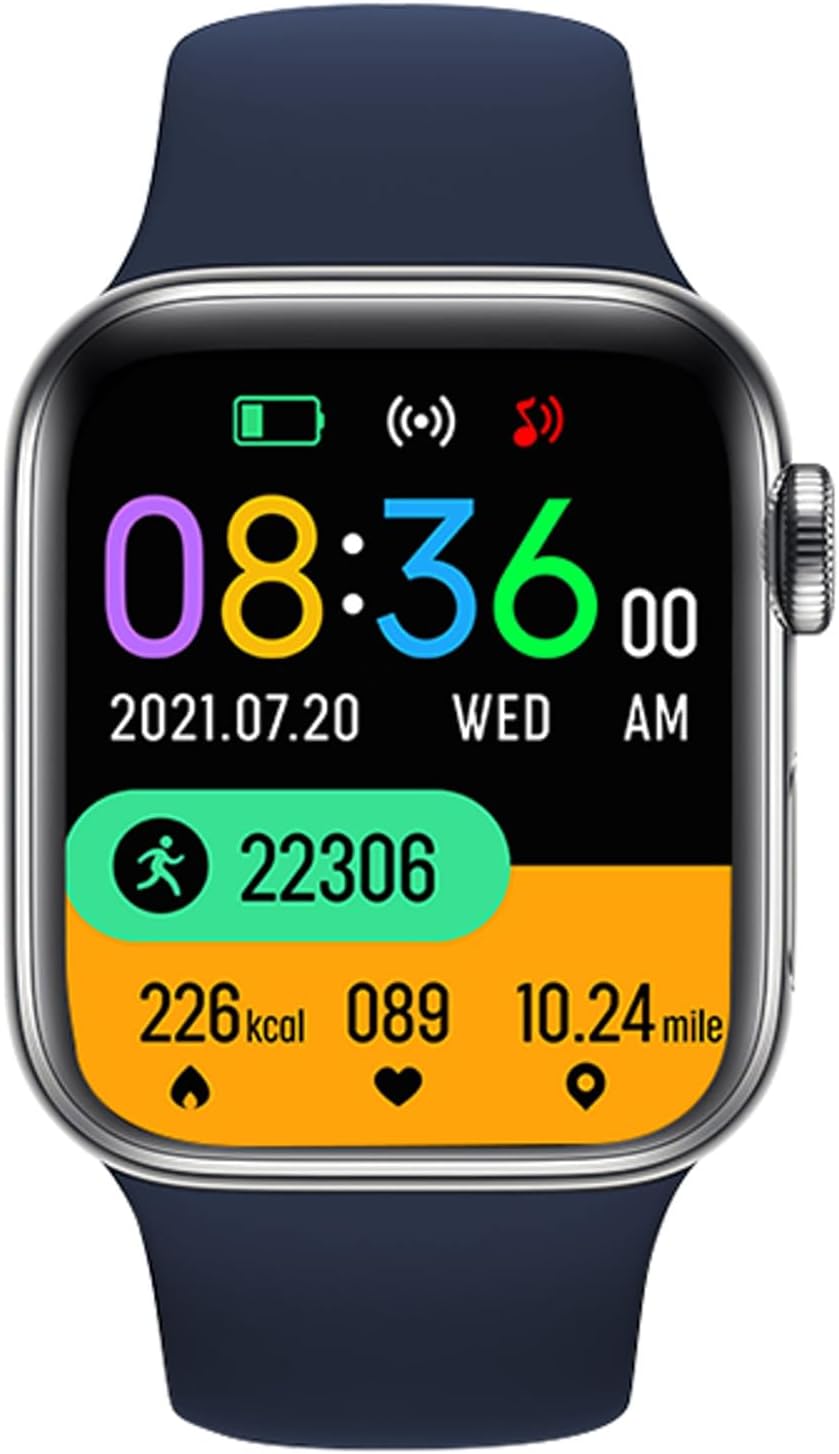
Figure 4: Smartwatch screen showing various health metrics. This display includes step count, calories burned, heart rate, and distance covered, indicating its fitness tracking capabilities.
4.4 športnih načinov
The smartwatch offers multiple sport modes to track your workouts more accurately. Select the appropriate mode before starting an activity to record specific data such as duration, distance, calories, and heart rate during exercise.

Figure 5: User engaging in a fitness activity while wearing the smartwatch. This image demonstrates the watch's use during exercise, highlighting its sport mode functionality.
4.5 Notifications and Other Features
- Obvestila o sporočilih: Receive alerts for incoming calls, SMS messages, and notifications from various social media applications (e.g., Messenger) directly on your watch. Configure these in the FitPro app.
- Vremenska napoved: View current weather conditions and forecasts on your smartwatch after synchronization with the app.
- Daljinski nadzor kamere: Use your smartwatch as a remote shutter for your phone's camera (feature availability may vary).
- Nadzor glasbe: Control music playback on your smartphone from your wrist.
5. Vzdrževanje
5.1 Čiščenje in nega
- Regularly clean your smartwatch and strap with a soft, dry, lint-free cloth.
- Po potrebi uporabite rahlo damp krpo z blagim milom, nato pa obrišite do suhega.
- Izogibajte se uporabi agresivnih kemikalij, abrazivnih čistil ali topil, saj lahko poškodujejo napravo.
- Ensure the charging contacts are free of dust and debris.
5.2 Vodoodpornost (IP65)
The Tracer TW7-BL FUN Smartwatch has an IP65 rating, which means it is protected against dust ingress and low-pressure water jets from any direction. This makes it suitable for:
- Everyday splashes, rain, and hand washing.
- Je ne suitable for swimming, showering, or prolonged submersion in water.
- Izogibajte se izpostavljanju ure vroči vodi ali pari.
6. Odpravljanje težav
If you encounter issues with your smartwatch, please refer to the following common solutions:
- Ura se ne vklopi: Prepričajte se, da je ura popolnoma napolnjena. Priključite jo na polnilnik za vsaj 30 minut.
- Seznanjanje s telefonom ni mogoče:
- Prepričajte se, da je Bluetooth omogočen v vašem telefonu.
- Prepričajte se, da je ura v dosegu Bluetooth (običajno 10 metrov).
- Znova zaženite telefon in pametno uro.
- Počistite predpomnilnik Bluetooth v telefonu ali pozabite napravo in poskusite znova seznaniti napravo.
- Ensure the FitPro app has all necessary permissions.
- Obvestila se ne prikazujejo:
- Check notification settings in the FitPro app.
- Ensure your phone's notification access is granted to the FitPro app.
- Verify that the watch is properly connected to the app.
- Netočni zdravstveni podatki:
- Prepričajte se, da je ura tesno prilegana zapestju, približno za širino enega prsta od zapestne kosti.
- Senzor naj bo čist.
- Note that these devices are not medical instruments and provide data for reference only.
- Kratka življenjska doba baterije:
- Zmanjšajte svetlost zaslona.
- Disable unnecessary features or continuous monitoring if not needed.
- Vsakič se prepričajte, da je ura popolnoma napolnjena.
7. Specifikacije
| Funkcija | Specifikacija |
|---|---|
| Številka modela | TRAFON47134 |
| Zaslon | 1.83-inch HD Touchscreen (240 x 286p) |
| Različica Bluetooth | 5.0 |
| Kapaciteta baterije | 180 mAh |
| Čas pripravljenosti | 20-22 dni |
| Ocena vodoodpornosti | IP65 |
| Združljivost | Android 5.0+ / iOS 9.0+ |
| Spremljevalna aplikacija | FitPro |
| Spremljanje zdravja | Heart Rate, SpO2, Pedometer, Calorie Counter, Sleep Monitor |
| Posebne lastnosti | Bluetooth Calling (Mic & Speaker), Sport Modes, Notifications, Weather Forecast |
| Vrata za polnjenje | Clip-type |
| Dimenzije (V x Š x G) | 3.8 x 1.1 x 4.4 cm |
| Teža | 53 g |
8. Garancija in podpora
Tracer products are designed for reliability and performance. For warranty information, please refer to the warranty card included with your product or visit the official Tracer website. If you encounter any issues not covered in this manual, please contact Tracer customer support for assistance.
Za garancijske zahtevke shranite dokazilo o nakupu.