
1. Končanoview
The Jennov K2-P52-V18 is a fully wireless outdoor solar security camera system designed for comprehensive surveillance. It features a 400-megapixel camera with Pan-Tilt-Zoom (PTZ) capabilities, offering 360° rotation and a 130° wide-angle view. The system includes a 4K-compatible monitor for direct viewing and supports remote monitoring via the Eseecloud app. Key features include AI human detection, color night vision, IP66 waterproof and dustproof rating, and efficient H.265+ video compression with built-in HDD storage.
2. Vsebina paketa
Preverite, ali so v paketu vsi spodaj navedeni predmeti. Če kateri koli predmet manjka ali je poškodovan, se obrnite na podporo strankam.
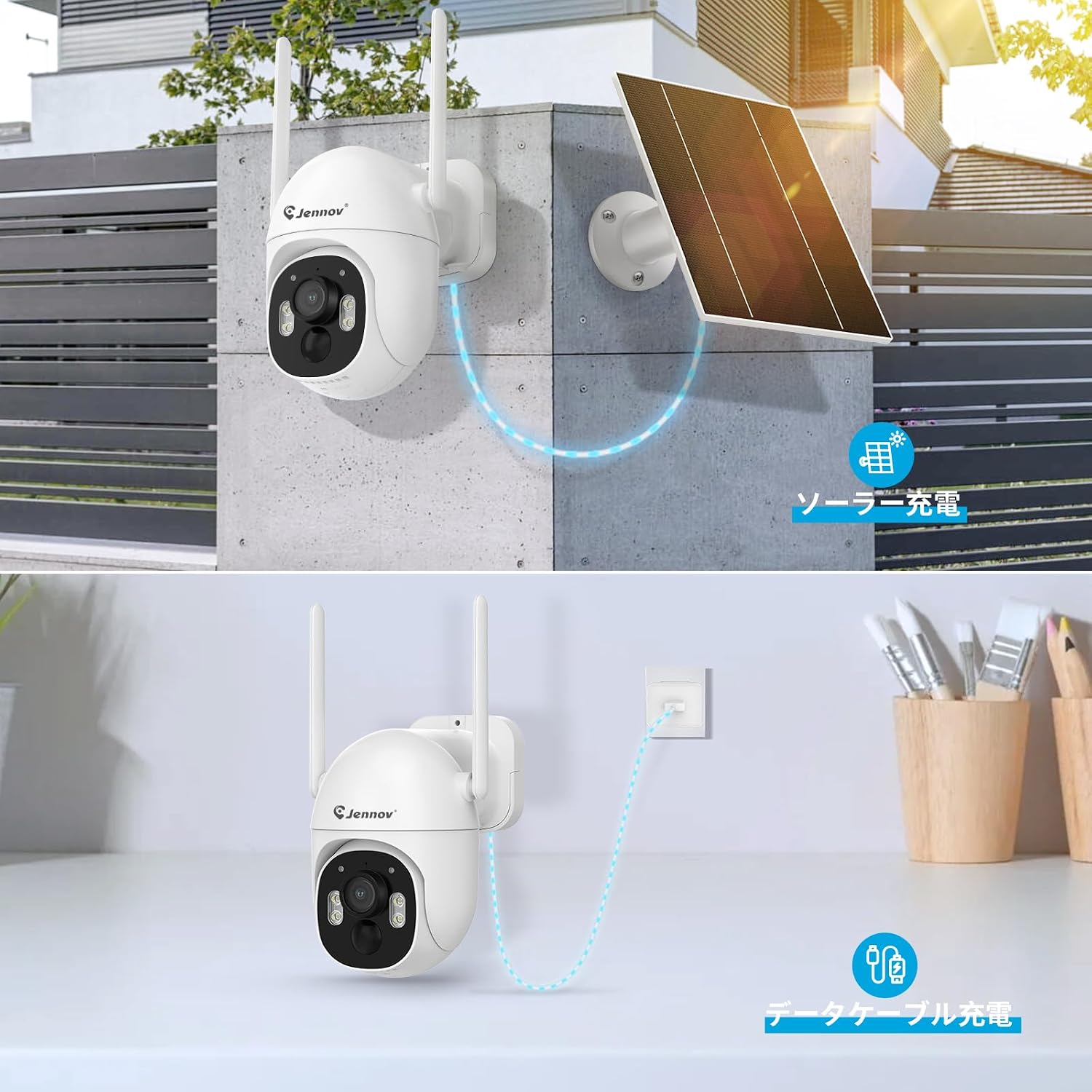
Image: Contents of the Jennov K2-P52-V18 security camera system package.
- 400MP Wireless Security Camera (2 units)
- 800MP Compatible Monitor with Built-in HDD (1 unit)
- Sončna celica (2 enoti)
- Napajalnik za NVR (1 enota)
- HDMI kabel (1 enota)
- USB miška (1 enota)
- Security Sticker (1 unit)
- Navodila za uporabo (1 enota)
- Camera Mounting Screws (2 sets)
- LAN Cable (1 unit)
3. Nastavitev
3.1 Začetno polnjenje
Before installation, it is recommended to fully charge the camera using a Type-C cable for at least 6 hours to ensure optimal performance. The camera can also be charged via the solar panel once installed.

Image: The camera supports both solar charging and Type-C cable charging.
3.2 Fizična namestitev
The cameras are designed for outdoor use with an IP66 waterproof and dustproof rating. Choose a location that provides a clear view of the area you wish to monitor and allows the solar panel to receive adequate sunlight.
Video: This video demonstrates the general method for installing the security camera.
- Označite vrtalne točke: Use the mounting template to mark the positions for drilling on the wall or ceiling.
- Vrtanje lukenj: Izvrtajte luknje na označenih mestih.
- Vstavi sidra: V izvrtane luknje vstavite plastična sidra.
- Montaža kamere: Poravnajte podstavek kamere s sidri in ga pritrdite z vijaki.
- Povežite sončni panel: Connect the solar panel to the camera. Position the solar panel to maximize sunlight exposure.

Image: Drilling holes into the wall for mounting the camera.

Image: Inserting plastic anchors into the drilled holes to secure the camera mount.

Image: Attaching the camera to the wall using screws and anchors.

Image: The IP66 waterproof camera installed outdoors with its solar panel for continuous power.
3.3 Sistemska povezava
The system is designed for easy plug-and-play setup. The monitor and cameras connect wirelessly. You can connect the monitor to a larger display via HDMI or to your network via LAN/Wi-Fi for remote access.
Video: This video illustrates the simple setup and plug-and-play functionality of the system.
- Vklop: Connect the NVR power adapter to the monitor and plug it into an electrical outlet. The cameras will automatically connect to the monitor.
- Monitor Ports: The monitor features ports for power, USB (for mouse), HDMI (for external display), LAN (for wired network connection), a reset button, and an SD card slot.
- Omrežna povezava (neobvezno): Za daljinsko viewing, connect the monitor to your router via the LAN port or Wi-Fi.

Image: The monitor connected to a power source and an external TV display, showing multiple camera feeds.

Slika: Bližnji posnetek view of the monitor's various ports, including power, USB, HDMI, LAN, reset button, and SD card slot.
3.4 Eseecloud App Setup
To enable remote monitoring and control, download the Eseecloud app on your smartphone or tablet. Follow the in-app instructions to add your camera system.
Video: This video provides a guide on connecting and operating a security camera system via an app.

Image: The Eseecloud mobile application interface, showing live camera feed and control options.
4. Delovanje
4.1 Viewing Live Feed & PTZ Control
Lahko view live camera feeds directly on the included monitor or remotely via the Eseecloud app. The camera supports Pan-Tilt-Zoom (PTZ) functionality, allowing you to adjust the viewvhodni kot.
- The camera offers a 130° wide-angle view and can rotate 355° horizontally (pan) and 90° vertically (tilt), eliminating blind spots.
- Use the controls on the monitor or within the Eseecloud app to remotely adjust the camera's pan and tilt.

Image: The camera's 130° wide-angle view, demonstrating its 355° pan and 90° tilt capabilities for comprehensive coverage.
4.2 Načini snemanja
The system offers three recording modes to suit your surveillance needs:
- 24-Hour Continuous Recording: Records continuously. This mode requires the camera battery to be above 80% charge.
- Snemanje zaznavanja gibanja: Records only when motion is detected. This mode helps conserve storage space and battery life. You can adjust the motion detection area to avoid unnecessary alerts.
- Optimal Power Saving Mode: Records only when motion is detected, with customizable recording durations and rest periods after detection.

Image: Illustration of the three available recording modes: 24-hour continuous, motion detection, and optimal power-saving mode.
4.3 AI Human Detection & Alerts
The camera features advanced AI human detection, which accurately identifies human movement while minimizing false alarms from non-human sources like insects, rain, or swaying leaves. When a person is detected, the system can trigger various alerts:
- Zvočni alarm: The built-in buzzer can sound an alarm (default is off, can be enabled in settings).
- Svetlobni alarm: LED lights on the camera can flash to deter intruders.
- Obvestilo: Receive instant alerts on your smartphone via the Eseecloud app.
- Opozorilo po e-pošti: Receive email notifications with snapshots or video clips.

Image: The AI human detection feature highlighting a person within the surveillance area, indicating accurate detection.

Image: Various alarm modes including audio, light, and app notifications, triggered upon detection of suspicious activity.
4.4 Dvosmerni zvok
The camera includes a built-in microphone and speaker, enabling two-way audio communication. This allows you to speak to visitors, delivery personnel, or deter unwanted individuals directly through the Eseecloud app.

Image: Illustration of the two-way audio feature, showing a user communicating through the camera with someone at the monitored location.
4.5 Nočni vid
The camera provides clear surveillance even in low-light conditions with multiple night vision modes:
- Barvni nočni vid: Utilizes white LEDs to provide full-color images at night.
- Infrardeči nočni vid: Uses infrared LEDs for clear black-and-white images in complete darkness, with a range of up to 30 meters.
Video: This video demonstrates the actual day and night image quality of the camera, showcasing its performance in various lighting conditions.

Image: Comparison of day vision, color night vision, and infrared night vision modes provided by the camera.
5. Vzdrževanje
5.1 Upravljanje porabe energije
The camera is primarily powered by a solar panel, ensuring continuous operation without external wiring. It also has an internal battery and can be charged via a Type-C cable if needed.
- Ensure the solar panel is positioned in an area that receives direct sunlight for most of the day to maintain battery charge.
- In prolonged periods of low sunlight, the camera can be temporarily charged using a Type-C cable.

Image: The camera connected to a solar panel for continuous power and an alternative Type-C cable for charging.
5.2 Upravljanje shranjevanja
The system includes a built-in HDD for video storage. It utilizes H.265+ compression technology to maximize storage efficiency without compromising video quality. When the HDD is full, the oldest recordings are automatically overwritten to ensure continuous recording.
- The H.265+ compression allows for extended recording times, such as 15 days of continuous recording.
- No SD card is required as the monitor has an internal HDD.

Image: Illustration showing the internal HDD and the efficiency of H.265+ video compression for extended recording.
5.3 Čiščenje
Objektiv kamere in sončno celico občasno očistite z mehko krpoamp krpo, da zagotovite jasno kakovost slike in učinkovito polnjenje s sončno energijo. Izogibajte se uporabi agresivnih kemikalij ali abrazivnih materialov.
6. Odpravljanje težav
If you encounter issues with your Jennov security camera system, refer to the following common troubleshooting steps:
| Težava | Možen vzrok | rešitev |
|---|---|---|
| Kamera se ne vklopi. | Low battery, solar panel obstruction, power adapter issue. | Ensure solar panel is clean and receiving direct sunlight. Charge camera via Type-C cable for several hours. Check power adapter connection to monitor. |
| Na monitorju ni slike. | Camera not connected, monitor power off, HDMI cable issue. | Verify camera is powered on. Check monitor power. If using external display, ensure HDMI cable is securely connected and input is correct. Cameras should automatically pair with the monitor. |
| Cannot connect to Eseecloud app. | Network issue, incorrect app settings, camera not paired. | Ensure monitor is connected to your home network (wired or Wi-Fi). Verify correct network password in app. Re-add the camera system in the Eseecloud app if necessary. Check router signal strength. |
| Pogosti lažni alarmi gibanja. | Sensitive motion detection, environmental factors. | Adjust the motion detection sensitivity and detection area in the camera settings via the monitor or app. Avoid placing the camera where trees or bushes frequently move in the wind. |
| Slaba kakovost nočnega vida. | Obstruction, dirty lens, insufficient ambient light for color mode. | Clean the camera lens. Ensure no obstructions are blocking the infrared or white LEDs. Switch between color and infrared night vision modes to see which provides better clarity for the environment. |
If these steps do not resolve the issue, please contact Jennov customer support for further assistance.
7. Specifikacije
| Funkcija | Podrobnost |
|---|---|
| Znamka | Jennov |
| Ime modela | K2-P52-V18 |
| Video ločljivost | 400 Megapixels (1600p / 2560x1600) |
| Viewkota | 130 stopinj |
| Vrtenje PTZ | Pan 355 °, nagib 90 ° |
| Tehnologija povezljivosti | Wireless (Wi-Fi), Wired (LAN), HDMI |
| Vir napajanja | Solar Powered, Battery Powered, Corded Electric (Type-C) |
| Vodoodpornost | IP66 (vodoodporen in odporen proti prahu) |
| Delovna temperatura | -20°C do 60°C |
| Območje nočnega vida | Do 30 metre |
| Vrsta nočnega vida | Color Night Vision, Monochrome Infrared Night Vision |
| Zaznavanje gibanja | AI Human Detection (PIR sensor) |
| Avdio | Two-Way Audio, Audio Alarm |
| Stiskanje videa | H.264+/H.265+ |
| Shranjevanje | Built-in HDD (capacity not specified, but mentioned 15 days recording) |
| Razširljivost | Up to 10 channels (cameras) |
| Združljive naprave | Smartphone, Tablet, TV, Desktop, Laptop |
| Podpora za aplikacije | Eseecloud |
| Dimenzije izdelka | 25 x 28 x 12 cm |
| Teža izdelka | 90 gramov |
| Certifikati | Japanese Technical Conformity Certification, PSE Certified Power Adapter |
8. Garancija in podpora
Jennov provides comprehensive support for your security camera system:
- 12-mesečna garancija: A 12-month quality warranty is provided from the date of purchase.
- 30-Day Return/Exchange: In case of initial defects or natural malfunctions, returns or exchanges are possible within 30 days without requiring a detailed explanation.
- Doživljenjska tehnična podpora: Lifetime technical support is included for assistance with setup, operation, and any technical inquiries.
If you have any questions or require assistance during setup or operation, please do not hesitate to contact us.
Kontaktni podatki:
- telefon: 05050509046
- Webspletno mesto: www.jennov.com
- E-pošta: supportjp@jennov.com

Image: Jennov customer support team ready to assist with inquiries.


