
1. Uvod
Thank you for choosing the OLTEANP 2500W Pure Sine Wave Power Inverter. This device is engineered to convert 12V DC power from your vehicle's battery into stable 230V AC power, making it ideal for powering a wide range of electronic devices and home appliances on the go. With a continuous output of 2500W and a peak power of 5000W, it provides reliable electricity for RVs, road trips, van life, and various off-grid applications. Please read this manual thoroughly before installation and operation to ensure safe and efficient use.
2. Varnostna navodila
Vedno upoštevajte naslednje varnostne ukrepe, da preprečite poškodbe ali škodo na razsmerniku in priključenih napravah:
- Pravilno prezračevanje: Ensure the inverter is installed in a well-ventilated area. Do not block the cooling fans or vents.
- Suho okolje: Keep the inverter away from water, moisture, and any liquids.
- Izogibajte se vnetljivim materialom: Do not operate the inverter near flammable gases, liquids, or materials.
- Pravilne povezave: Always connect the inverter to the battery with the correct polarity (positive to positive, negative to negative). Incorrect connections can cause severe damage.
- Nosilnost: Do not exceed the inverter's rated continuous power output (2500W) or peak power (5000W). Overloading can damage the inverter and connected appliances.
- Zaščita pred iskrami: This inverter is equipped with a professional spark protection circuit. Ensure proper connection to prevent sparks during initial hook-up.
- Otroci in hišni ljubljenčki: Pretvornik hranite izven dosega otrok in hišnih ljubljenčkov.
- Kvalificirano osebje: Vzdrževanje ali popravila naj izvaja samo usposobljeno osebje.
3. Značilnosti in komponente izdelka
Familiarize yourself with the various parts and features of your OLTEANP Power Inverter.
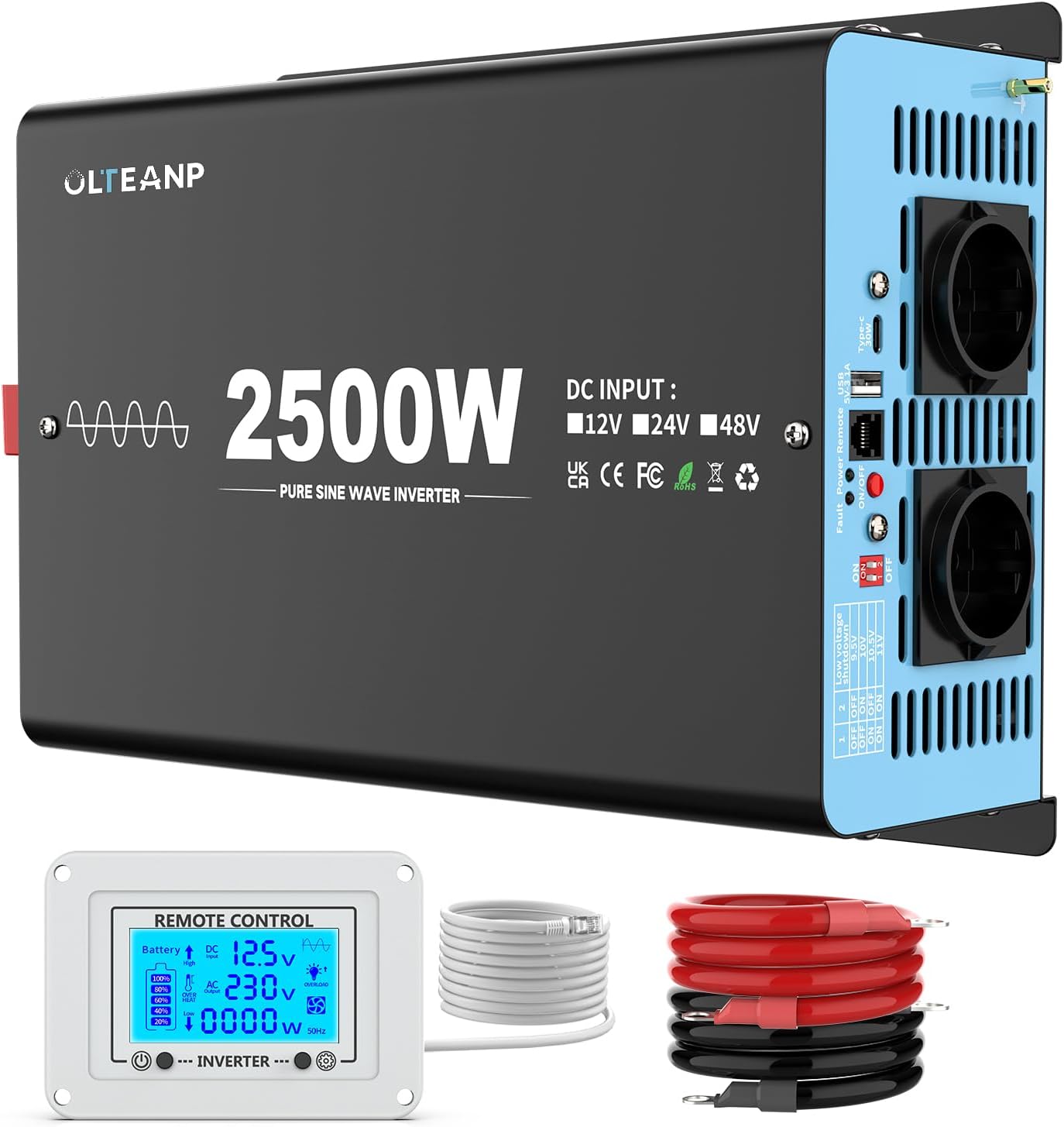
Slika 3.1: konecview of the OLTEANP 2500W Pure Sine Wave Power Inverter, showing the main unit, remote control with LCD display, and included battery cables.
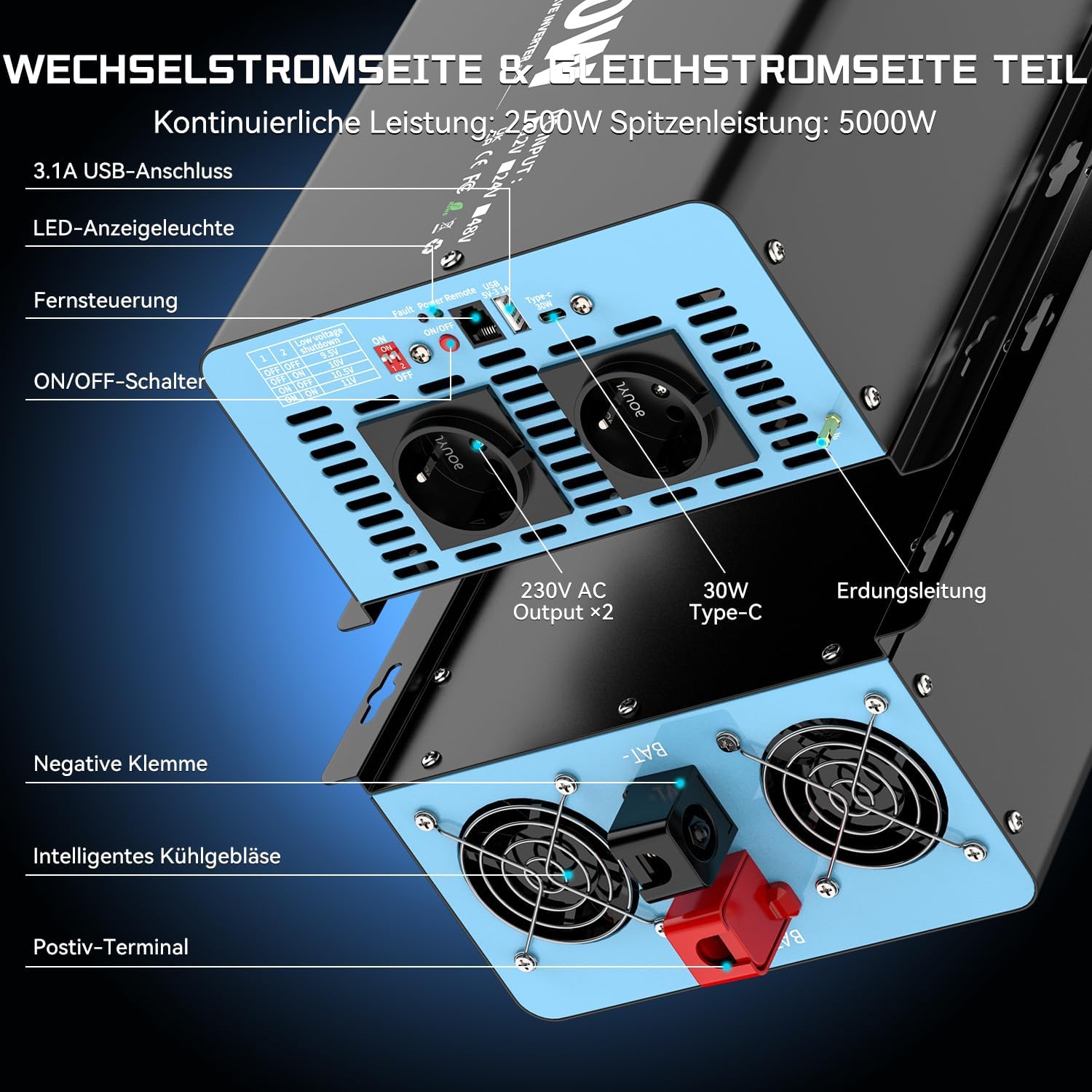
Slika 3.2: Podrobno view of the inverter's input and output terminals. The AC side features two 230V AC outlets, a 3.1A USB port, and a 30W Type-C port. It also includes an ON/OFF switch, remote control port, LED indicator light, and fault/power indicator lights. The DC side shows the positive and negative terminals for battery connection, intelligent cooling fans, and an earthing terminal.

Slika 3.3: The remote control with its LCD screen. This display provides real-time information on battery status, DC input voltage, izhodna voltage, current power consumption (in Watts), and indicators for overheat or overload conditions. Flashing icons on the LCD directly communicate any issues, aiding in troubleshooting and parameter adjustment.

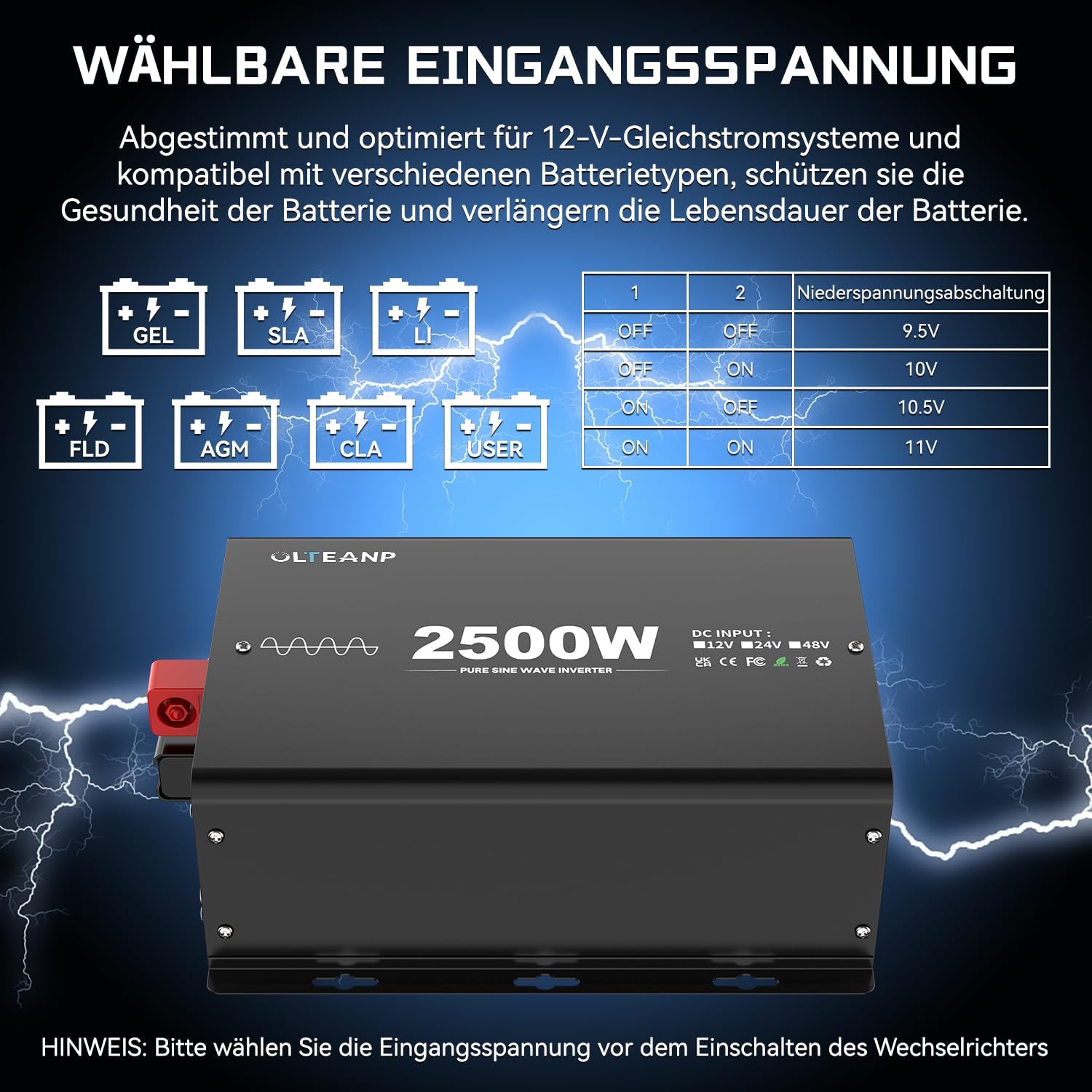
Slika 3.4: The adjustable input voltage function, compatible with various battery types including GEL, SLA, LI (Lithium), FLD, AGM, CLA, and USER-defined settings. The table illustrates how to set the low voltage shutdown threshold using DIP switches (1 and 2) to protect battery health and extend its lifespan. Pomembno: Prilagodite glasnosttage only when the inverter is turned OFF.

Slika 3.5: Examples of typical applications for the 2500W Pure Sine Wave Inverter. It can power a wide range of devices such as electric ovens, cameras, laptops, coffee machines, hair dryers, LED lights, TVs, and electric drills, provided their combined power consumption does not exceed 2500 Watts.
Slika 3.6: Dimensions of the OLTEANP 2500W Inverter (approximately 11.88 inches / 302mm in length, 7.91 inches / 201mm in width, and 4.4 inches / 113mm in height). The image also shows the included accessories: the remote control and 80cm battery cables (red for positive, black for negative).
4. Namestitev in namestitev
Za pravilno namestitev sledite tem korakom:
- Izberite lokacijo: Select a cool, dry, and well-ventilated area for the inverter. Ensure there is sufficient space around the unit for airflow.
- Priključite kable akumulatorja:
- Connect the red (positive) battery cable to the positive (+) terminal of the inverter.
- Connect the black (negative) battery cable to the negative (-) terminal of the inverter.
- Connect the other end of the red cable to the positive (+) terminal of your 12V battery.
- Connect the other end of the black cable to the negative (-) terminal of your 12V battery.
- Priključitev daljinskega upravljalnika (neobvezno): Plug the remote control cable into the designated port on the inverter.
- Adjust Input Voltage (if necessary): If you are using a lithium battery or wish to customize the low voltage shutdown, refer to Section 3.4 and adjust the DIP switches on the inverter while it is OFF.
- Ozemljitev: Connect the grounding terminal on the inverter to a proper earth ground.
5. Delovanje
Once installed, operating the inverter is straightforward:
- Vklop: Press the ON/OFF switch on the inverter or the remote control. The LED indicator light will illuminate, and the LCD screen on the remote control will activate.
- Stanje monitorja: The LCD display on the remote control provides real-time information:
- Ikona baterije: Shows approximate battery charge level.
- DC vhod Voltage: Prikaže trenutno voltage iz vaše 12V baterije.
- AC izhod Voltage: Shows the 230V AC output.
- Poraba energije (W): Indicates the real-time power draw of connected appliances.
- Overheat/Overload Icons: These icons will flash if the inverter detects an overheat or overload condition, indicating a potential issue.
- Priključite naprave: Plug your 230V AC appliances into the AC outlets. For charging mobile devices, use the 5V/3.1A USB port or the 30W Type-C port.
- Ugasniti: When finished, disconnect appliances and press the ON/OFF switch on the inverter or remote control to turn off the unit.
6. Vzdrževanje
Redno vzdrževanje pomaga zagotoviti dolgo življenjsko dobo in optimalno delovanje vašega pretvornika:
- Vzdržujte čisto: Periodically wipe the exterior of the inverter with a dry, soft cloth. Do not use liquid cleaners.
- Preverite povezave: Regularly inspect battery cable connections to ensure they are tight and free from corrosion.
- Zagotovite prezračevanje: Make sure the cooling fans and vents are free from dust and obstructions. Clean them gently if necessary.
- Shranjevanje: Če boste pretvornik shranjevali dlje časa, ga odklopite iz akumulatorja in shranite na hladnem in suhem mestu.
7. Odpravljanje težav
Če imate težave z razsmernikom, si oglejte naslednje pogoste težave in rešitve:
| Težava | Možen vzrok | rešitev |
|---|---|---|
| Ni izhodne moči / Inverter se ne vklopi | Zrahljani akumulatorski priključki Nizka voltage Stikalo inverterja je IZKLOPLJENO Pregorela varovalka (notranja) | Check and tighten battery cables Napolnite ali zamenjajte baterijo Turn ON the inverter switch Contact support (do not attempt to replace internal fuses) |
| Overload warning (LCD icon flashing) | Connected appliance(s) exceed 2500W continuous power | Reduce the total load by unplugging some appliances. Restart the inverter. |
| Overheat warning (LCD icon flashing) | Slabo prezračevanje Visoka temperatura okolja Stalna visoka obremenitev | Ensure clear airflow around the inverter. Move to a cooler environment. Reduce load. Allow inverter to cool down. |
| Nizka glasnosttage zaustavitev | Baterija voltage dropped below set threshold | Recharge the battery. Check battery health. Adjust low voltage shutdown setting if using lithium batteries (refer to Section 3.4). |
| No AC output, but inverter is ON | Short circuit in connected appliance Notranja napaka | Disconnect all appliances and restart. If issue persists, contact support. |
For any issues not covered here, or if troubleshooting steps do not resolve the problem, please contact OLTEANP customer support.
8. Tehnične specifikacije
| Funkcija | Specifikacija |
|---|---|
| Neprekinjeno napajanje | 2500 vatov |
| Največja moč | 5000 vatov |
| DC vhod Voltage | 12V DC (Adjustable range: 9.5V - 16V) |
| AC izhod Voltage | 230 V AC |
| Izhodna valovna oblika | Čisti sinusni val |
| AC vtičnice | 2 |
| Vrata USB | 5V / 3.1A |
| Vrata Type-C | 30 W |
| Zaščitne funkcije | Spark protection, Overload, Overheat, Low/High Voltage, Kratek stik |
| Hlajenje | Inteligentni hladilni ventilator |
| Daljinski upravljalnik | Yes, with LCD Display |
9. Garancija in podpora
For warranty information, technical support, or service inquiries, please refer to the product packaging or contact OLTEANP customer service directly through the retailer where the product was purchased. Please have your product model and purchase details ready when contacting support.