
BOXPUT MT10
BOXPUT MT10 Backlit Mini Wireless Keyboard Remote Control User Manual
Model: MT10
Uvod
This manual provides detailed instructions for the BOXPUT MT10 2.4G Mini Wireless Keyboard Remote Control with Touchpad Mouse Combo. This device combines the functionality of a keyboard, mouse, and remote control, designed for use with various systems including PC, Pad, Xbox, PS3, TV Box, HTPC, IPTV, and Raspberry Pi.
The MT10 features a 2.4GHz wireless connection, a sensitive touchpad, and multi-color backlighting for enhanced usability in different environments.
Vsebina paketa
- 1x BOXPUT MT10 Wireless Backlit Keyboard
- 1x Wireless USB Receiver
- 1x uporabniški priročnik
Vodnik za namestitev
1. Namestitev baterije
The BOXPUT MT10 requires batteries (not included) for operation. Open the battery compartment located on the back of the device and insert the required batteries, ensuring correct polarity.
2. Priključitev USB-sprejemnika
- Locate the wireless USB receiver included in the package.
- Plug the USB receiver into an available USB port on your device (PC, Smart TV, TV Box, etc.).
- The system should automatically detect and install the necessary drivers. No additional software installation is typically required.

Image: The BOXPUT MT10 keyboard shown with its USB receiver and various compatible devices like Smart TV, Projector, Desktop Computer, Android TV Box, and Notebook. Only one USB receiver is required for connection.
3. Vklop
Once the batteries are installed and the USB receiver is connected, turn on the keyboard using the power switch (if available) or by pressing any key. The keyboard is designed for plug-and-play functionality.
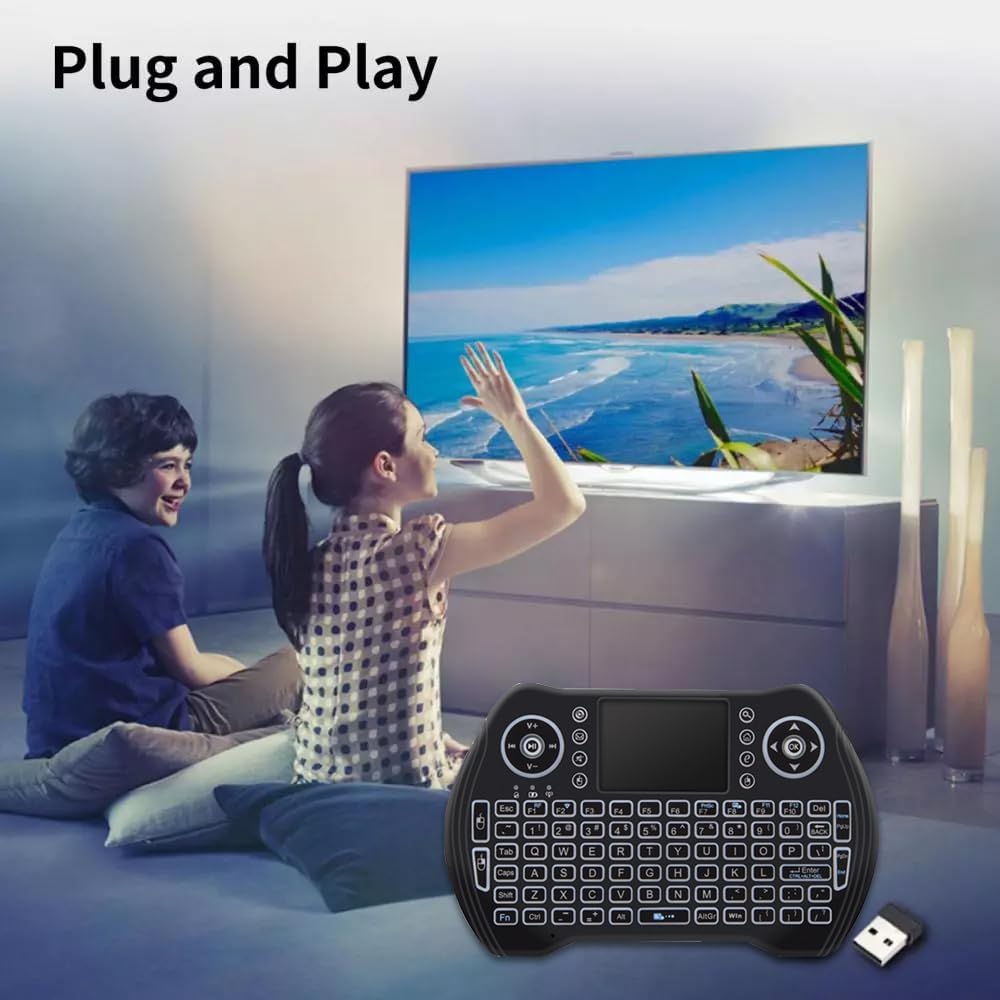
Image: Two individuals are shown comfortably using the BOXPUT MT10 mini wireless keyboard with a large screen TV, demonstrating its simple plug-and-play setup.
Navodila za uporabo
Osnovne funkcije
- Vnos s tipkovnico: Use the QWERTY layout for typing.
- Touchpad Mouse: The integrated touchpad functions as a mouse.
- Single finger tap: Left mouse click
- Two finger tap: Right mouse click
- Two finger drag: Scroll
- Daljinski upravljalnik: The device can function as a remote, and some keys may be programmable or learnable from your TV remote. Refer to your device's manual for specific programming instructions if applicable.
Special Functions and Shortcuts
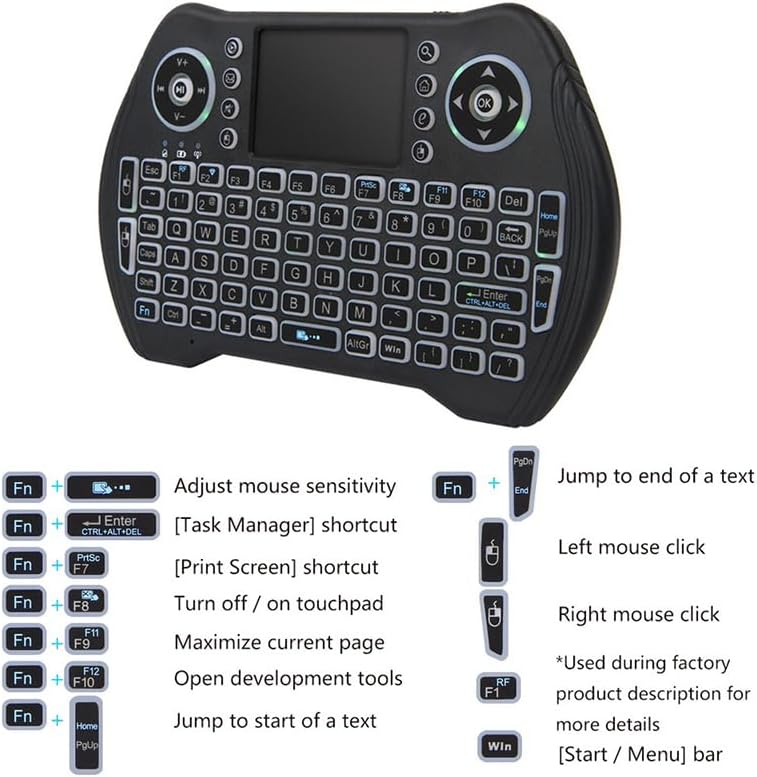
Slika: Podrobna view of the BOXPUT MT10 mini wireless keyboard, illustrating its full QWERTY layout, touchpad, and dedicated function keys for various shortcuts and controls.
| Kombinacija tipk | funkcija |
|---|---|
| Fn + preslednica | Prilagodi občutljivost miške |
| Fn + Enter | Bližnjica upravitelja opravil |
| Fn + PrtSc | Bližnjica za Print Screen |
| Fn + F8 | Turn touchpad on/off |
| Fn + F9 | Povečaj trenutno stran |
| Fn + F10 | Odprta razvojna orodja |
| Fn + Domov | Skoči na začetek besedila |
| Fn + PgDn | Skoči na konec besedila |
| Win ključ | [Start / Menu] bar |
Nadzor osvetlitve ozadja
The MT10 features multi-color backlighting. You can switch between different backlight colors at will. Refer to the keyboard layout for the specific key combination to change backlight colors (often Fn + F2 or a dedicated backlight key).

Image: Three BOXPUT MT10 mini wireless keyboards are displayed, each showing a different backlight color (blue, green, and red), illustrating the multi-color backlight feature.
Združljivost
The keyboard is compatible with a wide range of operating systems and devices, including Windows, Linux, Android, Xbox 360/PS3, and Mac OS.

Image: The BOXPUT MT10 mini wireless keyboard is centrally placed, surrounded by circular icons representing various compatible operating systems and devices: Windows, Linux, Android, Xbox 360/PS3, and Mac OS, highlighting its broad compatibility.
Vzdrževanje
Čiščenje
Za čiščenje tipkovnice uporabite mehko, suho krpo. Za trdovratno umazanijo rahloamp cloth can be used, but ensure no liquid enters the device. Avoid using harsh chemicals or abrasive cleaners.
Zamenjava baterije
When the keyboard's performance degrades or it stops responding, it may be time to replace the batteries. Open the battery compartment, remove the old batteries, and insert new ones, observing correct polarity.
Odpravljanje težav
- Naprava se ne odziva:
- Prepričajte se, da je USB-sprejemnik varno priključen v delujoča USB-vrata.
- Check if the keyboard batteries are installed correctly and have sufficient charge. Replace if necessary.
- Preverite, ali je tipkovnica vklopljena.
- Poskusite priključiti USB-sprejemnik v drug USB-vhod na vaši napravi.
- Poor wireless connection or lag:
- Ensure there are no obstructions between the keyboard and the USB receiver. The optimal operating distance is up to 10 meters.
- Avoid placing the receiver near other wireless devices or sources of electromagnetic interference.

Image: The BOXPUT MT10 mini wireless keyboard is shown alongside a "Wireless 2.4G" signal icon, illustrating its stable transmission technology. It is advised to avoid placing obstructions between the keyboard and the receiver for optimal performance.
- Keyboard enters sleep mode too quickly:
The keyboard automatically enters sleep state when not in use for a short period to conserve battery. To wake it up, press any key. If it takes 30 seconds to restart, this is normal behavior after a longer period of inactivity.
- Sledilna ploščica ne deluje:
- Ensure the touchpad has not been accidentally turned off using the Fn + F8 bližnjica.
- Clean the touchpad surface to ensure smooth operation.
Specifikacije
| Funkcija | Podrobnost |
|---|---|
| Številka modela | MT10 |
| Senzorji | Sledilna ploščica |
| Metoda prenosa | 2.4G brezžično |
| Delovna razdalja | Do 10 metre |
| Število ključev | 92 ključev |
| Material | ABS Plastic and Silicone |
| Dimenzije (D*Š*V) | 15.9 x 10 x 2.2 cm |
| Teža | 126 g |
| Osvetlitev ozadja | Yes (Multi-color) |
| Multi-touch | ja |
| Certifikati | FCC, CE, RoHS |
| Vir napajanja | Napajanje na baterije |
| Funkcija Bluetooth | št |
Podpora
For any operational or usage issues that cannot be resolved using this manual, please contact BOXPUT Official Support. Our technical team is available to assist you.
You can find contact information and further support resources on the official BOXPUT webspletnega mesta ali prek platforme, kjer ste izdelek kupili.

Image: An individual is shown at a desk, looking at a computer screen displaying the BOXPUT website, symbolizing the availability of online support for users.
Ask a question about this manual
Ask about setup, troubleshooting, compatibility, parts, safety, or missing instructions. Manuals+ will review the question and use this page’s manual context to help answer it.