
1. Uvod
Thank you for choosing the LHKNL TG-T069 Rechargeable HeadlampTa priročnik vsebuje podrobna navodila za varno in učinkovito uporabo vaše glave.amp. The TG-T069 features a super bright LED, motion sensor functionality, multiple lighting modes, and a rechargeable battery, making it ideal for various outdoor and indoor activities.

Image 1.1: LHKNL TG-T069 Rechargeable Headlamps (Black and Orange)
This image displays both the black and orange versions of the LHKNL TG-T069 headlamp, razstavaasing their design and illuminated state.
2. Varnostna navodila
- Do not look directly into the LED light. The high intensity light can cause temporary vision impairment or eye damage.
- Naj ostane headlamp izven dosega otrok.
- Do not attempt to disassemble, repair, or modify the headlampTo bo razveljavilo garancijo in lahko povzroči škodo ali telesne poškodbe.
- Dispose of batteries according to local regulations. Do not expose batteries to fire or extreme temperatures.
- Izogibajte se izpostavljanju glaveamp na ekstremno vročino ali mraz.
- Ko ne polnite, se prepričajte, da je pokrovček polnilne odprtine varno zaprt, da ohranite vodoodpornost.
3. Vsebina paketa
Prosimo, preverite paket za naslednje artikle:
- 1 x LHKNL TG-T069 Rechargeable Headlamp (črna)
- 1 x LHKNL TG-T069 Rechargeable Headlamp (oranžna)
- 2 x USB polnilni kabli
- 1 x uporabniški priročnik
4. Izdelek je končanview
Familiarize yourself with the components of your LHKNL TG-T069 Headlamp:
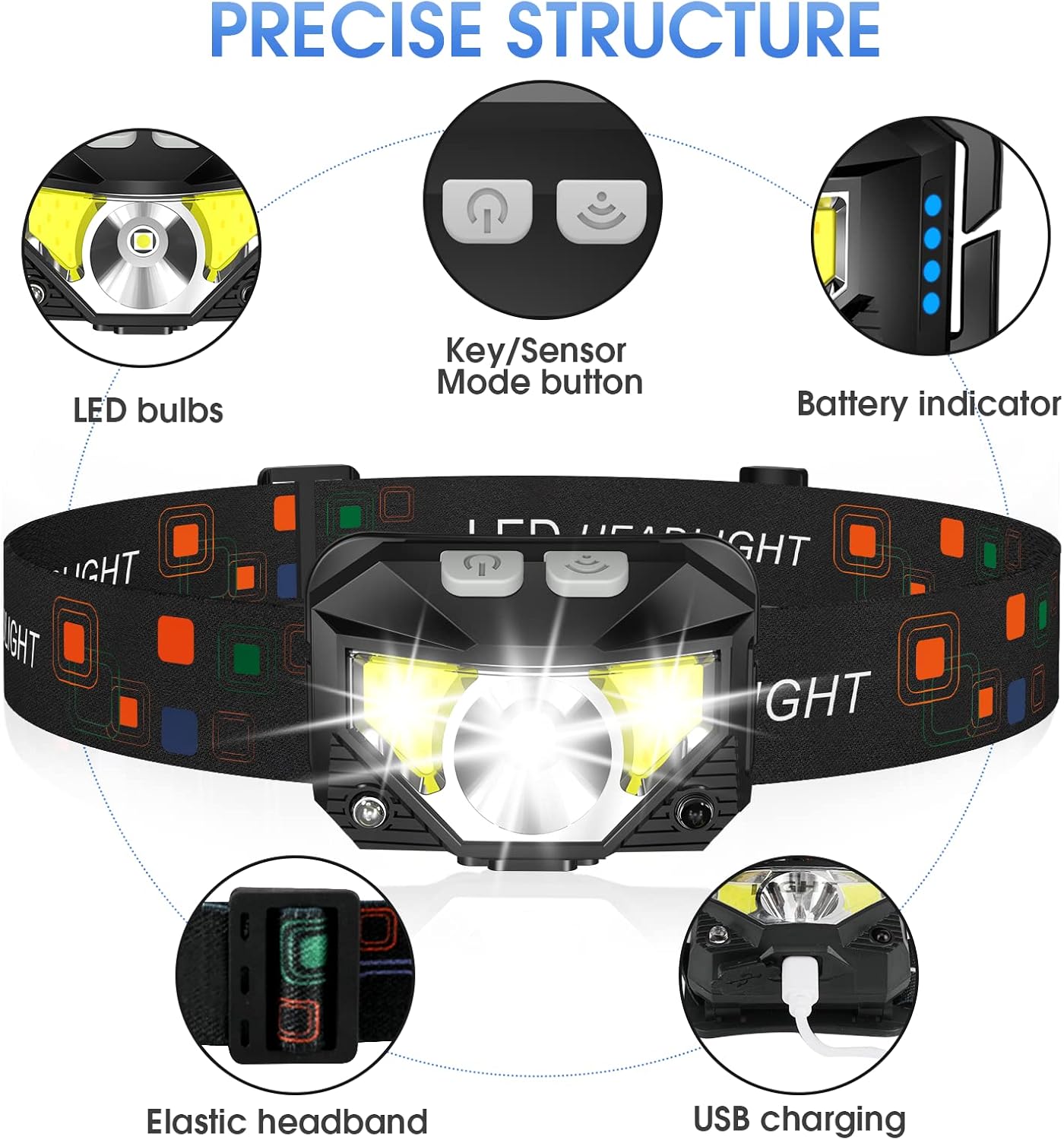
Image 4.1: LHKNL TG-T069 Headlamp Komponente
This diagram illustrates the key components of the headlamp, including the LED bulbs, the combined Key/Sensor Mode button, the battery indicator lights, the elastic headband, and the USB charging port.
- LED žarnice: Main and side LED lights for various illumination needs.
- Key/Sensor Mode Button: Controls power, lighting modes, and activates motion sensor.
- Indikator baterije: Prikazuje preostalo napolnjenost baterije.
- Elastic Headband: Adjustable for a comfortable and secure fit.
- Vrata za polnjenje USB: Za polnjenje vgrajene baterije.
5. Nastavitev
5.1 Začetno polnjenje
Before first use, it is recommended to fully charge your headlamp.
- Locate the USB charging port on the side of the headlamp.
- Odprite zaščitni pokrovček vrat USB.
- Priloženi polnilni kabel USB priključite na slušalkoamp and a suitable USB power source (e.g., wall adapter, computer USB port, power bank).
- Indikatorske lučke baterije bodo zasvetile, da bi prikazale stanje polnjenja. Ko bo baterija popolnoma napolnjena, bodo vse lučke neprekinjeno svetile.
- Once fully charged, disconnect the cable and securely close the USB port cover to maintain water resistance.
5.2 Prilagajanje naglavnega traku
The elastic headband is adjustable to fit various head sizes, for both adults and children.
- Postavite glavoamp na tvoji glavi.
- Adjust the sliding buckle on the headband until it feels snug and comfortable, without being too tight.
- Lamp head can be rotated up to 60 degrees to direct the light where needed. Adjust the angle as desired.
6. Navodila za uporabo
6.1 Key Mode Operation
The main button controls the standard lighting modes.

Image 6.1: Key Mode and Motion Sensor Button Functions
This image highlights the two main control buttons: the Key Mode button for cycling through light modes and the Sensor Mode button for activating motion control.
- Power On/Mode Cycle: Press the Key Mode button once to turn on the headlamp. Subsequent presses will cycle through the following modes:
Main Strong Beam → Main Weak Beam → Side Strong Beam → Side Weak Beam → Red Beam → SOS Red Strobe. - Power Off (Long Press): Za izklop glaveamp directly from any mode, press and hold the Key Mode button for approximately 3 seconds. This eliminates the need to cycle through all modes to turn off the device.
6.2 Delovanje senzorja gibanja
The motion sensor allows for hands-free control of specific lighting modes.
- Aktivirajte senzor gibanja: Press the Sensor Mode button once. The indicator light for the motion sensor will illuminate.
- Cycle Sensor Modes: While in motion sensor mode, press the Key Mode button to cycle between:
Sensor Main Beam → Sensor Side Beam. - Vklop/izklop prostoročnega načina: Wave your hand in front of the headlamp's sensor to turn the light ON or OFF.
- Deactivate Motion Sensor: Press the Sensor Mode button again to exit motion sensor mode.

Image 6.2: All 8 Working Modes
This image visually represents all eight available lighting modes, including both manual and motion-sensor activated options, demonstrating the versatility of the headlamp.
7. Polnjenje
The LHKNL TG-T069 Headlamp is equipped with a powerful 1500mAh built-in rechargeable battery. It can be charged and used simultaneously.
- Use the provided USB cable to connect the headlamp to a 5V USB power source.
- The battery indicator lights will show the charging progress.
- A full charge typically provides 4-10 hours of usage, depending on the selected mode.
- Always ensure the USB port cover is sealed after charging to maintain the IPX4 waterproof rating.
8. Vzdrževanje
8.1 Čiščenje
- Obrišite glavoamp telo z mehkim, damp krpo. Ne uporabljajte abrazivnih čistil ali topil.
- Prepričajte se, da je polnilna vrata brez prahu in umazanije.
8.2 Shranjevanje
- Shranite glavoamp na hladnem in suhem mestu, stran od neposredne sončne svetlobe.
- Če baterijo shranjujete dlje časa, jo napolnite vsake 3–6 mesecev, da ohranite njeno zdravje.
9. Odpravljanje težav
| Težava | Možen vzrok | rešitev |
|---|---|---|
| Headlamp se ne vklopi. | Baterija je prazna. | Napolnite glavoamp v celoti. |
| Luč utripa ali je šibka. | Nizka baterija. | Ponovno napolnite glavoamp. |
| Senzor gibanja se ne odziva. | Motion sensor mode not activated or sensor obstructed. | Ensure the Sensor Mode button is pressed. Clear any obstructions in front of the sensor. |
| Headlamp se ne polni. | Okvarjen kabel ali vir napajanja. | Try a different USB cable or power adapter. Ensure the cable is securely connected. |
10. Specifikacije
| Funkcija | Specifikacija |
|---|---|
| Model | TG-T069 |
| Vrsta svetlobnega vira | LED |
| Svetlost | Do 1100 Lumens |
| Vir napajanja | Napajanje na baterije (za ponovno polnjenje) |
| Vrsta baterije | Lithium Ion (1500mAh built-in) |
| Teža predmeta | 1.87 unč (približno 53 g) |
| Stopnja vodoodpornosti | IPX4 (vodoodporen) |
| Posebne lastnosti | Long Press Function, Motion Sensor, 8 Lighting Modes |
| Material | Plastika ali guma |
| Proizvajalec | LHKNL |
11. Garancija in podpora
LHKNL products are designed for reliability and performance. For any questions, technical support, or warranty claims, please contact LHKNL customer service through the retailer where the product was purchased or visit the official LHKNL webspletno mesto za kontaktne podatke.
Prosimo, shranite dokazilo o nakupu za namene garancije.