
Outdoor Tech OT4800-B
Outdoor Tech Turtle Shell 4.0 Wireless Bluetooth Speaker User Manual
Model: OT4800-B
Brand: Outdoor Tech
Uvod
The Outdoor Tech Turtle Shell 4.0 is a portable, rugged, and waterproof wireless Bluetooth speaker designed for outdoor adventures. It features 360-degree sound, a durable IPX7-rated construction, and an extended battery life, making it ideal for various environments from camping to poolside relaxation. This manual provides essential information for setting up, operating, and maintaining your speaker.

Figure 1: Turtle Shell 4.0 highlighting key features like waterproof, 18-hour battery, impressive sound, Siri/Power Bank, and simple controls.
Kaj je v škatli
- Turtle Shell 4.0 Wireless Bluetooth Speaker
- USB-C kabel za polnjenje
- Torbica za nošenje
- Instructional manual (this document)
Nastavitev
1. Polnjenje zvočnika
Before first use, fully charge your Turtle Shell 4.0. The charging port has been upgraded to USB-C for faster and more efficient charging.
- Priloženi polnilni kabel USB-C priključite na polnilno vtičnico zvočnika.
- Drugi konec kabla priključite na združljiv napajalnik USB (ni priložen) ali vrata USB računalnika.
- A full charge takes approximately 3 hours. The LED indicator will change to show charging status (refer to LED indicator section for details).
2. Vklop/izklop
- Za vklop: Pritisnite in držite gumb za vklop (⏻) until you hear an audible cue or see the LED indicator light up.
- Za izklop: Pritisnite in držite gumb za vklop (⏻) again until you hear an audible cue or the LED indicator turns off.
3. Bluetooth seznanjanje
The Turtle Shell 4.0 can be effortlessly paired with your smartphone or other Bluetooth-enabled devices from up to 65 feet away.
- Ensure the speaker is powered on and in pairing mode (the LED indicator will typically flash rapidly).
- V napravi se pomaknite do nastavitev Bluetooth.
- Select "Turtle Shell 4.0" from the list of available devices.
- Ko je povezava vzpostavljena, bo LED indikator neprekinjeno svetil in zaslišali boste potrditveni zvok.
4. Daisy-Chaining Multiple Speakers
The Turtle Shell 4.0 features an upgraded daisy-chain function, allowing you to link up to 50 Shells together for a massive portable stereo sound experience.
- Ensure all speakers you wish to link are powered on and not currently paired to any device.
- Pair the first speaker (master speaker) to your device via Bluetooth as described above.
- On the master speaker, press the daisy-chain button (refer to button layout for specific icon).
- On the additional speakers, press their daisy-chain button. They will automatically connect to the master speaker.
- Repeat for up to 50 speakers.
Navodila za uporabo
1. Funkcije gumbov

Slika 2: stran view of the Turtle Shell 4.0 with visible control buttons.
| Gumb | Funkcija (kratek pritisk) | Funkcija (dolg pritisk) |
|---|---|---|
| moč (⏻) | Preverite stanje baterije | Vklop/izklop |
| Zmanjšanje glasnosti (-) | Zmanjšajte glasnost | Prejšnja skladba |
| Multi-function (Bigfoot icon) | Predvajanje/pavza, sprejem/končanje klica | Activate Siri/Google Assistant, Reject Call, Daisy-chain pairing |
| Povečaj glasnost (+) | Povečaj glasnost | Naslednja skladba |
2. 360-Degree Audio Experience
The Turtle Shell 4.0's patented Dual-Directional Sound technology produces an immersive 360-degree audio experience, ensuring powerful sound from all angles. This is achieved through two full-range drivers and a bass radiator housed within its unique polygonal design.
3. Smart Assistant Compatibility
Activate your device's Siri or Google Assistant directly from the speaker by long-pressing the multi-function button (Bigfoot icon).
4. Prostoročno telefoniranje
With the built-in microphone, you can answer and end calls directly through the speaker. Short press the multi-function button to answer or end a call. Long press to reject an incoming call.
5. Funkcionalnost prenosne baterije
The 4K mAh battery allows you to charge small devices while enjoying your music. Connect your device to the speaker's USB-A output port (located under the sealed port cover) using your device's charging cable.
6. Možnosti namestitve
The Turtle Shell 4.0 includes a standard 1/4"-20 camera threading mount and custom strap mounts for multiple easy carry and transport options, allowing you to secure it to various surfaces or gear.

Figure 3: The Turtle Shell 4.0 is versatile for various outdoor activities including camping, general outdoor use, beach, and pool.
Vzdrževanje
1. Waterproof and Durability
The Turtle Shell 4.0 is IPX7-rated waterproof, dustproof, and shockproof. This means it can be submerged in water up to 1 meter for 30 minutes. Ensure all port covers are securely sealed before exposing the speaker to water or dusty environments.

Figure 4: The Turtle Shell 4.0 demonstrating its IP67 waterproof capability.
2. Čiščenje
Za čiščenje zvočnika ga obrišite z mehko,amp cloth. Do not use abrasive cleaners or solvents. If exposed to saltwater or chlorinated water, rinse thoroughly with fresh water and allow to air dry completely before charging or opening port covers.
3. Shranjevanje
Store the speaker in a cool, dry place away from direct sunlight and extreme temperatures. For long-term storage, ensure the battery is partially charged (around 50%) to preserve battery health.
Odpravljanje težav
| Težava | Možen vzrok | rešitev |
|---|---|---|
| Zvočnik se ne vklopi. | Nizka baterija. | Zvočnik polnite vsaj 30 minut. |
| Seznanitev prek Bluetootha ni mogoča. | Zvočnik ni v načinu seznanjanja; Bluetooth naprave izklopljen; preveč oddaljen od zvočnika. | Ensure speaker is in pairing mode (flashing LED). Turn device Bluetooth off and on. Move device closer to speaker (within 65 feet). Forget device on your phone and re-pair. |
| Popačenje zvoka pri visoki glasnosti. | Volume too high for audio source. | Reduce the volume on the speaker or your connected device. |
| Daisy-chaining not working. | Speakers not in correct mode; too many speakers. | Ensure all speakers are powered on and not paired to other devices before initiating daisy-chain. Confirm you are within the 50-speaker limit. |
| Zvočnik se ne polni. | Cable issue; port issue; power source issue. | Poskusite z drugim kablom USB-C in napajalnikom. Prepričajte se, da je polnilna vrata čista in brez umazanije. |
Specifikacije
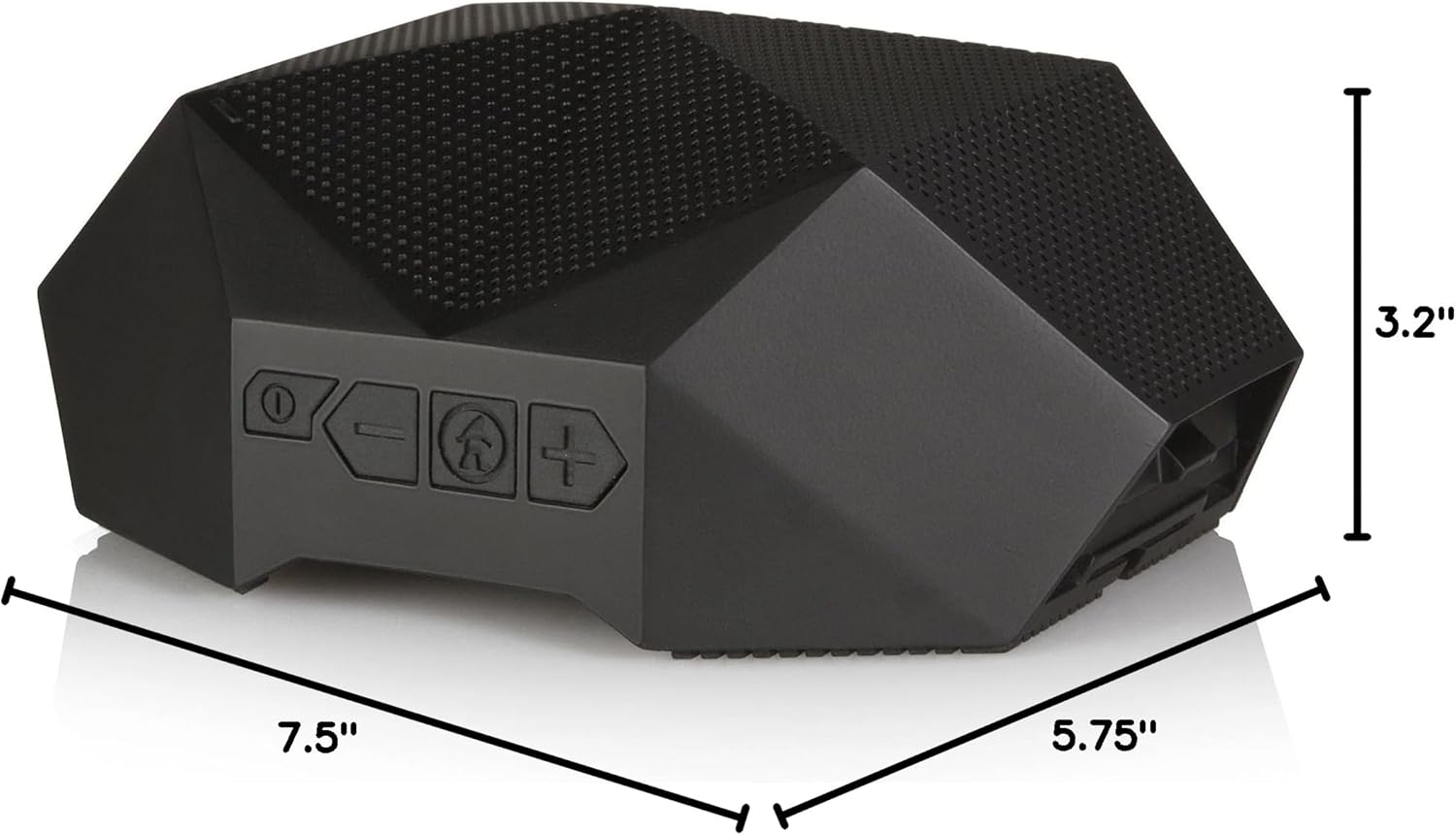
Figure 5: Physical dimensions of the Turtle Shell 4.0 speaker.
| Funkcija | Podrobnost |
|---|---|
| Ime modela | OT4800-B |
| Vrsta zvočnika | Na prostem |
| Posebna funkcija | Vodotesen |
| Priporočene uporabe | Notranji/zunanji |
| Združljive naprave | Pametni telefon, tablični računalnik, prenosni računalnik, namizni računalnik |
| Vrsta krmilnika | Glasovni nadzor |
| barva | Črna |
| Življenjska doba baterije | Do 18 ur |
| Vključene komponente | USB charging cable, carry pouch, instructional manual |
| Dimenzije izdelka | 7.5"D x 5.75"Š x 3.2"V |
| Ocena vodotesnosti | IPX7 |
| Kapaciteta baterije | 4000 mAh |
| Čas polnjenja | 3 ur |
| Največji doseg Bluetooth | 65 čevljev |
| Teža predmeta | 1.37 funtov |
| Tehnologija povezljivosti | Bluetooth |
| Način avdio izhoda | Stereo |
| Material | Mixed Plastic/Silicone |
Uradni videoposnetek izdelka
Watch this video to see the Turtle Shell speaker in action, demonstrating its ruggedness and suitability for outdoor activities like paddleboarding. Please note this video features the Turtle Shell 3.0, a previous model, but showcases similar core functionalities and durability relevant to the Turtle Shell 4.0.
Video 1: "SUP with the Turtle Shell 3.0 Speaker" by Outdoor Technology. This video demonstrates the speaker's use in a water environment.
Garancija in podpora
Outdoor Tech products are designed for durability and performance. For warranty information and customer support, please visit the official Outdoor Tech webspletno mesto ali se obrnite neposredno na njihovo službo za stranke. Shranite dokazilo o nakupu za morebitne garancijske zahtevke.
Za dodatno pomoč se lahko obrnete tudi na Outdoor Tech Store on Amazon.
Ask a question about this manual
Ask about setup, troubleshooting, compatibility, parts, safety, or missing instructions. Manuals+ will review the question and use this page’s manual context to help answer it.