
1. Uvod
The Pronomic DX-50 USB MKII is a professional 4-channel DJ mixer designed for a wide range of applications, including discos, parties, restaurants, and presentations. Its user-friendly design ensures that both experienced and less experienced users can fully utilize its features. This manual provides detailed instructions for setting up, operating, and maintaining your mixer.
Key features include a recording function, integrated Bluetooth interface, USB player with transport controls, and multiple input channels.
2. Pomembna varnostna navodila
- Preberite navodila: Pred uporabo izdelka preberite vsa varnostna navodila in navodila za uporabo.
- Shranite navodila: Varnostna navodila in navodila za uporabo shranite za prihodnjo uporabo.
- Upoštevajte opozorila: Upoštevajte vsa opozorila na izdelku in v navodilih za uporabo.
- Sledite navodilom: Upoštevajte vsa navodila za delovanje in uporabo.
- Voda in vlaga: Do not use this apparatus near water (e.g., bathtub, washbowl, kitchen sink, laundry tub, wet basement, or swimming pool).
- Prezračevanje: Ne blokirajte prezračevalnih odprtin. Namestite v skladu z navodili proizvajalca.
- Toplota: Ne nameščajte v bližini virov toplote, kot so radiatorji, grelniki, peči ali druge naprave (vključno z amplifiers), ki proizvajajo toploto.
- Viri napajanja: Use only power sources specified by the manufacturer.
- Zaščita napajalnega kabla: Zaščitite napajalni kabel, da se po njem ne pohodi ali stisne, zlasti pri vtičih, vtičnicah in na mestu, kjer izstopa iz naprave.
- Čiščenje: Čistite samo s suho krpo.
- Servisiranje: Izdelka ne poskušajte servisirati sami, saj vas lahko odpiranje ali odstranjevanje pokrovov izpostavi nevarni voltage ali druge nevarnosti. Za vse servise se obrnite na usposobljeno servisno osebje.
3. Vsebina paketa
Please check that all items listed below are included in your package. If any items are missing or damaged, contact your dealer immediately.
- Pronomic DX-50 USB MKII DJ Mixer
- Power Adapter (AC 12V)
- USB Stick (32 GB, if included in your specific bundle)
- Uporabniški priročnik (ta dokument)
4. Izdelek je končanview
Familiarize yourself with the various controls and connections on your DX-50 USB MKII mixer.
4.1 Kontrole sprednje plošče
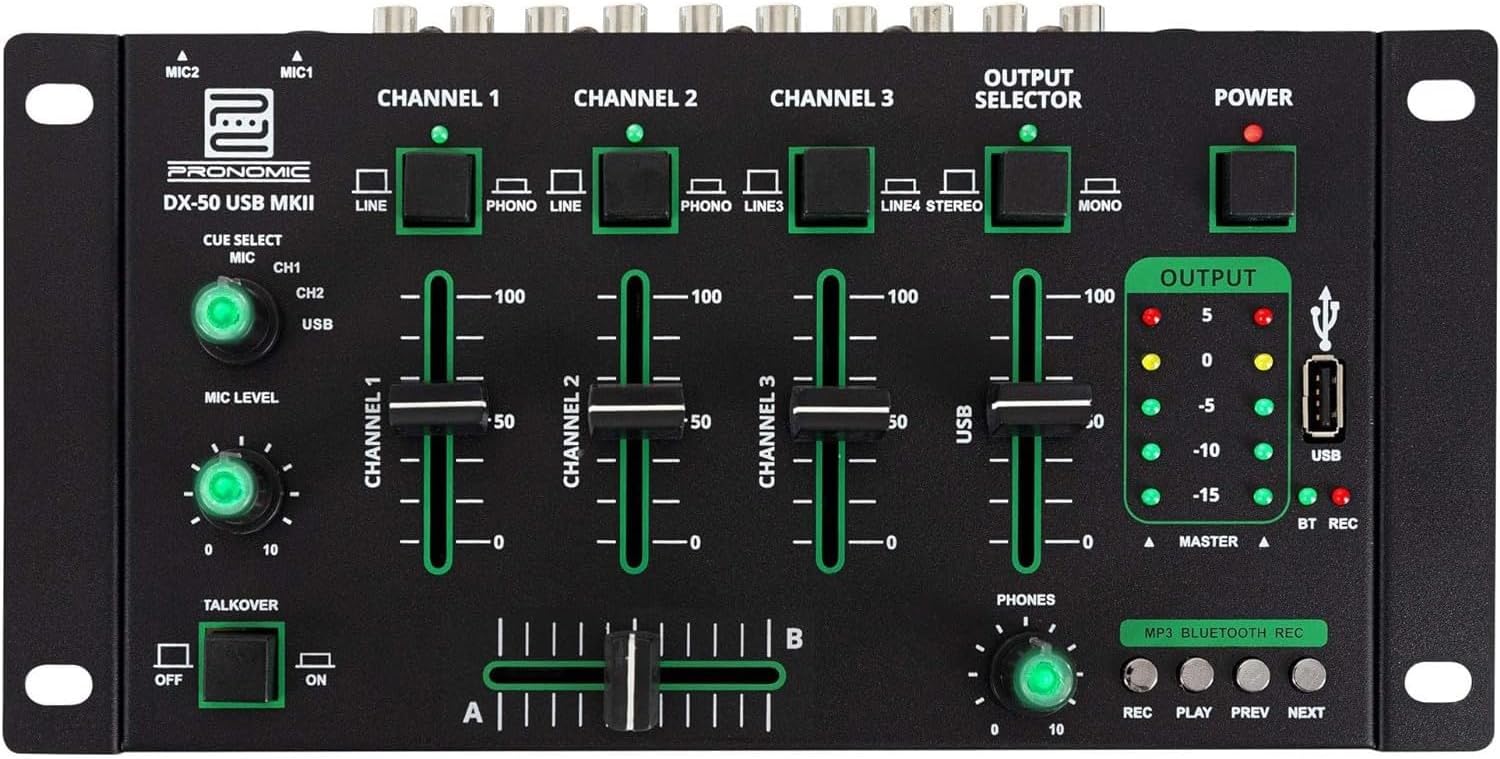
- MIC 1/2 Inputs: Priključite mikrofone.
- Channel 1-4 Input Selectors: Switch between LINE, PHONO, or USB/Bluetooth inputs for each channel.
- Faders za kanale: Adjust the volume level for each channel.
- CUE Select Buttons: Route specific channels to the headphone output for monitoring.
- MIC Level Knob: Adjust the volume of the microphone inputs.
- Talkover Switch: Activates the talkover function, which automatically lowers music volume when speaking into the microphone.
- Output Selector: Choose between Stereo or Mono master output.
- Stikalo za vklop: Turns the mixer on/off.
- Merilniki izhodne ravni: LED indicators showing the master output level.
- Vrata USB: Connect a USB drive for MP3 playback and recording.
- MP3/Bluetooth/REC Player Controls: Buttons for Play/Pause, Previous, Next, and Record functions for the integrated player.
- Phones Level Knob: Prilagodi glasnost izhoda za slušalke.
- Crossfader (A/B): Blends between channels assigned to A and B.
4.2 Priključki na zadnji plošči

- AC 12V Power Input: Priloženi napajalnik priključite tukaj.
- Izhod za telefone: 6.3 mm priključek za priklop slušalk.
- MASTER OUT L/R (RCA): Connect to your main amplifier ali močni zvočniki.
- Channel 1 & 2 Inputs (RCA Line/Phono): Connect turntables (Phono) or other line-level devices (CD players, media players). Use the front panel selector to switch.
- Channel 3 & 4 Inputs (RCA Line): Connect line-level devices.
- MIC 1 & 2 Inputs (6.3mm Jack): Priključite mikrofone.
5. Nastavitev
Follow these steps to set up your Pronomic DX-50 USB MKII mixer:
- Napajalni priključek: Ensure the mixer's power switch is in the OFF position. Connect the supplied AC 12V power adapter to the "AC 12V" input on the rear panel of the mixer. Plug the adapter into a suitable power outlet.
- Master Output Connection: Connect the "MASTER OUT L/R" RCA outputs on the rear panel to the inputs of your amplifier ali močni zvočniki.
- Povezava vhodne naprave:
- Gramofoni: Connect turntables to the "CHANNEL 1" or "CHANNEL 2" RCA inputs. Set the corresponding input selector on the front panel to "PHONO".
- CD Players/Line Devices: Connect CD players, media players, or other line-level devices to "CHANNEL 1", "CHANNEL 2", "CHANNEL 3", or "CHANNEL 4" RCA inputs. Set the corresponding input selector on the front panel to "LINE".
- Mikrofoni: Connect microphones to the "MIC 1" or "MIC 2" 6.3mm jack inputs on the rear panel.
- Priključek za slušalke: Connect your headphones to the "PHONES" 6.3mm jack on the rear panel.
- USB Drive (Optional): If using a USB drive for playback or recording, insert it into the "USB" port on the front panel.
- Vklop: Once all connections are made, switch the mixer's power switch to the ON position. The power indicator LED will illuminate.
6. Navodila za uporabo
6.1 Osnovno mešanje
- Izberite vnos: For each channel, use the input selector switch (LINE/PHONO/USB/BT) to choose the desired audio source.
- Adjust Channel Volume: Use the vertical faders for each channel to adjust its individual volume level.
- Glavni izhod: Monitor the "OUTPUT" LED meters and adjust the master volume knob (if present, otherwise rely on channel faders and amplifier volume) to achieve a suitable overall output level without clipping.
- Crossfader: Use the crossfader to smoothly transition between channels assigned to A and B. Channels 1 and 2 are typically assigned to the crossfader.
6.2 Uporaba mikrofona
- Connect your microphone to one of the MIC inputs on the rear panel.
- Adjust the "MIC LEVEL" knob on the front panel to control the microphone's volume.
- Funkcija pogovora: Activate the "TALKOVER" switch to automatically reduce the volume of the music when you speak into the microphone. This is useful for announcements.
6.3 Predvajanje in snemanje prek USB-ja
- USB predvajanje: Vstavite pogon USB, ki vsebuje MP3 files into the "USB" port. Select "USB" as the input source for the dedicated USB channel. Use the "PLAY/PAUSE", "PREV", and "NEXT" buttons to control playback.
- USB snemanje: Press the "REC" button to start recording the master output to the connected USB drive. Press "REC" again to stop recording. Ensure your USB drive has sufficient free space and is formatted correctly (FAT32 is commonly supported).
6.4 Povezljivost Bluetooth
- Aktiviraj Bluetooth: Select "BT" as the input source for the dedicated Bluetooth channel. The mixer will enter pairing mode.
- Seznani napravo: On your Bluetooth-enabled device (smartphone, tablet, etc.), search for available Bluetooth devices. Select "Pronomic DX-50 USB MKII" (or similar name) from the list to pair.
- Predvajaj zvok: Once paired, you can play audio from your device through the mixer. Control playback from your device or using the mixer's transport controls (if supported by your device).
6.5 Monitoring with Headphones
- Connect headphones to the "PHONES" output.
- Use the "CUE SELECT" buttons to choose which channels you want to monitor in your headphones without affecting the main output.
- Adjust the "PHONES" level knob to set your desired headphone volume.
7. Vzdrževanje
- Čiščenje: Disconnect the power before cleaning. Use a soft, dry cloth to wipe the surface of the mixer. Do not use liquid cleaners, aerosols, or solvents.
- Shranjevanje: Mešalnik shranjujte na hladnem in suhem mestu, stran od neposredne sončne svetlobe in ekstremnih temperatur.
- Nega faderja in gumbov: Avoid excessive force when operating faders and knobs. Periodically check for dust or debris accumulation around moving parts.
- Upravljanje kablov: Ensure cables are not kinked or strained, which can lead to damage.
8. Odpravljanje težav
| Težava | Možen vzrok | rešitev |
|---|---|---|
| Brez moči | Power adapter not connected; Power switch off; Faulty power outlet. | Check power adapter connection; Ensure power switch is ON; Try a different power outlet. |
| No sound from main output | Master volume too low; Amplifier/speakers off or disconnected; Incorrect input selection; Channel faders down. | Increase master volume; Check amplifier/speaker connections and power; Verify correct input selected for channels; Raise channel faders. |
| Iz slušalk ni zvoka | Headphone volume too low; Headphones not connected; No CUE selected. | Increase PHONES level; Connect headphones properly; Press CUE button for desired channel. |
| Bluetooth se ne seznani | Mixer not in pairing mode; Device too far; Interference. | Ensure BT input is selected; Bring device closer; Restart mixer and device. |
| USB predvajanje ne deluje | USB-pogon ni pravilno vstavljen; Napačno file format; USB drive not formatted correctly. | Re-insert USB drive; Ensure files are MP3; Format USB drive to FAT32. |
9. Specifikacije
| Model | Pronomic DX-50 USB MKII |
| Število kanalov | 4 |
| Tehnologija povezljivosti | Bluetooth, USB |
| Avdio vhod | RCA (line/phono), 6.3mm microphone, Bluetooth, USB |
| Vrsta izhodnega priključka | RCA (Master Out), 6.3mm (Phones) |
| Vir napajanja | Električni kabel (adapter AC 12V) |
| Dimensions (without corner brackets and controls) | 222 x 129 x 28 mm (širina x globina x višina) |
| Total Dimensions (with corner brackets and controls) | 267 x 136 x 51 mm (širina x globina x višina) |
| Teža | 790 g |
10. Garancija in podpora
Za informacije o garanciji in tehnično podporo glejte dokumentacijo, ki je bila priložena nakupu, ali se obrnite na prodajalca. Shranite dokazilo o nakupu za morebitne garancijske zahtevke.
For further assistance, you may also visit the official Pronomic webali se obrnite na njihov oddelek za pomoč uporabnikom.