
1. Uvod
Thank you for choosing the EasySMX T37 Wireless Switch Pro Controller. This manual provides detailed instructions for setting up, operating, maintaining, and troubleshooting your controller. Please read this manual carefully before use to ensure optimal performance and longevity of your device. This controller is compatible with Nintendo Switch, Switch Lite, and Switch OLED consoles.
2. Izdelek je končanview
The EasySMX T37 is a wireless gamepad designed for an enhanced gaming experience on Nintendo Switch systems. It features an ergonomic design, dual turbo vibration, and 6-axis gyro motion control.

Slika 2.1: Spredaj view of the EasySMX T37 Wireless Switch Pro Controller, showcasinzaradi svoje ergonomske oblike in razporeditve gumbov.
3. Nastavitev
3.1 Združevanje z Nintendo Switch
- Vklopite konzolo Nintendo Switch.
- V meniju HOME izberite Krmilniki > Spremenite oprijem/vrstni red.
- On the EasySMX T37 controller, press and hold the Gumb SYNC (located on the top edge of the controller) for 3 seconds until the LED indicators start flashing rapidly.
- Once the controller is successfully paired, the player LED(s) on the bottom of the controller will light up solid.
3.2 Polnjenje krmilnika
Connect the provided USB-C charging cable to the USB-C port on the controller and the other end to a USB power source (e.g., Switch dock, USB wall adapter, computer USB port). The LED indicators will show charging status and turn off when fully charged.
4. Navodila za uporabo
4.1 Osnovne kontrole
The controller features standard button layouts for Nintendo Switch compatibility:
- Gumbi A/B/X/Y: Gumbi za dejanja.
- D-pad: Smerni vhod.
- Leva/desna analogna palica: Nadzor gibanja in kamere.
- Gumbi L/R/ZL/ZR: Ramenski in sprožilni gumbi.
- Gumb HOME: Returns to the Switch HOME Menu.
- Gumb ZA ZAJEMANJE: Takes screenshots.
- PLUS (+) / MINUS (-) Buttons: Start/Select functions.

Image 4.1: A user holding the EasySMX T37 controller, demonstrating the comfortable grip and accessible button placement during gameplay.
4.2 Funkcija Turbo
The Turbo function allows for rapid, automatic pressing of a button, useful in action or arcade games.
- Aktiviraj Turbo: Press and hold the desired action button (A/B/X/Y/L/R/ZL/ZR), then press the Turbo gumb (T button). The button will now auto-fire.
- Prilagodi turbo hitrost: Medtem ko držite Turbo gumb, premakni Desna analogna palica gor ali dol to cycle through three speeds: 5 shots/s, 12 shots/s, and 20 shots/s.
- Izklopi Turbo: Repeat the activation step (hold the action button, then press the Turbo button) or press and hold the Turbo gumb for 5 seconds to clear all Turbo settings.
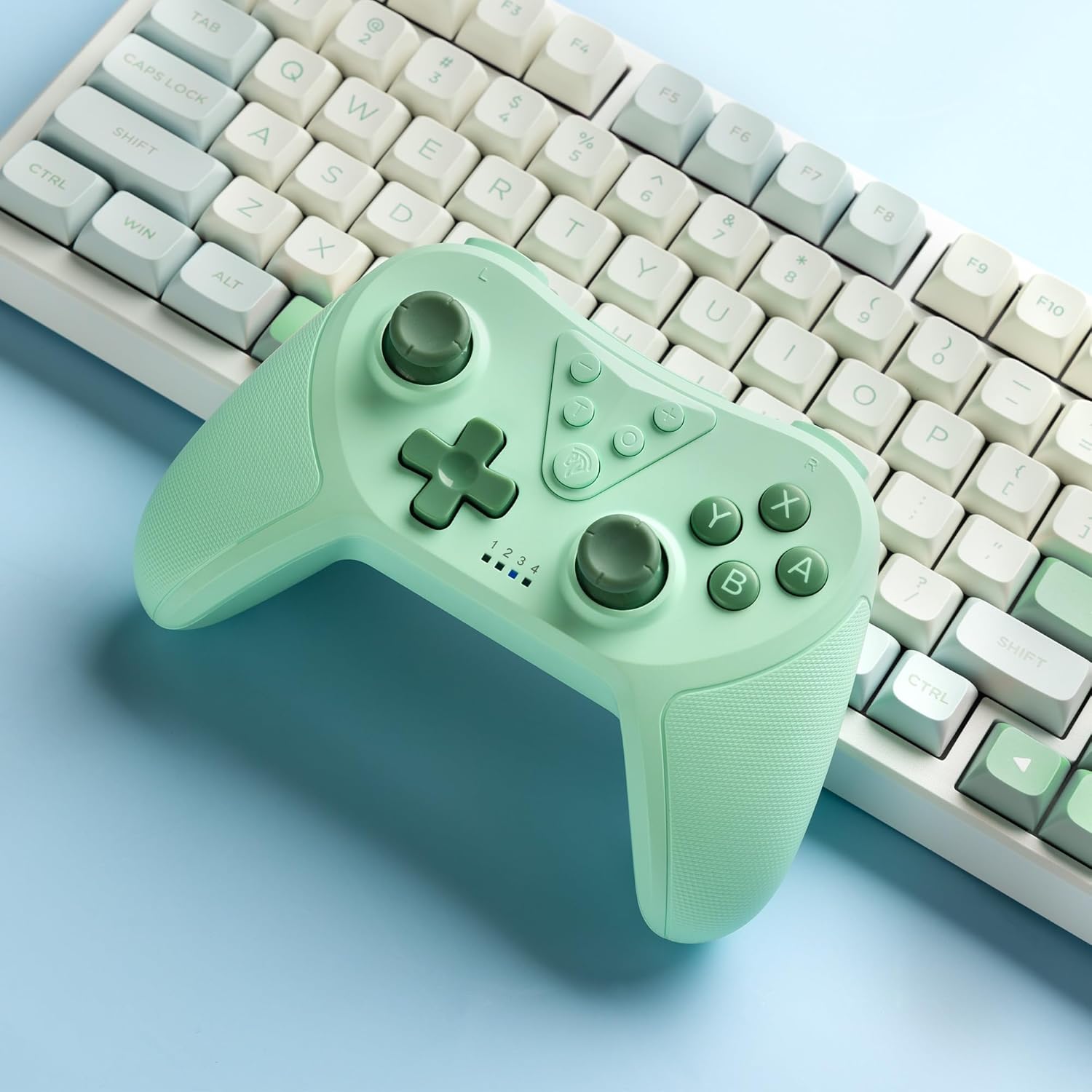
Image 4.2: Illustration of the Turbo function on the EasySMX T37 controller, showing the three adjustable speeds: 5, 12, and 20 shots per second.
4.3 Nastavitev vibracij
The controller features dual motors for adjustable vibration feedback, enhancing immersion in games.
- Prilagodite intenzivnost vibracij: Pritisnite in držite Turbo gumb, nato premaknite Leva analogna palica gor ali dol to cycle through four vibration levels: 0% (off), 30%, 70%, and 100%.

Image 4.3: Visual representation of the Dual Vibration feature on the EasySMX T37 controller, indicating four intensity levels from 0% to 100%.
4.4 Krmiljenje gibanja 6-osnega žiroskopa
The built-in 6-axis gyroscope provides precise motion sensing, allowing for intuitive control in games that support motion input.

Image 4.4: Illustration depicting the 6-Axis Gyro Motion Control feature of the EasySMX T37 controller, showing how it interacts with a game on the Nintendo Switch screen.
5. Vzdrževanje
- Čiščenje: Za čiščenje krmilnika uporabite mehko, suho krpo. Izogibajte se uporabi agresivnih kemikalij ali abrazivnih materialov.
- Shranjevanje: Krmilnik shranjujte na hladnem in suhem mestu, stran od neposredne sončne svetlobe in ekstremnih temperatur.
- Vzdrževanje baterije: Da podaljšate življenjsko dobo baterije, se izogibajte pogostemu popolnemu praznjenju krmilnika. Redno ga polnite, tudi če ga dalj časa ne uporabljate.
- Izogibajte se kapljicam: Krmilnik zaščitite pred padci in udarci, ki lahko poškodujejo notranje komponente.
6. Odpravljanje težav
6.1 Krmilnik se ne povezuje
- Prepričajte se, da je krmilnik napolnjen.
- Verify the Switch console is updated to the latest system version.
- Try re-pairing the controller by following the steps in Section 3.1.
- If issues persist, try resetting the controller by inserting a thin object into the small reset hole (if present, usually on the back) for a few seconds.
6.2 Buttons Unresponsive or Lagging
- Prepričajte se, da je krmilnik popolnoma napolnjen.
- Move closer to the Switch console to ensure a strong wireless connection.
- Preverite, ali so okoli gumbov kakšne fizične ovire ali ostanki.
- Ponovno seznanite krmilnik.
6.3 Controller Not Charging
- Prepričajte se, da je kabel USB-C varno priključen na krmilnik in napajalnik.
- Poskusite uporabiti drug kabel USB-C ali napajalnik.
- Prepričajte se, da je vir napajanja delujoč.
7. Specifikacije
- Model: T37
- Povezljivost: Brezžično (Bluetooth)
- Združljivost: Nintendo Switch, Switch Lite, Switch OLED
- Lastnosti: Dual Turbo Function, Adjustable Vibration, 6-Axis Gyro Motion Control, Ergonomic Design
- Product Identifier (ASIN): B0CTTWN84L
8. Garancija in podpora
For warranty information, technical support, or further assistance, please refer to the official EasySMX webspletno mesto ali se obrnite neposredno na njihovo podporo strankam. Za uveljavljanje garancije shranite račun.