
1. Uvod
This manual provides detailed instructions for the safe and effective use of your iJoy Disney Winnie The Pooh Wireless Bluetooth Speaker. Please read this manual thoroughly before operating the device and retain it for future reference.
2. Kaj je v škatli
Carefully unpack your speaker and ensure all items are present:
- iJoy Disney Winnie The Pooh Wireless Bluetooth Speaker
- USB polnilni kabel
- Rezervni AUX kabel
- Priročnik za lastnike (ta dokument)

Image: The speaker shown next to its retail packaging, illustrating the product and its box.
3. Izdelek je končanview
3.1 gumbi za nadzor
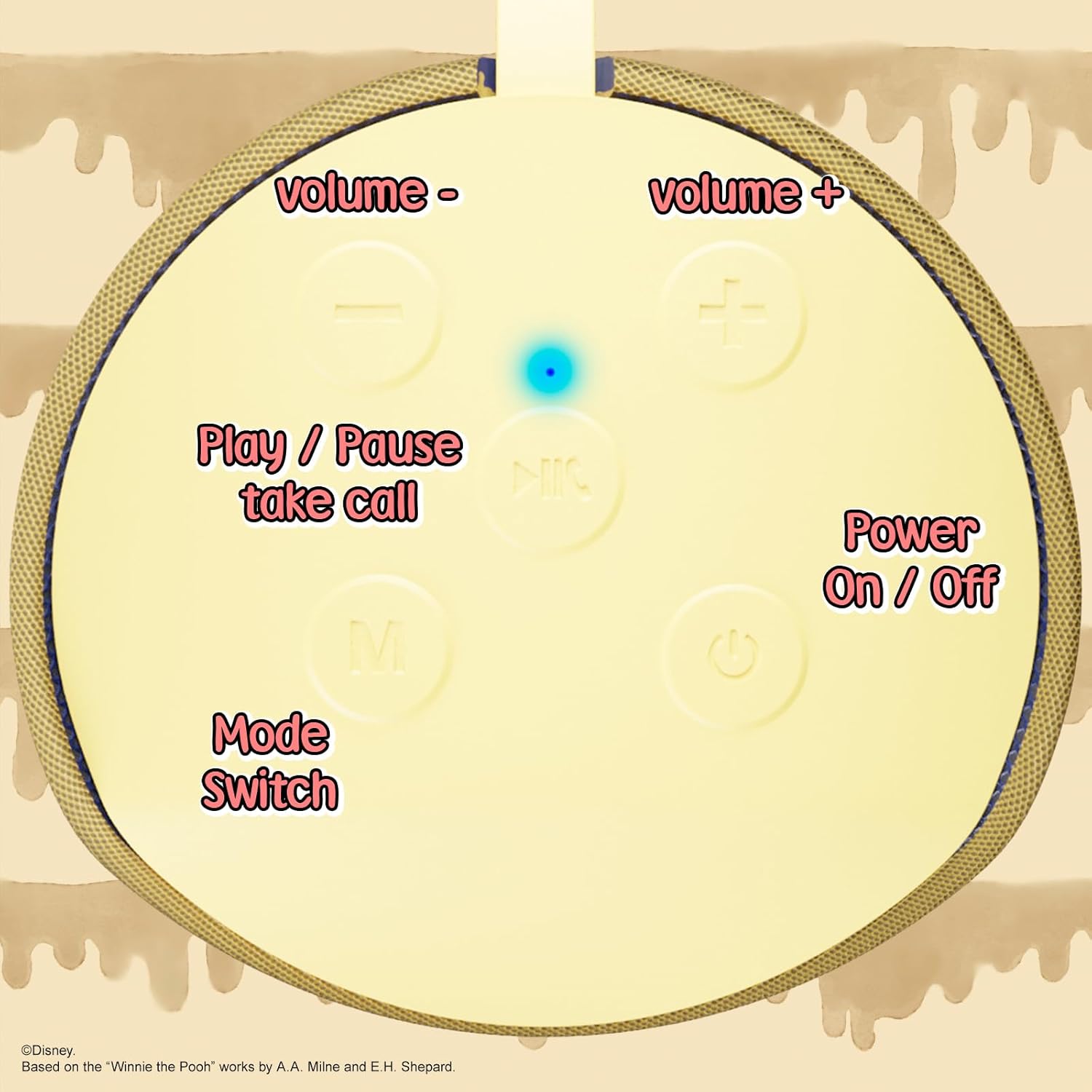
Image: A close-up of the speaker's top panel, displaying the control buttons.
- Gumb za vklop / izklop: Pritisnite in držite, da vklopite ali izklopite zvočnik.
- Gumb za predvajanje/pavzo: Press to play or pause audio. Also used to answer or end phone calls.
- Gumb za povečanje glasnosti (+): Pritisnite za povečanje glasnosti. Pritisnite in držite za preskok na naslednjo skladbo.
- Gumb za zmanjšanje glasnosti (-): Pritisnite za zmanjšanje glasnosti. Pritisnite in držite za premik na prejšnjo skladbo.
- Mode Switch (M) Button: Press to switch between Bluetooth, FM Radio, SD Card, and USB modes.
3.2 Vrata in indikatorji

Slika: Podrobna view of the speaker's rear panel, highlighting the AUX port, SD card slot, USB port, and Micro USB charging port.
- Vrata AUX: For connecting external audio devices via the provided 3.5mm AUX cable.
- Reža za kartico SD: Insert a microSD card for direct audio playback.
- Vrata USB: Insert a USB flash drive for direct audio playback.
- Vrata za polnjenje mikro USB: Connect the USB charging cable here to charge the speaker.
- LED indikatorska lučka: Indicates charging status and Bluetooth pairing status.
4. Nastavitev
4.1 Polnjenje zvočnika
- Connect the Micro USB end of the charging cable to the speaker's Micro USB charging port.
- Standardni konec kabla USB priključite na napajalnik USB (ni priložen) ali na vrata USB računalnika.
- The LED indicator light will illuminate during charging and turn off once fully charged.
- Polno polnjenje običajno traja približno 2 uri.
4.2 Bluetooth seznanjanje
- Prepričajte se, da je zvočnik popolnoma napolnjen.
- Press and hold the Power On/Off button to turn on the speaker. You will hear an audible prompt, and the LED indicator will flash, indicating it's in pairing mode.
- Na svoji mobilni napravi (pametnem telefonu, tablici itd.) omogočite Bluetooth.
- Iskanje available Bluetooth devices. The speaker will appear as "iJoy Winnie The Pooh Speaker" or similar.
- Select the speaker from the list to pair. Once successfully paired, you will hear a confirmation sound, and the LED indicator will stop flashing and remain solid.
- Zvočnik se bo ob vklopu samodejno ponovno povezal z zadnjo seznanjeno napravo, če je Bluetooth naprave aktiven in v dosegu.
5. Navodila za uporabo
5.1 Način Bluetooth
After successful pairing, you can stream audio wirelessly from your device to the speaker. Use your device's controls or the speaker's Play/Pause, Volume Up/Down buttons to manage playback.
5.2 Način radia FM
- Press the Mode (M) button to switch to FM Radio mode.
- Pritisnite gumb Predvajaj/Pavza, da samodejno poiščete in shranite razpoložljive FM postaje.
- Za navigacijo med shranjenimi postajami uporabite gumba za povečanje glasnosti (+) in zmanjšanje glasnosti (-) (kratek pritisk).
5.3 SD Card / USB Playback
- Insert a microSD card into the SD card slot or a USB flash drive into the USB port.
- Zvočnik bo samodejno preklopil v ustrezen način in začel predvajati zvok files. If not, press the Mode (M) button to select the correct mode.
- Use the speaker's Play/Pause, Volume Up/Down buttons to control playback.
5.4 Način AUX
- Connect one end of the provided 3.5mm AUX cable to the speaker's AUX port.
- Drugi konec priključite v vhod za slušalke na zvočni napravi.
- The speaker will automatically switch to AUX mode. If not, press the Mode (M) button.
- Control playback and volume primarily from your connected audio device.
5.5 Prostoročno klicanje
Ko je s pametnim telefonom povezan prek Bluetootha:
- Sprejmi klic: Enkrat pritisnite gumb Predvajaj/Premor.
- Končaj klic: Med klicem enkrat pritisnite gumb Predvajaj/Pavza.
- Zavrni klic: Pritisnite in držite gumb Predvajaj/Premor.
6. Vzdrževanje
- Zvočnik očistite z mehko, suho krpo. Ne uporabljajte abrazivnih čistil ali topil.
- The speaker is IPX4 splashproof, meaning it can withstand splashes of water. Do not submerge it in water.
- Ko zvočnika ne uporabljate, ga hranite na hladnem in suhem mestu.
- Zvočnika ne izpostavljajte ekstremnim temperaturam, neposredni sončni svetlobi ali visoki vlažnosti.
7. Odpravljanje težav
| Težava | Možen vzrok | rešitev |
|---|---|---|
| Zvočnik se ne vklopi | Nizka baterija | Zvočnik popolnoma napolnite. |
| Seznanitev prek Bluetootha ni mogoča | Zvočnik ni v načinu seznanjanja / Bluetooth naprave izklopljen / Preveč daleč od naprave | Ensure speaker is in pairing mode (flashing LED). Turn on Bluetooth on your device. Move speaker closer to device (within 30 feet). |
| Brez zvoka | Glasnost je prenizka / Napačen način / Naprava ne predvaja zvoka | Increase speaker and device volume. Press 'M' button to select correct mode. Ensure audio is playing on your connected device. |
| Sprejem FM radia je slab | Weak signal / Interference | Move the speaker to a different location. The AUX cable can act as an antenna; try connecting it. |
8. Specifikacije

Image: The speaker with visual indicators showing its height of 6.3 inches and width of 2.9 inches.
| Funkcija | Podrobnost |
|---|---|
| Številka modela | SS-KH7C-FS4O |
| Tehnologija povezljivosti | Bluetooth |
| Obseg brezžične komunikacije | Do 30 čevljev (10 metrov) |
| Vrsta zvočnika | Stolp |
| Največja izhodna moč zvočnika | 20 vatov |
| Način avdio izhoda | Mono |
| Kapaciteta baterije | 800 milliamp ure |
| Čas polnjenja | Približno 2 uri |
| Igralni čas | Up to 3 Hours (depending on volume and usage) |
| Stopnja vodoodpornosti | IPX4 (odporen na škropljenje) |
| Dimenzije izdelka | 3" G x 3" Š x 6" V (7.62 cm G x 7.62 cm Š x 15.24 cm V) |
| Teža predmeta | 8 unče (226.8 gramov) |
| Vključene komponente | Bluetooth Speaker, USB Charging Cable, Backup AUX Cable, Owners Manual |
| Posebne lastnosti | Built-in Microphone, LED Indicator Lights, Portable, SD Card Slot, USB Port, FM Radio |
9. Garancija in podpora
9.1 Informacije o garanciji
This iJoy Disney Winnie The Pooh Wireless Bluetooth Speaker comes with a 90-day manufacturer's warranty from the date of purchase. This warranty covers manufacturing defects and workmanship under normal use. It does not cover damage caused by misuse, accidents, unauthorized modifications, or normal wear and tear.
9.2 Podpora strankam
For technical assistance, warranty claims, or further inquiries, please contact iJoy customer support through their official website or the retailer where the product was purchased. Please have your model number (SS-KH7C-FS4O) and proof of purchase ready.