
Uvod
Thank you for choosing the RECHOO SR5000 Rechargeable Flashlight. This manual provides essential information for the safe and efficient use of your new flashlight. Please read it thoroughly before operation and retain it for future reference.
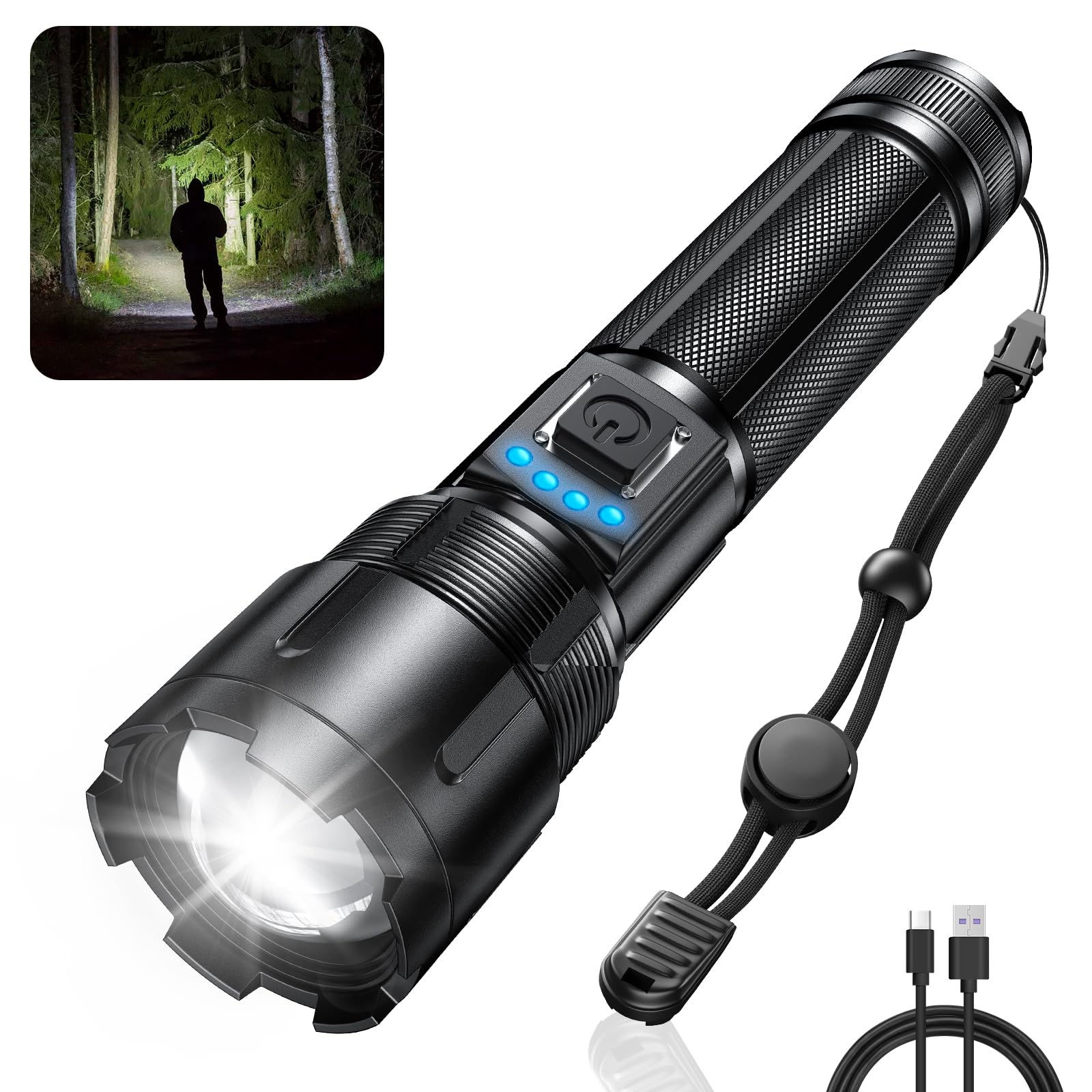
Image: The RECHOO SR5000 Rechargeable Flashlight, showcasing its design and bright beam in a dark environment.
Varnostne informacije
- Ne svetite s svetilko neposredno v oči, saj lahko visok svetlobni tok povzroči začasno okvaro vida.
- Hraniti izven dosega otrok.
- Do not disassemble or modify the flashlight. This may void the warranty and pose safety risks.
- Svetilke se izogibajte izpostavljanju ekstremnim temperaturam ali neposredni sončni svetlobi dlje časa.
- Ensure the charging port cover is securely closed when not charging to maintain IP65 waterproof rating.
Vsebina paketa
Prosimo, preverite paket za naslednje artikle:
- RECHOO SR5000 Rechargeable Flashlight (1 unit)
- Vgrajena polnilna baterija s kapaciteto 4800 mAh (predhodno nameščena)
- Polnilni kabel USB (tip C)
- Uporabniški priročnik (ta dokument)
Konec izdelkaview
The RECHOO SR5000 flashlight features a durable aluminum alloy body, a powerful LED, and a user-friendly interface.

Image: Diagram illustrating the USB-C charging port and the flashlight's capability to act as a power bank for other devices.
- LED oddajnik: Provides up to 1000 lumens of bright light.
- Zoomable Head: Adjusts beam from wide flood to narrow spot.
- Gumb za vklop: Nadzira napajanje in preklaplja med načini osvetlitve.
- Lučke indikatorja baterije: Four blue LED lights show remaining battery capacity (25%, 50%, 75%, 100%).
- Vrata za polnjenje USB-C: For recharging the flashlight's internal battery.
- Izhodna vrata USB-A: For using the flashlight as a power bank.
- Vzdržljiv Casing: Constructed from aluminum alloy for impact resistance and IP65 waterproof rating.
Nastavitev
Pred prvo uporabo sledite tem korakom:
- Remove Insulating Foil: Unscrew the tail cap of the flashlight. Locate and remove the transparent insulating foil from the pre-installed battery.
- Ponovno vstavite baterijo: Ensure the battery is placed with the positive (+) end facing the head of the flashlight and the negative (-) end towards the tail cap.
- Varna kapa za rep: Screw the tail cap back on tightly to ensure proper contact and maintain water resistance.
- Začetni strošek: It is recommended to fully charge the flashlight before its first use. Refer to the "Charging" section for instructions.
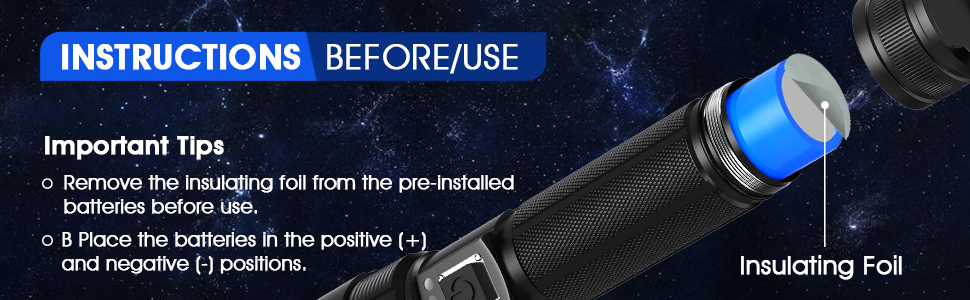
Image: Illustration demonstrating the removal of the insulating foil from the battery before initial use.
Polnjenje
The RECHOO SR5000 features a built-in rechargeable battery and a Type-C charging port.
- Priključite polnilni kabel: Open the rubber cover of the USB-C charging port on the flashlight. Insert the provided Type-C charging cable into the port.
- Priključite na vir napajanja: Connect the other end of the USB charging cable to a 5V/1A USB power source (e.g., wall adapter, power bank, computer USB port, car charger).
- Indikator baterije monitorja: The four blue LED indicator lights will illuminate sequentially during charging, indicating the charging progress.
- 1 LED: 0–25 % napolnjenosti
- 2 LED diodi: 25–50 % napolnjenost
- 3 LED diodi: 50–75 % napolnjenost
- 4 LED diodi: 75–100 % napolnjenost
- Čas polnjenja: Popolna napolnjenost običajno traja 4-6 ure.
- Prekini povezavo: Ko je polnjenje končano, odklopite kabel in varno zaprite gumijast pokrovček, da ohranite vodoodpornost.

Image: The flashlight displaying its battery indicator lights and illustrating its extended run time of up to 20 hours in low mode.
Delovanje
Vklop/izklop
Za vklop svetilke enkrat pritisnite gumb za vklop. Za izklop ga pritisnite znova.
Načini osvetlitve
With the flashlight on, press the power button repeatedly to cycle through the 5 lighting modes:
- Visoko: Maximum brightness (1000 lumens) for powerful illumination.
- Srednje: Moderate brightness for general use.
- Nizka: Reduced brightness for extended run time or close-range tasks.
- Strobe: Utripajoča lučka za signaliziranje ali dezorientacijo.
- SOS: International Morse code signal for emergencies.
Funkcija povečave
To adjust the beam focus, gently pull the head of the flashlight outwards for a narrow, focused spot beam (zoom in), or push it inwards for a wide floodlight beam (zoom out).

Image: Visual representation of the flashlight's zoomable head, showing the difference between a focused beam (zoom in) and a wide beam (zoom out), along with icons for the five lighting modes.
Funkcija Power Bank
The RECHOO SR5000 can serve as an emergency power bank to charge other devices.
- Priključite napravo: Open the rubber cover of the USB-A output port on the flashlight. Connect your device's charging cable to this port.
- Polnjenje: The flashlight will begin charging your device. The battery indicator lights on the flashlight will show its remaining power.
- Prekini povezavo: Disconnect your device once charging is complete or when the flashlight's battery is low. Securely close the rubber cover.
Opomba: Using the power bank function will deplete the flashlight's battery. It is intended for emergency use.
Vzdrževanje
- Čiščenje: Svetilko obrišite z mehko damp krpo. Ne uporabljajte abrazivnih čistil ali topil.
- Shranjevanje: Store the flashlight in a cool, dry place away from direct sunlight when not in use for extended periods.
- Vzdrževanje baterije: For optimal battery life, charge the flashlight at least once every three months if not used regularly.
- Vodoodpornost: Ensure all port covers and the tail cap are tightly sealed to maintain the IP65 waterproof rating.

Image: The RECHOO SR5000 flashlight shown with water splashing on it, highlighting its IP65 waterproof feature.
Odpravljanje težav
| Težava | Možen vzrok | rešitev |
|---|---|---|
| Svetilka se ne prižge. | Baterija je prazna. Insulating foil not removed. Baterija je nepravilno vstavljena. Ohlapna repna kapa. | Napolnite svetilko. Remove the insulating foil from the battery. Prepričajte se, da je polarnost baterije pravilna. Privijte zadnji pokrovček. |
| Svetilka se ne polni. | Polnilni kabel je pokvarjen. Power source is not working. Polnilna vrata so umazana. | Poskusite z drugim kablom USB-C. Poskusite z drugim napajalnikom ali vrati USB. Nežno očistite polnilno odprtino. |
| Beam is weak or flickers. | Nizka baterija. Ohlapne povezave. | Napolnite svetilko. Ensure the tail cap is tight. |
| Funkcija prenosne baterije ne deluje. | Baterija svetilke je prenizka. Kabel naprave je pokvarjen. | Popolnoma napolnite svetilko. Poskusite z drugim polnilnim kablom za svojo napravo. |
Specifikacije
- Model: SR5000
- Vir svetlobe: LED
- Svetlost: Do 1000 Lumens
- Načini osvetlitve: Visoka, srednja, nizka, Strobe, SOS
- Baterija: Built-in 4800mAh Rechargeable Battery (NiMH)
- Vrata za polnjenje: USB Type-C (5V/1A input)
- Izhodna vrata: USB-A (za funkcijo prenosne baterije)
- Material: Aluminijeva zlitina
- Vodoodpornost: IP65 (Dustproof and protected against water jets)
- Odpornost na udarce: 10-foot drop resistance
- Dimenzije: 6.5 cm (dolžina) x 1.3 cm (širina) x 1.7 cm (višina)
- Teža: 11.7 unč
Garancija in podpora
RECHOO provides a limited warranty for this product. For detailed warranty information or if you encounter any issues with your RECHOO SR5000 Rechargeable Flashlight, please contact our customer support team. We are committed to providing excellent after-sales service and will respond to inquiries within 24 hours.
Please refer to the contact information provided with your purchase or visit the official RECHOO webstran za podporo.