
Primevolve PF11R
Uporabniški priročnik za prenosni polnilni ventilator Primevolve PF11R
Model: PF11R
Konec izdelkaview
The Primevolve PF11R is a versatile, battery-powered portable fan designed for both desk and floor use. It features an adjustable height, four speed settings, and a long-lasting 7200 mAh rechargeable battery. Its compact, foldable design makes it ideal for various environments, and it comes with a convenient remote control for ease of use.
Ključne značilnosti
- Visoko zmogljiva baterija: Equipped with a 7200 mAh battery, providing 6 to 21 hours of operation depending on the speed setting. Fully charges in approximately 5 hours.
- USB napajanje: Compatible with various USB power sources (5V/2A) including PCs, laptops, power banks, AC adapters, and car chargers.
- Enostavno čiščenje: The fan grille and blades are removable for regular cleaning, ensuring optimal airflow and hygiene.
- Daljinski upravljalnik: Includes a remote for convenient power on/off and speed adjustment from a distance.
- Nastavljiva višina in zložljiva zasnova: Transforms from a compact 7cm folded unit to a 36cm desk fan or a 100cm floor fan.
- Tiho delovanje: Operates at a low noise level of 30-40dB.
Postavitev in montaža
Unfolding and Adjusting Height
The PF11R fan is designed for easy setup. To unfold, gently pull the fan head upwards from the base. The telescopic rod allows for height adjustment. Extend it to your desired height for desk or floor use. Ensure the fan head is securely locked in position after adjustment.

This image displays the Primevolve PF11R fan's versatility, showing it in its compact folded state, as a medium-height desk fan, and extended to its full height as a floor fan. The included remote control is also visible.

This image highlights the fan's adjustable height feature, showing it can be used compactly at 7cm, as a desk fan at 36cm, or as a floor fan at 100cm.
Navodila za polnjenje
Before first use, fully charge the fan. Connect the included USB cable to the fan's charging port and to a compatible 5V/2A USB power source. The charging indicator light will show the charging status. A full charge takes approximately 5 hours.

The image shows the fan's USB charging port and lists various compatible charging methods such as laptops, power banks, car chargers, and wall adapters. A 5ft USB cable is also depicted.
Navodila za uporabo
Vklop/izklop in nadzor hitrosti
To turn the fan on or off, press the power button on the fan's base or on the remote control. To adjust the wind speed, press the speed button on the fan's base or the corresponding buttons on the remote control. The fan offers four speed settings: Low, Medium, Natural, and High.

A visual guide illustrating the four fan speed modes: Low, Medium, Natural, and High, along with their respective battery runtimes ranging from 6 to 21 hours on a full charge.

The fan is shown operating on a desk next to a person, emphasizing its quiet operation with a noise level of 30-40dB and its four available wind modes.
Adjusting Fan Angle and Stability
The fan head can be manually tilted to direct airflow. The base is equipped with anti-slip silicone pads for stability on various surfaces. Ensure the fan is placed on a flat, stable surface during operation.
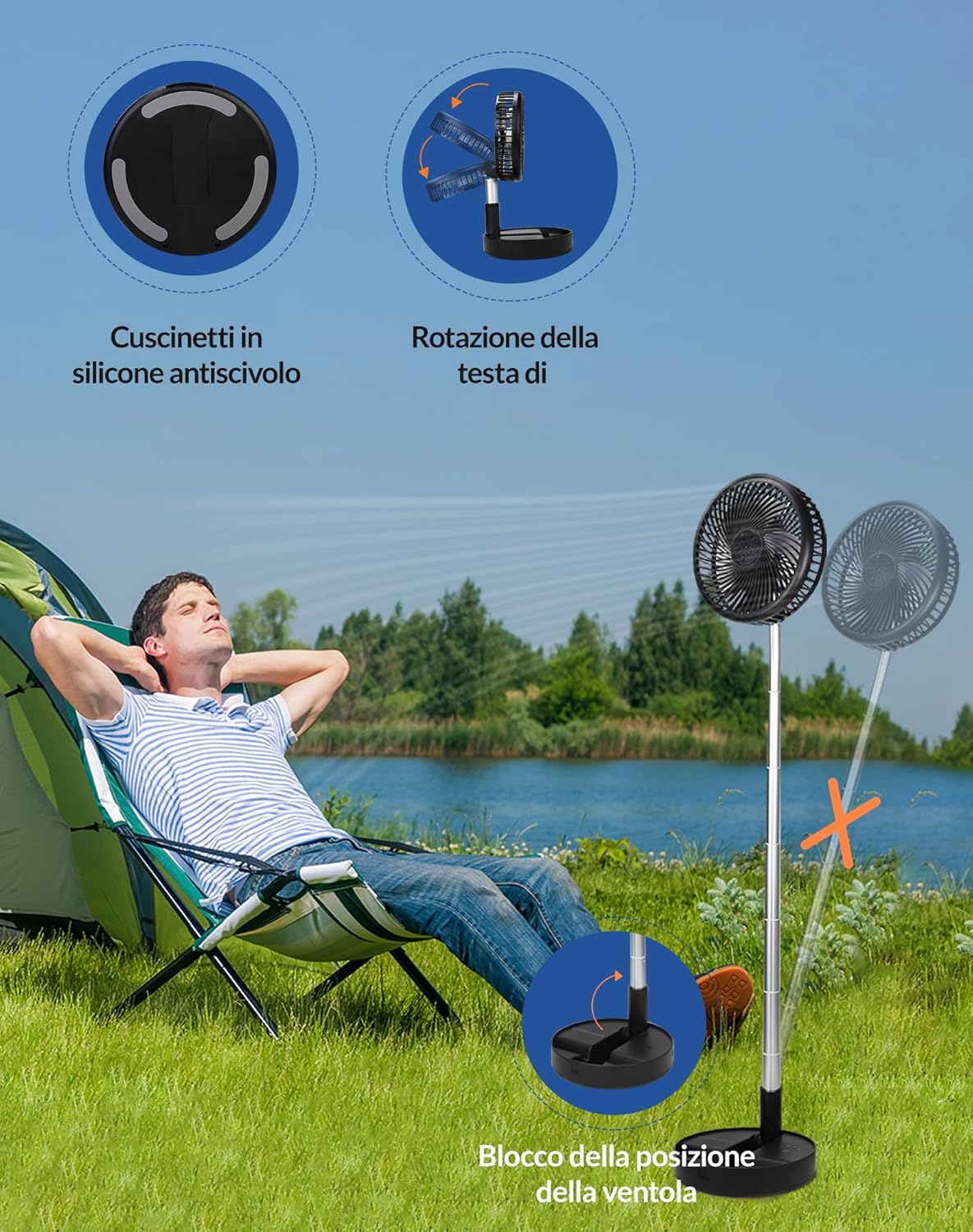
This image details the fan's base features, including anti-slip silicone pads for stability, the ability for the fan head to rotate, and a mechanism to lock the fan's position.
Vzdrževanje in čiščenje
Regular cleaning of your Primevolve PF11R fan will help maintain optimal performance and airflow. The front grille is detachable for easy access to the fan blades.
Cleaning the Fan Grille and Blades
- Prepričajte se, da je ventilator izklopljen in izklopljen iz katerega koli vira napajanja.
- Gently twist the front grille counter-clockwise to unlock and remove it.
- Wipe the fan blades and the inside of the grille with a soft, damp cloth. Do not use abrasive cleaners or immerse the fan in water.
- Pred ponovnim sestavljanjem pustite, da se vsi deli popolnoma posušijo.
- Align the grille and twist clockwise to lock it back into place.

A clear visual guide demonstrating the fan's detachable front cover, which can be twisted counter-clockwise for easy removal and cleaning of the blades.
Tehnične specifikacije
| Funkcija | Specifikacija |
|---|---|
| Znamka | Primevolve |
| Številka modela | PF11R |
| barva | Črna |
| Mere izdelka (D x Š x V) | 23 x 11 x 23 cm |
| Teža predmeta | 1.11 kilogramov |
| Moč | 3.47 vatov |
| voltage | 5 volta |
| Material | Plastika |
| Število hitrosti | 4 |
| Nivo hrupa | 40 dB |
| Lastnosti | Foldable, Portable, Remote Control |
| Vrsta baterije | 1 litijeva kovinska baterija (priložena) |
| Vir napajanja | Napajanje na baterije |
| Priporočene uporabe | Prezračevanje |
| Vrsta namestitve | Talni nosilec |
Odpravljanje težav
If you encounter any issues with your Primevolve PF11R fan, please refer to the following common problems and solutions:
- Ventilator se ne vklopi:
- Ensure the battery is charged. Connect the fan to a power source and allow it to charge for at least 30 minutes.
- Check if the power button on the fan or remote control is pressed correctly.
- Verify that the USB cable and power adapter are functioning correctly.
- Šibek pretok zraka:
- Povečajte nastavitev hitrosti ventilatorja.
- Clean the fan grille and blades as described in the Maintenance section. Dust buildup can restrict airflow.
- Ensure the fan is not obstructed by objects.
- Fan makes unusual noise:
- Check for any foreign objects caught in the fan blades or grille.
- Prepričajte se, da je ventilator postavljen na ravno in stabilno površino.
- Clean the fan blades to remove any debris that might cause imbalance.
- Daljinski upravljalnik ne deluje:
- Prepričajte se, da med daljinskim upravljalnikom in ventilatorjem ni ovir.
- Preverite, ali je treba zamenjati baterijo daljinskega upravljalnika.
Garancija in podpora
Primevolve products are manufactured with high-quality standards. For specific warranty information and customer support, please refer to the documentation included with your purchase or contact Primevolve customer service through the retailer's platform or the official brand webspletnega mesta. Prosimo, shranite dokazilo o nakupu za morebitne garancijske zahtevke.
Ask a question about this manual
Ask about setup, troubleshooting, compatibility, parts, safety, or missing instructions. Manuals+ will review the question and use this page’s manual context to help answer it.